






You’ve probably noticed it too. Organic reach on Instagram isn’t what it used to be. Posts that once got great engagement now barely make it past your followers’ feeds. That’s why more and more brands are learning how to run Instagram ads effectively to stay visible, and it’s working.
In fact, 68% of marketers say they’ve seen positive ROI from their Instagram campaigns. Whether you’re a small business or a growing brand, Instagram ads can help you reach the right people, tell your story visually, and convert attention into real sales.
That’s exactly what this Instagram advertising guide will help you with. You’ll learn about ad formats, campaign setup, creative strategies, and optimization techniques that drive real results.
Let’s dive in.
Pre-launch Readiness Checklist
Before you start running Instagram ads, you need to consider two main aspects. First up, the basic requirements for eligibility, and then a few factors to see if and when you’re ready to run ads on Instagram. Here’s a quick snapshot of what your checklist should include:
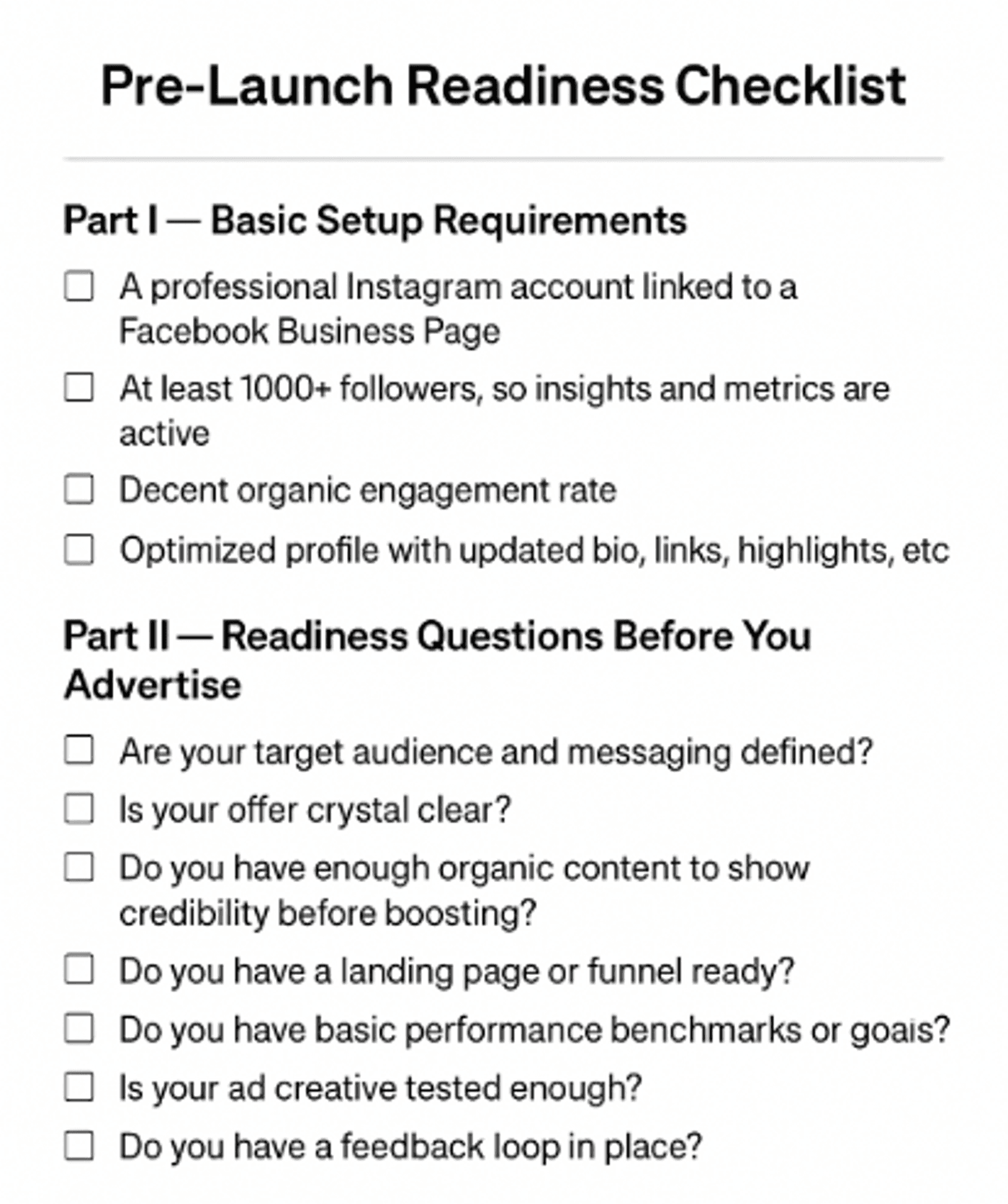
Considering these aspects and questions can help you understand if you’re actually ready to start advertising on Instagram.
Why Advertise on Instagram in 2026?
Among all other social media platforms, Instagram stands out for its reach and popularity among the younger audience. Apart from this, there are several other reasons why it is a smart move to run ads for your business on Instagram.
Reach and Engagement
In 2026, Instagram continues to be one of the most dynamic and youth-driven social media platforms. Around 62% of Instagram users are between 18 and 34 years old. Within this range, users aged 18-24 account for approximately 31%, while those aged 25-34 contribute about 30%.
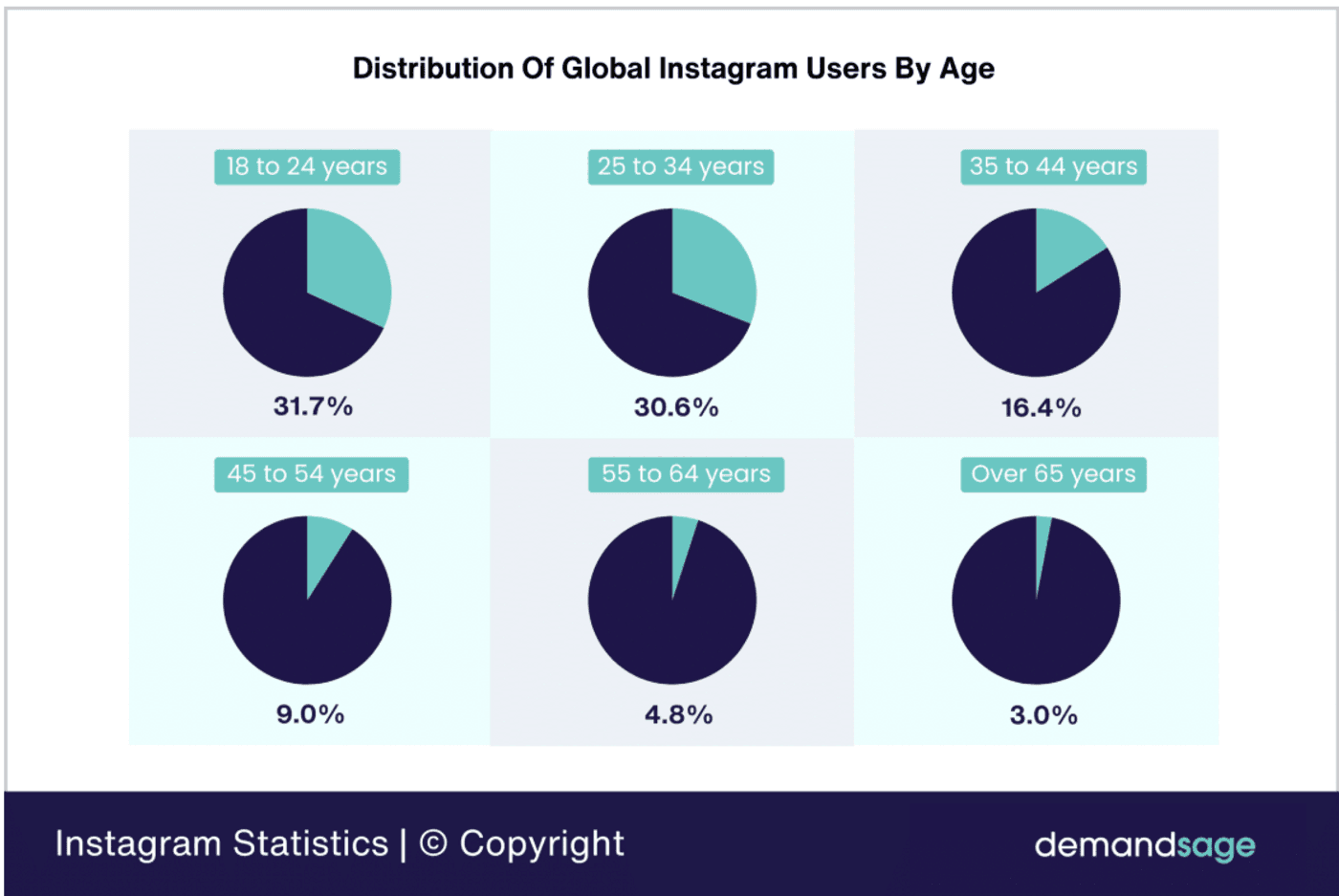
Source: Demand Sage
The platform, however, is not limited to younger audiences. The 35-44 age group forms about 17% of total users, showing a gradual expansion into more mature segments. This indicates that while Instagram remains most popular among younger adults, it is gaining traction among older demographics who are using it to stay informed, explore interests, and connect with family.
Advertising Advantages
Another reason Instagram continues to be one of the most effective platforms for businesses in 2026 is due to its integration with Meta Ads Manager and powerful e-commerce features.
Meta Ads Manager which provides a unified platform for managing campaigns across Facebook, Instagram, Messenger, Threads, and the Audience Network.

As a result, your ads can appear simultaneously across multiple Meta platforms. Similarly, its e-commerce capabilities make it a natural choice for brands selling products online. Instagram offers a range of built-in shopping features like product tags, shop tab, collection ads, and in-app checkout that create a smooth shopping experience.
Business Results
On average, brands see a conversion rate of 1-2% across campaigns, and top-performing campaigns can even exceed 3%. In fact, carousel posts deliver the highest engagement rate at around 0.55%, outperforming both Reels (0.50%) and static images (0.45%). Larger accounts see strong results with carousels, as users spend more time swiping through multiple slides.
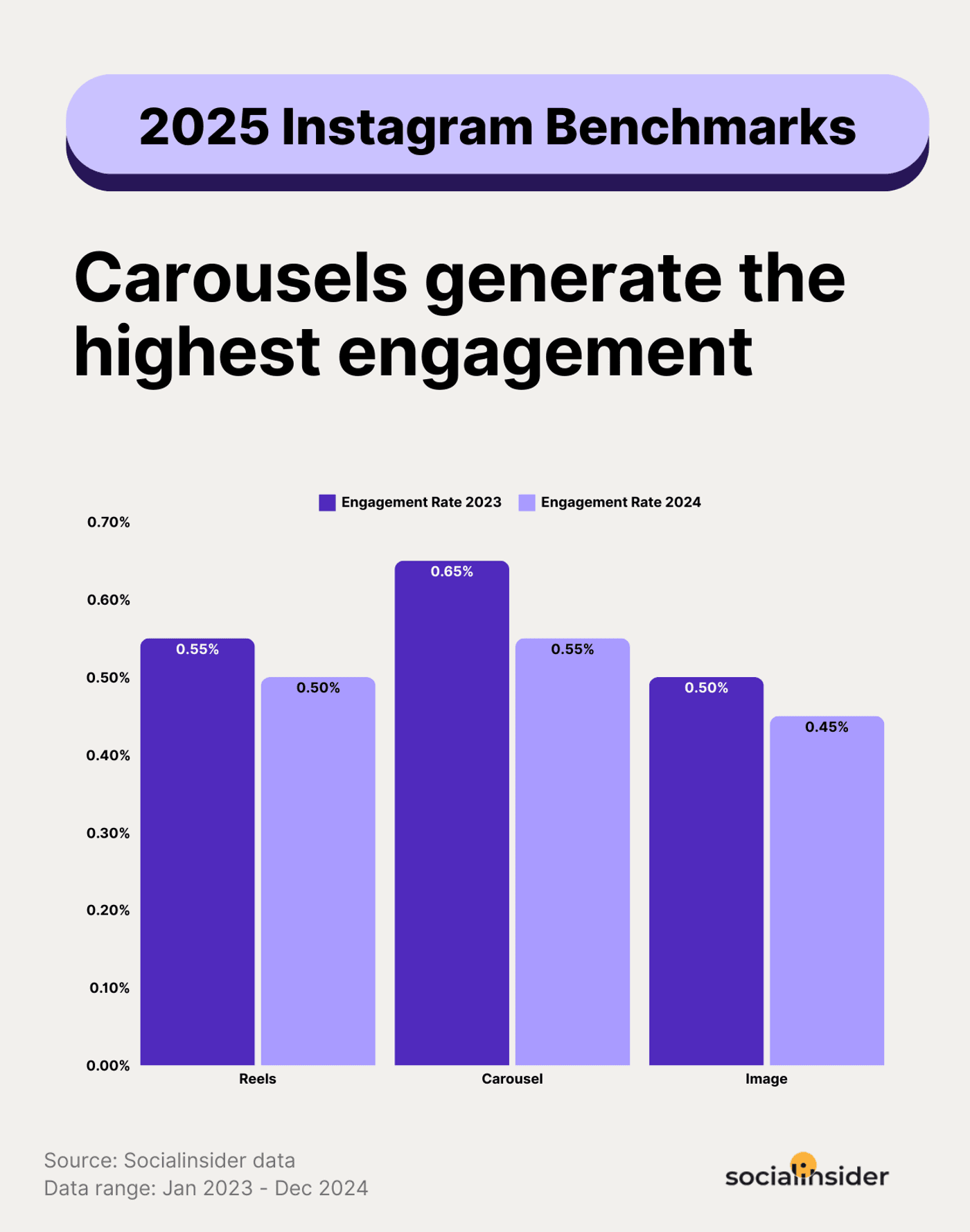
Source: Socialinsider
Breaking content into multiple slides encourages users to keep swiping, increasing total time spent on a post.
Types of Instagram Ads and When to Use Them
Not every Instagram ad works the same way. Some are great for building awareness, while others are better at driving clicks or sales. Let’s look at some dominating formats and when you should ideally use them:
Instagram Feed Ads (Image & Video)
Feed ads appear directly within the feed as single images or videos and include a small “Sponsored” tag under your account name. To improve the visual appeal of feed ads, many brands now use AI-generated images to create eye-catching product visuals and promotional creatives that blend naturally into the Instagram feed.
Best Use Cases
Product showcases, promotional campaigns, or educational content.
Key Specs
-
Image ratio: 1:1 (square) or 4:5 (portrait)
-
Video length: Up to 60 seconds
-
File type: JPG, PNG, or MP4
-
CTA options: Learn More, Shop Now, Sign Up, etc.
Best Practice Tips
-
Use high-quality visuals that match your organic feed’s aesthetic.
-
Add clear CTAs that direct users to your product or website.
For instance, the ad below promotes Coursera’s “GenAI Fundamentals” course in collaboration with Google Cloud. The ad uses a clean, minimal design with brand colors, a bold headline (“Learn GenAI Fundamentals”), and a clear CTA – “Learn more”.

The concise copy below the image expands on the benefit, helping users understand what they’ll gain if they click.
Instagram Reels Ads
Reels ads appear between user-generated Reels and play as full-screen vertical videos. As of 2026, Reels are Instagram’s dominant format, favored by the algorithm and users alike for their entertainment value.
Best Use Cases
Brand awareness, lifestyle storytelling, product demos, or trends that rely on music and motion.
Key Specs
-
Aspect ratio: 9:16
-
Length: Up to 90 seconds
-
File type: MP4 or MOV
-
Audio: Trending sounds or royalty-free tracks
Best Practice Tips
-
Hook viewers in the first 3 seconds.
-
Keep transitions smooth and visuals lively.
This Reels ad by Case_n_Cover does a great job of showcasing its product, opening with an upbeat vibe and a bold on-screen text.

At the bottom, there’s a “Shop now” button, making it easy for viewers to act on impulse while they’re already hooked.
Instagram Story Ads
Story ads appear between users’ Stories and occupy the entire vertical screen. They feel more spontaneous and disappear after 24 hours, which makes them great for limited-time offers or flash sales.
Best Use Cases
Quick promotions, product launches, seasonal sales, or BTS content.
Key Specs
-
Aspect ratio: 9:16
-
Image duration: 5 seconds
-
Video duration: Up to 15 seconds/card
-
Placement: Between user Stories
Best Practice Tips
-
Use motion or GIF elements to grab attention instantly.
-
Include interactive stickers (polls, swipe-ups, or link stickers).
The ad here from Zapvi is a great example, featuring a real, unboxing-style clip showing their branded package and products against a natural background.
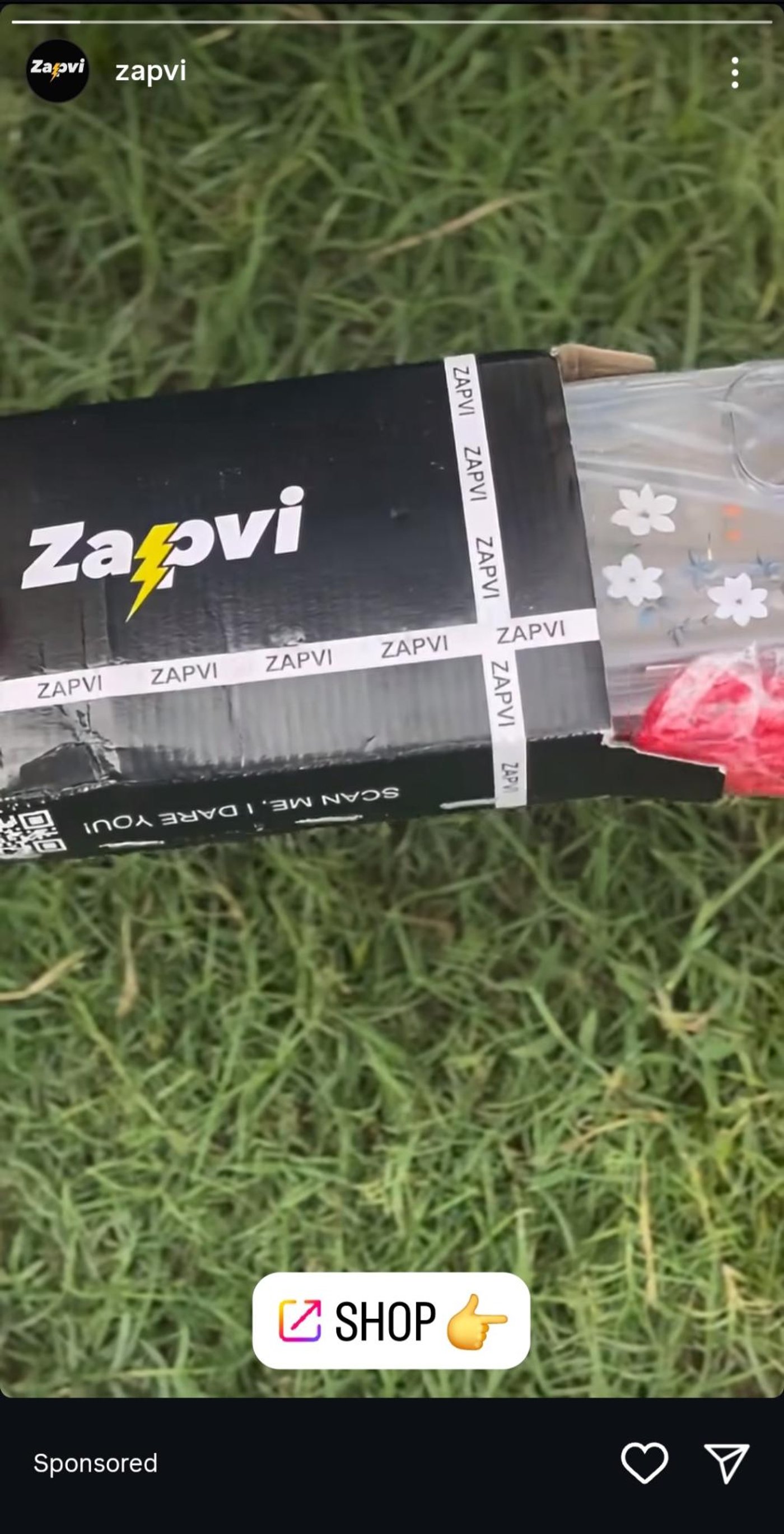
The “Shop” sticker with a pointing emoji adds an interactive touch, guiding viewers toward the next step.
Carousel Ads
Carousel ads allow you to display up to 10 images or videos in a single post that users can swipe through. Each card can include its own headline, description, and link, making this one of the most versatile formats.
Best Use Cases
Storytelling, showing a step-by-step process, highlighting product variations, or building curiosity through sequential visuals.
Key Specs
-
Number of cards: 2–10
-
Aspect ratio: 1:1 or 4:5
-
Video length per card: Up to 60 seconds
-
CTA: Optional per card
Best Practice Tips
-
Use the first card as a strong hook.
-
Maintain consistent design across all slides.
In this ad, the design agency uses a carousel format to promote their email script product. It’s clear, benefit-driven, and visually consistent.

As viewers swipe through, they see follow-up slides on how they can achieve similar success.
Collection Ads
Collection ads combine a hero image or video with a grid of smaller product images below it. They’re built for seamless product discovery and are especially effective for eCommerce campaigns.
Best Use Cases
Ideal for promoting multiple related products, new launches, or themed collections during sales events.
Key Specs
-
Format: One main creative + product grid
-
Aspect ratio: 1:1 or 9:16
-
CTA: Shop Now or Learn More
Best Practice Tips
- Feature your best-selling or most visually appealing product in the hero creative.
- Ensure all product links lead to accurate listings.
In this ad, the brand highlights its perfume Miss Gorgeous as the main product, with one hero image of the perfume bottle, a festive sale mention, and smaller thumbnails showing other products from the same brand.

It’s a smart way to show variety in one frame while also giving users a direct shopping option through the Shop Now button.
Explore Ads
Explore ads appear in the Explore tab, where users go to discover new content. These ads look like organic posts but include a “Sponsored” tag and, when shoppable, clickable product tags that show prices and links.
Best Use Cases
Reaching new audiences, boosting discovery, and converting interest into direct sales.
Key Specs
-
Placement: Explore feed
-
Formats: Image, video, carousel
-
Aspect ratio: 1:1 for square, 4:5 for vertical, and 1.91:1 for landscape
Best Practice Tips
-
Keep visuals consistent with trending Explore aesthetics.
-
Use product tags strategically, not cluttered.
This ad by Feature.fm blends right into the Explore grid, showing up among trending posts and videos. The bright purple background, clear typography, and mockups of music apps immediately draw attention.
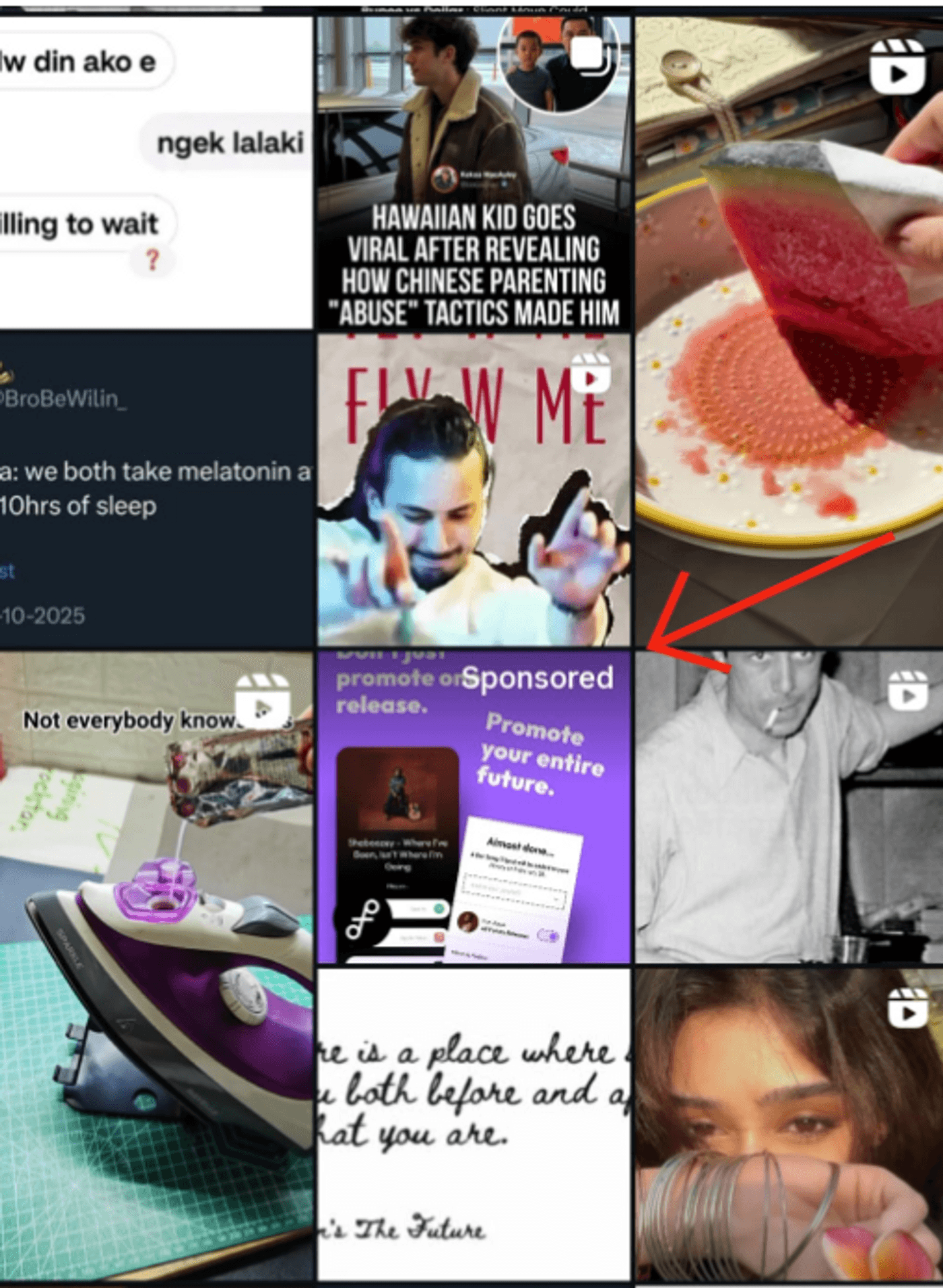
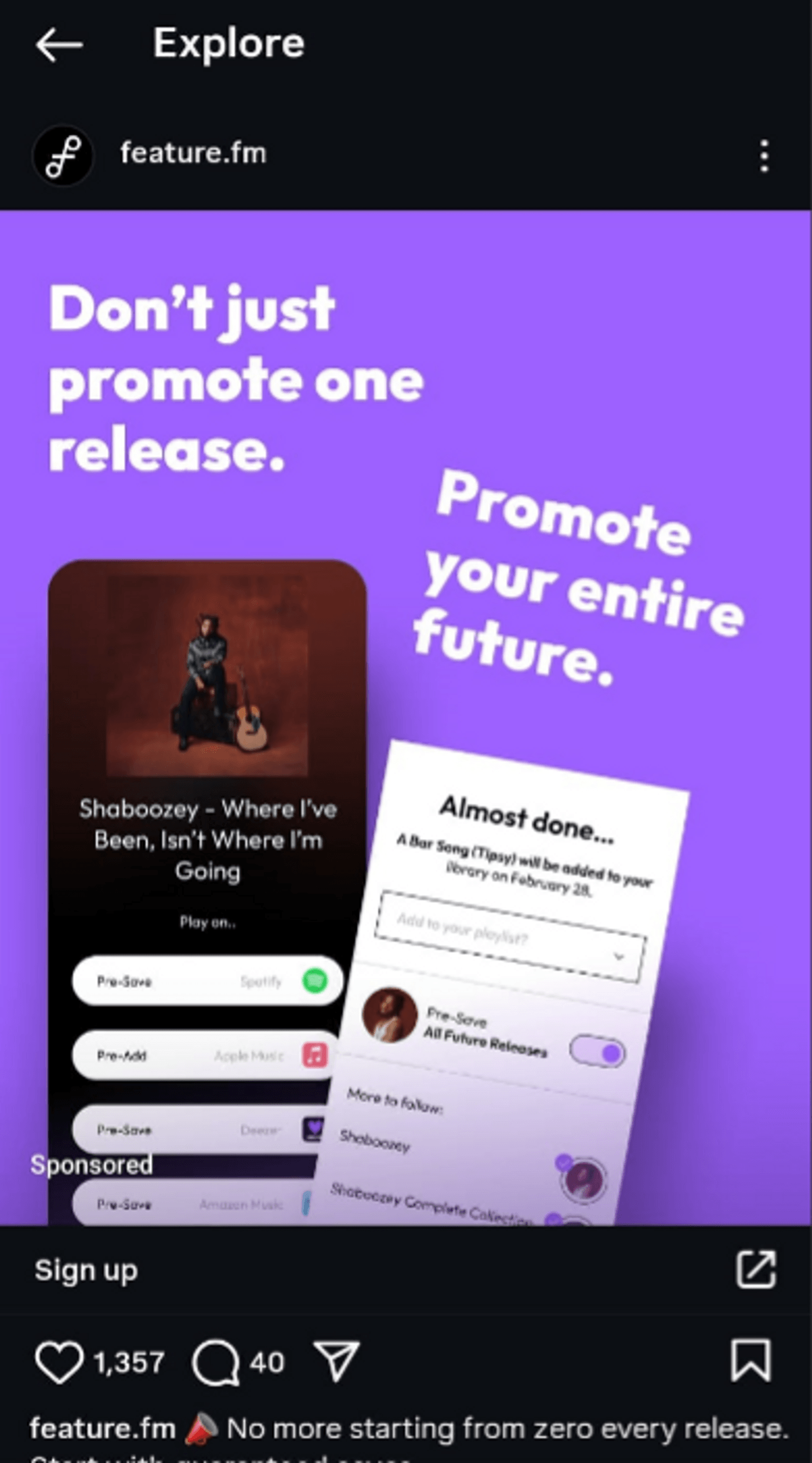
The line “Don’t just promote one release. Promote your entire future.” cleverly speaks to artists’ ambitions and makes the message feel motivational rather than salesy.
How to Create Instagram Ads Using Meta Ads Manager: Step-by-Step
Instagram ads aren’t created directly in the app. They’re made through Meta Ads Manager, which works as a unified platform to control campaigns across all Meta platforms. Here’s a step-by-step guide on how to create Instagram ads in Meta Ads Manager:
Step 1: Set Up Your Meta Ads Manager Account
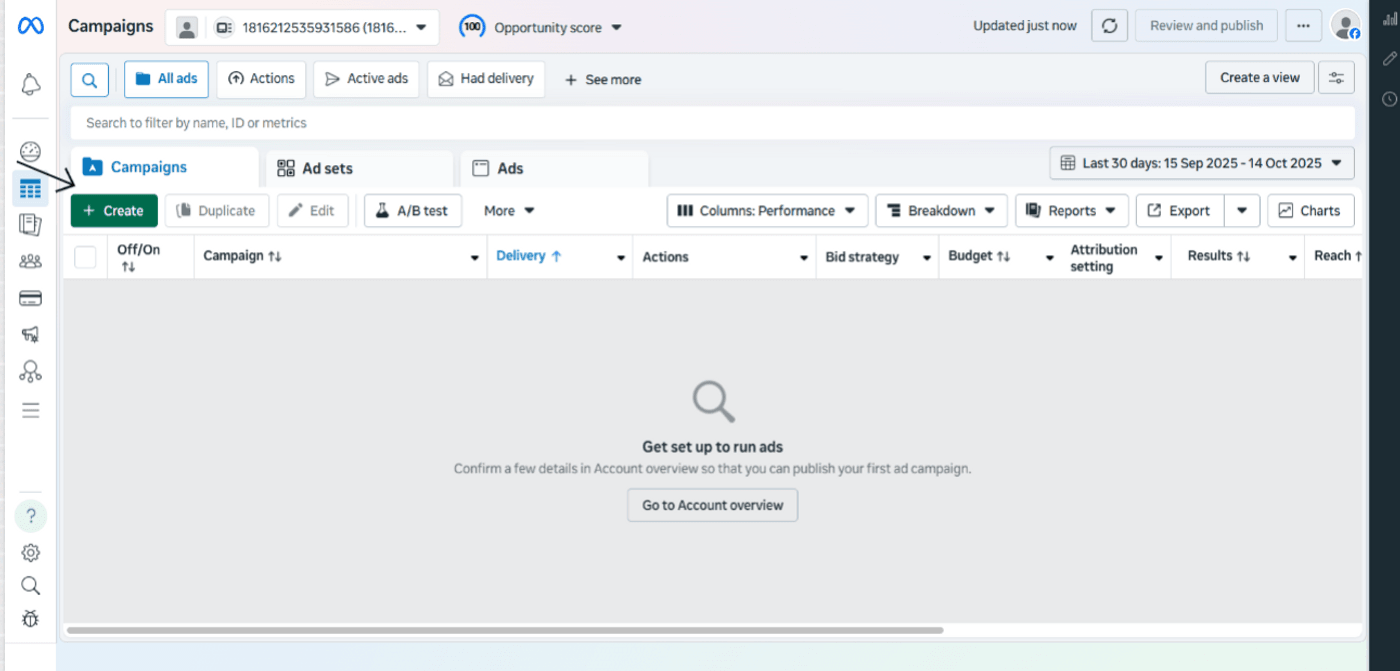
First up, you’ll need to create a Facebook account, which acts as your brand's verified identity inside Meta Ads Manager. Once created, visit Meta Ads Manager, log in to your Facebook account, and click on “Create” to create your campaign.
Step 2: Choose Your Campaign Objective
Next, pick your campaign objective from six options. This tells Meta what you want to achieve so they can adjust your ad for the best results.
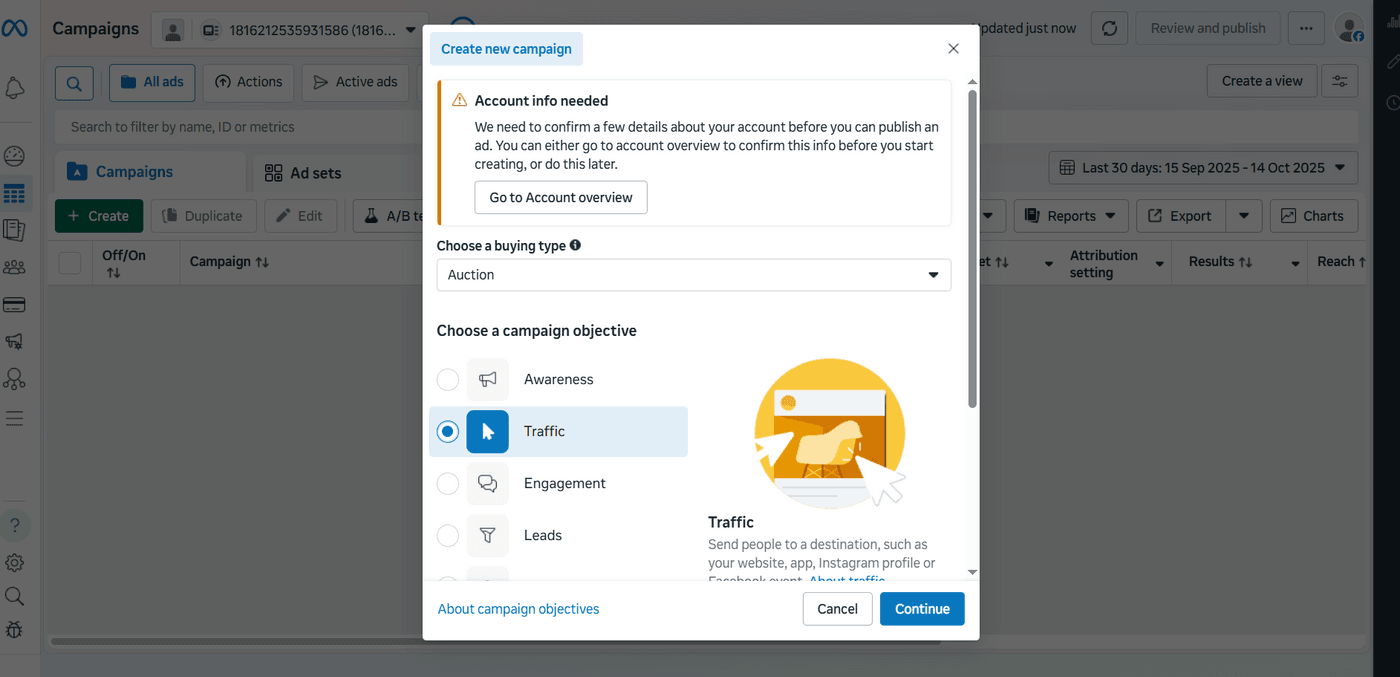
Make sure to choose this very carefully, as it will decide the course of your entire campaign.
Step 3: Define Your Target Audience
Once your objective is in place, define your target audience based on demographics like age, gender, location, interests, etc.
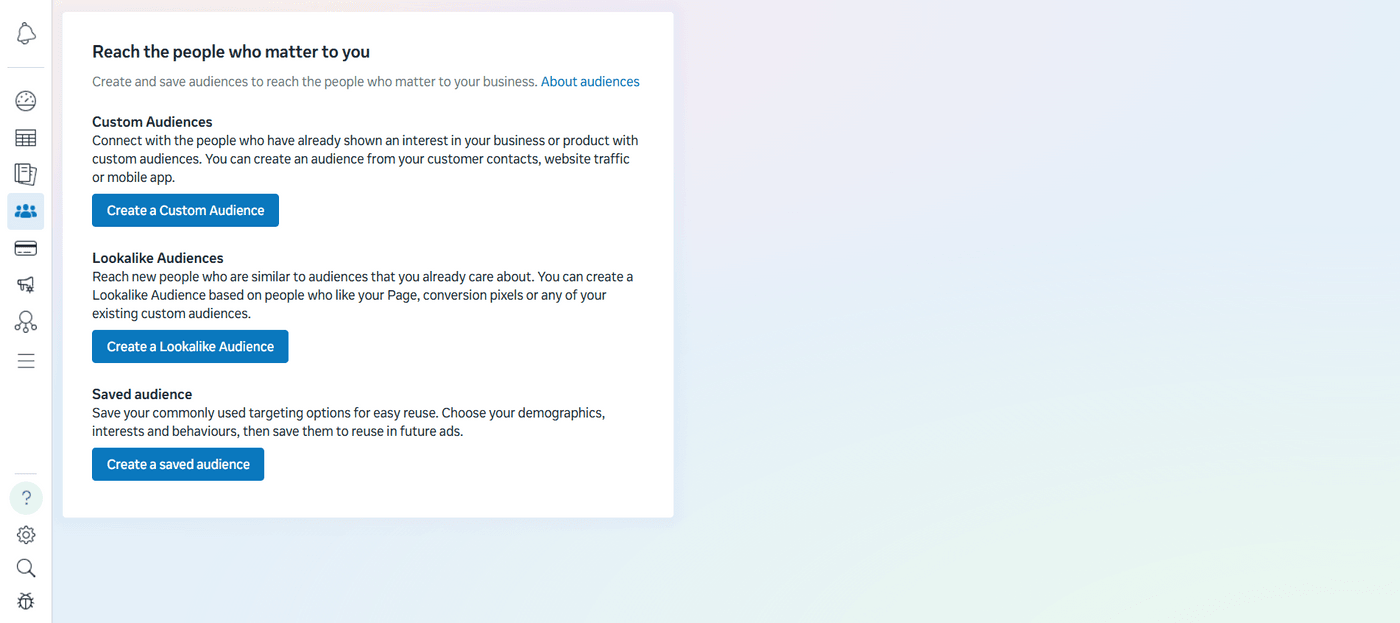
For this, you get 3 options:
-
Custom Audiences: People who've already interacted with your business.
-
Lookalike Audiences: New people similar to your best customers.
-
Saved Audiences: Reusable targeted audience based on common demographics.
Based on your preferences, choose the audience you want to target.
Step 4: Set Your Budget and Schedule
To run your campaigns, you’ll need to set defined budgets. Meta offers two primary options for this: a daily budget and a lifetime budget.
For optimization, use Facebook’s campaign budget optimization feature, which automatically distributes your budget across all ads for the best performance. Ben Heath breaks down the whole process in his short tutorial.
This way, you can ensure that your budget drives optimum return without any manual hassle in your entire campaign.
Step 5: Create Your Ad Creative
The next step is to create your ad, for which you can use invideo AI. It lets you quickly generate professional, platform-optimized video ads for your campaign. Once your videos are ready, upload them to Meta Ads Manager. Dami’s Tutorials explain how to upload, preview, and set up creative testing.
For testing, start with 3-5 variations. Let each ad run for a few days before deciding what works best, and use Meta’s Dynamic Creative feature to find winning combinations.
Step 6: Choose Your Call-to-Action
A CTA is the final push that converts viewers into customers. Instagram offers various options for this depending on your objective. Here's a quick overview of the best option depending on the campaign objective.
Step 7: Review and Publish
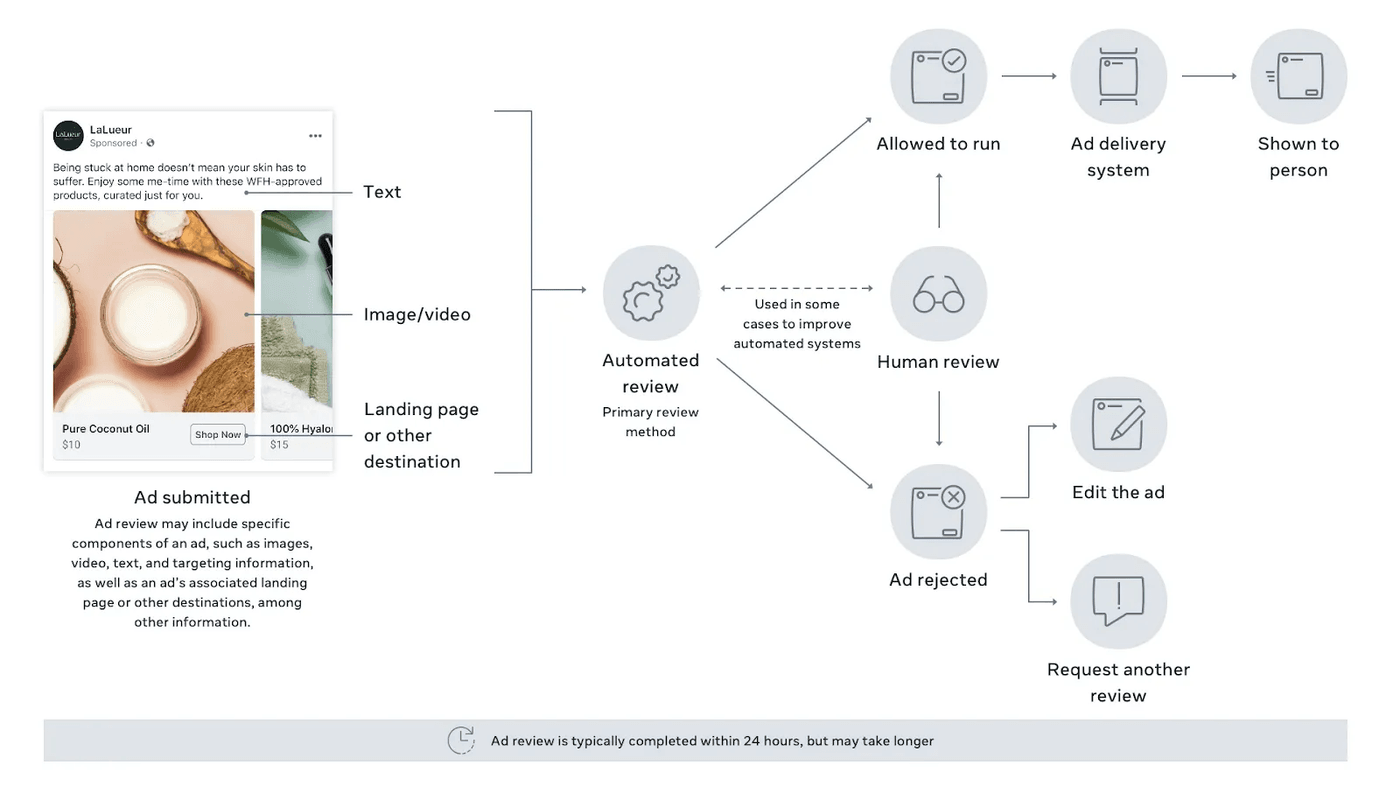
When you create or edit an ad on Facebook or Instagram, it automatically enters the ad review process. This review is mostly automated, but can involve human reviewers for certain types of content or sensitive topics.
Source: Facebook
You can track your ad’s status in the Ads Manager under the “Delivery” column. If approved, your ad starts running, but if rejected, Meta provides a reason and allows you to edit and resubmit. Most ads are reviewed within 24 hours, though some may take longer depending on content type or ad volume.
Creating High-Converting Instagram Ad Creative
After setting up your campaign on Meta Ads Manager, ensure your ad’s visuals are compelling enough to make the scrolls stop. Everything from format, clear visuals, readable text, and sound-off optimization counts.
But doing all of this manually takes time, expertise, and endless testing. That’s exactly where invideo AI takes the load off and does all the heavy lifting for you.
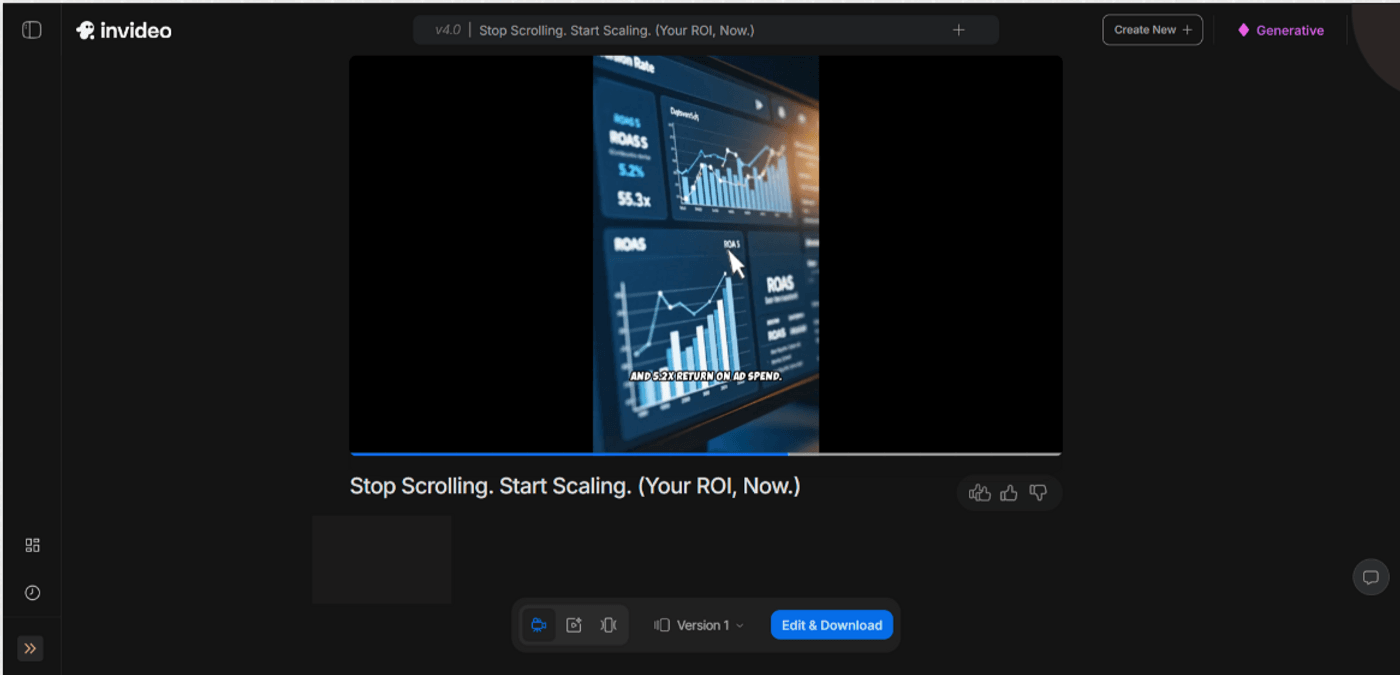
Based on your inputs, it automatically understands your product, goal, and audience, and then generates visuals built around proven performance patterns. Everything from aspect ratio and formatting to scroll-stopping hooks, text readability, pacing, and CTAs is optimized for mobile-first impact!
Visual Design Principles
To make your ads stand out, they must be visually captivating. Chris from The Future further breaks down some examples of how thoughtful changes in layout, color, and typography can make designs more impactful.
These tips can help you develop a designer’s eye, perfect for anyone who wants their Instagram ads to look polished, modern, and built for mobile.
Copywriting for Instagram Ads
While visuals matter significantly, the words you choose to accompany them are equally critical to driving conversions. This holds especially true for the hook you use in the first 3 seconds of your ad. In her tutorial, Dara Deeney breaks down why strong hooks matter and the different types you can use to make your ad more persuasive.
These tips are super helpful to create a strategic foundation that turns good ads into great ones and maximizes the ROI of the high-quality creatives you create.
Using Video Effectively
The creative framework works as a blueprint for how your ad captures attention, builds interest, and drives action. HubSpot Marketing’s tutorial further breaks down the latest Instagram ad strategies and creative structures brands are using today.
It’s a great visual guide that complements everything we’ve discussed here, especially if you want to see these frameworks in action before you start building your own.
Instagram Advertising Strategy & Best Practices
A big part of running successful Instagram ads requires picking the right campaign objectives, segmenting your audience, setting clear KPIs, and understanding how to budget across different stages of the funnel.
Meta’s advertising best practices provide updated guidance on exactly how to pick posts that are likely to succeed. It covers which engagement metrics, content types, and performance indicators suggest a post is worth boosting.
However, there are strict guidelines around restricted content and general community standards.
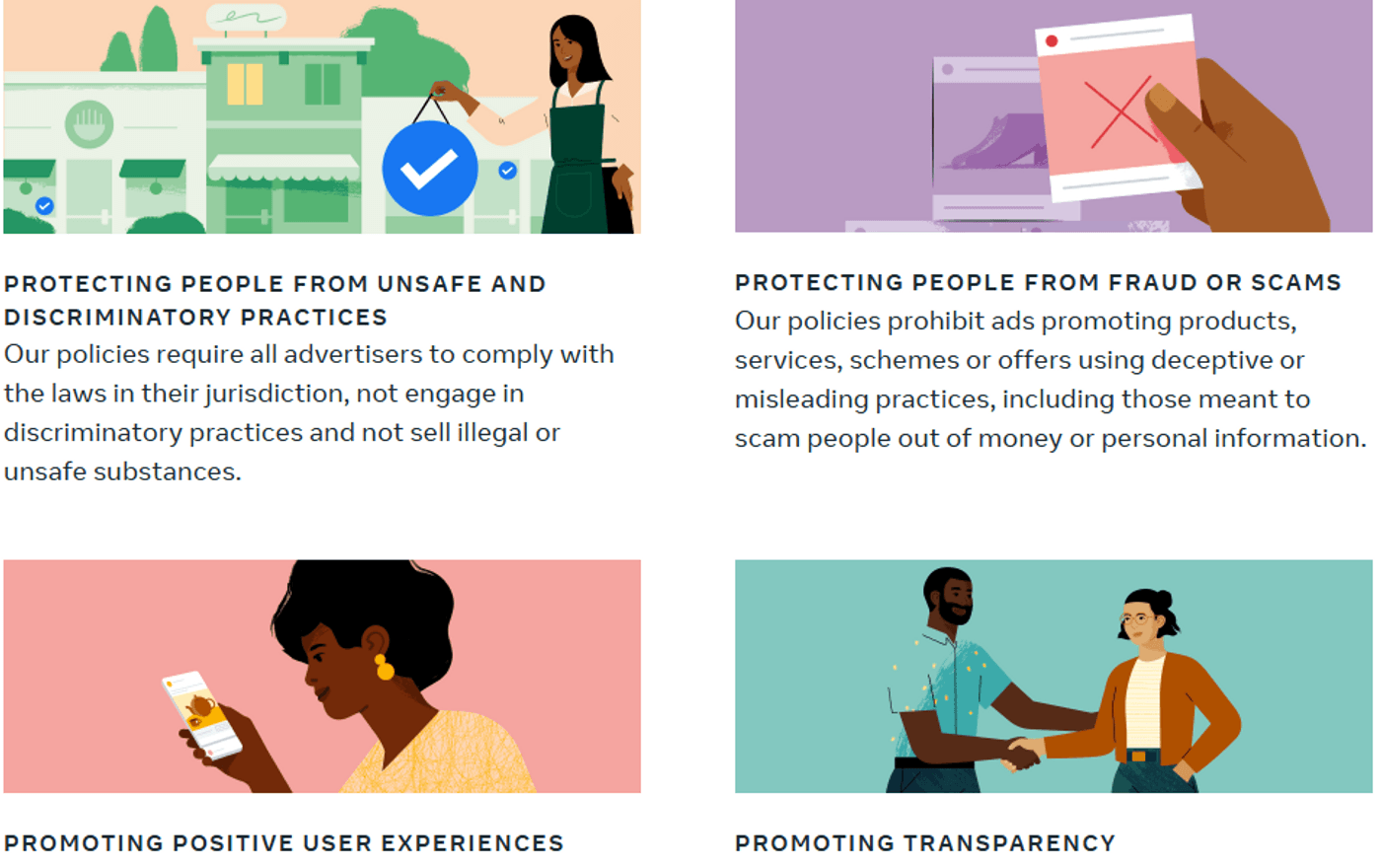
For deeper insights, check out Meta’s Ad Standards to stay compliant with these guidelines.
Before You Go...
Instagram advertising has evolved into one of the most accessible and results-driven marketing channels available to businesses of all sizes. Moreover, you don't even need a massive budget or Fortune 500 resources to start seeing results. Even better, tools like invideo AI now generate professional, conversion-optimized video ads in minutes.
All in all, you now have a complete system for launching Instagram ad campaigns that drive real business results. So, start creating, testing, learning, and scaling your way to measurable growth!
Final Action Steps
-
Now that you understand the Instagram advertising framework, here's a quick roadmap to get started:
-
Create a Meta Business account, link Facebook & Instagram, add payment, and get familiar with Ads Manager.
-
Pick one ad format to start and master it.
-
Make 3-5 ad variations to test different hooks.
-
Start with a small test budget to gather data without overspending.
-
Run for 7 days, then analyze metrics, cut underperformers, boost winners, and plan your next tests.
-
Stay consistent, trust the process, and let results guide your strategy!
