






Image stills for an article, reference, or moodboard once took ages to capture, and the version everyone described still felt one edit away. AI-powered image generation stepped in and boiled it down into a few focused prompts. Invideo even delivers unlimited generation and image-reference video generation into your creative workflow.
But the pain point hasn’t disappeared. It’s moved upstream. Whether your image lands or drifts now depends on the model you start with. That choice decides how literal a scene feels, how stylised it leans, how consistent it stays, and where it breaks.
That’s why creators keep returning to the same finalists: Nano Banana Pro, GPT-Image 1.5, Flux 2, Seedream, Midjourney, and Z-Image. Each one processes prompts, interprets ideas, and behaves differently. To know what to pick, you need to review what fits your creative goals, output expectations, and how they behave in real use.
Nano Banana Pro vs GPT-Image 1.5 vs Flux 2 vs. Seedream vs. Midjourney vs. Z-Image: Comparison Snapshot
Key Aspects to Look For in an best AI Image Model
1. Built-In Creative Range
Every model settles into a look almost immediately. Some lean cinematic, some feel clean and commercial, others drift toward illustration or art. The real question is how easily the model steps out of that comfort zone when the brief changes. Strong models adapt their look to the task instead of pulling everything toward the same visual center.
What to look for:
- Product images stay clean instead of becoming dramatic by default
- Lifestyle scenes feel natural rather than over-stylised
- Concept visuals remaining readable, not abstract for its own sake
2. Control Over Atmosphere and Tone
Once the subject is right, mood becomes the differentiator. Lighting, color balance, framing, and facial expression are what make an image feel calm, tense, playful, or premium. Some models respond clearly to small shifts in language, while others need heavy prompting to move the needle.
What to look for:
- Softer light and open space create a relaxed feel
- Darker shadows and tighter framing add tension
- Brighter palettes and open expressions add energy
3. Repeatability and Memory
Getting one great image is easy. Getting five that belong together is harder. Faces, proportions, angles, and styling often drift between generations unless the model can hold on to what worked. This becomes critical the moment you’re building a series instead of a single visual.
What to look for:
- Characters remaining recognisable across multiple scenes
- Products holding the same shape and camera angle
- Background styles staying consistent across outputs
4. Prompt Interpretation
Some models wait for exact instructions. Others read between the lines. The difference shows up in how much explaining you need to do before the image makes sense. Models with stronger interpretation deliver usable composition and context even from short prompts.
What to look for:
- “Founder in a workspace” producing a believable environment
- Scenes framing themselves without specifying camera details
- Fewer random elements appear unexpectedly
5. Iteration Speed and Workflow Fit
Creative work moves in quick cycles. You try, react, tweak, and move on. The model should respond quickly and clearly to changes without breaking momentum. When updates show up immediately and predictably, the tool keeps pace with fast workflows instead of slowing them down.
What to look for:
- Seeing clear differences when you tweak framing, lighting, or style
- Generating multiple variations quickly to compare directions
- Moving forward without long pauses or constant reruns
6. Cross-Style Adaptability
A project might begin with realistic visuals, then move toward illustration, abstraction, or a more expressive look. Some models handle these shifts gracefully, while others struggle the moment they’re pushed outside their default style. Adaptable models let you evolve the visual direction without switching tools mid-project.
What to look for:
- Shifting from photo-like imagery to stylised visuals smoothly
- Maintaining subject clarity while changing art direction
- Supporting different visual styles across the same campaign
How Each Model Performs in Practice
Time to see how well theoretical prompts turned them into usable visual outputs. Below are the most crucial aspects of image generation and how the six models perform in practice.
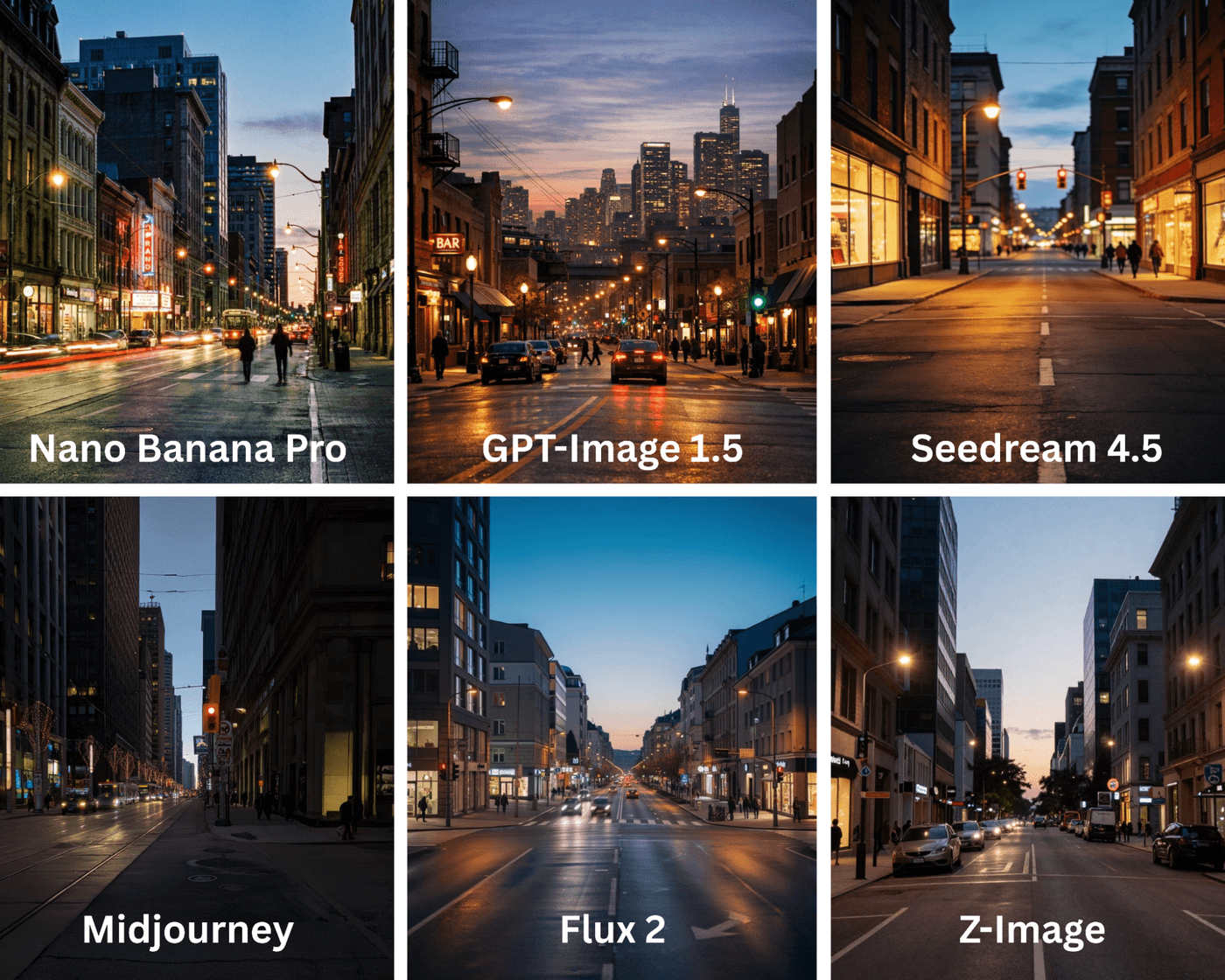
1. Scene Atmosphere and Environmental Believability
When people look at an AI image, they instinctively judge whether the place feels real. Even without knowing why, viewers notice when lighting, depth, or space feels off. Strong environmental generation makes a scene feel grounded and believable, while weaker outputs feel staged or artificial.
This difference is most visible in wide or mid-shots where the background carries as much weight as the subject. Some models naturally create layered spaces with depth and spatial logic, while others feel like a subject placed in front of a flat backdrop.
What each model delivers:
- Nano Banana Pro: Produces orderly environments that feel intentional and well-structured, though they can appear slightly staged.
- GPT-Image 1.5: Creates a natural-looking atmosphere with reasonable depth, but complex spaces can sometimes feel soft or less defined.
- Flux 2: Generates realistic environments with clear depth and believable spatial logic that holds together across the frame.
- Seedream: Leans toward mood-heavy environments that prioritise imagination and style over grounded realism.
- Midjourney: Delivers immersive, cinematic environments with strong mood, depth, and visual impact.
- Z-Image: Produces simple, readable spaces with limited depth and minimal environmental layering.
Category winner: Nano Banana Pro and Midjourney for immersive, mood-driven environments.
Prompt: A wide city street scene at dusk with layered lighting, visible depth, realistic space, and subtle human presence in the background.
2. Visual Identity and Artistic Signature
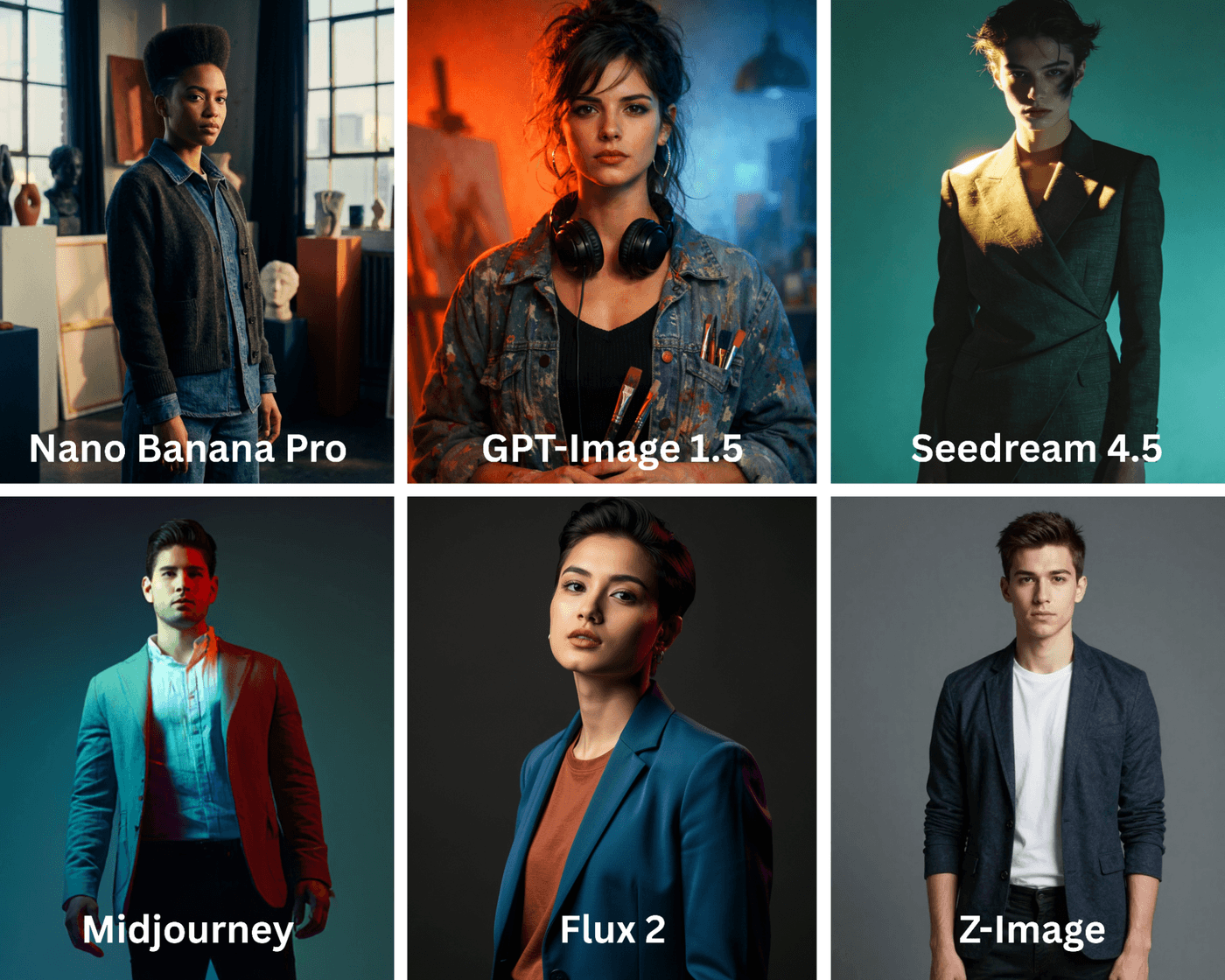
Some images feel deliberate and authored, while others fade into the background. That difference comes from visual identity. This matters most for hero images, posters, and campaign visuals where the image itself needs to carry a point of view.
Here, models differ in how strongly they impose a style. Some leave a clear artistic signature on the image, while others stay neutral so the image can adapt across contexts.
What each model delivers:
- Nano Banana Pro: Produces restrained visuals that feel intentional, but rarely push a strong or expressive visual identity.
- GPT-Image 1.5: Adapts well to different style directions, though its visual signature remains subtle unless heavily guided.
- Flux 2: Delivers polished, professional-looking images with an understated visual identity that feels refined rather than bold.
- Seedream: Creates expressive and imaginative visuals with a clear artistic bias that stands out stylistically.
- Midjourney: Generates highly distinctive images with bold art direction that are instantly recognizable as its own style.
- Z-Image: Produces neutral, utility-focused visuals that prioritize clarity over artistic expression.
Category winner: Nano Banana Pro stands out for its strong artistic signature and portrait depth.
Prompt: Create a campaign hero image of a young creative professional standing still and facing the camera, framed from the waist up. Use deliberate composition, distinctive lighting, and a tightly controlled color palette to express a strong artistic point of view. The pose, lighting, and visual treatment should feel intentionally styled and authored rather than neutral or documentary. Avoid text and logos.
3. Texture, Detail, and Material Accuracy
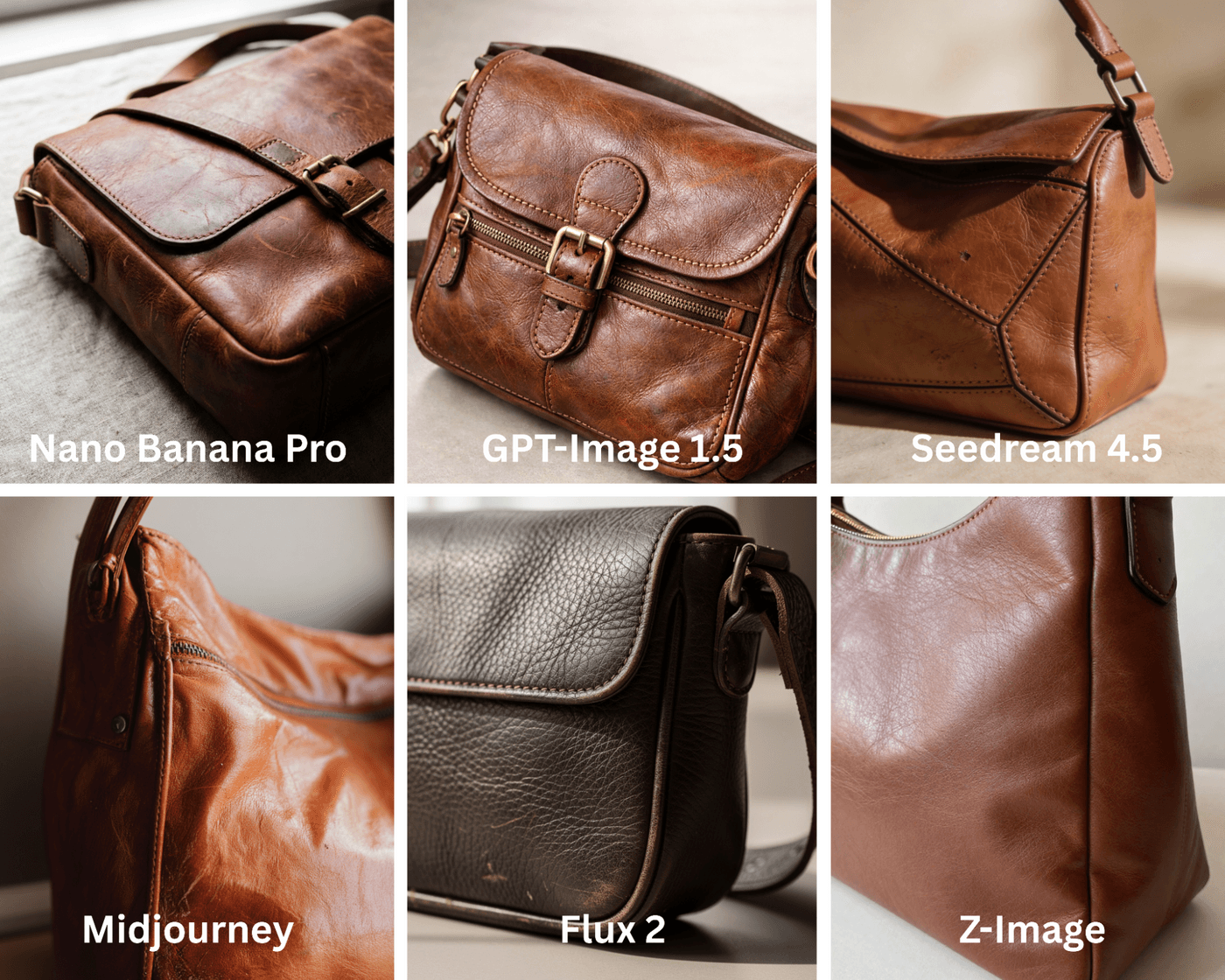
Up close is where AI images either convince or fall apart. Skin texture, fabric weave, reflections, and imperfections are what make an image feel real rather than synthetic. When these details are mishandled, images feel artificial even if the composition looks good.
This aspect matters most for close-ups, product images, and portraits where viewers are likely to zoom in and inspect surfaces.
What each model delivers:
- Nano Banana Pro: Renders surface details cleanly and consistently, making textures feel controlled and reliable.
- GPT-Image 1.5: Provides balanced material detail, though skin and surfaces can sometimes appear slightly smoothed.
- Flux 2: Produces crisp textures with accurate material behavior, making fabrics, skin, and surfaces feel realistic.
- Seedream: Applies soft, painterly textures that favor visual style over material accuracy.
- Midjourney: Generates high levels of detail, but textures can feel stylized or exaggerated rather than realistic.
- Z-Image: Delivers basic texture detail that is readable but lacks fine-grain realism.
Category winner: Flux 2 for material accuracy and clarity. Nano Banana Pro is a close second for its contextual detail and realism.
Prompt: Close-up of a leather shoulder bag on a neutral surface under soft natural light. Show realistic leather grain, stitching, subtle creases, and small imperfections, with accurate highlights and shadows on the material.
4. Narrative Readiness for Storytelling
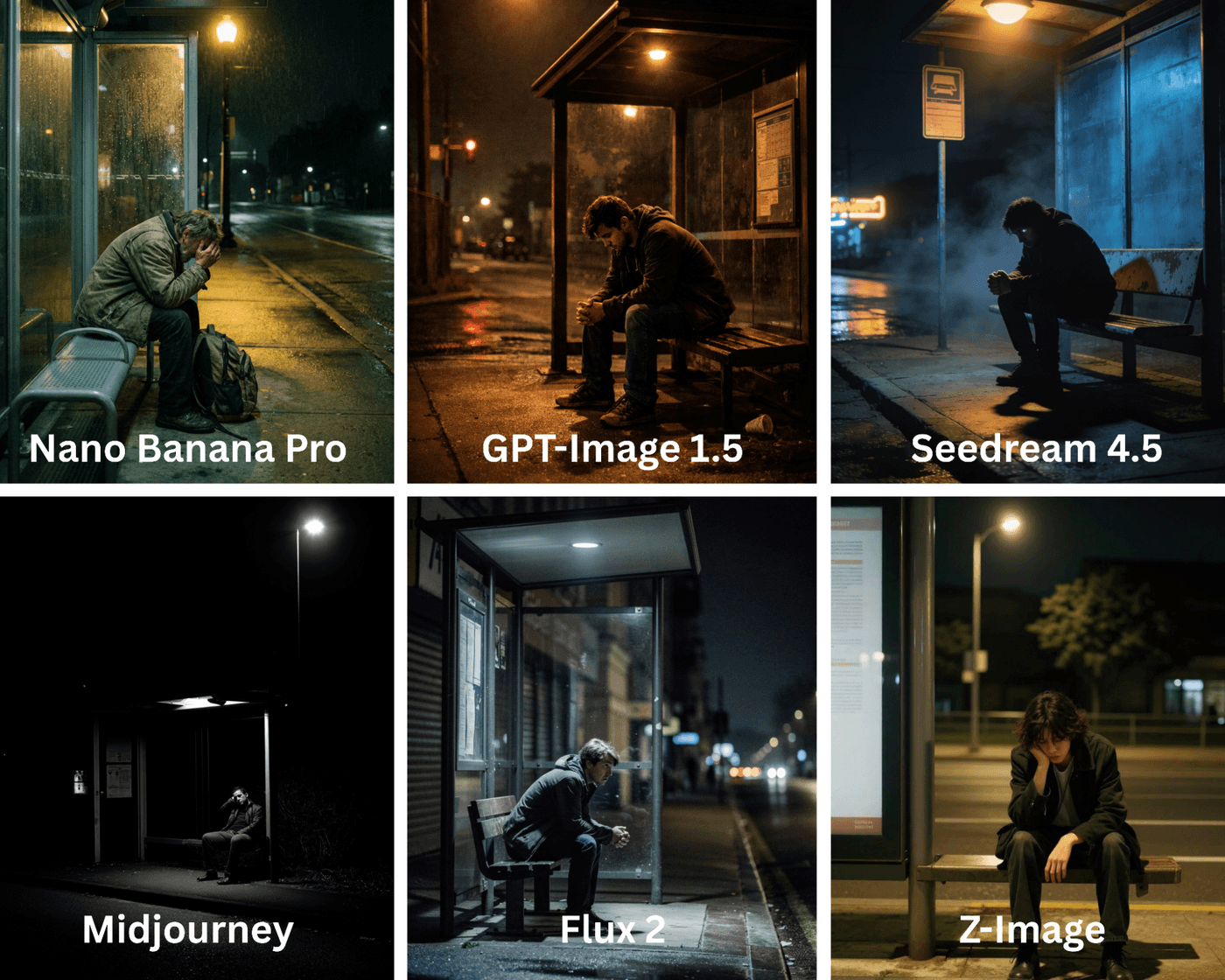
Some images feel like a moment pulled from a larger story, while others feel complete and static. Narrative-ready images suggest what happened before and what might happen next, even though only one frame is shown.
This is especially important for storytelling, cinematic concepts, and emotionally driven campaigns where the image needs to carry more than just visual information.
What each model delivers:
- Nano Banana Pro: Creates clear and readable scenes, but with limited implied story or emotional depth.
- GPT-Image 1.5: Adds subtle storytelling cues through expression, posture, and environmental context.
- Flux 2: Generates grounded, believable moments that feel natural and lived-in rather than dramatic.
- Seedream: Focuses on abstract or emotion-driven storytelling, often prioritizing mood over literal narrative.
- Midjourney: Produces cinematic frames rich with emotional tension and implied story beyond the frame.
- Z-Image: Interprets scenes very literally, resulting in minimal narrative layering or subtext.
Category winner: Nano Banana Pro and Midjourney tie for cinematic storytelling.
Prompt: Still frame of a person sitting alone at a bus stop late at night, lit by a single streetlight. Posture and expression should suggest emotional tension, with the environment adding context without resolving the moment.
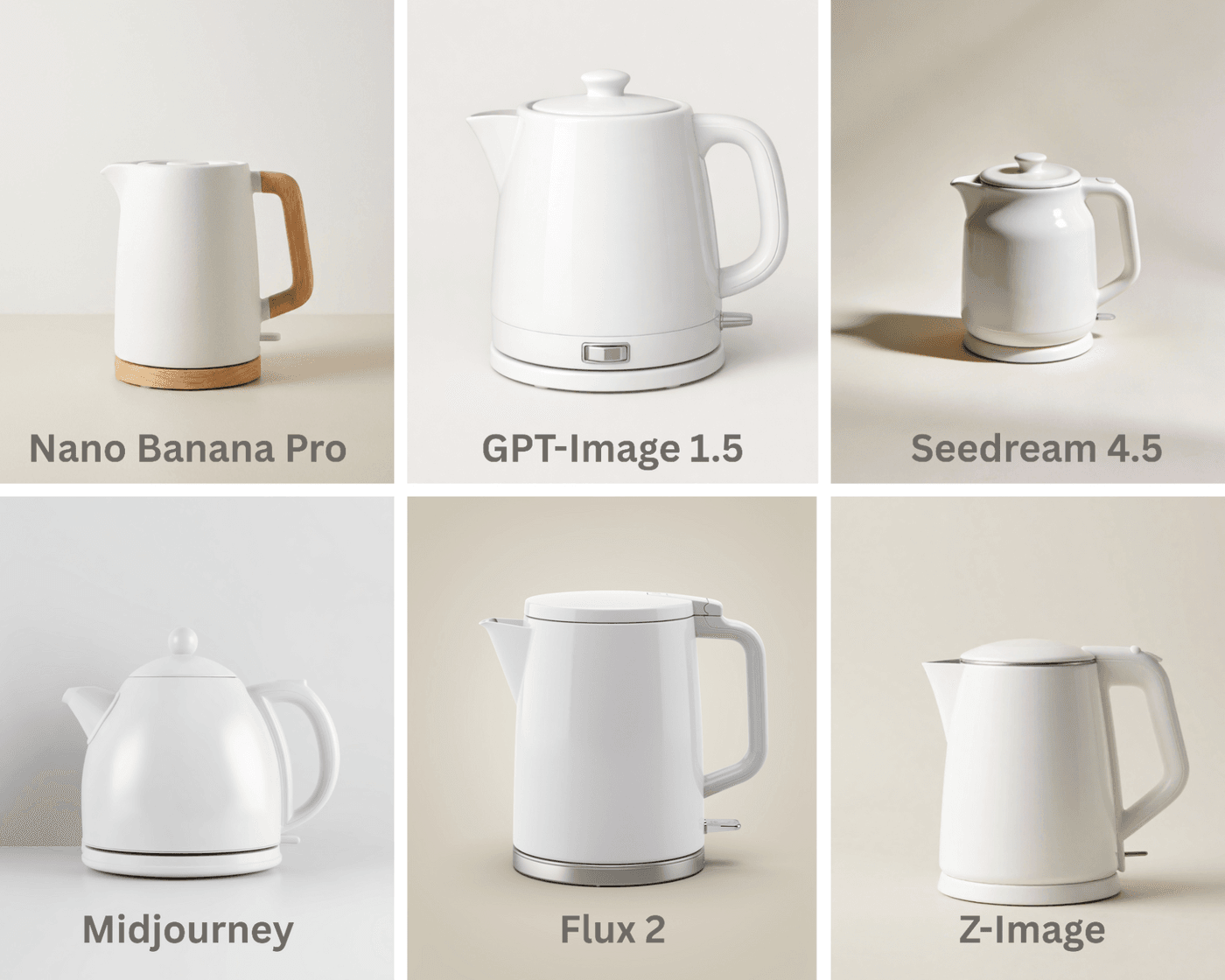
5. Brand-Safe Output and Commercial Reliability
In commercial use, unpredictability is a problem. Images for ads, websites, and product pages need to be clear, controlled, and repeatable. Brand-safe output means the image looks appropriate, balanced, and consistent every time it is generated.
Here, restraint matters more than visual flair.
What each model delivers:
- Nano Banana Pro: Consistently delivers predictable and controlled outputs that feel safe for commercial use.
- GPT-Image 1.5: Produces reliable framing and consistent visuals that adapt well across brand contexts.
- Flux 2: Offers a premium, professional finish, though images can sometimes feel more cinematic than commercial.
- Seedream: Generates creative visuals, but with less control, making them harder to standardize for brand use.
- Midjourney: Creates visually striking images that can be unpredictable for strict brand guidelines.
- Z-Image: Produces simple and usable visuals that prioritize clarity and low risk.
Category winner: Nano Banana Pro and GPT-Image 1.5 tie for brand-safe consistency.
Prompt: Create a clean commercial image of a white ceramic electric kettle placed on a light neutral background. The kettle should be centered, fully visible, and evenly lit with soft, shadow-controlled lighting. Use a simple, uncluttered setup with no dramatic angles, props, or stylized effects. The composition should feel calm, balanced, and neutral, suitable for a brand website or product listing.
6. Adaptability for Marketing and Performance Content
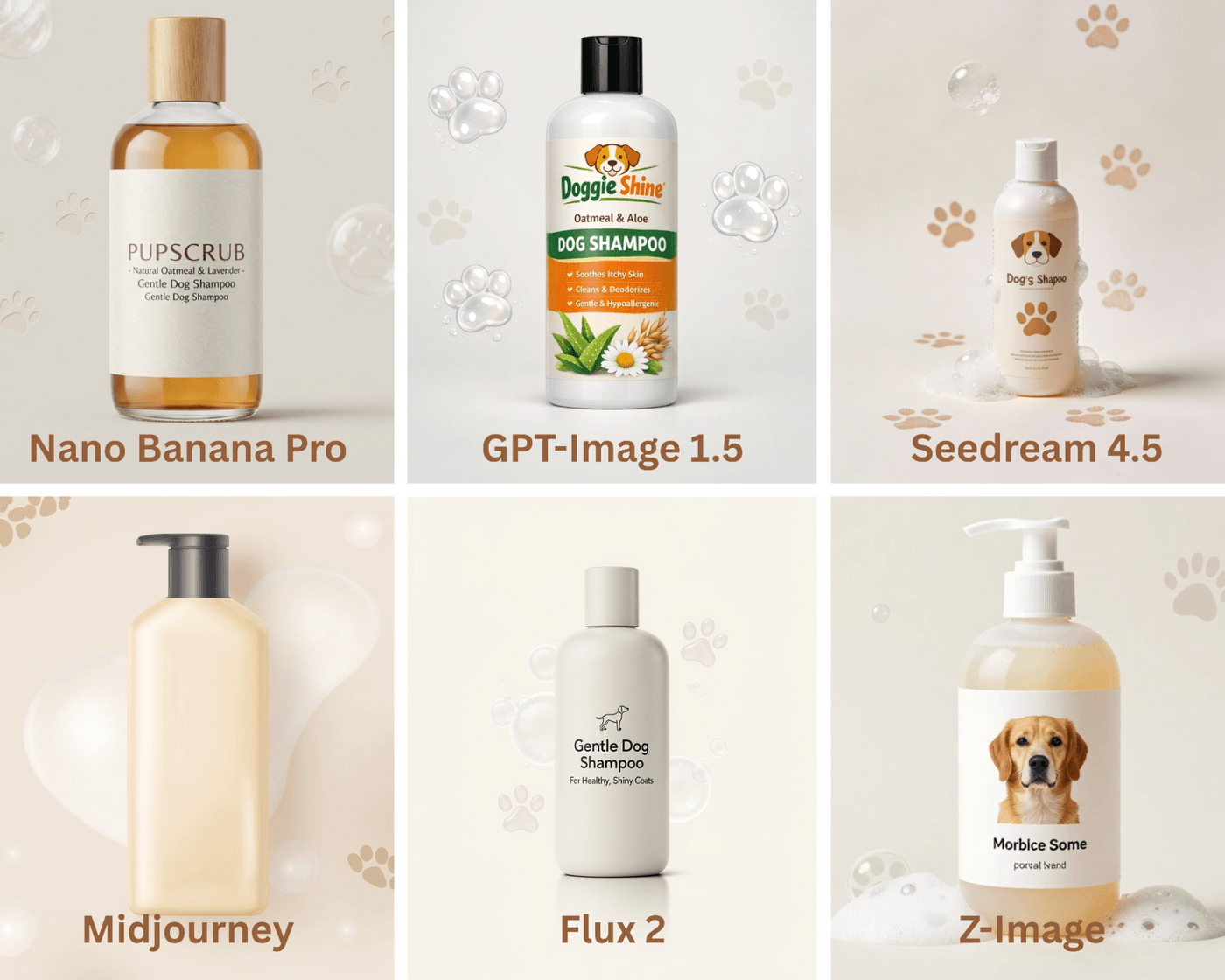
Most marketing images do not live in one place. They are cropped, resized, and reused across ads, social posts, thumbnails, and landing pages. Images that scale leave room to work with and retain clarity across formats.
This is where modular composition and flexibility matter more than visual drama.
What each model delivers:
- Nano Banana Pro: Creates structured compositions that adapt well to standard marketing layouts and crops.
- GPT-Image 1.5: Produces highly flexible images that maintain balance and clarity across multiple formats.
- Flux 2: Delivers strong, polished framing, though compositions can feel tightly resolved and less flexible.
- Seedream: Produces highly stylized visuals that are visually strong but difficult to modularize.
- Midjourney: Generates attention-grabbing visuals that can be challenging to standardize across formats.
- Z-Image: Creates simple, flexible layouts that are easy to repurpose, though visually basic.
Category winner: Nano Banana Pro and GPT-Image 1.5 stand out for marketing versatility.
Prompt: Create a marketing-ready product hero image of a dog shampoo bottle for paid ads and social feeds. Place the bottle centrally, front-facing, and evenly lit on a light neutral background with subtle paw-shaped soap bubbles and soft paw-mark accents. Keep these elements secondary, leave generous negative space for headlines or CTAs, and avoid edge-bound details so the image crops cleanly across square, vertical, and horizontal formats.
6 Tips to Generate Stunning AI Images (That Actually Scale)
Creating visuals with AI should hold up as you iterate, expand into video, and move across formats. Here are tips to keep your images realistic and usable beyond the first render:
- Write prompts like creative briefs, not descriptions: Every AI model needs guidance, but too much detail too early can limit exploration. Frame prompts around intent, mood, and outcome so the model has direction without being boxed in.
- Build visual consistency through iterative anchors: Consistency comes from being deliberate, not repetitive. Reuse core anchors like lighting, framing, or tone across generations to keep outputs aligned instead of drifting.
- Use image outputs as strategic inputs, not final assets: Early image generations work best as thinking tools that help set direction and surface what works. Save refinement and polish for later stages of the workflow.
- Design images with motion in mind: Images that scale account for natural movement within the frame. Include depth, open space, and environmental action so the scene can extend into motion instead of feeling frozen.
- Prepare images as visual seeds for video AI tools: Strong stills can act as reference frames for video generation. Feeding them into models like Sora or Kling o1 helps maintain visual continuity and reduce style breaks.
- Know when to switch models mid-workflow: Some models are better for exploration, while others excel at polish and control. Switching tools between ideation and execution stages often leads to stronger results.
Defining Your Creative Direction With invideo
There’s no single “best” AI image model, only the one that fits the moment you’re in. Some ideas need mood and drama, others need realism, consistency, or speed. The trick is knowing which muscle you’re flexing.
Midjourney thrives on cinematic flair and bold artistic choices. Flux 2 brings realism and material detail that hold up under scrutiny. GPT-Image 1.5 balances brand safety with flexibility, while Nano Banana Pro keeps things controlled and execution-ready. Seedream leans into imagination, and Z-Image keeps workflows fast and structured.
The key is to choose based on intent, not loyalty. Invideo lets you switch between the latest image models and also cutting-edge video generation. Its built-in editor and video AI tools tie everything together with end-to-end production control for any campaign and format.
Start with invideo and turn prompts into production, one (or a dozen) creative briefs at a time.
FAQs
-
1.
Which AI image model is best for beginners?
GPT-Image 1.5 and Nano Banana Pro are the easiest to start with. They handle simple prompts well and give predictable results. On invideo, beginners can also switch models easily, which reduces trial and error while learning.
-
2.
Can these image models be used for commercial projects?
Yes, most models allow commercial use, but licensing terms depend on the model and plan. It’s always best to review usage rights before publishing. Invideo helps by keeping everything in one workflow, making it easier to manage and review assets before campaigns go live.
-
3.
How do I choose between realism and creativity?
Use realistic styles for products, brands, and visuals where accuracy builds trust. Creative or stylized looks work better for storytelling and ideas. With invideo, you can test both styles from the same brief and quickly see what works best.
-
4.
Do these models support consistent characters or visual systems?
Yes, but consistency needs structure. GPT-Image 1.5 and Nano Banana Pro work best when you reuse the same visual references and prompts. Invideo makes this simpler by letting you reuse base images and prompts across scenes and extend them into videos.
-
5.
How do I use these image models inside invideo?
Inside your invideo workspace, open the prompt page and go to Agents and Models. Select the image model you want, generate visuals, and use them directly in the editor or as inputs for video tools like Kling or Sora.
