






Here’s a detailed guide on how to use Hailuo Minimax’s Effects to create viral Instagram effects for free on invideo.
Invideo and Hailuo have just formed a momentous collaboration to introduce a powerful new feature that allows users to create viral and attention-grabbing AI videos by simply uploading a reference photo.
The Minimax video model is especially known for its speed, creative control, and enhanced frame-to-frame stability, which keeps characters, clothing, and backgrounds consistent across generated shots. For creators and brands, these viral-style videos are essential tools for driving brand recall, increasing user engagement, and accelerating business growth.
Check out some of the cool viral effects below created with Minimax Effects.
Instagram:
How to Access Minimax Effects
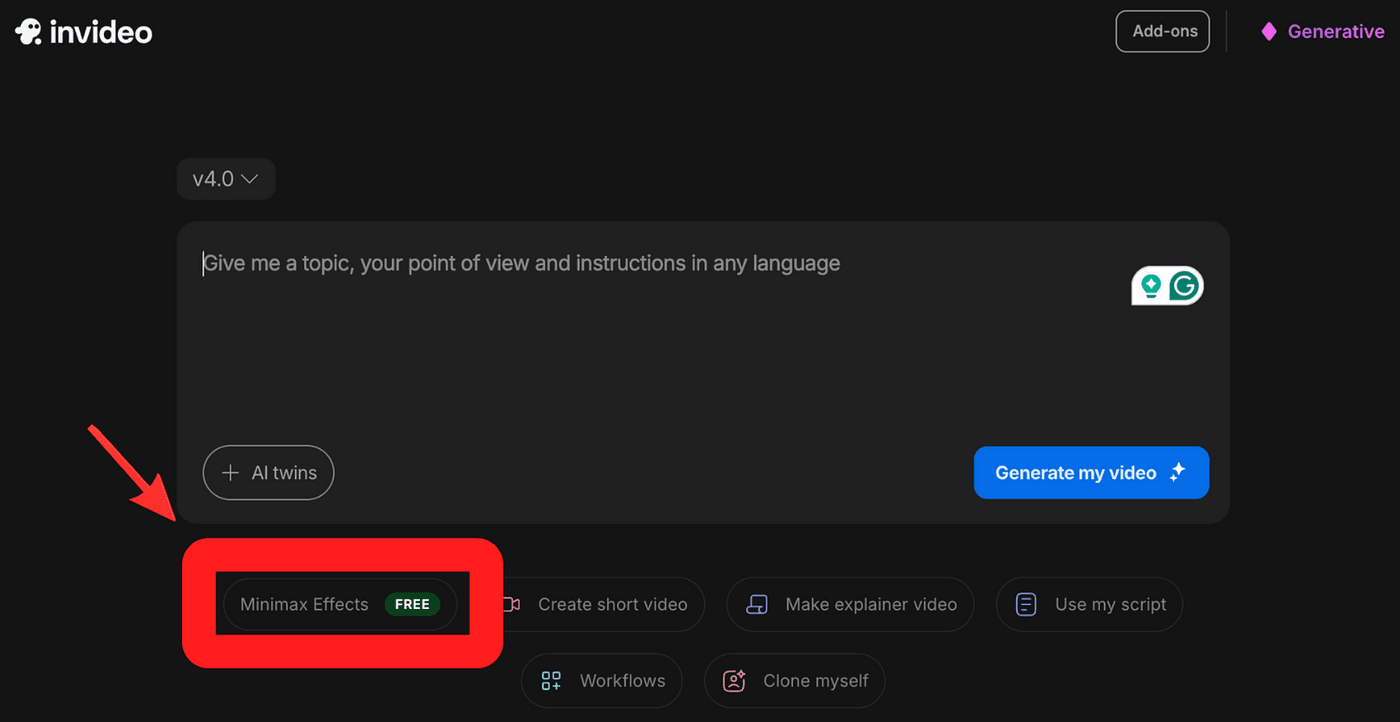
To get started, head over to invideo and create an AI video. Under the prompt field, click the “Minimax Effects” tag.
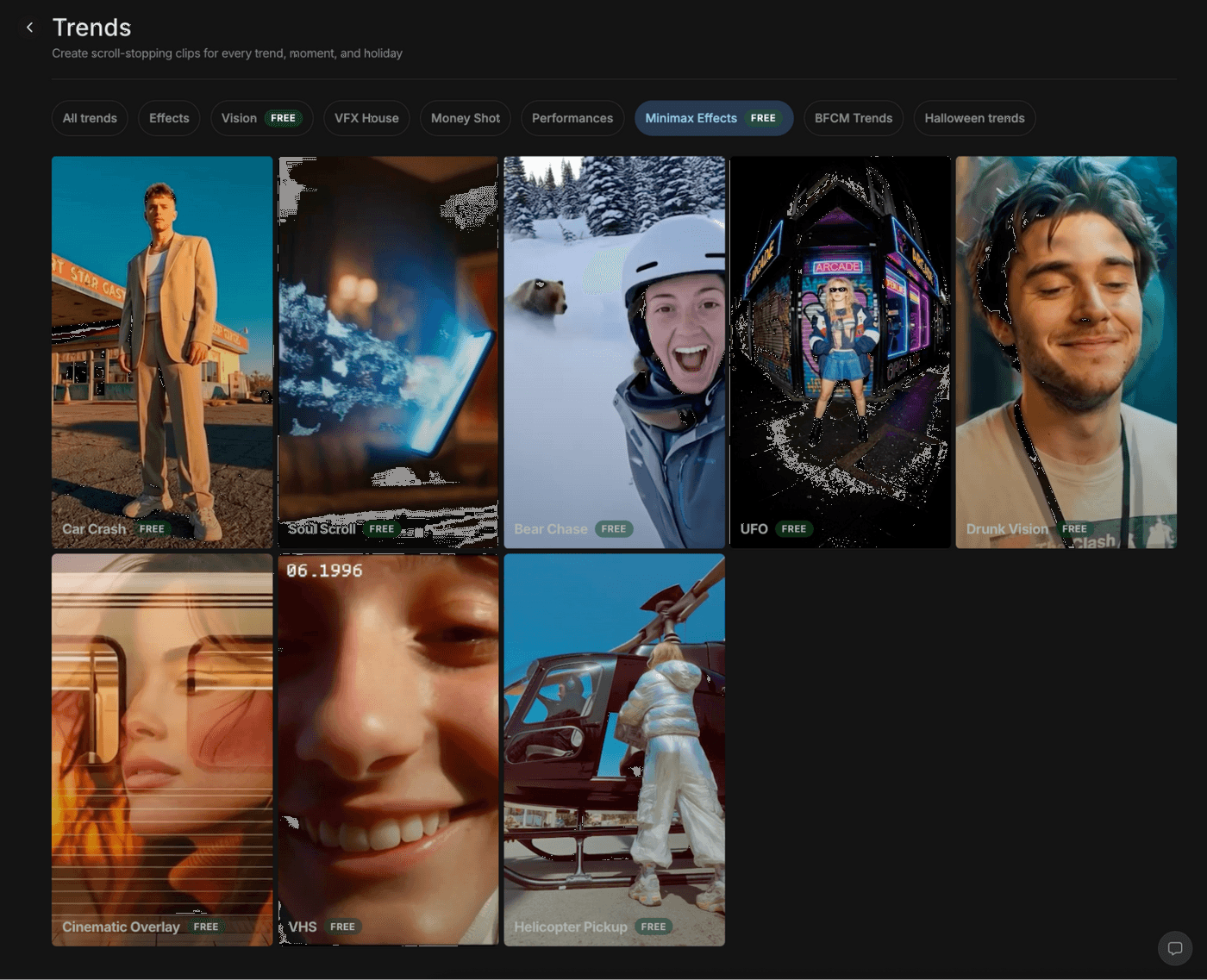
This will open a dashboard with a list of Minimax Effects. You can choose from a basic video style like cinematic overlay to fun effects like getting picked up by a UFO.
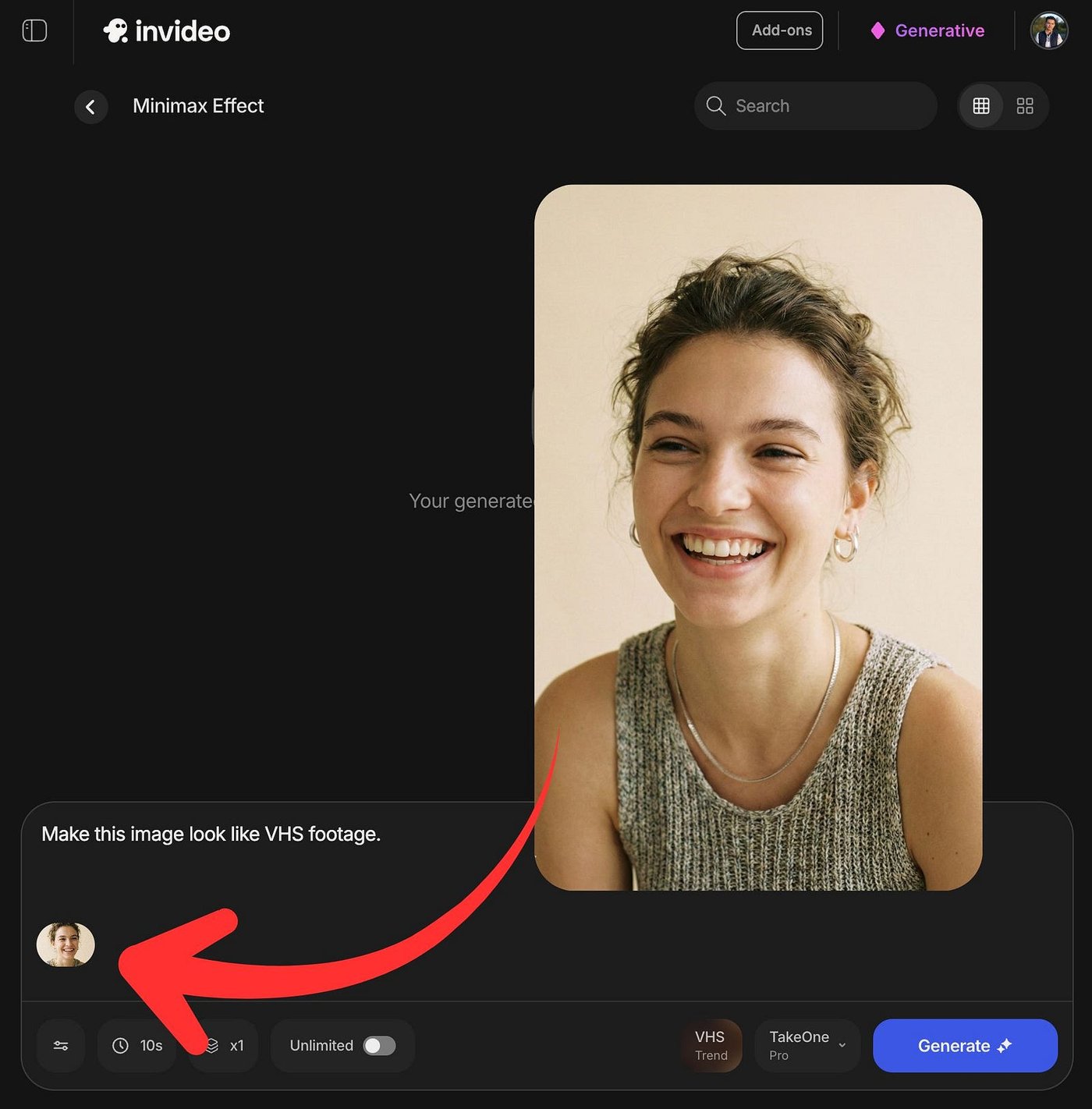
Select the effect that you like and upload your reference photo. For example, here’s a sample portrait photo of a young female turned into a video with a VHS effect.
Video:
In under a minute, your video is ready.
The quality of the VHS filter looks cool, especially the amount of jitter added toward the end. I also like how the character looks the same in every frame and how realistic her movements are when she smiles, blinks, and moves her head. It’s so believable you won’t even think it’s made by AI unless you pixel peep.
You can customize your results by adjusting several parameters, such as the text prompt, video duration, and the number of videos per generation. It’s also worth noting that invideo keeps the aspect ratio of the video the same as the reference image. This means you don’t need to adjust any settings or be surprised by an incorrect aspect ratio in the output.
Here’s another example with a Minimax Effect called “UFO.”
Video:
This particular example shows the subject being swept up by a tractor beam. Note that this effect effectively functions as instant CGI. It would be a perfect special effect for a music video or a sci-fi movie scene, allowing indie creators to pull off a cool abduction shot without needing green screens, wire rigs, or complex compositing.
Another example is an effect that makes it look like you're getting hit by a car.
Video:
This is easily one of the most "crazy" and high-impact effects in the entire collection. For those getting started with AI filmmaking, these effects are a huge time-saver because it allows indie filmmakers to add "impossible" scenes like helicopter pickups or car crashes that would normally require a massive budget for stunts or CGI. It basically gives you a digital stunt team and a VFX studio for free, allowing you to tell much bigger stories without the extra cost.
A great way for brands and content creators to place their logos or business names within the shot, making it an excellent tool for brand exposure or product placement.
What You Can Do with Minimax Effects
If you are running a small business, you don't really need a film crew anymore to make a decent ad. You can literally take a simple photo of your product or a person holding it and turn it into a trendy and viral video clip in seconds. It is a massive cheat code for testimonials too. instead of a boring static photo of a customer on your site, you animate it. Slap or logo or brand on those videos to improve brand awareness. Videos with cool effects and wild concepts easily catch the eye on social media.
For the marketers out there, using a "crazy" effect like the UFO abduction or a car crash in the first 3 seconds of your reel is a guaranteed way to stop people from scrolling. It is a pattern interrupt. Plus, since these videos take under a minute to generate, you can create ten different variations of an ad hook in the time it usually takes to edit one. It lets you test what actually converts without wasting days on editing.
And for my indie filmmakers and creators, Minimax Effects is a budget hack. You can pull off "impossible" shots for music videos or sci-fi shorts without needing green screens or a VFX team. It is perfect for faceless channels too since you can generate unique footage that matches your script instead of using the same stock clips everyone else is reusing.
I am just scratching the surface here. There are likely a dozen other ways to use this that I haven't even thought of yet. It really just comes down to how creative you can get with a single photo and a weird idea.
Create Viral AI Videos Today
Minimax Effects brings high-end character consistency and studio-level motion control directly to the invideo platform, removing the technical barriers that once made viral VFX hard to do. With its enhanced frame-to-frame consistency, you can now produce high-quality AI videos where your subject’s looks remain locked in from start to finish. This workflow allows you to focus purely on creativity rather than struggling with technical inconsistencies.
Minimax Effects are currently free and require no subscription or paywall. It is ready to use after creating an account. This is great if you are building brand exposure through product placement or just looking to engage your audience with “fun and crazy” content.
Also check out these related articles:
-
Kling O1 Preview: How Kling O1 Pushes Motion, Control, and Consistency with invideo
-
Kling on invideo: How It Became the Filmmaker’s Favorite AI Video Engine
-
How Can You Create Scroll-Stopping Ads from Simple Product Pages with Kling on invideo?
FAQs
1. What are Minimax Effects?
Minimax Effects is a free feature on invideo that helps you turn static photos into viral AI videos using the Hailuo Minimax model. It is designed to give creators speed and consistency so your characters and backgrounds look stable throughout the clip. You can also play with creative styles to get specific looks like a vintage VHS tape or a cinematic helicopter shot.
2. How to convert images to viral video using MiniMax?
You can easily turn your images into viral videos by heading to invideo.io and signing up for a free account. Once you are in, select the Minimax Effects feature and upload a high-quality reference image to serve as your starting frame. You then just need to choose how long you want the clip to be and hit generate to see the results.
3. What is the ideal input image to make viral AI videos?
The best results come from high-quality and well-lit photos that have a clear subject in the frame. Using sharp images allows the model to produce HD outputs up to 1080p resolution. Clear inputs help Minimax Effects generate crisp 10-second clips that maintain the details of your original photo.
4. How fast can I generate AI videos with Minimax Effects?
MiniMax is built for speed and typically generates a 10-second clip in about 60 to 90 seconds. Invideo also lets you multitask by generating up to four of these videos at the same time. This means you can create a large batch of content in just a few minutes without waiting for one to finish before starting the next.
5. What are ideal use cases for vertical AI videos?
Vertical AI videos are perfect for social media hooks where you need a 3-second pattern interrupt to grab attention. They also work great for turning product photos into engaging video ads or creating visual effects for indie films. You can even use them to quickly test different creative variations without spending hours on complex editing.
