






Key Takeaways
-
Seedream 4.5 is an excellent production tool for video-first marketing.
-
Seedream 4.5 supports multi-line text, clear typography, and accurate spelling, making it dependable for ads, packaging visuals, and social media graphics where text must remain readable.
-
Non-destructive text and object-level editing allow copy changes without regenerating the entire image, keeping iteration fast and predictable.
-
Prompt weighting helps maintain visual hierarchy by ensuring headlines and CTAs stay dominant over background styles as assets scale into video.
-
Faster generation and cleaner upscaling than Seedream 4.0 reduce post-production work and speed up creative testing.
-
Resolution support up to 2048×2048 makes visuals flexible enough for web, video frames, and print workflows without rework.
In 2026, most forms of marketing have become video-first. Ads, thumbnails, social posts, and even basic announcements are now designed to live inside timelines, cropped into formats, and reused across platforms. Yet most visual workflows still treat text and layout as fixed, even though messaging rarely is.
That mismatch is where teams slow down. A headline that worked yesterday loses impact once it’s placed on a thumbnail. A small pricing or CTA change forces updates across overlays, title cards, and ad variants. Hence, what should be a routine iteration turns into a fragile chain of revisions.
Seedream 4.5, developed by ByteDance, is built for this reality. It focuses on what modern workflows demand, i.e., accurate text rendering, controlled layouts, and fast iteration without destructive edits.
The good news is that Seedream 4.5 now works directly inside the advanced video capabilities of invideo. This helps you remove the gap between image creation and video production. Teams can generate text-perfect marketing visuals and immediately place them into timelines as thumbnails, title cards, overlays, or animated elements.
Today we’ll talk about how Seedream 4.5 fits real marketing and content workflows, and how to use it deliberately rather than experimentally, so that you can make your videos look like:
Seedream 4.5 Features You Must Know
Seedream 4.5 is designed for teams that produce visuals under real marketing pressure. It is designed to prioritize clarity, control, and repeatability, making it suitable for ad creatives, social assets, and video-first workflows. Let’s quickly look at the features:
1. Professional text rendering & typography
Seedream 4.5 handles text as a core design element, and not an afterthought. Headlines, CTAs, disclaimers, and pricing remain readable and well-spaced across layouts.
This makes it reliable for ad creatives, thumbnails, and title cards where typographic precision directly affects performance and trust.
2. Non-destructive editing
Seedream 4.5 allows for text and visual adjustments without regenerating the entire image. Marketers can update copy, reposition elements, or refine layouts while preserving the original design structure.
This reduces revision cycles and keeps campaigns agile when messaging or offers change at the last minute.
3. Speed & efficiency
Seedream 4.5 generates usable outputs quickly, even for complex, text-heavy compositions. Faster generation means teams can test more variants, respond to trends, and meet tight publishing timelines.
This speed is especially valuable when producing multiple assets for ads, reels, and short-form video content.
4. 4K production-ready output
Images generated in Seedream 4.5 are suitable for high-resolution use cases, including 4K video frames. This ensures assets hold up across thumbnails, full-screen title cards, and motion graphics. Teams can move from image generation to video assembly without quality loss or manual upscaling.
5. Character consistency & brand safety
Seedream 4.5 maintains consistent characters, products, and visual identities across generations. This is critical for brand campaigns, spokesperson visuals, and recurring video formats. It reduces the risk of visual drift while helping teams stay aligned with brand guidelines and compliance requirements.
6. Prompt weighting & priority
Prompt weighting gives creators precise control over what matters most in an image. Text accuracy, layout structure, subject focus, and style can be prioritized independently. This helps marketers guide outputs toward conversion goals rather than relying on trial-and-error prompt experimentation.
Seedream 4.5 vs. Seedream 4.0 vs. Midjourney vs. Nano Banana Pro
Each of these models targets a different creative priority. The difference shows up clearly once you move beyond single images and start building repeatable, text-heavy, or video-linked visual systems. Seedream 4.5 focuses on consistency, typography, and production readiness. Nano Banana Pro leans into hyper-realism. Midjourney remains an artistic benchmark, while Seedream 4.0 reflects an earlier generation with more limitations at scale.
| Feature | Seedream 4.5 | Seedream 4.0 | Midjourney | Nano Banana Pro |
|---|---|---|---|---|
| Image quality | Cinematic, stylized, editorial-grade | High quality but less refined | Strong artistic flair | Hyper-realistic, photo-like |
| Text rendering | Excellent, production-safe typography | Limited for complex text | Inconsistent for ads | Moderate, not text-first |
| Resolution support | Native 4K | Lower effective ceiling | High but varies | High, realism-focused |
| Consistency across images | Strong multi-image consistency | Weaker across sets | Moderate | Strong for realism, weaker for branding |
| Editing flexibility | Non-destructive workflows | Regeneration-heavy | Limited control | Precise edits, realism-first |
| Best use cases | Ads, video assets, branded visuals | Standalone images | Concept art, creatives | Photorealism, products, food |
How To Use Seedream 4.5 on invideo
Seedream 4.5 is available directly on invideo, letting you generate high-quality marketing images and turn them into video assets without switching tools. This setup works especially well for ads, thumbnails, title cards, and text-driven visuals that flow straight into video timelines.
Step 1: Access Seedream 4.5 in invideo
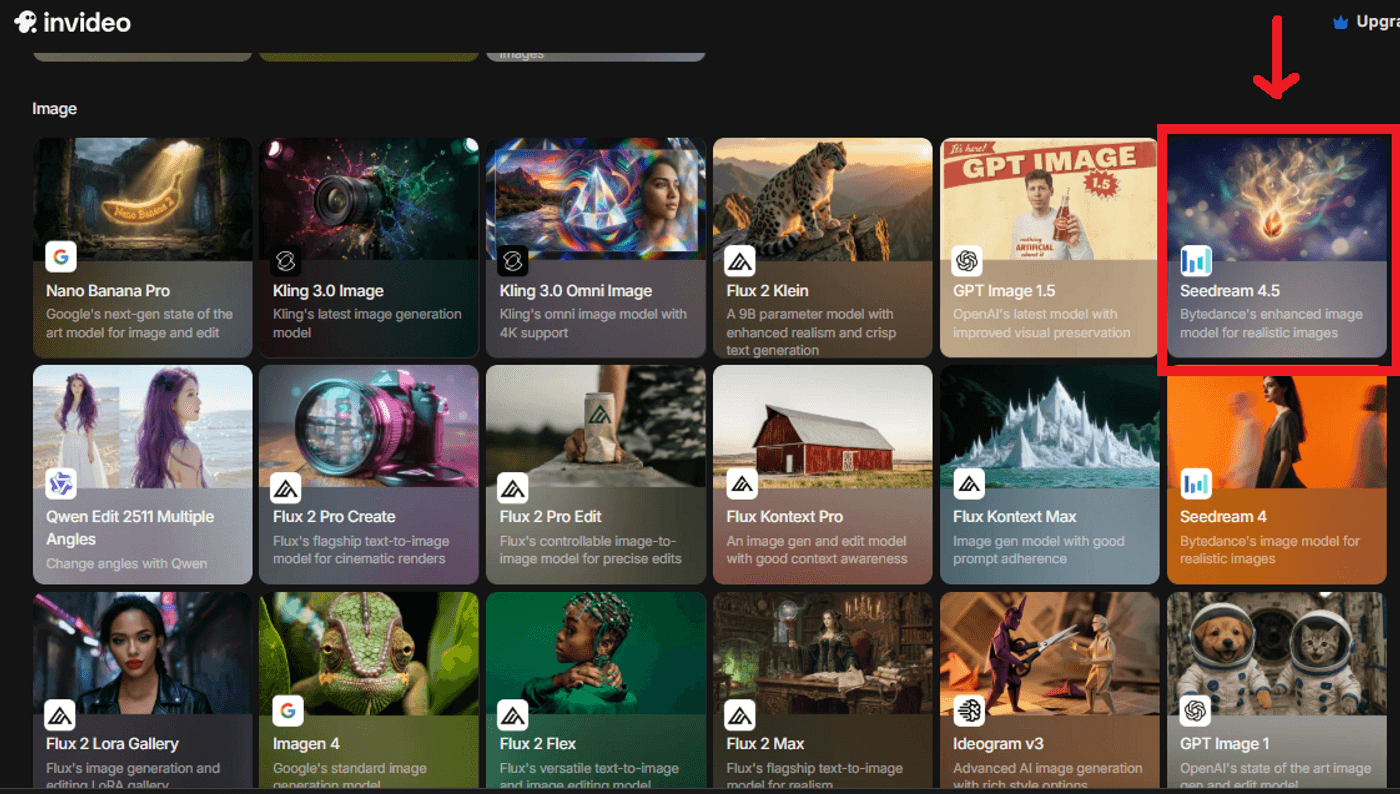
Open or log into your invideo dashboard and go to Agents & Models. From the image generation options, select Seedream 4.5. This activates Seedream as your visual engine for marketing-focused image creation.
Step 2: Craft your marketing prompt
Approach prompts as creative briefs, not open-ended ideas. Seedream 4.5 responds best when intent, structure, and usage are clearly defined. Specify the message first, then guide how it should appear visually. This reduces revisions and produces assets that are immediately usable in campaigns.
Make sure you’re clear about:
-
The exact text to render, including headlines, offers, and CTAs
-
Layout and alignment, such as centered, left-aligned, or text overlay
-
Brand colors, typography style, and overall visual tone
-
The final use case, whether it’s an ad, thumbnail, or product visual
Example prompt:
Prompt: “Instagram promotional ad for a coffee brand. Display text ‘20% OFF YOUR FIRST ORDER’ in bold sans-serif typography, centered. Use warm brown and cream tones with a minimalist aesthetic. Feature a close-up latte art product shot in the background. Output in a square format suitable for social ads.”
Step 3: Choose resolution and aspect ratio
Select resolution and aspect ratio with distribution in mind. This decision determines whether the asset survives cropping, animation, and motion without losing text clarity. Here’s a quick guide of recommended formats by use cases.
| Use case | Aspect ratio | Resolution |
|---|---|---|
| Instagram & Facebook ads | 1:1 or 4:5 | 1080×1080 or 1080×1350 |
| Stories, Reels, Shorts | 9:16 | 1080×1920 |
| YouTube thumbnails | 16:9 | 1920×1080 |
| Title cards & overlays | 16:9 | 4K where possible |
| Zoom-ins & motion graphics | Any | 4K preferred |
Seedream 4.5 generates high-resolution, production-safe images, so text remains sharp during pans, zooms, and transitions inside video timelines.
Step 4: Send the image into your video workflow
After generation, move the image directly into your invideo project. Treat it as a modular visual asset rather than a static image. Some of the common video use cases include:
-
Thumbnails with readable headlines
-
Title cards and chapter breaks
-
Lower-thirds with offers or CTAs
-
Background layers for animated text
Once placed, add motion, transitions, voiceovers, and music without redesigning the visual. Seedream 4.5 preserves text clarity and layout integrity, allowing the image to scale smoothly from still creative to full video output.
Seedream 4.5 Use Cases
Seedream 4.5 excels at producing text-accurate, layout-stable visual assets that plug directly into modern video marketing workflows. Its value is best enjoyed when mapped to real roles and real production constraints. Here's how different roles leverage it to solve specific production challenges:
| Use case / role | How Seedream 4.5 helps | What it's best for | Key limitation to remember |
|---|---|---|---|
| Social Media Marketers | Generates text-heavy graphics, quote cards, and promotional visuals with legible text | Instagram carousel ads, Facebook campaign graphics, Twitter/X promo images, LinkedIn posts | Limited to static images—requires video platform to add motion |
| Small Business Owners | Creates professional marketing materials without hiring designers | Sale announcements, product labels, event flyers, menu boards, store signage concepts | Text accuracy high but may need minor post-edits for brand fonts |
| YouTube Creators | Produces eye-catching thumbnails with clear, readable titles | Thumbnail creation, title cards, lower-thirds graphics, intro/outro frames | Doesn't generate facial expressions or complex human poses well |
| Performance Marketers | Enables rapid A/B testing with copy variations and different CTAs | Ad creative variants, headline tests, CTA button designs, campaign concepts | Each variant is a new generation—no batch copy-swap yet |
| E-commerce Brands | Generates product shots with pricing, features, and promotional text | Product badges, discount overlays, comparison charts, feature callouts | Not a replacement for actual product photography—best as enhancement |
| Content Creators | Fast visual asset production for video projects and content campaigns | Video thumbnails, B-roll text overlays, animated graphic frames, explainer visuals | Still images only—needs video editor to add animation/motion |
| Agencies | Streamlines client pitch and concept approval processes | Mockups, concept boards, campaign pitch decks, client preview assets | Client-specific fonts/logos may need manual overlay in post |
| Affiliate Marketers | Creates promotional graphics for offers, deals, and product features | Banner ads, promo graphics, comparison images, discount announcements | Generic AI aesthetic—needs branding overlay for uniqueness |
Move From Design Bottlenecks To Visual Output With invideo
Seedream 4.5 delivers the most value when it is used with intent, not experimentation. Instead of treating it as a one-off image generator, start with a single, repeatable workflow that mirrors how your marketing actually runs. Here’s how you can start:
-
Create 3-5 ad variants for an upcoming campaign using the same layout and different headlines or CTAs
-
Build a library of branded thumbnail templates for YouTube or short-form video
-
Generate a full week of social graphics from one core message
As you refine your prompts, save the ones that consistently perform. Over time, this becomes a prompt library that produces predictable, on-brand visuals at speed. Combined with precise text rendering and seamless video integration, Seedream 4.5 moves from a creative tool to an operational advantage.
Try Seedream 4.5 on invideo and turn production bottlenecks into repeatable workflows.
FAQs
1. What is Seedream 4.5, and what can it generate?
Seedream 4.5 is an AI image model by ByteDance that generates text-accurate, production-ready marketing visuals such as ads, thumbnails, title cards, and branded graphics. Unlike general-purpose AI models that sometimes struggle with technical layouts, Seedream 4.5 is built to be "production-ready."
This means it excels at generating text-accurate visuals where the typography is just as sharp as the imagery.
2. How do I write prompts for Seedream 4.5?
Write prompts like a creative brief, clearly defining the exact text, layout, visual style, and final use case to get reliable, usable outputs. To get reliable, usable outputs that don't require endless "re-rolling," your prompts should be highly descriptive and structured.
3. How do I access Seedream 4.5?
Currently, the most streamlined way to use Seedream 4.5 is through invideo. By integrating the model directly into the video creation suite, the workflow becomes significantly faster.
Instead of generating an image in one app, downloading it, and then uploading it to your video editor, the assets you create with Seedream 4.5 flow directly into your video timeline. This makes it an ideal tool for creators who need to maintain a fast pace without sacrificing visual quality.
4. How is Seedream 4.5 different from Seedream 4.0?
Seedream 4.5 represents a major leap forward in "intelligence" and "fidelity" over its predecessor. While Seedream 4.0 was a powerful proof of concept, the 4.5 update focuses on solving the most common pain points for creators:
-
Superior Text Rendering: Significant reduction in typos or "hallucinated" characters in graphics.
-
Multi-Image Consistency: It is much easier to generate a series of images that look like they belong to the same brand or campaign.
-
Higher Native Resolution: Sharper details that hold up even on larger screens.
-
Granular Editing Control: Better adherence to complex instructions, allowing for more precise iterations.
5. Can Seedream 4.5 replace graphic designers?
The short answer is no. Seedream 4.5 is a force multiplier, not a replacement. It is designed to handle the repetitive, high-volume tasks that often eat up a designer’s day, like resizing ads for different platforms or churning out dozens of thumbnail variations for A/B testing.
