




Key Takeaways
-
Treat Midjourney like a shot generator, not an image tool. Write prompts that specify camera angle, movement, lens, and lighting so each output feels like part of a video sequence, not a standalone frame.
-
Use a structured, repeatable prompt format and keep variables like lighting, color, and lens consistent across prompts to maintain continuity between scenes.
-
Keep prompts specific and focused on one idea per shot, avoiding vague language or overloaded descriptions, and iterate by refining small elements instead of rewriting everything.
-
Plan your video first (as a shot list), then generate visuals and assemble them using tools like invideo to add pacing, transitions, and narrative flow.
The new V8 Alpha from Midjourney doesn’t feel like an upgrade, but rather a complete reset. It’s faster, pushes cleaner details, and finally stops falling apart on visuals like hands and text. There’s a new interface, new controls, and just enough personalization to make you think you’re in charge of the aesthetic. On a good prompt, it gets you dangerously close to something that looks production-ready.
And that’s exactly where it gets tricky. Because what V8 really produces isn’t a complete video; rather it’s convincing pieces of one. A few seconds of motion, a frame that feels directed, a shot that hints at the story but doesn’t carry it forward.
So the bottleneck shifts. The gap now comes down to how deliberately you shape the input. The way you write Midjourney prompts now decides whether you get a usable scene or just another beautiful dead end. From there, you still need a system that can stitch those fragments into a coherent narrative. That’s where invideo comes in, helping you sequence visuals, add timing, and shape them into something that actually plays like a video. To see how that actually plays out, here’s a quick breakdown of prompts that translate cleanly into video-ready scenes like:
Why Most Midjourney Prompts Fail for Video Creators
Most Midjourney prompts fail because you treat them like captions instead of directions. You describe what the scene is, but how can the AI give you the desired output unless you tell it how to behave. The model responds the same way every time. It gives you a polished image that looks right but doesn’t move, evolve, or connect to the next frame.
That gap becomes even more evident when you try to build anything resembling a sequence. The output feels generic because the input is vague. You asked for a mood, not a shot.
Take a typical prompt:
It sounds fine, but it leaves every decision open. Camera angle, movement, pacing, and environment all default to whatever the model finds most probable.
Now compare that with:
The second prompt directs a scene. It tells the model how to see, not just what to show. That’s the shift most creators miss. Midjourney doesn’t struggle with visuals; it struggles with unclear intent, and vague prompts give it too much room to guess.
Anatomy of Strong MidJourney Prompts For Video Creators
A strong Midjourney prompt is one without ambiguity. You need to understand that you’re working with a system that will happily fill gaps with its own bias and or understanding, so the goal is to leave as little room for interpretation as possible while still keeping the prompt usable across multiple shots.
-
Define the subject in a working context: A subject only becomes useful when it exists within a clean environment and moment. When you anchor it to a situation rather than a label, the model is less likely to drift and more likely to remain consistent across variations.
-
Keep style intentional and controlled: Style has a tendency to overpower everything else, especially in newer models that lean heavily into aesthetics. You need to frame it as a constraint rather than a direction, so it supports the scene instead of rewriting it.
-
Frame the scene with production logic: Composition works best when it reflects how a shot would actually be captured. When framing follows a clear point of view, the output starts to feel like part of a sequence rather than a standalone image.
-
Treat lighting as a system, not a mood: Lighting holds scenes together across iterations. When it stays consistent and directional, it gives you a base you can build on instead of something you have to keep correcting.
The Midjourney Prompt Framework for Video Creators
A reliable Midjourney workflow starts with a prompt structure you can reuse and refine. When each part of the scene has a clear role, your outputs stay consistent and easier to build into sequences. Here’s a template to help you through:
Dos and Don’ts While Writing a Prompt
Here’s a quick breakdown showing what to lean into and what to avoid when you’re writing prompts that need to hold up in a video workflow.
| Do this | Avoid this |
|---|---|
| Be specific about the subject and action | Using vague terms like "something cool" or "a nice scene." |
| Define the setting and environment clearly | Leaving the background open to interpretation |
| Use visual, descriptive language | Writing abstract ideas like "success" or "growth." |
| Add a clear visual style (cinematic, realistic, anime, etc.) | Mixing too many styles in one prompt |
| Include camera angle or framing (close-up, wide shot, low angle) | Ignoring composition, leading to flat images |
| Specify lighting and mood (soft light, neon glow, dramatic shadows) | Skipping lighting, resulting in dull outputs |
| Focus on one idea per prompt | Overloading with too many elements or concepts |
| Think in shots for video (frame-by-frame usability) | Treating prompts like standalone images only |
| Use atmosphere details (fog, rain, reflections, textures) | Adding random details that don't support the scene |
| Iterate and refine prompts based on outputs | Expecting perfect results from the first try |
| Keep prompts structured and readable | Writing long, messy, unstructured sentences |
| Align prompts with the final video use case | Generating visuals that don't fit your content format |
12 Best Midjourney Prompts For Video Creators
The real value of Midjourney shows up when your prompts map directly to how a video opens, transitions, or builds momentum. Each use case below focuses on prompts that hold continuity, suggest motion, and give you footage you can actually sequence.
1. Cinematic city intro
A strong city intro does more than show scale; it establishes how the world feels before anything happens. You want the environment to carry motion, density, and rhythm so the frame already suggests a story in progress.
Example Prompt:
2. Product promo close-up
A close-up is where the product either holds up or falls apart. You want to see how light sits on it, how the surface behaves, and whether it feels real enough to reach out and touch.
Example Prompt:
3. Storytelling character scene
A character scene works when it captures a moment that feels mid-thought or mid-action. The frame should hint at what came before and what might follow, rather than feeling staged.
Example Prompt:
4. Instagram reel aesthetic scene
Short-form content depends on immediacy, so the scene should feel natural, bright, and easy to process at a glance. Visual clarity matters more than complexity because the viewer decides within seconds.
Example Prompt:
5. Fantasy world sequence
A fantasy world only works if it feels like it could keep going beyond the frame. You're not just showing scale, you're building a space that feels consistent enough to return to.
Example Prompt:
6. Documentary-style shots
Documentary visuals fall apart the second they look directed. You want the frame to feel like it was found, not constructed, with all the small imperfections that come with that.
Example Prompt:
7. Tech explainer background
A tech background has to stay out of its own way. It should feel modern and active, but never so loud that it competes with whatever you're trying to explain on top of it.
Example Prompt:
8. Travel vlog landscape
A travel shot video should make you feel like you're already there. It's less about showing a place and more about pulling someone into it, even for a few seconds.
Example Prompt:
9. Corporate presentation visual
Corporate visuals tend to get sterile very quickly. The goal is to keep things structured and clear, while still giving the frame enough life that it doesn't feel forgettable.
Example Prompt:
10. Historical reenactment scene
A historical scene only works when it feels lived-in. If everything looks too clean or too perfect, the illusion breaks almost immediately.
Example Prompt:
11. Horror/thriller atmosphere shot
What makes a scene unsettling usually isn't what you show, it's what you hold back. The frame should create just enough uncertainty to keep someone leaning in.
Example Prompt:
12. Fashion / editorial frame
An editorial frame isn't just about the subject; it's about the attitude. Every choice in the frame should feel deliberate, like it belongs in a magazine spread rather than a random capture.
Example Prompt:
Turning Midjourney Visuals Into Videos With invideo
Once you have a set of visuals from Midjourney, the next step is turning them into something that actually plays as a video. This is where most creators get stuck, because individual frames don’t automatically translate into a sequence. You need structure, pacing, and a layer that connects everything into a narrative.
That’s exactly what invideo handles. Instead of juggling multiple tools, you can bring your Midjourney outputs into a single workflow and shape them into a finished video with timing, voice, and motion built in.
Here’s how the process works:
1. The Narrative Blueprint
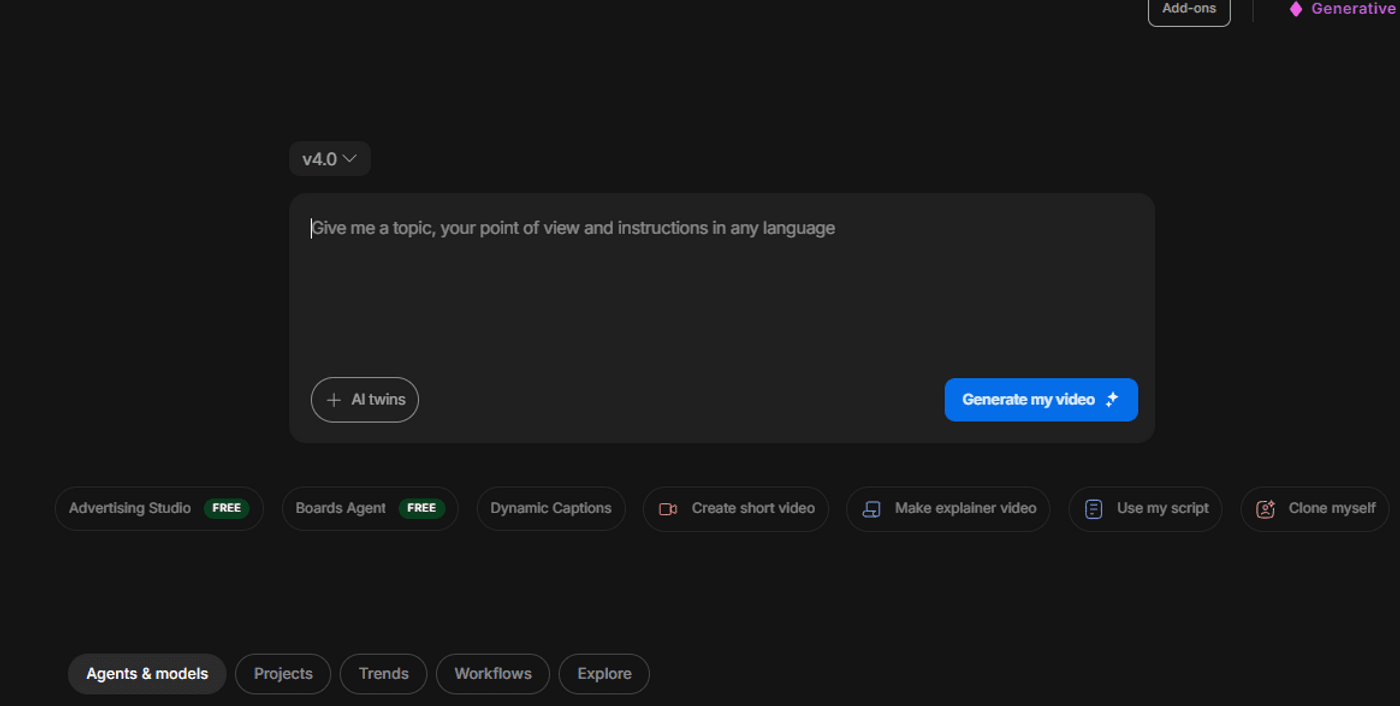
First thing’s first, before generating images, start with invideo. Log in or sign up and then enter your core concept to generate a full script, voiceover, and initial video structure. This provides the "timing" and "shot list" you need, so you aren't guessing which visuals to create in Midjourney.
2. Directed Shot Generation
Use the previously talked about Midjourney Prompt Framework to create your visuals based on the invideo script. Instead of vague captions, write "directions":
-
Prompt Template: [Subject + action], in [setting + environment], in [visual style], shot with [camera angle/framing], with [lighting + mood], details like [textures/atmosphere]
-
Focus: Generate "production-ready" scenes that suggest motion (e.g., "tracking shots," "slow aerial descents") so they feel fluid when sequenced.
3. The Great Asset Swap
Upload your Midjourney V8 renders into the invideo Media Library. Open the invideo editor and use the "Replace" feature to swap the default stock footage with your custom Midjourney assets. This ensures your unique aesthetic is perfectly synced to the pre-generated narrative timing.
4. Narrative Anchoring & Export
Use invideo’s Magic Box to add the final "living" layers. Command the AI to "add dramatic cinematic music" or "adjust the voiceover to a gritty documentary tone" to match your Midjourney aesthetic. Invideo handles the complex layering of subtitles and sound effects, turning your fragments into a finished MP4.
Turn your Midjourney visuals into scroll-stopping videos with invideo
Creating with Midjourney gives you striking visuals, but the real shift happens when those visuals start to move, connect, and hold attention. The difference between a good frame and a strong video comes down to how you shape it after generation.
Platforms like invideo let you treat those outputs as building blocks rather than finished pieces. You can control pacing, layer in narrative, and guide how each scene flows into the next without going back to recreate anything.
Creative control here isn’t about generating more images; it’s about turning the ones you already have into something watchable. If you want your Midjourney prompts to translate into actual content, it’s worth trying what you can build inside invideo.
FAQs
-
1.
What makes a Midjourney prompt effective?
An effective Midjourney prompt is built on intentionality and structural hierarchy. Midjourney weights words based on their position; the earlier a word appears, the more influence it has on the generation. A "pro" prompt doesn't just list objects; it defines the medium (e.g., oil painting vs. 35mm film), the environment, and the lighting (e.g., "volumetric fog" or "cinematic rim lighting").
-
2.
How detailed should a Midjourney prompt be?
There is a "sweet spot" for detail, too little results in generic "stock photo" vibes, but too much (often called "prompt stuffing") creates noise where the model ignores half of your instructions. Focus your details on Compositional Anchors:
-
Subject: What is it? (e.g., "A weathered deep-sea diver")
-
Environment: Where is it? (e.g., "Inside a neon-lit underwater cavern")
-
Technical Specs: What "camera" is being used? (e.g., "Wide-angle lens, f/1.8, grainy film texture")
-
-
3.
Can Midjourney generate full videos?
Technically, no. Midjourney remains a world-class static image generator. However, it has introduced a "Zoom Out" and "Pan" feature that can be used to create sequence-like movements. You can also use the ‘--video’ parameter to generate a short time-lapse of the image being "painted" by the AI, but this is a behind-the-scenes look, not a cinematic narrative.
To get full video, Midjourney is best used as the "Concept Artist." You generate the perfect frame, then port that image into a dedicated motion model (like Kling, etc.) to bring the pixels to life. -
4.
How can video creators use Midjourney visuals in their content?
You can use Midjourney visuals as scene assets, backgrounds, or transitions, then assemble them into a narrative using tools like InVideo for editing, voiceovers, and sequencing.
