






Key takeaways
-
TV-level product videos are now built from clean images, not studio bookings. Use 4–8 isolated angles, a hero shot, and detail close-ups to unlock premium motion, lighting, and transitions.
-
Pick a Money Shot style that fits your product’s personality and placement. Faster pacing suits action and social, slower movement suits luxury and detail-led stories.
-
Keep prompts outcome-focused. Describe the vibe and result you want, then let the preset handle camera moves, lighting, and pacing for rhythmic, ad-grade flow.
-
Assemble 10-second modules into a 20–30 second commercial with a clear hook, proof, lifestyle context, and a clean CTA. Align cuts to music for recall and clarity in titles, captions, and alt text.
When crafting a TV-commercial look, the same checklist usually pops up. A creative director to crack the idea, a DP to chase perfect lighting, and a small army of gaffers, stylists, coupled with studio bookings, and props, sometimes just to ship a 10‑second product tease.
Even at that length, you are staring at weeks of coordination and a spend that starts in the tens of thousands.
With AI into the picture, the bar hasn’t dropped at all. If anything, the bar still remains the same. What’s changed however is the production model. With cell phone cameras now being able to click product stills that genuinely stun, audiences gravitate toward polish, rhythm, and intentional visual language more than ever. And with tools like invideo’s Money Shot, broadcast‑level motion videos are but a key-stroke away. And all of this at a fraction of the original budget.
Product images turn into videos with a structured, commercial-style motion. Zero studio bookings, complex pipelines, or production teams.
The result: A commercial-grade product video, built in four focused steps.
What “TV Commercial Level” Really Means
The best commercials feel effortless to watch. They leave an impression on your audience and get them to stop, notice, and remember. Here are a few key aspects that make up the TV commercial vibe behind your shot:
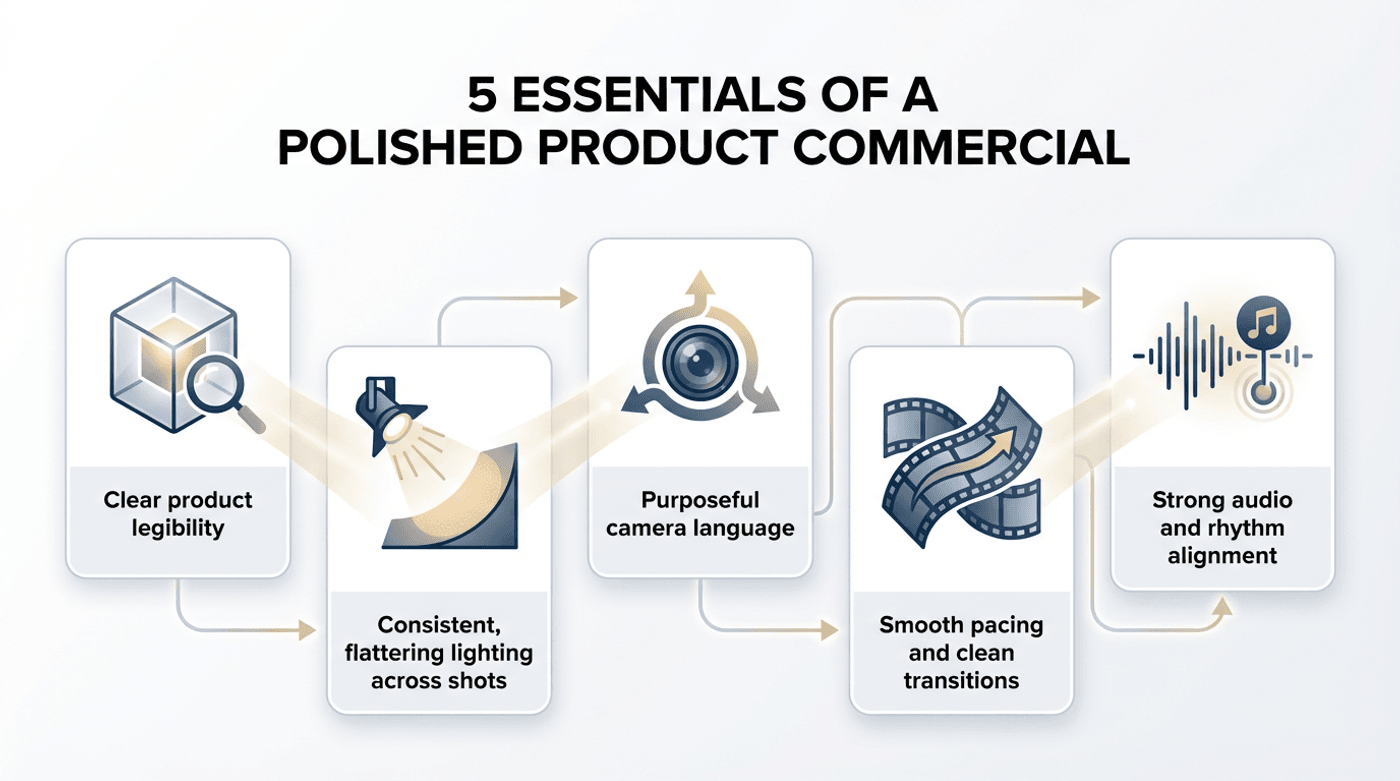
1. Clear product legibility
From the very first frame, the viewer should instantly understand what the product is and why it matters. There’s no guessing, no visual clutter, and no competing elements. The product is always the hero, framed clearly and confidently.
2. Consistent, flattering lighting across shots
Good commercials use lighting to make products look their best. Even well-controlled light highlights texture, shape, and finish, helping the product feel premium and trustworthy. Consistency across shots is what keeps the video feeling polished instead of patchy.
3. Purposeful camera language
Every movement has intent. Slow push-ins build focus, gentle rotations add depth, and angle changes keep attention alive. Nothing moves randomly. Camera motion exists to guide the viewer’s eye and elevate the product, not distract from it.
4. Smooth pacing and clean transitions
Commercials respect attention spans. Shots are tight, transitions are seamless, and the video flows without dragging or rushing. This rhythm keeps viewers engaged and makes the experience feel professionally crafted.
5. Strong audio and rhythm alignment
Timing matters as much as visuals. When cuts, movement, and music/sound effects are in sync, the video feels satisfying and memorable. Good rhythm is what turns a sequence of shots into something that feels like a real ad.
All that said, you’ll be surprised to know that invideo’s Money Shot acts as the creative director for your product shoot. Each style is built for a specific product story and comes with commercial-grade elements like defined camera movement, clean transitions, controlled lighting, and pacing. The preset trend you choose becomes your all-in-one video direction set.
4 Steps to Creating TV Commercial-Level Product Videos Using invideo
Creating a professional product video doesn’t require a production house anymore. With Money Shot, the process becomes structured, repeatable, and fast, while still leaving room for creative control.
Here’s how it works step by step:
Step 1: Prepare the Right Product Images
Invideo’s Money Shot builds camera movement, lighting, and transitions around your product images, so starting clean makes a visible difference in the final video.
Clear, isolated product images help the system understand the product’s shape, edges, and surfaces. When the background is simple, Money Shot can apply realistic depth, smooth motion, and consistent lighting without visual noise getting in the way.
Busy backgrounds or lifestyle-heavy shots introduce extra elements the model has to work around. Think of your images as the foundation of the shoot. The cleaner and more focused they are, whether captured on a phone or created with an AI generator, the easier it is to stitch them together and create motion that feels intentional, polished, and truly commercial in quality.
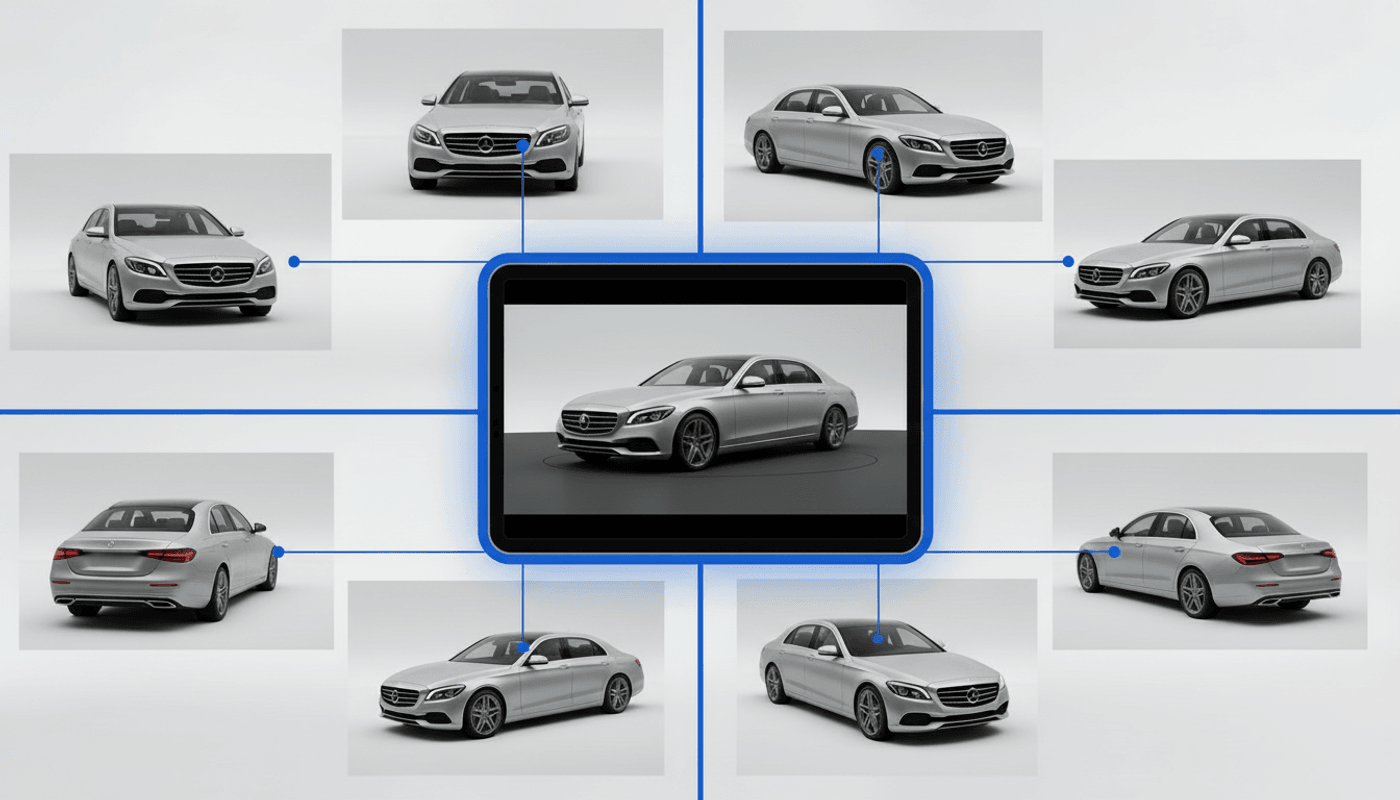
Uploading the right images:
- Upload 4-8 images per product: This gives enough angles to create smooth motion and variety without repeating shots or breaking visual consistency.
- Use clean or white backgrounds: Simple backgrounds help isolate the product, apply even lighting, and avoid unwanted color casts or visual noise.
- Include one clear hero shot: The hero image anchors the video and sets the framing and tone for all other shots.
- Add angled views: Angled shots allow natural rotations and push-ins, helping the product feel dimensional instead of flat.
- Include close-ups for details and materials: Detail shots help highlight texture, finish, buttons, and build quality, which motion alone can’t communicate.
- Be mindful of reflective or transparent surfaces: For glass or metal, use evenly lit images with controlled reflections to avoid harsh highlights during movement.
- Add label or text close-ups when needed: Close-ups keep logos and fine text readable once camera movement and transitions are applied.
Think of this step as setting up a mini product shoot, just without the studio.
Step 2: Choose the Right Money Shot Style
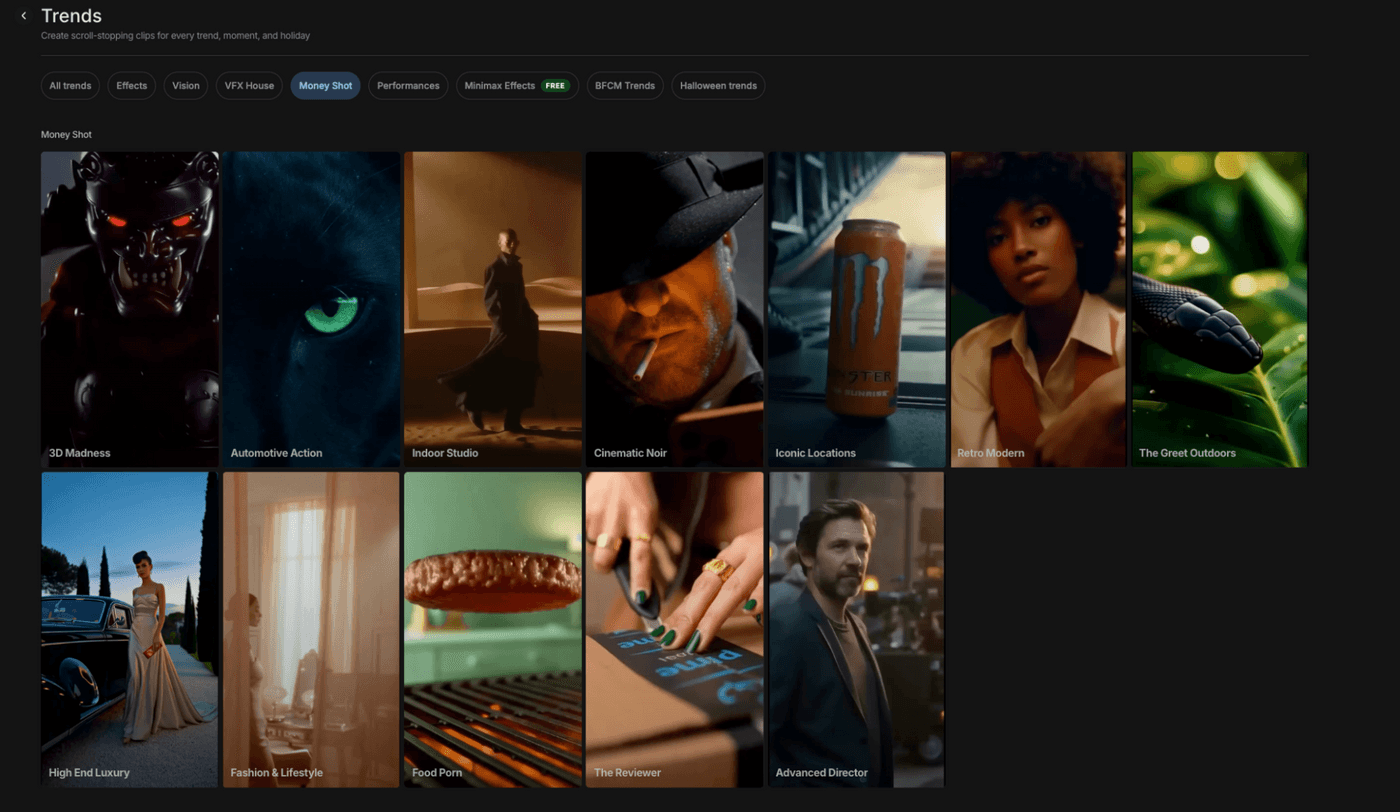
Invideo Money Shot
Money Shot has 11 styles, each of which is a ready-made creative hub and direction. It comes defined with how the camera moves, how lighting is applied, how transitions flow, and how long each shot stays on screen.
Switching styles can completely change how a product may feel or the emotions it evokes. The pacing shifts, the camera language evolves, and even the emotional tone of the video, as mentioned just a while back, adjusts automatically. For example, changing from Indoor Studio to Iconic Location for your car dims the lighting and speeds up transitions drastically.
Choose the right style, and your product video stays intentional, aligned with your brand, and unmistakably commercial in its finish.
Tips to choose the right Money Shot style
- Start with the product category: Action-driven products usually benefit from faster motion, while premium or technical products work better with slower, controlled movement.
- Match the style to the product’s personality: Sporty, bold, and youthful products can handle energy. Refined or high-end products need restraint.
- Think about what you want the viewer to notice first: Use dynamic styles for overall impact, calmer styles when details and features matter more.
- Consider where the video will be used: Short ads and social placements often need punchy pacing, while landing pages allow for slower, more informative motion.
- Avoid over-styling: If a style feels louder than the product itself, it’s probably not the right fit.
Bonus: Using Advanced Director Mode
For creators who want deeper control, Money Shot offers Advanced Director Mode.
This mode allows custom prompting and even storyboarding using sketches, giving you more influence over camera language and shot structure. It is especially useful when presets get you close, but you want to fine-tune the vision.
Key terms that help in Advanced Director Mode:
- Camera angle: Defines how the viewer sees the product.
- Push-in / Pull-out: Adds subtle motion to build drama or reveal detail.
- Depth of field: Controls focus to guide attention.
- Hero shot: The defining frame of the product.
- Transition pacing: Sets the rhythm between shots.
This mode works best for users familiar with basic visual or cinematography concepts. While it delivers more control, keeping it simple often works for most creators.
Step 3: Add a Simple Prompt
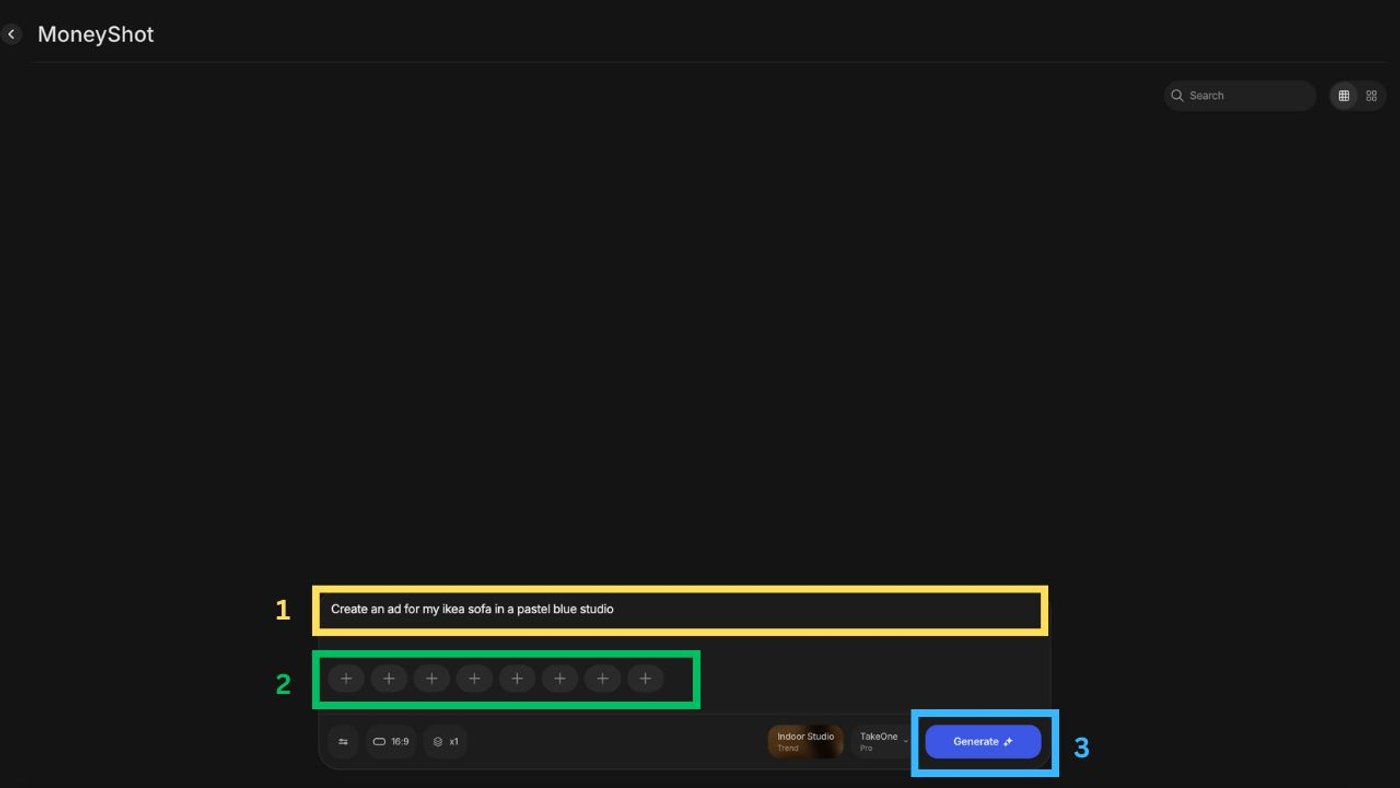
Money Shot handles the same things a TV commercial team would on set, like framing the product, moving the camera, and connecting shots smoothly. So you don’t need to explain camera moves or transitions.
Instead, you focus on the kind of ad you’re making. Is it a fast, energetic launch? A clean product reveal? Or a calm, premium showcase?
The trend you choose works like a familiar TV ad style, setting the tone, pacing, and look of the video while Money Shot takes care of the execution.
Examples of effective prompts:
1. Prompt for luxury watch
2. Macro style ad prompt
3. Sneaker video ad prompt
Prompts guide intent, not execution. Overly detailed prompts often reduce clarity rather than improve results. The best prompts describe the outcome you want, and not every visual instruction.
Step 4: Turn Short Outputs into a Full Commercial
Each Money Shot output is about 10-12 seconds long at most and includes multiple shots and transitions. This is intentional. Real TV commercials are rarely shot as one continuous sequence.
For maximum control, pacing, and flexibility, you need to stitch short, modular segments together.
Parts that make a full-length commercial:
How Light post-editing helps here!
Your commercial should feel finished, not overworked. So, after you've woven together the perfect shots:
-
Minimal on-screen text to support the message without distracting from the product
-
Music beats aligned to key cuts to make transitions feel sharper
-
Small trims to keep pacing smooth and intentional
6 Product Video Examples to Get You Started
Money Shot gives you TV‑level camera moves, lighting, and pacing out of the box, but the story still lives in how you design the shot. The same product can be read as bold, luxurious, cinematic, or warm and lived‑in, depending on the shot you pick and the intent behind your prompt.
The examples below focus on shot types so you can see how each one shapes a different product narrative, and how to brief it clearly.
1. The fashion & lifestyle shot
When you are selling a beauty or fashion product, the goal is bigger than “show the packaging.” You want to signal confidence, modern style, and everyday wearability. A fashion & lifestyle Money Shot places the product in a human‑led, styled environment. Here, think models, wardrobe, and a clean set. This is so it feels like part of a real, aspirational routine rather than a floating object.
2. The high-end luxury shot
Premium products are less about action and more about presence. For luxury goods, the goal of the video is to communicate exclusivity, craftsmanship, and timeless value. A high end luxury Money Shot slows everything down with controlled lighting, minimal composition, and deliberate pacing, letting the product sit in the frame like an object in a gallery. Even the slightest of camera movements has intent behind it.
3. The iconic location shot
Some products sell a lifestyle of exploration and possibility as much as their features. Similarly, an iconic location Money Shot places the product in a visually striking setting, like landmarks, epic landscapes, or bucket‑list destinations, so as to suggest what the owner can experience with it, without needing to explain specs on screen. Here, it’s as much about selling the feeling as it is the product.
4. The automotive action shot
Vehicles and outdoor gear need motion. The automotive action Money Shot leans into dynamic camera moves, tracking shots, and natural environments to show strength, endurance, and performance in real conditions. Long roads, changing terrain, and wide landscapes give a sense of power, scale, and adrenaline without a single line of dialogue.
5. The 3D madness shot
Fragrances, tech accessories, and design‑forward objects often benefit from a more abstract, sensorial treatment. The 3D madness Money Shot uses CGI‑style motion, floating objects, and smooth camera orbits to turn the product into a hero in its own mini‑universe. Here, the shape, color, and texture do the storytelling, evoking mood and energy rather than showing literal use.
6. The indoor studio shot
For home décor and tabletop products, you want warmth, realism, and a sense of place. The indoor studio Money Shot recreates an editorial‑style set with soft, directional light and minimal distractions so viewers can imagine the product living in their own space. It keeps things clean and commercial, but still inviting and believable.
Money Shot Trends and When to Use Them
Along from the aforementioned here is a rundown of a few more trends Money Shot has to offer:
Product Videos That Stun & Sell with invideo
Money Shot on invideo acts as a built-in creative director for commercial product videos. With clean inputs and the right preset, you’ll have a produced, polished, ad-ready visual with strong product consistency and a clear visual language. In short, scaling output and maintaining brand coherence becomes a breeze.
Invideo also lets you generate multiple clips, assemble full commercials, refine pacing, resize for every platform, and export final assets without ever having to leave the tool’s dashboard. Additionally, invideo just launched a $25k Money Shot Challenge for the best product spec ads. Comment “invideo”, and we’ll send over all the details!
So, sign up, pick your product, choose a Money Shot style, and start building your first commercial today.
Also check out these related articles:
-
The New Rulebook for Product Photos: How to Shoot Images That Turn into Flawless Commercials
-
How to A/B Test Dozens of Product Ad Variations in a Single Afternoon Using invideo Money Shot
-
AI Prompting Techniques To Take Product Shots In Different Angles
FAQs
-
1.
Do I need editing experience to use Money Shot?
No. Money Shot is built for non-technical users who want professional results without learning complex editing tools. The presets handle camera movement, lighting, and pacing automatically, while advanced controls are available for users who want deeper creative direction.
-
2.
What kind of product images work best?
Clean, well-lit images with clear angles perform best. Isolated backgrounds help the AI understand product shape, while multiple angles and close-ups improve motion, depth, and detail handling, especially for textures, labels, or small design elements.
-
3.
What kind of videos are Money Shot videos used for?
Money Shot videos are commonly used for ads, product launches, landing pages, social media content, and e-commerce listings. Their commercial-style pacing makes them versatile across platforms where short, attention-grabbing visuals matter most.
-
4.
How long can each Money Shot video be?
Each Money Shot output is approximately 10 to 11 seconds long and includes multiple shots and transitions. These modular clips are designed to be combined, allowing you to build 20–30 second commercials through simple sequencing inside invideo.
-
5.
Can I customize or extend the outputs?
Yes. You can combine multiple Money Shot clips, adjust pacing, add text overlays, music, or branding, and refine visuals using invideo’s editor. This flexibility allows you to shape AI-generated outputs into fully polished campaign-ready videos.
