Best AI Video Editors for Turning Long Videos into Shorts
October 29, 2026

invideo Editor is the best overall choice for turning long recordings into finished Shorts, combining agent-assisted clip selection, separate editable timelines and detailed manual control over framing, captions, graphics and sound. Manual editing, ordinary ChatGPT or Claude MCP editing, and exports are free; your assistant’s usage limits apply separately. Built-in-agent work and generated media use invideo credits. OpusClip and Klap suit repeatable clipping and publishing; Vizard adds conversational editing, Submagic focuses on caption-led finishing, Descript on transcript-led restructuring, and Riverside on recording and repurposing.
Cover: AI-generated editorial illustration of a long recording becoming separate short edits.
A long interview, webinar or demonstration may contain several moments worth turning into Shorts, but each needs editing to work as a standalone video. The interesting quote may need a question from earlier in the recording. A useful explanation may lose its meaning if you remove the qualification. And every chosen passage still needs an opening, a complete ending, portrait framing, readable captions and clear sound.
We compared seven AI video editors for that complete job: invideo Editor, OpusClip, Klap, Vizard, Submagic, Descript and Riverside. The comparison follows finding clips, shaping each standalone Short, reframing and finishing, then delivering and revising the batch. It draws on current product documentation and demonstrations, with the same editing needs in view across the tools.
AI editors for long videos into Shorts at a glance
Tool | Finding and selecting clips | Shaping each Short | Reframing and finishing | Delivering and revising |
|---|---|---|---|---|
invideo Editor | The built-in agent or free ChatGPT/Claude MCP route searches spoken ideas and visual action, helping you compare moments and retain the setup and payoff each Short needs. | Separate editable timelines keep each story open to agent-directed revisions and precise manual cuts. Change an opening, restore context or rearrange passages while preserving the other Shorts. | Agent assistance and manual controls work together on portrait framing, editable captions, layered graphics, color and dialogue, music and effects, giving each Short its own finish. | Export watermark-free videos or editable projects with media for free. Keep the named timelines for later revisions, with ordinary MCP editing also free. |
Selection prompts steer ClipAnything toward spoken, visual and audio moments. You review the candidate clips and use source material to complete the ideas you want to develop. | Text and timeline controls trim, extend and rearrange scenes. Editing requires a paid plan, so users on the free plan must upgrade to reshape the generated clips. | Reframing, captions and B-roll layouts support a repeatable look. Picture-in-picture takes one B-roll per segment, requiring segment splits when several cutaways share that treatment. | Posting and downloads sit together, with scheduling and editable export on the Pro plan. Clips on the free plan have watermarks and a three-day export window, limiting clean, delayed delivery. | |
Klap uses your prompts to find clips about specific topics in a spoken recording. Low-speech footage needs more manual selection, since its clipping workflow is strongest around what people say. | Trim, caption and element controls support light revisions. Detailed layering, color or complex transitions need another editor, adding a finishing handoff for more developed Shorts. | Speaker-aware reframing, split-screen and screencast layouts adapt the picture; caption text, styles and saved presets help keep the batch visually consistent. | Download, post or schedule clips, including through MCP. Plans cap generated clips, so producing more candidates and new cuts uses the batch’s paid allowance. | |
AI discovery and transcript selections provide two ways to choose passages. Classic clipping charges by uploaded source minute, so long recordings use allowance before the final cuts exist. | Transcript edits, timeline trims and added scenes develop a cut. Some source extensions require returning to the original-video editor, where you may need to create a broader clip. | Speaker framing, layouts, captions and supporting media finish the clips. The classic editor’s free plan exports 720p videos with a watermark, requiring paid access for clean higher-resolution delivery. | Keep editing and distribute approved clips. Projects on the classic editor’s free plan expire after three days; longer review cycles need paid storage. Agent projects use their own credit-based workflow. | |
Magic Clips selects moments from a long recording; transcript selection also creates manual cuts. Magic Clips costs eight credits per clip, making batch size part of the budget. | Text-based trimming and a timeline remove passages and adjust the selected cut. Captions, supporting footage and cleanup tools let you develop it beyond the initial excerpt. | Caption styles, B-roll, zooms and audio treatment support a finished social format. Extra AI treatments spend more credits, reducing how many clips the same balance can cover. | Created videos export without another credit charge. The Starter and Pro plans provide 1080p/30 fps; the advertised 4K/60 fps route requires the Business plan, raising costs for that specification. | |
Create Clips takes topics, clip counts and length preferences, then makes editable compositions. The full imported source uses media minutes, even when only short excerpts survive. | Transcript edits restructure each composition, with timeline control for finer timing. Underlord requests consume AI credits, so repeated prompted revisions belong in the budget. | Captions, visual layers, speaker framing and Studio Sound support finishing in the same project, with direct editing available alongside the AI tools. | Watermark-free video exports require a paid plan; timeline export needs the Creator plan or above. XML omits animation and some audio treatments, leaving that work to rebuild after a handoff. | |
Magic Clips finds highlights by speaker or topic. You can also create clips from selected transcript passages. The Pro plan caps external uploads at 15 hours per month, limiting how much existing footage you can repurpose. | Transcript cuts, freely movable tracks and split overlays let you change hooks and timing. Expanded-track editing gives direct control over individual speakers and supporting material. | Custom layouts, captions and overlays finish the cut. External HDR converts to SDR, and imported background music does not carry into the timeline, potentially requiring color or music work. | The free plan exports videos at 720p with a watermark. Watermark removal and higher-resolution exports require paid access. MCP additionally requires a Grow, Webinar or Business plan for supported assistant workflows. |
1. invideo Editor: Best overall for turning long recordings into finished Shorts

A captioned portrait video and editable timeline in The Future Of AI’s invideo Editor walkthrough.
In invideo Editor, you can develop several distinct Shorts from the same recording while keeping the longer source available. Its built-in agent, ChatGPT and Claude can operate the full professional editing suite to find moments, assemble cuts, refine picture and sound, and export. You direct the built-in agent inside the editor, or connect ChatGPT or Claude through MCP. Their edits stay on your multitrack timeline, where you can use the same tools manually and continue with the assistant from your updated edit.
The useful starting point is an editorial direction. For a product interview, that might be a surprising design decision, a demonstration that explains it and a lesson from the launch. The agent can search speech and visual action, identify candidate passages and bring the relevant material into separate cuts. You can compare the setup, central point and ending before committing to a selection. Our Claude guide to developing distinct Shorts shows how that direction becomes separate editable timelines.
Each Short can then take the shape its material needs. Move a revealing line to the opening, remove the repeated introduction that follows it and retain the qualification that makes the answer fair. If an explanation and its demonstration sit in different parts of the source, you can join them and keep the speaker’s dialogue beneath a supporting shot. Named timelines make it possible to revise one Short, preserve another and compare an alternative opening without rebuilding the full batch.
Those decisions stay open to detailed control. You can ask the agent to restore a sentence or hold a reaction, then refine the cut frame by frame yourself. A targeted request can coordinate several elements: shorten the opening of the design Short, retime its title and B-roll, and leave the other cuts unchanged. The ChatGPT long-video-to-Shorts guide develops this approach to selective revisions and independently editable versions.
Portrait finishing also belongs to the edit. Keep the presenter’s hands and the object visible during a demonstration, change composition when the speaker changes, and position captions around the action. Editable title and graphic layers can explain a detail without replacing the spoken captions. The Future Of AI’s portrait edit at 7:15 shows captions sharing a vertical preview with the speaker, above separate video and audio cuts.
The same suite carries through color and sound. Match an inserted shot to the interview, balance dialogue against music, adjust fades and use EQ or dynamics where the recording needs them. Agent instructions, including through MCP, can handle those changes while the manual controls remain available. You can use supplied or stock supporting media, or generate new images, video and audio when the Short needs them.
Manual editing, watermark-free video exports and editable-project exports are free. Ordinary editing through ChatGPT or Claude via MCP is also free, with your assistant’s subscription and usage allowance applying separately. Work assigned to the built-in agent uses invideo credits on paid plans, and generating new media uses credits regardless of how you request it.
Invideo is our strongest overall choice because you can choose complete ideas, shape distinct cuts and finish their picture, captions, graphics and sound in one editable workflow. Export the finished Shorts or send an editable project with its media to Premiere Pro, Final Cut Pro or DaVinci Resolve, then return to the saved timelines when the next revision arrives.
2. OpusClip: For a repeatable clipping and social publishing workflow
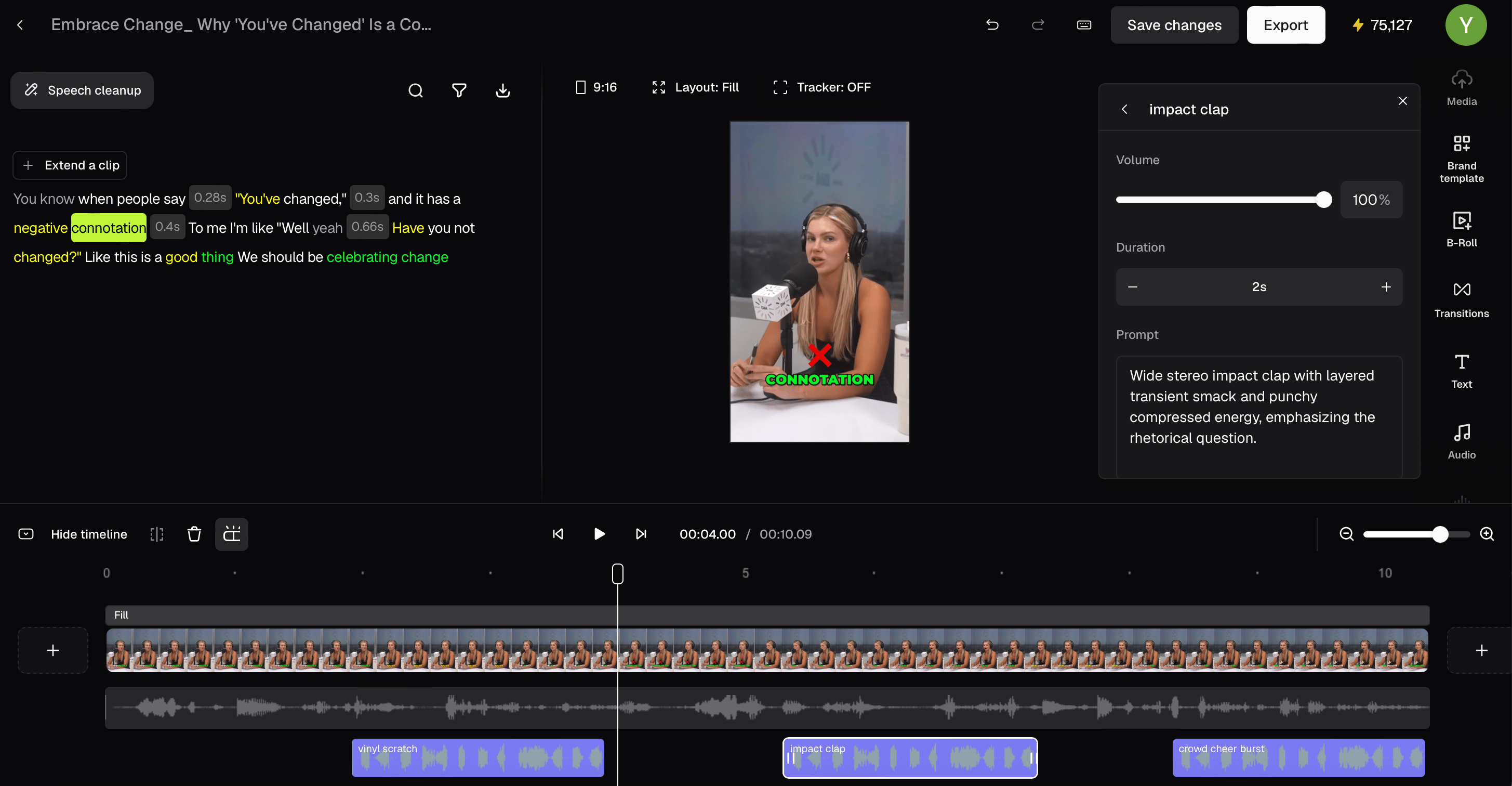
OpusClip’s official clip editor combines a transcript, portrait preview and timed sound-effect blocks. Shown features have paid-plan requirements.
OpusClip is built around turning a recording into a pool of candidate clips and moving approved selections toward publication. ClipAnything can use speech, sound and visual content, with prompts to focus the search on an action, topic or kind of moment. That makes it relevant to demonstrations and visually driven recordings as well as conversations.
Its paid editor gives you meaningful control after selection. You can remove text to cut a passage, trim the timeline, extend a clip from the full transcript, rearrange scenes and duplicate a version before trying another hook. Captions, text overlays, custom media and B-roll let you develop the selected Short further. Its MCP tools also support operations including section trims, splits, dropping and reordering material.
The important access distinction is that OpusClip’s free plan generates clips but does not include editing. Its 60 monthly credits produce watermarked output with a three-day export window. If a candidate needs more context or a different ending, the free route does not cover that revision in the editor. The Starter plan costs US$15 per month when billed monthly and includes 150 credits, editing and watermark removal.
The three-day export window can expire while you wait for client approval, leaving the approved clips unavailable for export on the free plan.
Some finishing choices also create extra work. Picture-in-picture accepts one B-roll per segment, so multiple cutaways need separate segments before you apply that layout to each.
The Pro plan adds social scheduling, Premiere Pro/Resolve export and other finishing features. It lists US$29 monthly or US$174 paid annually, with 300 monthly credits. Calling MCP tools requires an eligible Pro Beta, Max or Business plan under the current MCP entitlement rules. Choose OpusClip when finding a batch, applying a repeatable social format and scheduling approved clips are central to the job. Our invideo Editor versus OpusClip comparison explores the individual editing decisions in more detail.
3. Klap: For speech-led clips with consistent captions and publishing

Frame from Klap’s official caption-editing demonstration, with transcript phrases, portrait preview and scene segments.
Klap suits recurring interviews, webinars and commentary where the main ideas are spoken. You can steer selection with instructions about the moments to find, then review the resulting clips. Its editor offers trims, manual reframing, caption text and style changes, presets and additional on-screen elements. Scene-aware layouts include split-screen and screencast treatments, helping the picture suit different source compositions.
It also has a genuine assistant route. Through MCP, an assistant can read the transcript, create a clip from a description or exact source range, translate captions, export MP4s and schedule posts. The connection uses your Klap account and plan, so you can work from an assistant without giving up the clipping and delivery workflow.
The boundary is the depth of finishing a particular Short needs. Klap recommends another editor for detailed layering, color work, precise beat cuts or complex transitions. A clip that needs those treatments therefore adds a download and finishing handoff. The same guide says its clipping automation works best on speech-led footage; for action with little commentary, expect more manual moment selection.
The current plans charge for generated clips: the Basic plan includes 100 clips per month, the Pro plan 300 and the Pro+ plan 1,000. The displayed annual-billing rates are US$14, US$39 and US$94 per month respectively, paid yearly. More generated candidates or new cuts draw on that allowance. A one-video trial gives you a starting point, while MCP usage follows the same Klap plan.
Choose Klap for a regular spoken-content batch whose clips mainly need selection, light edits, a consistent caption treatment and social scheduling.
4. Vizard: For browser clipping with transcript and agent revisions

Vizard’s current scene-insertion interface offers transcript, Brand Kit and uploaded material from the timeline.
Vizard combines automatic highlight selection with direct ways to choose and change footage. In its classic clipping editor, you can select transcript text to create a Short, delete text to cut content and use timeline handles for closer timing. Added scenes can bring in more source transcript, uploaded footage or saved brand material. Speaker layouts, captions and B-roll support developing the result into a complete social clip.
Vizard Agent adds conversational editing, including selecting highlights, dropping sentences, rearranging talking points and changing captions or aspect ratio. Its MCP route can start a project from an assistant and send revisions to the same saved project. These are useful alternatives to handling every change through the classic clip editor.
In the classic workflow, extending a cut can mean returning to the original-video editor when the clip editor does not contain enough surrounding material. You can then select a broader passage or create another clip from the source transcript. That matters when an otherwise promising quote needs an earlier question or a later qualification.
The classic clipping editor’s free plan includes 60 upload credits, with one credit per source minute, full editor access and 720p output. Its watermark and three-day project expiry make a longer client review cycle difficult: you need a paid plan to remove the watermark and retain projects. The Creator plan adds watermark-free 4K exports, scheduling and storage; its price varies with the selected credit allowance and billing term.
In the classic clipping workflow, credits are spent on the full recording you upload. A long interview can therefore consume much of your allowance even when you keep only a few short excerpts.
Keep the Agent budget separate from those source-minute calculations. Agent projects spend Vizard credits, including through MCP; the free Agent account uses the Flash tier, while paid Agent plans unlock additional tiers. Choose Vizard when you want browser clipping, transcript control and a conversational route, with the appropriate allowance and storage for the review cycle.
5. Submagic: For developing caption-led Shorts from long recordings

Submagic Academy’s official Magic Clips demo at 1:11 shows manual transcript selection beside a portrait preview.
Submagic’s Magic Clips takes a long recording and proposes shorter selections, with file, YouTube and Google Drive input routes. You can also choose a passage manually from the transcript. Its text-based trimmer and timeline let you remove unwanted material, shorten the cut and adjust the result before building its caption treatment.
The appeal is how much of the social-video finish sits around that cut. You can correct and style captions, add your own or stock B-roll, use zooms and transitions, and work with music, sound effects and audio cleanup. A selected interview answer can become a caption-led Short with supporting visuals in the same environment.
The main budget issue is that a plan’s headline video count does not describe a batch using all those AI tools. Magic Clips costs eight credits per clip. Ordinary uploads cost three credits, while operations such as AI B-roll, silence removal and audio cleanup have additional charges. Those actions draw from the same pool, so the number of finished Shorts depends on the treatments you apply, not just the number you upload. Exporting work already created is free.
The current monthly plans are Starter at US$19 per member for 45 credits, Pro at US$39 for 120 credits and Business at US$69 for 300 credits. The Starter and Pro plans provide 1080p/30 fps output, while the advertised 4K/60 fps export requires the Business plan. A higher delivery specification therefore changes the plan you need.
Choose Submagic when the Short’s caption styling and accompanying social-video treatment are central, and budget the actual clip and AI-operation mix rather than treating every credit as a finished video.
6. Descript: For selecting and restructuring Shorts through the transcript
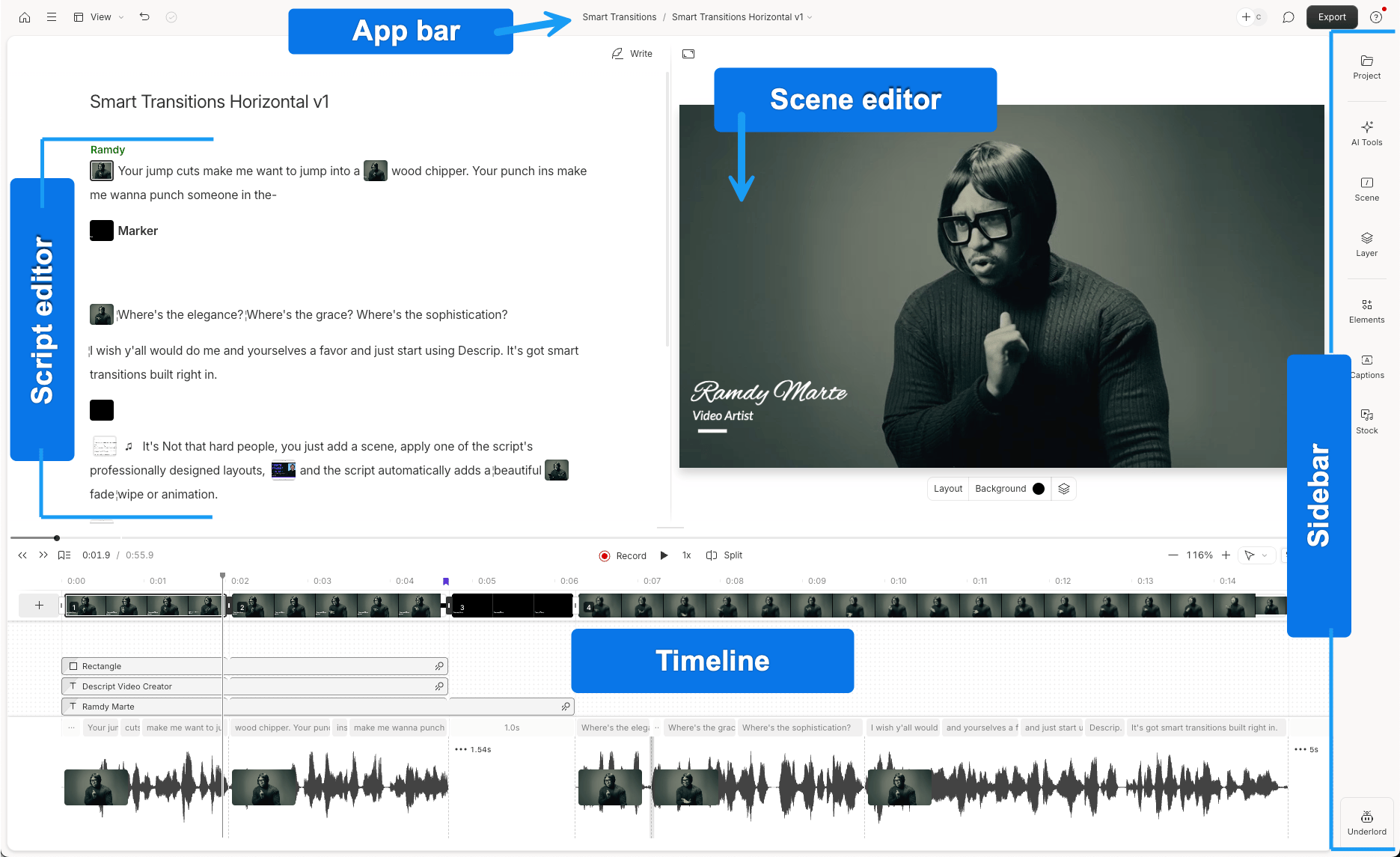
Descript’s official annotated interface shows the script, scene editor, timeline and layers. The pictured project is a general editing example.
Descript offers automatic selection as well as transcript-led editing. Create Clips accepts a topic or selection criteria, a target length and a clip count, then creates separate editable compositions. You can request 1–20 clips in a run, with lengths from ten seconds to five minutes, and choose portrait or square layouts. Underlord, its AI co-editor, can also handle the clipping request.
Once the compositions exist, moving or deleting transcript passages restructures the corresponding video. The timeline gives closer timing control, while captions, visual layers, B-roll, speaker framing and Studio Sound carry the edit through finishing. This is particularly useful when the Short needs an explanation rewritten through selection and order rather than merely a shorter source range. Descript also supports ChatGPT, Claude and other assistants through MCP.
The source recording and AI work have separate budgets. Imports use media minutes and Underlord requests use AI credits, including work started through MCP. A long recording uses its full imported duration even if you retain a few one-minute cuts. Repeated requests also use credits, including messages to Underlord, so the cost depends on the work and revisions involved.
Descript’s free plan includes one media hour monthly, while watermark-free exports require a paid plan. The Hobbyist plan costs US$24 per person with monthly billing, with ten media hours, 400 AI credits and watermark-free 1080p output. The Creator plan costs US$35 per person with monthly billing, with 30 hours, 800 credits and 4K output. Annual-billing rates are lower.
An editable handoff requires the Creator plan or above. XML leaves out animation, audio effects and audio keyframes, although Studio Sound has its own supported rendered-source treatment. Choose Descript when reading and restructuring speech is your preferred editing method, and decide whether to finish in Descript or hand off before investing in treatments that will need rebuilding.
7. Riverside: For clipping and editing alongside a recording workflow

Frame from Riverside’s current expanded-track trimming demonstration, showing separate speaker waveforms and the transcript.
Riverside’s Magic Clips can select highlights around speakers or topics, and you can create a chosen clip directly from a transcript passage. It accepts recordings made elsewhere, so it is relevant even when your long interview or presentation already exists. Clip length, aspect ratio, captions, branding and layouts can then be changed in the editor.
Its current timeline offers substantial direct control: trim and split individual tracks, move sections freely, copy a moment to the beginning as a hook and change the timing of text, video, image or music overlays. Speaker tiles can be moved and resized into custom layouts. These controls make Riverside a credible option for shaping each Short after the automatic selection.
External imports have consequential boundaries. The Pro, Grow and Webinar plans include 15 hours of external uploads per month; the Business plan includes unlimited external uploads. Imported HDR footage converts to SDR, and background music does not carry into the timeline. For an already finished long video, that can mean checking the changed color and rebuilding the music treatment before the Shorts are ready. Speaker layouts also depend on eligible video-track separation.
A large archive can exhaust the 15-hour monthly allowance before you finish importing all its recordings. Riverside does not show used upload hours, so you also need to track uploads yourself to know how much allowance remains.
Riverside’s free plan includes the editor and Magic Clips, with 720p watermarked exports. Removing the watermark and choosing video quality require a paid plan. MCP is available on the Grow, Webinar and Business plans, with transcript search, edits and exports from supported assistants. Riverside’s connection guide limits personal ChatGPT plans to read-only tasks, and an assistant-exported file still has to be downloaded in Riverside.
Choose Riverside when the recording, archive and clip-editing workflow belong together, particularly for a show already produced there. For externally recorded material, weigh the source-import behavior and upload allowance alongside the finished-video plan you need.
Frequently asked questions
Can I make a batch of Shorts without paying for another editing subscription?
Yes. Invideo’s manual editing, ordinary ChatGPT/Claude MCP editing, watermark-free videos and editable-project exports are free. Your external assistant’s allowance is separate; built-in-agent work and media generation use invideo credits. Among the other tools here, a free clipping offer does not necessarily include clean exports, editing or enough project retention for a review cycle. Check those three requirements together.
Can I start with a long video I have already finished?
Yes. A rendered long video can be the source for new cuts. It contains the combined picture and sound, so original title, camera and audio layers are no longer independently editable. Invideo also supports importing a compatible XML project with its media when you need those layers. Keep the original recording or project, and create the Shorts as separate versions. Riverside users should check its external-import behavior for HDR, frame rate and background music.
Can I use an assistant I already subscribe to?
Yes. Invideo’s MCP route lets ChatGPT or Claude work on the same timeline you can edit manually, with no invideo charge for ordinary editing. OpusClip, Klap, Vizard Agent, Descript and Riverside also offer assistant connections, with different operations and entitlements. Their product allowances or qualifying plans still apply. Riverside’s MCP connection requires a Grow, Webinar or Business plan; personal ChatGPT connections are currently limited to read-only tasks. Choose the client and operation you actually need, rather than treating every MCP connection as identical.
What should I check before approving the whole batch?
Watch each Short independently, as if you have not seen the long recording. Check that the opening has a payoff, the selection preserves the speaker’s meaning and qualifications, and the ending is complete. Then check moving subjects in the portrait frame, caption names and timing, and the dialogue against music. A clip score helps order your review; it does not establish audience performance. Keep editable versions so a corrected caption or new opening does not require rebuilding the batch.