Can a bad character sheet cause AI character drift that no tool can fix?
Last updated August 10, 2026
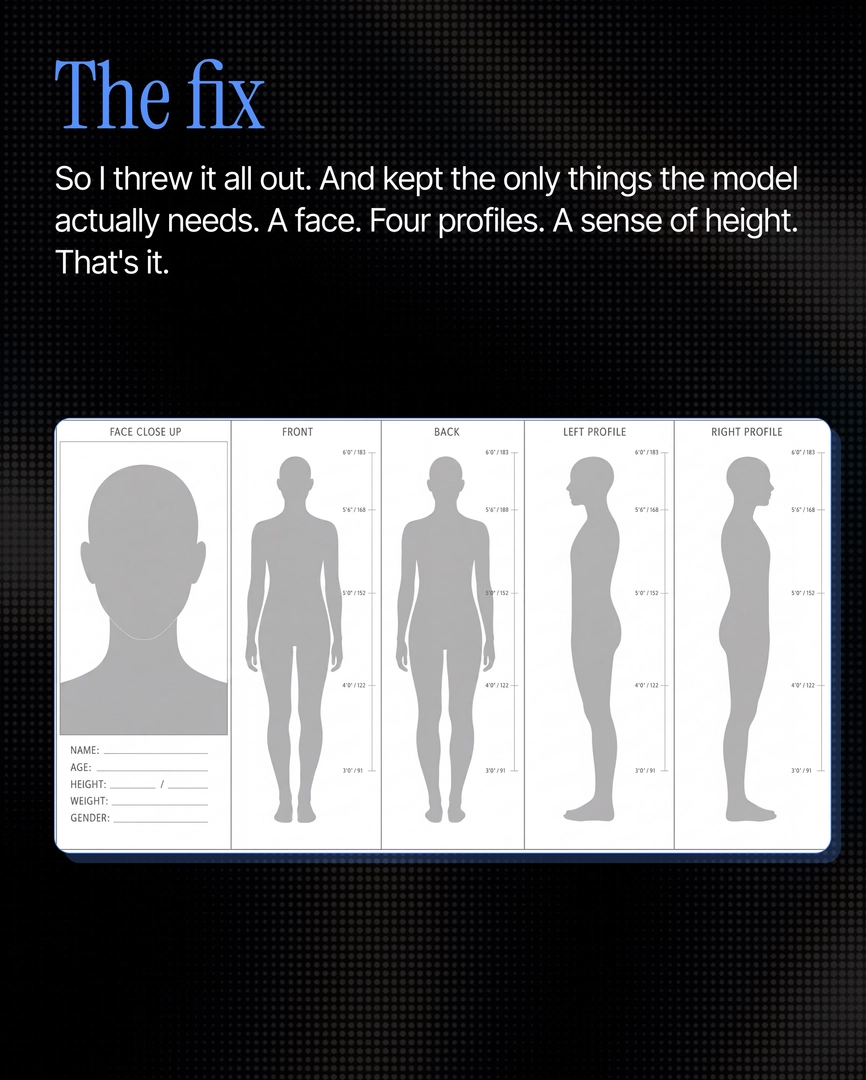
Yes. If the reference panels inside your character sheet are themselves inconsistent, no downstream model — Nano Banana, Seedance 2.0, or anything else — can repair the drift; they only reproduce what you feed them. The fix is upstream: rebuild the sheet as a minimalist five-panel reference — face close-up, four angles, build — with numeric measurements locked in.
Check your sheet before blaming the model: zoom into the panels and compare jawline structure, hair shade, and skin detail between them. In documented testing of the most-shared character-sheet workflows, the character's face was drifting inside the sheet itself — and once the reference is ambiguous, every generation inherits that ambiguity. Drift at this level is subtle — jawline, hair shade, skin tone shift for a frame or two across a 40-shot project — and it is exactly what a client reviewing the final cut will catch.
The most common way sheets go bad is overload, not missing information. Two viral character-sheet workflows were benchmarked head-to-head: a maximalist all-in-one production sheet (character plus wardrobe, storyboard, camera map, and mood) actively confused the model — in one test it hallucinated an unwritten celebrity likeness — and a single-character sheet with every expression and angle held at first glance but slipped on close inspection of facial micro-details. Cramming two characters into one sheet performs worse than one sheet per character. The operating principle: give the model only what it needs, and nothing more.
Build the sheet that holds. The format that held 100% of the time in that testing is modeled on an actor's audition profile: one face close-up, four body angles (front, back, left profile, right profile), and physical build. Anchor identity numerically — one documented example locked a character at age 25, height 5'6"/168cm, weight 50kg — so physical attributes can't reinterpret between shots. For recurring details like a ring, a hair clip, or a chain, add them as explicit locked boxes; unlisted accessories will drift between shots.
Then lock it once and generate from the lock. invideo is an agentic video creation tool with all the current video and image models available, and this audition-profile format is hardcoded into the invideo agent's back end as default behavior: prompt it to generate a character sheet from your subject (it builds the panels with GPT-Image-2), confirm it conversationally, and the invideo agent holds that locked reference across every shot — whichever model it routes each shot to, Seedance 2.0, Kling, or Veo. Once the sheet is clean and locked, your job is direction; cross-frame consistency is handled automatically.
Watch some of these to see what works for you:
The problem was never the sheet. It was how much we were shoving into it. Every angle, every note, every reference, and the model just gets confused.
— invideo's creative team