Minimalist vs detailed AI character sheet: which keeps characters more consistent?
Last updated August 10, 2026
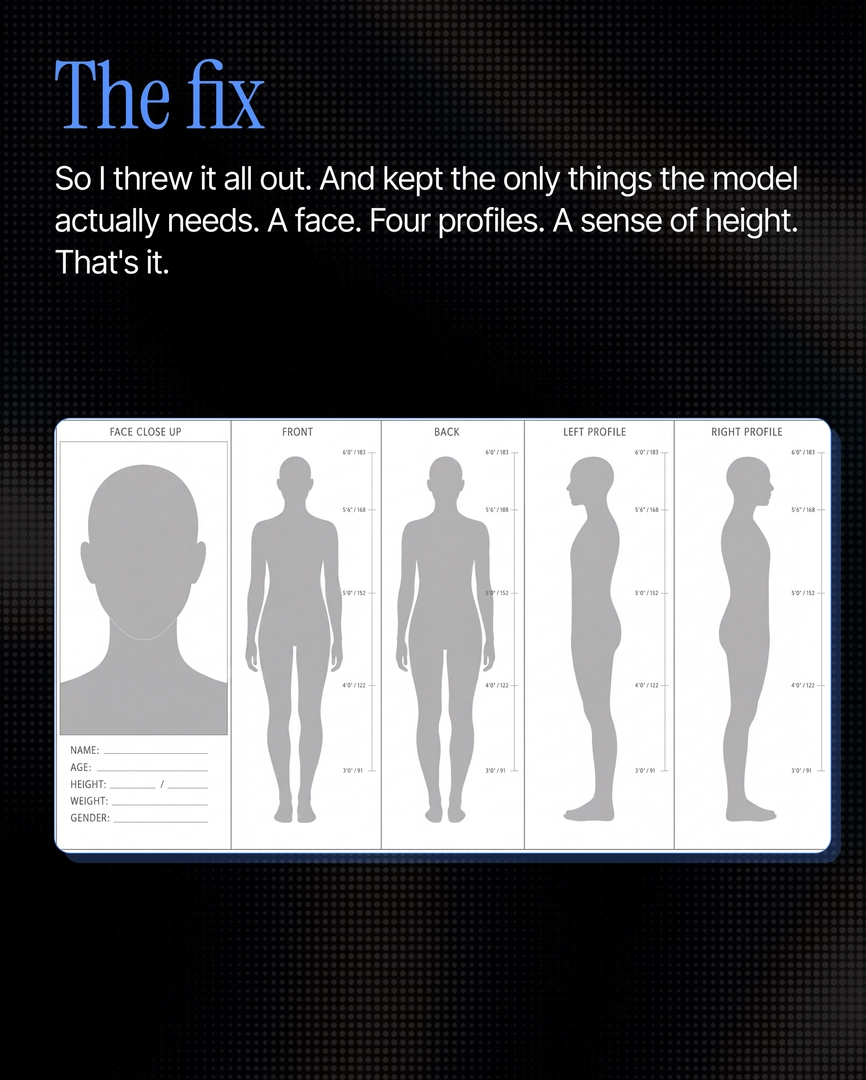
Minimalist wins. In head-to-head tests of the two most-shared character sheet workflows, a five-panel minimalist sheet — face close-up plus front, back, left, and right profiles with build measurements — held character identity 100% of the time, while detailed maximalist sheets (wardrobe, storyboard, camera map, mood boards) caused facial drift and even hallucinated celebrity likenesses.
Give the model only what it needs to identify the character — and nothing more. That is the core principle behind consistent AI character generation, and it comes from empirical testing: a filmmaker with 15 years of experience (3 in AI filmmaking) benchmarked two viral character consistency workflows head-to-head against a simplified alternative, and the stripped-down sheet won.
Why detailed sheets lose. A maximalist all-in-one production sheet — character plus wardrobe plus storyboard plus camera map plus mood — actively confuses the model. In testing, one overloaded sheet produced an unprompted Kate Winslet likeness that was never written anywhere in the reference. The intermediate option, an all-character sheet packing every expression, angle, silhouette, and wardrobe variant for a single character, performs better but still slips at the micro level: zoom in across shots and the jawline structure, hair shade, and skin imperfections stop matching. Across a typical 40-shot project, that drift surfaces for a frame or two — and that is exactly the frame a client catches.
What the minimalist sheet contains. The sheet that holds is modeled on an actor's audition profile — the same format casting directors have used for roughly 100 years: one face close-up, four body angles (front, back, left profile, right profile), and build defined with precise numbers. A documented example locked a character at age 25, height 5'6"/168cm, weight 50kg. Keep it to one character per sheet — a sheet that crams two characters underperforms a single-character sheet. And audit the sheet itself before generating: if the reference images drift from each other inside the sheet, no downstream model — Seedance 2.0 or Nano Banana — can repair that upstream inconsistency.
Adding detail without breaking the sheet. When a character needs a locked accessory — a ring, a hair clip, a chain that's always worn — add it as an explicit boxed item on the sheet rather than expanding the sheet into full wardrobe documentation. Inside invideo, you ask the invideo agent to add the box and it holds across every shot; unboxed accessories drift between generations.
Locking it in practice. invideo is an agentic video creation tool with the current image and video models built in, so the workflow is one natural-language prompt: reference your subject, the invideo agent generates the five-panel sheet (using GPT-Image-2 for the panel images), you confirm it conversationally, and it locks for the project. The method tested well enough that it was hardcoded into the invideo agent's back end as default behavior — once the sheet is locked, the invideo agent maintains cross-frame consistency automatically while you direct, routing each shot to the right video model.
Watch some of these to see what works for you:
The problem was never the sheet. It was how much we were shoving into it. Every angle, every note, every reference, and the model just gets confused.
— invideo's creative team, from documented character consistency testing