Best Remotion Alternatives for Agentic Video Editing in 2026
November 13, 2026

invideo Editor is the strongest complete Remotion alternative in this comparison for assistant-led video creation and manual finishing. It combines editable custom graphics and effects, precise motion controls, footage editing, selective colour and detailed audio mixing. You can refine the same video manually or through ChatGPT or Claude via MCP and export it without a watermark, all for free. HyperFrames suits reusable HTML compositions, ChatCut suits desktop-agent timeline work, and Descript suits narration-led videos.
Remotion turns React compositions into videos, combining custom graphics, animation, footage and audio in a project that can be reused with different inputs. Its assistants can do much of the construction: the Remotion plugin for Codex in the ChatGPT desktop app and its Claude Code tools support creating and revising videos from a brief. Remotion Studio also provides a visual preview and interactive editing controls.
An alternative may suit you better if you want ChatGPT or Claude to create a video in a conventional editing workspace, where you can trim footage, adjust graphics and mix sound yourself. Other options centre the edit on a transcript or use HTML instead of React for reusable animations.
We compared four Remotion alternatives for this: invideo Editor, HyperFrames, ChatCut and Descript. We looked at what each lets ChatGPT or Claude create, the controls available for refining graphics, footage and sound, and the options for reusing and exporting the video. We also checked which assistant connections work in web chats and which require a desktop agent.
Top Remotion alternatives at a glance
Alternative | Manual control | Assistant access and video creation | Custom graphics and motion | Footage and sound finishing | Export |
|---|---|---|---|---|---|
invideo Editor | You can search footage, make precise trims and manually adjust clips, layers, effects and keyframes for free. Separate timelines let you keep the approved edit while developing alternate cuts. | ChatGPT and Claude connect through MCP to assemble uploads, stock and generated media into a video on an editable timeline. The built-in agent offers another way to direct the same project. | Separate text, shapes and media retain their timing. Property keyframes, motion curves and custom effects with adjustable controls develop the composition. | Selective colour controls, EQ, compression, automation and separate sound tracks support a complete finish. | Exporting without a watermark is free. You can also export the project with its media. |
HyperFrames | The timeline supports trimming and splitting; the Design panel controls text, position, size, cropping and appearance. Some agent-created settings need code changes, either by you or the agent. | Claude Code or Codex builds an HTML/CSS/JavaScript project; a beta hosted connector also creates videos in eligible AI chats. The hosted route does not supply the same local project and editor access. | Canvas selection, keyframes, easing curves and motion paths refine designs. Computed animation values still need source changes, even with the visual editor. | Colour effects, track processing, audio groups and automation keep picture and sound editable in the local composition. | Local rendering offers MP4, WebM and ProRes MOV, with resolution and frame-rate controls. The hosted connector returns MP4 at default settings. |
ChatCut | Manual controls cover track arrangement, transcript cuts, track locks, and graphic text, fonts, colours and placement. Design or animation changes without direct controls need the agent. | Claude Code Desktop or Codex desktop opens an editable project through the Agent Plugin. The plugin does not run in Claude or ChatGPT web chats. | Custom animated graphics have adjustable text, styling and animation speed. Designs can be saved as reusable templates. Direct element selection in Desktop needs version 0.3.13 or later. | Colour wheels, LUTs and curves refine colour in Desktop. Noise reduction, fades and automatic ducking clean up and balance the soundtrack. | Export does not spend ChatCut credits. Free cloud rendering has a cumulative 60-minute quota and is limited to 1080p. Compatible local rendering supports 4K. |
Descript | Transcript changes cut matching recordings; scene and timeline tools arrange B-roll and graphics. Layouts and compositions retain manual edits. Native text, images, visual layers and animations remain adjustable in the same project. | ChatGPT or Claude directs Underlord through MCP. The connection does not directly control the timeline. AI Video Maker also turns a prompt, script or footage into an editable project. | Native scenes, text, captions and layers develop the design. Claude Motion imports are flat video, so their internal text, design and animation timing cannot be edited in Descript. | Colour adjustments refine footage. Studio Sound cleans up speech, while EQ, compression and automatic ducking balance the soundtrack. | Hobbyist provides watermark-free 1080p; 4K and timeline export need Creator or above. XML handoffs omit animation, titles, images, transitions and most effects. |
1. invideo Editor

invideo Editor brings AI assistant-led creation and a complete manual editing suite into the same browser project. A brief can combine supplied footage, images, text, narration and supporting media. ChatGPT or Claude connected through invideo MCP can import and inspect assets, assemble a sequence, build graphics and apply revisions. The built-in agent provides an additional way to direct the edit, while the frame-accurate multitrack timeline stays available throughout.
Custom motion remains part of that editable project. Separate titles, shapes, images and footage can have their own position, scale, rotation and opacity keyframes. Bézier curves and the graph editor shape acceleration and settling, so a title’s arrival and a background’s movement can have different timing. An AI assistant can coordinate those changes across layers, and you can move keyframes or refine their values directly.
The built-in agent can also create a custom effect from a description or visual reference and expose settings for later refinement. Scenecraftstudio’s demonstration around 02:19 shows a highlight-trail treatment with threshold, softness, trail-length, direction and mix controls beside the preview. This gives a bespoke treatment controls within the edit, alongside ordinary effects and compositing layers.
The same project handles footage and finishing. Visual analysis and speech search help find relevant material; trims, ripple edits and layered B-roll develop the sequence around it. Colour wheels, curves, masks and colour-range selections balance shots or isolate an adjustment. The audio workspace keeps dialogue, music, ambience and effects separate, with parametric EQ, compression, de-essing, fades, volume automation, buses and sends for a detailed mix.
Creation can use existing assets or new images, video and sound generated for the project. The result remains open to precise changes in wording, layout, clip order, animation and audio. Ashish Tech’s creator-linked Claude walkthrough at 05:15 shows a title-and-portrait composition on layered Editor tracks after a typography-reference revision.
How invideo Editor compares with Remotion
Remotion and invideo Editor both support AI assistant-led video creation and manual refinement. Remotion Studio offers visual transforms, effects, keyframes and easing controls, with supported changes written back to the React project. Invideo keeps the AI assistant’s work on a layered timeline, alongside controls for trimming footage, refining animation, grading shots and mixing sound. It is a strong alternative when you want custom motion, substantial footage editing and detailed colour and sound finishing in one browser workspace.
Its supported ChatGPT and Claude connections also let you carry out editing work for free using an external assistant like Claude or ChatGPT, including supported web routes. This work includes footage analysis, transcription, captions and audio cleanup, among other editing tasks. The project remains accessible in the browser for review and manual changes.
Separate timelines also keep alternate cuts available, and supported editable-project handoffs let work continue in Premiere Pro, Final Cut Pro or DaVinci Resolve. The ChatGPT editing guide and Claude editing guide explain how assistant changes and manual revisions stay connected to the project.
Choose invideo Editor for the most complete combination here of assistant-led creation, editable custom motion and hands-on video finishing. Its layered timeline, effect controls, selective colour and detailed sound tools support developing the first composition into a finished video, with free ordinary MCP editing and free delivery.
2. HyperFrames
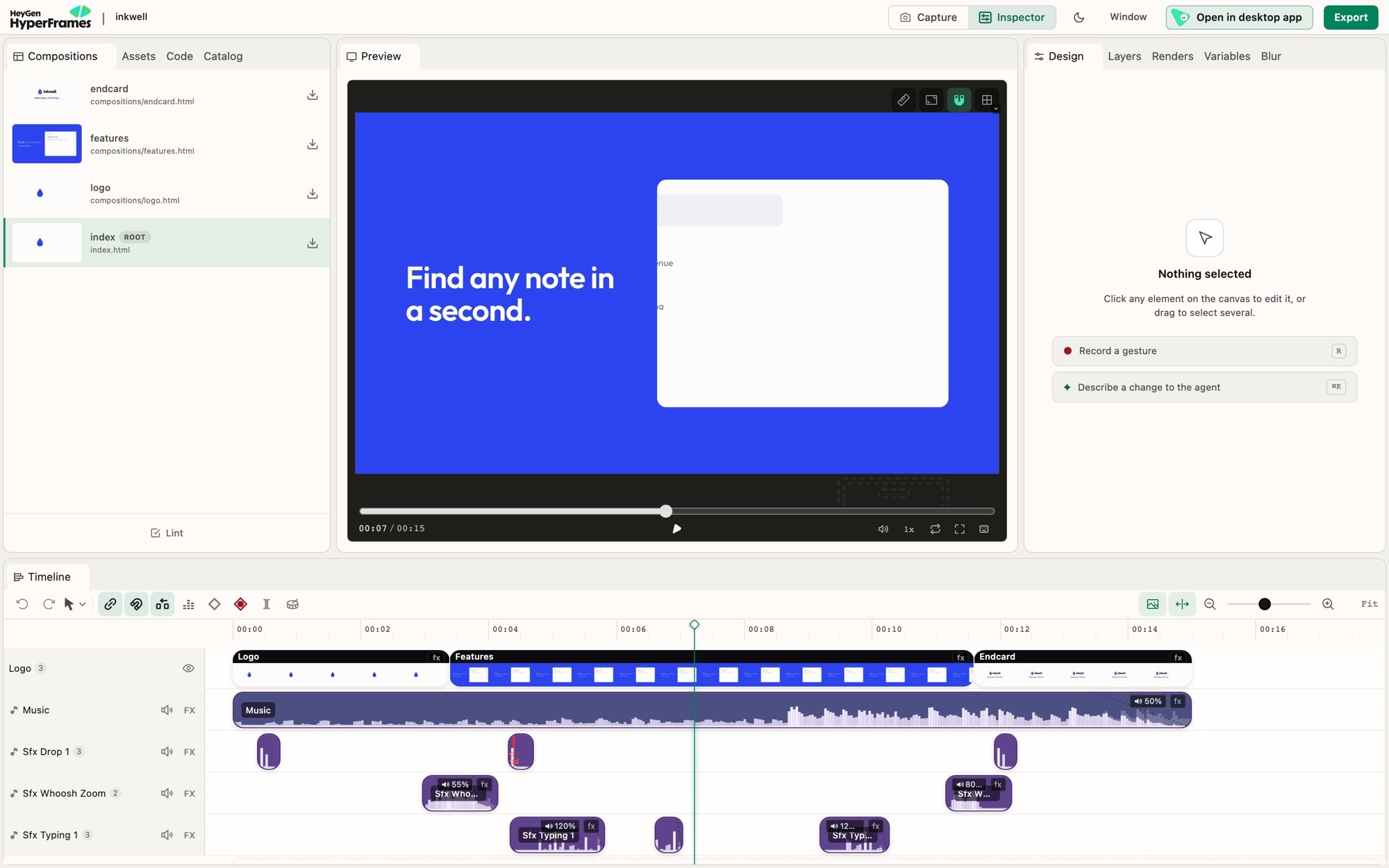
HyperFrames is the closest alternative in this shortlist to Remotion’s reusable, agent-built composition model. Claude Code or Codex writes an HTML, CSS and JavaScript project from the brief. Images, video, narration, sound and animated graphics can be combined in the composition, with GSAP controlling motion. The project files remain available to the agent and to direct visual editing.
Its browser editor is a substantial manual surface. Canvas handles and the Design panel change text, placement, dimensions, cropping and appearance. Keyframes, easing curves and editable motion paths refine movement; the timeline supports moving, trimming and splitting clips. A local Studio app for Mac, Windows and Linux can put an agent beside the preview, while the browser editor works on the same project files.
Picture effects and grading develop the look. Audio tracks have effect racks, frequency and dynamics processing, groups and automation, with a voiceover carve that creates room for narration in music. Variables expose text, colours, logos and media inputs so the same design can produce versions without reconstructing its layout or motion.
How HyperFrames compares with Remotion
Both tools support coding agents, reusable compositions, precise timing and a visual editing environment. The consequential switch is from React components and Remotion’s frame-based animation to HTML/CSS and HyperFrames’ seekable animation model. HyperFrames is appealing when web-layout tools and GSAP suit the design or the people maintaining it. Remotion remains a natural fit when the video already belongs to a React application or component system.
Remotion’s Studio interactivity already supports canvas transforms, effects, keyframe timing and supported easing edits that write back to source. HyperFrames’ canvas and timeline are therefore an alternative visual workflow, rather than a unique escape from personally writing every change. Both can keep an agent’s construction available for further manual or source revisions.
Local HyperFrames rendering offers MP4, WebM and ProRes MOV options with resolution and frame-rate settings. Its free open-source framework and local tools have a different licensing model from Remotion, which is free for eligible individuals and companies of up to three people and requires a company licence outside that eligibility. Coding-agent usage, hosted generation and infrastructure costs remain separate from either framework.
Where HyperFrames falls short
The beta hosted MCP connector offers a different level of access from a local project. It creates and renders through an eligible Claude or ChatGPT connection, but returns MP4 at default settings and does not provide the same local project folder, browser-editor surface or debugging access. Choosing frame rate, 4K, WebM or MOV requires the local route. The ChatGPT custom-server route requires the ChatGPT Business, Enterprise or Edu plan on the web, with workspace permissions controlling who can add it. Claude also offers the HyperFrames directory connector. The hosted route therefore has account requirements as well as narrower project access.
The visual editor cannot expose every generated animation value. Supported loops and helpers can be converted to ordinary keyframes; values marked as computed require the Code tab or the agent. A more involved structural change can also return to the source rather than being completed entirely with canvas handles.
Audio automation also does not cover every effect parameter. Compressor, limiter, gate and pitch-shift parameters cannot be automated; some distortion and reverb settings have the same restriction. A changing dynamics treatment may need gain automation before the processor, while a changing pitch treatment requires another construction rather than a pitch-shift lane.
Its Remotion migration skill translates source in one direction, with no export back to Remotion. State-driven animation and unsupported third-party React UI kits can block translation. An existing React composition therefore needs its dependencies and animation model checked before migration can replace the original.
The free local framework is separate from the Studio service’s plans. The free plan supplies five cloud exports and three AI video clips a month; reference-video recreation, image and footage search, team review and cloud projects require the Pro plan. The Pro plan is US$25 per month with 25,000 monthly credits and unlimited cloud exports. Connecting Claude Code or Codex to the local app uses that assistant’s separate allowance.
Choose HyperFrames for reusable, agent-built web compositions that you want to maintain as HTML/CSS and refine visually. The local project is the useful replacement for Remotion’s composition workflow; the hosted connector is a narrower option for conversational MP4 creation.
3. ChatCut
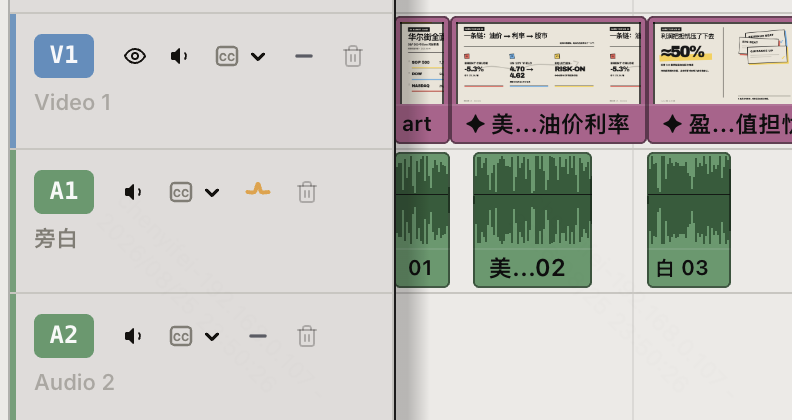
ChatCut combines an agent workspace with a manual video timeline. A brief can reference source clips, transcript passages, assets or time ranges. The agent can assemble footage, add captions, create supporting media and build editable motion graphics. Manual transcript and timeline changes continue in the same project, and several timelines can share its media pool.
Its motion graphics include titles, lower thirds, charts, diagrams and animated overlays. Design Styles guide new graphics, while reusable templates preserve an approved design. ChatCut Desktop allows selection of exposed text, font, colour and other properties, with canvas dragging for placement. Larger structural and animation changes can still be directed through the agent.
Separate video and audio tracks, track locks, trims, splits, effects and automatic ducking support the rest of the edit. Dialogue can act as the priority track while music lowers beneath it. The Agent Plugin brings this workspace into Claude Code Desktop or Codex desktop; ChatCut Desktop can also work with a connected local agent. Its web editor offers a built-in agent and manual controls.
How ChatCut compares with Remotion
ChatCut is useful when the video is primarily footage, captions, sound and graphic overlays arranged on an editing timeline. Its media pool, transcript references and clip controls make those elements available for direct selection and revisions. Remotion can combine the same media types, but retains the composition as reusable React source, which suits graphics that need to live inside a larger software or data-driven rendering system.
Both products support assistant-directed creation and continued changes. ChatCut adds a conventional footage-editing workspace around its generated graphics, while Remotion Studio retains its own visual transforms, effects, keyframes and easing controls. The decision is the editable project you prefer to maintain.
Where ChatCut falls short
The Agent Plugin requires a supported desktop agent. It does not install into ordinary Claude or ChatGPT web conversations. ChatCut’s built-in web agent remains available, but using it changes which assistant directs the edit and which usage allowance applies.
Direct graphic-element editing requires ChatCut Desktop 0.3.13 or later. Other surfaces use agent requests for element-level, structural and animation changes. Even in Desktop, only exposed properties have direct controls, so a graphic’s internal motion can still need another request rather than a manual keyframe adjustment.
Ordinary external-agent work uses the host assistant’s subscription or API allowance; ChatCut-hosted generation uses ChatCut credits. The built-in ChatCut Agent also uses credits, including its motion-graphics creation and revision work. The Pro plan is required for ChatCut image generation, eligible AI video models, cloned voices and transparent ProRes 4444 graphic delivery, with generation charges still applying.
Export does not spend ChatCut credits, but free cloud rendering has a cumulative 60-minute account quota. Browser-local and Desktop local rendering do not count against it. Cloud video is limited to 1080p; 4K needs compatible browser or Desktop local rendering. The external-agent export route defaults to browser rendering and needs an explicit request for cloud, while required media must be accessible to the chosen renderer.
An XML handoff to Premiere Pro or DaVinci Resolve can drop captions, effects, transitions, text, SVGs and unrendered graphics. The Pro plan can include motion graphics as transparent ProRes renders, carrying their appearance but flattening their internal elements. Later graphic revisions therefore still need the original ChatCut project or reconstruction in the receiving editor.
Choose ChatCut for desktop-assistant creation that stays close to footage, transcripts and a manual editing timeline. Its editable graphics and shared media pool are useful when you accept the Desktop-specific controls, generation charges and limits of an NLE handoff.
4. Descript
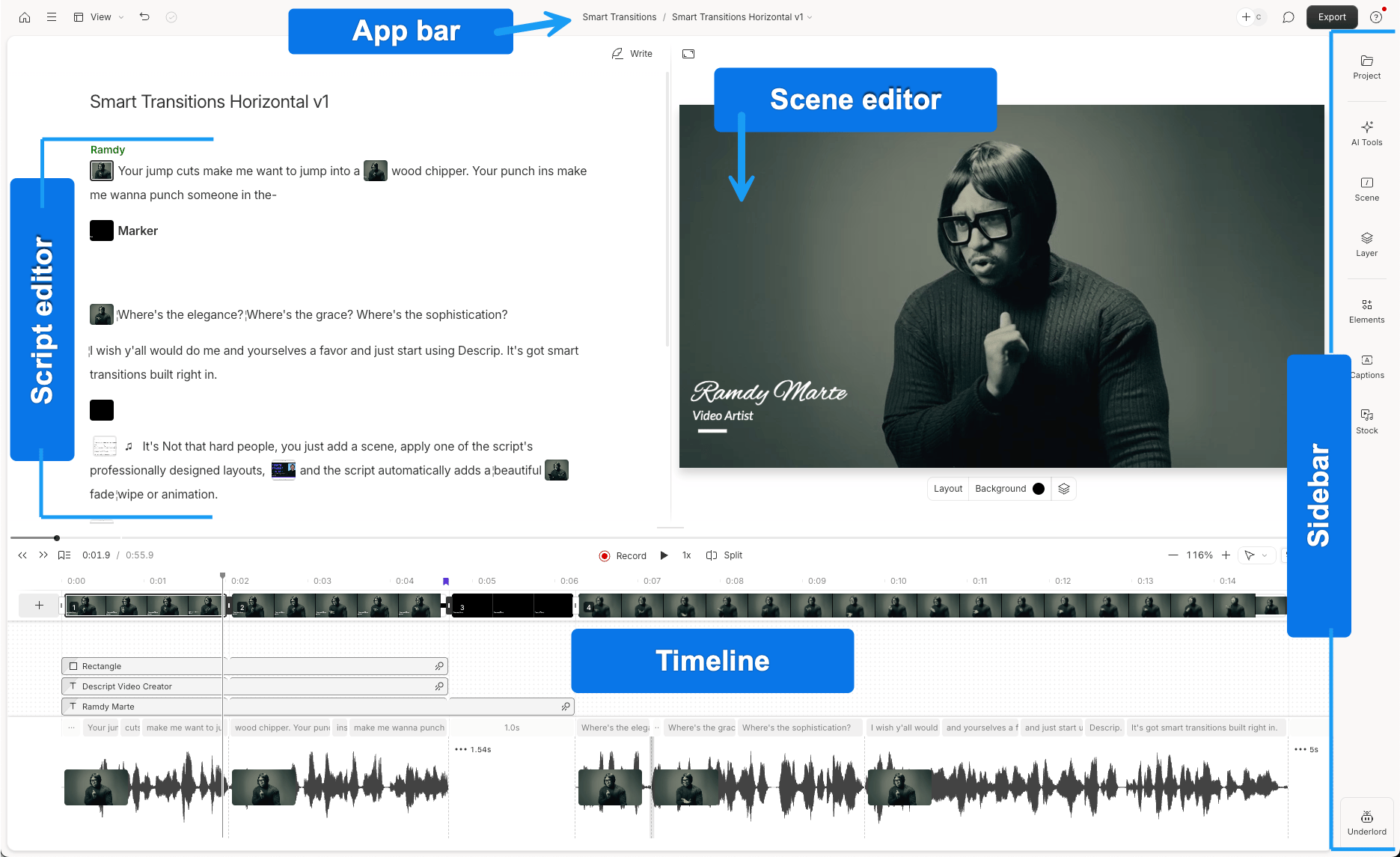
Descript is a useful partial replacement when the video is built around a script, voiceover, screen recording or spoken footage. Its MCP connection lets ChatGPT or Claude import media, find projects and send instructions to Underlord. The resulting composition remains available through Descript’s transcript, scene and timeline controls.
AI Video Maker creates an editable project from a prompt, rough script or footage, combining narration, visuals and an optional avatar. Stock or generated media supplies the supporting picture. Within the editor, deleting or moving transcript passages changes the matching recording, while visual layers, captions, layouts, animations and audio effects develop the finish. Studio Sound treats recorded speech, and manual levels and effects refine the soundtrack.
Descript also accepts a Claude Motion animation as a clip. That is useful for combining an animation made in Claude with narration, captions, screen recordings or a spoken introduction, then finishing the surrounding video in Descript.
How Descript compares with Remotion
Descript makes the spoken sequence and its scene layouts easier to reshape through text. It is a practical choice for an explainer or presentation whose main editorial changes concern wording, pacing, supporting footage and narration. ChatGPT or Claude can direct Underlord while you retain a manual transcript and timeline route.
Remotion’s reusable React composition serves a different kind of control: custom graphics, timing logic and parameterized scenes remain in the source, with Studio exposing supported interactive changes. Descript’s native layers and animations are editable, but importing a Claude Motion render does not bring its source design into those layers. Keep Remotion when the composition itself must remain a programmable design system.
Where Descript falls short
A Claude Motion import arrives as flat video. Its internal headline, colours, design and animation timing cannot be changed in Descript; those revisions happen in Claude before the clip is sent again. Native Descript text, shapes and other layers remain separately editable, so this restriction belongs specifically to the imported animation.
The MCP route delegates edits to Underlord instead of giving the external assistant direct timeline control. Its available editing actions therefore depend on Underlord, and its AI work still uses Descript credits. Source imports use media minutes, including material left out of the final video. Claude’s directory connector excludes generative image and video tools; using those tools needs the custom MCP connection.
The separate AI Video Maker GPT route chooses the voice and avatar for you. Those selections cannot be specified in that ChatGPT creation flow, although the delivered project can be opened in Descript for further changes. A tightly specified narration or presenter therefore needs refinement in the editor.
The Hobbyist plan provides watermark-free 1080p, 10 media hours and 400 AI credits monthly. The Creator plan adds 4K, 30 media hours and 800 AI credits. Timeline export requires the Creator, Business or Enterprise plan, and XML omits animation, titles, images, transitions, audio keyframes and most effects. The beta native Premiere route retains supported multicam structures but omits visual transforms and is not available on every account. Detailed finishing can therefore need rebuilding after handoff.
MCP delivery also has a publishing boundary: it publishes a Descript web link to provide a downloadable rendered file. A finished-video download without publishing uses the Descript app. The connector is scoped to one selected Drive, so projects on another Drive require reconnection.
Choose Descript for narration-led videos that benefit most from transcript editing, scene layouts and speech tools. It is a useful finishing companion to a Claude animation, provided you keep that animation’s internal revisions in Claude and account for the media, AI and export allowances.
Frequently asked questions
Which Remotion alternative can combine custom graphics with recorded footage and a voiceover?
invideo Editor is a strong fit. Footage, narration, text, shapes and supporting images stay on separate tracks and layers, with precise trims, editable animation and sound controls. ChatGPT or Claude can help assemble the video through MCP, then you can refine the same timeline manually. Generated cutaways or sound can be added when needed, using invideo credits.
Can I change the timing of an AI-created animation without rebuilding the whole video?
Yes, when the result retains editable animation controls. In invideo Editor, position, scale, rotation and opacity keyframes remain available for timing and value changes, with motion curves for acceleration and settling. A custom effect can expose its own adjustable settings. You can refine the selected movement manually or ask the assistant to revise it while preserving the rest of the edit.
Can I use a visual reference to create an effect on footage I already have?
Yes. In invideo Editor, the built-in agent can work from a description or visual reference to build a custom treatment on existing footage, with controls for further refinement. A connected ChatGPT or Claude conversation can also direct reference-led editing through MCP. The reference guides the chosen treatment, while the footage, layers, timing and sound remain open to revisions in the project.
How can I make several versions of a video while keeping the approved edit?
invideo Editor can keep alternate openings, shorter cuts and different aspect ratios on separate timelines. ChatGPT or Claude can read the existing edit and create a version from it, then refine framing, titles and timing. The approved timeline stays available, and you can continue manually or through MCP. Ordinary MCP edits and exports do not use invideo credits; generation and built-in-agent work do, with the external assistant’s allowance separate.