Do I need to storyboard every shot before generating AI video?
Last updated July 27, 2026
No — you don't need a traditional shot-by-shot storyboard for every frame. What you do need is a lightweight pre-visualization layer: locked characters, locked world, and a beat-level shot list. For short clips, a one-line beat per shot is enough. For long-form or multi-character work, board the key beats — skipping that step is where pacing and continuity drift.
Decide the depth of your storyboard by the shape of the project, not by habit. Use this rough ladder:
Single shot or short clip (under ~15 seconds). Skip formal boards. Write one line per shot — subject, action, camera intent, mood — and generate. The invideo agent is an agentic video tool that holds project context across shots, so a beat note plus your locked references is usually enough to get a usable generation in roughly 3 attempts per shot.
Short film, single location, 1–2 characters. Lock characters and world first, then work from a shot list — not full panels. In one documented 70-second short, the team ran 12 key parameters per shot (film reference, lens, lighting plan, color script, blocking, prompt, negative prompt, revision prompt) instead of drawing boards, and finished in 2 days for ~$750. The shot list, not the sketch, is the load-bearing artifact.
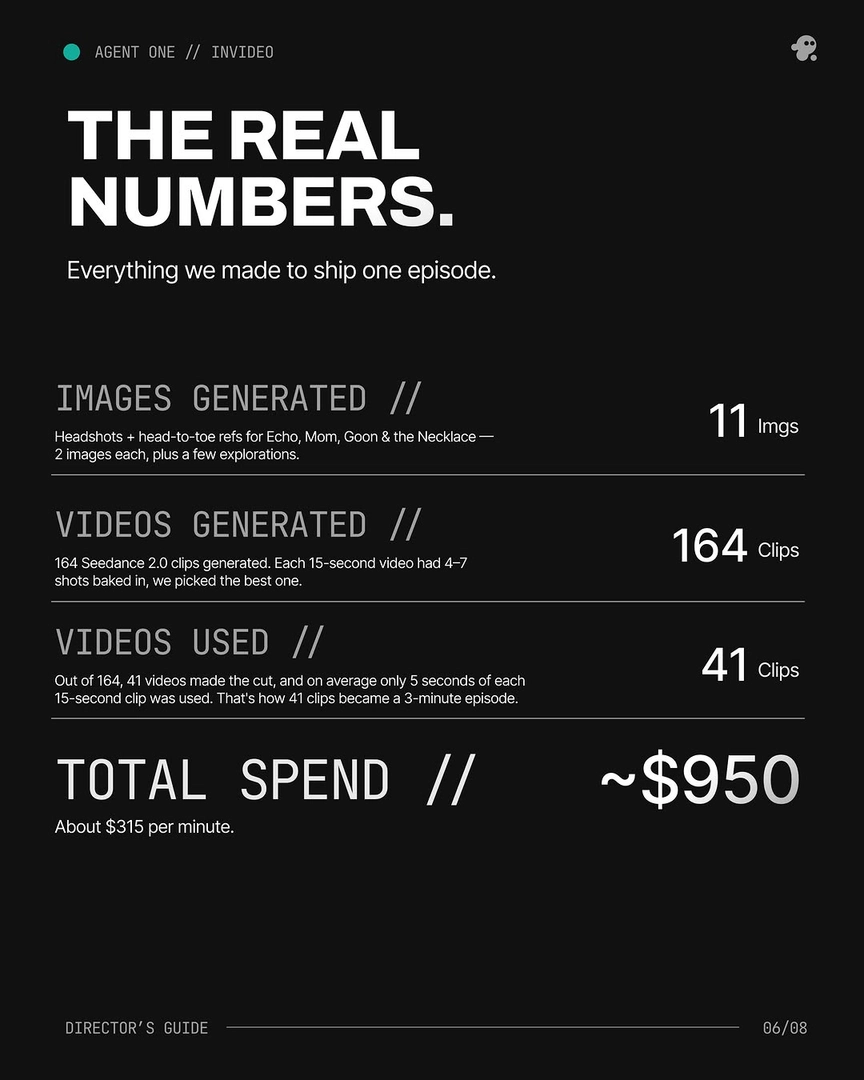
Long-form, multi-scene, or multi-character work. Board the key beats. A 3-minute animated episode in one production ran 164 generations to land 41 final clips (~25% selection rate) — that yield only works because beats were planned, not improvised. Storyboard the scene-opening shot, the emotional pivot, and the scene-out; let the agent fill coverage. A storyboard sub-agent inside invideo can draft these panels from your script so you review rather than draw.
Client work or agency delivery. Board fully. External approvals still require a traditional storyboard lock — that workflow hasn't changed; only your generation step has.
A minimal viable structure that works across all of the above, per shot: (1) scene goal in one line, (2) character position and action, (3) lighting/mood cue, (4) camera angle and lens intent, (5) what the shot cuts to. That's enough context for the invideo agent to route the prompt to the right model — Seedance 2.0 for reference-to-video continuity across a sequence, Kling or Veo where their strengths fit, Runway where it's the right call — without you drawing a single panel. As Hridaye, invideo's creative director, puts it: "You write the direction. Agent One builds the shot, holds it against the treatment, and only sends back what passes. Every frame is a decision, not a draft."
One thing not to skip regardless of project size: locking characters and world references before any video generation. In one production, 4 reference options were generated per character sheet and environment, the best selected, and locked — that step, not panel drawings, is what kept consistency across every later shot. Storyboarding is optional; locked references are not.
Watch some of these to see what works for you:
You write the direction. Agent One builds the shot, holds it against the treatment, and only sends back what passes. Every frame is a decision, not a draft.
— Hridaye, invideo's creative director