Should you script an AI short film to a fixed runtime or let editing decide the length?
Last updated July 27, 2026
Script to a runtime target, but treat it as a band — the edit sets the final length inside it. Documented AI productions consistently finish shorter than scripted: one creator planned a 60-second film and cut it down because the pacing worked better, and editorial yield (roughly 25% of generated clips survive) means the edit, not the script, decides what runtime actually holds.
Set the runtime at the script stage as a budget ceiling, not a lock. AI footage arrives in short generated clips that get selected hard in the edit: in one documented 3-minute animated episode, 164 clips were generated, 41 made the final cut, and on average only 5 seconds of each 15-second clip was used. You cannot predict at scripting time which seconds will survive, so a fixed-runtime commitment breaks the moment selection starts — but scripting with no target at all breaks your budget instead.
Why the target matters: every scripted second carries generation cost. Documented productions ran $315–$750 per finished minute depending on team and approach — $315/minute for a 3-minute animated episode, roughly $580/minute for a 90-second horror short, $750/minute for a 2-minute brand promo. With an average of 3 generations per usable shot and a ~25% clip selection rate, overgeneration is a deliberate budget line, so your scripted runtime multiplied by cost-per-minute is effectively your credit ceiling. Script tighter and you cap spend; script open-ended and iteration costs scale with every extra beat.
Expect the edit to compress, so script slightly over target rather than padding to hit it. In one production the film was scripted at 60 seconds and the final cut came in shorter because the pacing was stronger at the reduced length — the agent-based workflow made trimming cheap since no reshoots were involved. Cutting down is the normal direction; needing to stretch a thin script to fill a runtime is the failure mode to avoid.
Let generation feedback adjust scene lengths mid-production. Runtime decisions don't end at the script: when one scripted sequence required 18 cuts in 15 seconds, the invideo agent — the agentic layer that holds your full project context across models — flagged the model limitation before any credits were spent and recommended splitting the scene, which produced a sharper result than the original script intended. Hold your overall band, but let structural feedback like this reshape individual scene durations.
Make the final length decision with a rough-cut review, not instinct. Once you assemble a cut, upload it back to the invideo agent with an open 'what's working, what's not' prompt: in one documented production this pass caught a reveal shot running at the wrong emotional register — a pacing error the director had missed. That review is what converts 'let editing decide' from guesswork into a concrete call on where the film actually ends.
The working rule: fix the runtime band in pre-production so your credit budget is bounded, generate to it, then let the edit land anywhere inside the band that the pacing supports.
Watch some of these to see what works for you:
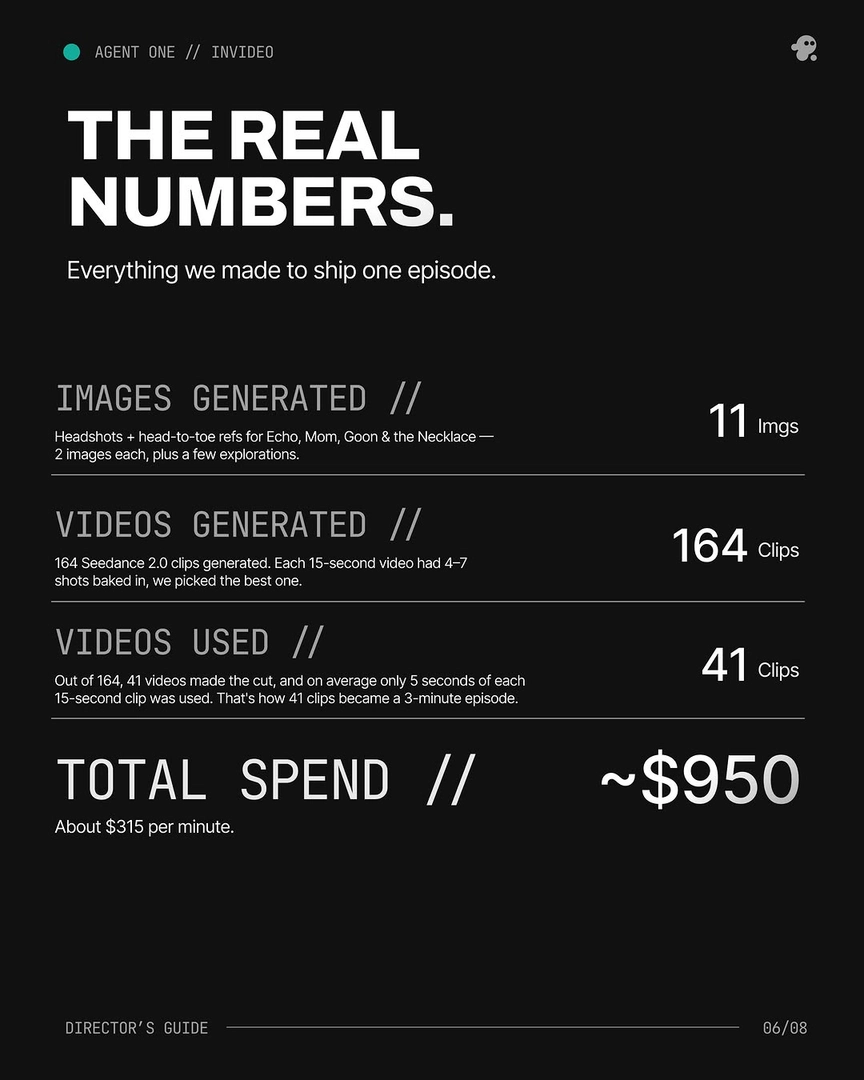
Out of 164, 41 videos made the cut, and on average only 5 seconds of each 15-second clip was used. That's how 41 clips became a 3-minute episode.
— invideo's creative team, from a documented production breakdown