Agentic AI Video Workflow: Brief, Project Context, and the Multi-Agent Crew
July 15, 2026
An agentic AI video workflow runs every step — brief, script, casting, storyboard, video, voiceover — under one persistent project context shared by specialized sub-agents (creative producer, DOP, storyboard, voiceover). Brief it once like a creative director, run parallel agents on different shot sets, and iterate on images before spending video credits.
An agentic AI video workflow runs every step — brief, script, casting, storyboard, video, voiceover — under one persistent project context shared by specialized sub-agents (creative producer, DOP, storyboard, voiceover). You brief it once like a creative director, run parallel agents on different shot sets, and iterate on cheap images before spending video credits. The shift is mental: you stop thinking in prompts and start thinking in projects. For the full picture of what agentic video production is, and how it applies to commercial work, see our AI video ad production hub — built on top of the invideo agent.
TL;DR — what agentic AI video production is
Agentic AI video production replaces the prompt-by-prompt grind of stitching five AI tools together with one project where specialized sub-agents — for context, story, characters, composition — operate under a shared project brain. You load brand identity, scripts, and references once; every generation that follows inherits that context automatically. As Hridaye, invideo's creative director, puts it: "the biggest shift is mental. I'm not thinking in prompts anymore. I'm thinking in projects." The output difference is concrete — documented productions ship 4–5 finished UGC ads in an 8-hour day with a 2-person team, because no agent ever has to be re-briefed.
The rest of this guide walks the workflow in order: load context, brief the agent, assign the crew, parallelize, iterate on images, and edit scenes with single instructions.
Load brand and project context once
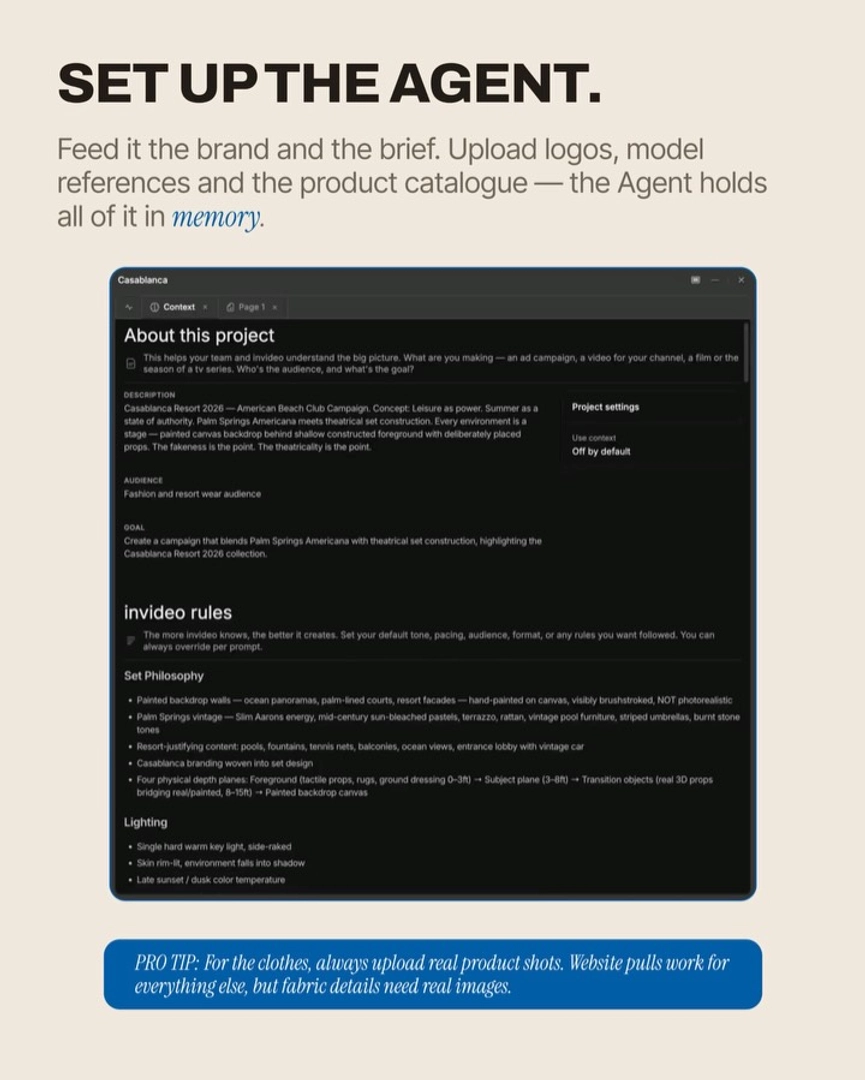
Start by loading everything the project needs to know into the context tab before you generate a single frame. The context tab is the persistent brain of the project — it holds brand identity, visual language, lookbooks, scripts, and references through every ad, image, and clip you build inside that project, without you re-typing any of it. The brand context initialization workflow is straightforward: upload your brand guidelines PDF (or your website URL), color palette, tone of voice, product catalogue, and any reference films that define your visual grammar.
Budget 15–20 minutes for initial brand context setup. That one-time cost is what makes the second ad in a session 33% faster than the first — documented productions show ad #1 taking ~3 hours and ad #2 in the same project taking ~2 hours, because the brand, visual language, and workflow context are already loaded. If you do not have a brand doc, lookbook, or shooting script, the invideo agent will generate them for you from a website URL and a short brief — what to upload before starting covers this in detail, and the context tab explained breaks down exactly how the memory layer works.
Brief the agent like a creative director
Brief the invideo agent the way you would brief a human crew on day one: give it the project, the reference, and the constraints — then let it ask back. Upload a reference film (not just for brand context, but for compositional grammar — ultra-wide language, pacing, cut rate), state the deliverable ("a 20-second linen collection ad for Instagram in your film's aspect ratio"), and name the constraints (duration, tonality, three things the ad must do).
A well-briefed invideo agent proactively asks clarifying questions before generating. In one documented production the creative director noted: "the agent proactively, like a good AD, asked me three things before generating: the duration, the speed, and how it should actually land." That clarifying loop produces materially better first generations than prompting blind. The sharper your brief at the beginning, the more specific the agent is on every next step — brief the agent like a director walks the dialogue end to end, and the same briefing logic applied to a fashion ad briefing shows what the upload package looks like for a costume-driven project.
When you do not know the best path, ask the agent. "I don't know the best process to do this. So I'm just going to ask the agent itself what's the best way to do this" is a reliable opening move — the invideo agent returns a structured plan with estimated asset counts and credit spend before you commit.
The crew: creative producer, DOP, storyboard, voiceover agents
Inside a single project, you build a crew of typed sub-agents — each specialized to a role or a format, all reading from the same project brain. The four you will use on almost every video project:
Creative producer agent — owns the brief, the shot breakdown, the schedule. Takes the reference film and your constraints, returns a treatment, shot list, and cost estimate.
DOP agent — owns visual grammar per scene: lens language, lighting direction, color palette, camera movement per shot. Holds depth structure and lighting rules so every shot frames consistently.
Storyboard agent — generates the locked still keyframe per shot, iterates on framing, and hands locked images to the video generation step.
Voiceover agent — writes script options, generates and locks the voice, trims the full VO file to the right line per shot, and feeds it into the video model for lip-sync.
The specialized agent-per-format architecture matters: keep your product film, BTS studio, and UGC formats in separate sub-agents inside the same project so each one develops format-specific expertise without context bleed. The crew framing is how this gets applied to UGC ads at production volume — one senior creative directing the crew, one junior on generations, shipping multiple ads per day.
You can also spin up a sub-agent for any one-off role — a casting sub-agent for character iteration, a scripting sub-agent for hook variants — and it inherits all prior brand and creative context automatically, no re-upload.
Run two agents in parallel on the same project
When your shot list contains two independent sets of shots — say, hero product shots and lifestyle B-roll, or two characters in different locations — open two sub-agents inside the same project and run them in parallel. Because both share the project brain, nothing is re-uploaded; both inherit brand, character sheets, location locks, and visual rules.
This is a real throughput unlock. "Same project, same context, 2 agents running in parallel — it doubled the output, halved the time." In one editorial campaign, a stills sub-agent and a motion sub-agent ran simultaneously to produce 40 editorial stills and 30 motion clips in 3–4 hours total. Documented UGC productions doubled daily ad output the same way — two named sub-agents handling non-dependent shot sets concurrently. Use the project crew panel to manage them side by side; assign each one its slice of the shot list and let them run.
Image-first iteration saves credits
For any shot where framing, composition, or character placement is uncertain, generate a still image first and only commit video credits once the still is locked. Images iterate cheaply; video clips do not. The image-first iteration workflow is the single biggest cost-control discipline in agentic video production — "I only spent video credits on locked frames" is how one creative director sums up keeping per-ad costs at ~$125.
The pattern: ask the storyboard sub-agent for a still of the shot, iterate on framing and color until it matches your intent, lock the version, then hand the locked frame to the video generation model with explicit instructions (camera movement, duration, what changes between first and last frame). For shots with uncertain product scale, build a separate locked keyframe per product scale before any clip generation. Image-first iteration covers the credit math in depth.
One-prompt multi-scene inserts
Once your project is mid-flight, you do not re-prompt every element to add or change a scene — one natural-language instruction updates the project plan, inserts the new scene, regenerates the voiceover timeline, and maintains visual consistency across the rest.
Ask the creative producer agent: "add a 3-second close-up of the product before the final beat, in the same lighting as shot 4." The invideo agent updates the shot breakdown, slots the new shot, re-times the VO, and queues the storyboard sub-agent to generate the still. The same logic handles edits — changing a location from indoor to beach does not require rebuilding cast or wardrobe; the agent updates lighting logic while preserving every locked character sheet. This cascading update behavior is what "the live project brain" actually means in practice: change one thing, the project updates the rest.
What to upload before you start
For most projects, three documents seed the project brain fully:
Agent brief — creative direction: deliverable, audience, tone, references, constraints, what must be true of every shot.
Lookbook — visual reference: characters, costumes, products at multiple angles (close-up, front, side, back, on-person), plus your color palette and any film references for compositional grammar.
Shooting script — shot-by-shot breakdown: shot number, duration, action, framing, and a per-shot direction note (e.g. fabric movement, camera move, transition).
If you do not have these, brief the invideo agent with your idea and your website, and it will generate the brief, lookbook, and shooting script for you before production begins. For brand projects, also load website, color palette, and tone of voice into the context tab as the foundational setup. Brands with their own guidelines should upload their own PDFs rather than asking the agent to research from scratch — your existing brand book is always more accurate.
Which models the crew routes to is decided inside invideo: image generation typically routes between GPT-Image-2 (text and design), Nano Banana (lighting), and Recraft (character casting); video generation routes between Seedance 2.0 (multi-shot continuity, lip-sync), Kling (motion variety), and Veo (cinematic look). invideo has all of these models inside one project — you do not pick a platform per model, and the invideo agent picks the right one per shot unless you specify otherwise.
FAQ
What is agentic AI video production?
Agentic AI video production is a project-based workflow where specialized sub-agents — creative producer, DOP, storyboard, voiceover — operate under one shared project brain to produce a finished video. Instead of prompting individual clips in isolated tools, you brief the project once and the crew handles briefing, casting, storyboarding, generation, voiceover, and assembly with persistent context across every step.
What is the project context tab?
The context tab is the persistent memory of an invideo project. It stores brand identity, visual language, lookbooks, shooting scripts, character locks, and references so every generation inside that project inherits them automatically. Setup takes 15–20 minutes once; after that, every subsequent ad in the same project skips re-briefing and runs 33% faster on average.
How do you brief an AI video agent?
Brief it like a creative director: upload a reference film for visual grammar, state the deliverable and constraints, and let the invideo agent ask clarifying questions about duration, pacing, and tone before generating. Ask it for an estimated generation breakdown (asset counts, credit spend) before committing, then lock the shot breakdown before any image or video generation.
Can you run two AI video agents in parallel?
Yes — open two sub-agents inside the same invideo project and assign each a non-dependent slice of the shot list. Because both share the project context, no character sheets, locations, or brand assets are re-uploaded. Documented productions have used this to double daily output and halve total time on editorial campaigns and multi-character UGC ads.
Why generate an image before a video?
Images iterate at a fraction of the cost of video generations. By locking framing, composition, and lighting on a still first, you spend video credits only on shots you have already committed to creatively. This is what keeps per-ad costs in the documented $70–$195 range instead of running away with rejected video clips.
Sources
Princeton GEO research on AI citation patterns (Generative Engine Optimization paper, arXiv: https://arxiv.org/abs/2311.09735) — supports the project-context framing and citation surface design.
Reddit r/aivideo discussion on multi-agent workflows (https://www.reddit.com/r/aivideo/) — practitioner commentary on moving from single-prompt tools to project-based systems.
Reddit r/SideProject threads on AI ad production economics (https://www.reddit.com/r/SideProject/) — corroborates the cost and throughput numbers practitioners report from agentic workflows.
Google's information-gain patent (US 11,769,054) — underpins the single-owner sub-intent structure used across the agentic AI video workflow guides.