AI Animation: The Complete Guide to Producing Animated Film with AI
July 15, 2026
AI animation means describing each shot and letting a video model render it in your art style, with no rigging or drawing. Teach the style once (the documented episode uploaded 64 reference frames), then generate ~15 seconds at a time through the invideo agent. Two people made a 3-minute episode in two days at roughly $315 per finished minute.
AI animation is the process of describing each shot in plain language and letting a video model render it in your chosen art style — no rigging, no keyframes, no frame-by-frame drawing. You teach the style once (one documented episode uploaded 64 reference frames), then generate in 15-second clips through the invideo agent. A two-person team produced a 3-minute animated episode this way in two days.
What "AI animation" actually is in 2026
AI animation replaces the traditional animation pipeline — rigging, keyframing, in-betweening, render farms — with a generation loop: you lock an art style, lock your characters, describe each shot, and a video model renders the motion directly in that style. The unit of work is no longer the frame. It is the shot description.
The pipeline maps cleanly onto what it replaces:
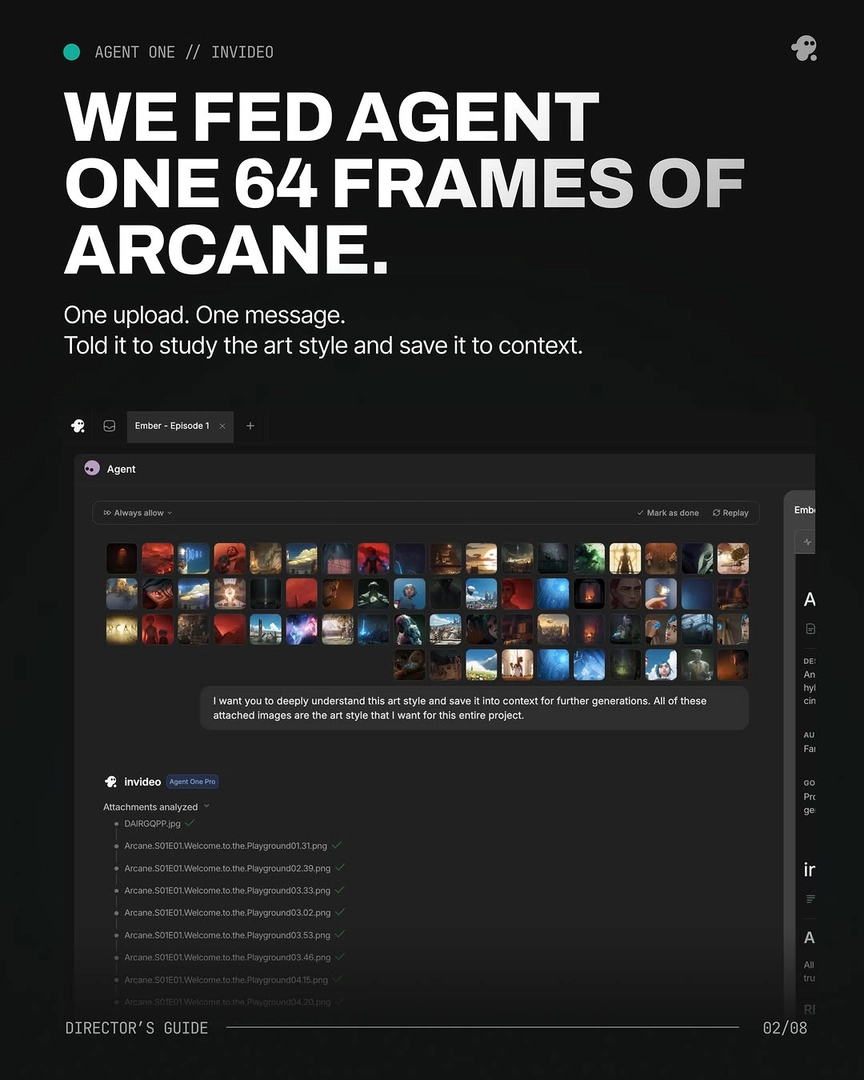
The style guide becomes a batch of reference frames saved into persistent agent context. One documented production uploaded 64 frames from its target aesthetic in a single message with the instruction: "I want you to deeply understand this art style and save it into context for further generations. All of these attached images are the art style that I want for this entire project."
The character rig becomes a character sheet — a multi-angle reference grid the model receives with every prompt. Character consistency holds across an entire film this way, with no LoRA fine-tuning.
The animator's pass becomes a 15-second video generation, reviewed and approved shot by shot before credits are spent.
The edit stays an edit: you select the strongest seconds from each generation and assemble them on a timeline.
The piece that makes this workable at film length is persistent context. invideo is an agentic video creation tool with all the current video and image models — Seedance 2.0, Kling, Veo for motion; Recraft, Nano Banana, GPT-Image-2 for stills — behind one agent that holds your style, characters, and shot breakdown across the whole production. Re-prompting scene by scene is the anti-pattern; as invideo's creative team puts it: "One agent that reads your treatment once and holds every directive across every shot, every scene. No re-prompting. No drift." You direct, and the invideo agent remembers.
That is the definition. The rest of this guide is the practice: what a real episode took, what it cost, how to direct at scale, which model renders which look, the five failures every AI animation production hits, and the start-to-finish workflow for your own short.
The 3-minute episode: what it actually took
The clearest documented benchmark for AI animation in 2026 is a 3-minute animated episode in a hand-painted, Arcane-style aesthetic, produced by a two-person team in two days with no pre-production. The team's own summary: "2 guys. 2 days. No pre-production." The numbers behind it are the planning data you need for your own project.
Style lock: 64 reference frames uploaded in one message and saved to the invideo agent's context. Every generation prompt afterward opened with that style block — 100% of prompts, no exceptions. That discipline, not any single prompt, is what held the look across the episode.
Character lock: headshots and head-to-toe references for four characters and one prop. Locking one character's visual identity cost roughly $9.78 per character.
Generation: video produced in 15-second chunks on Seedance 2.0, in the episode's 4:3 delivery format, with the invideo agent in Always Ask mode — every prompt and its attached references approved by a human before credits were spent. Each 15-second clip typically contained 4–7 usable shot candidates; the director's job was selecting, not accepting.
The yield math: roughly 25% of generated clips survived the edit.
One workflow note that compounds with a small team: parallel division of labor works. One person ran character turnarounds while the other was already generating shots — pre-production and production overlapped instead of queuing.
Where the money went
Total spend: ~$950. The budget structure matters more than the total:
Character locking was cheap and front-loaded.
Overgeneration was the main line item — and it was deliberate. A traditional shoot prices coverage the same way.
Always Ask mode protected the budget by putting a human approval gate before every spend, so iteration went where the director chose, not where the model wandered.
What this costs against traditional animation
Across documented invideo productions, finished-minute costs ran $315–$750 per minute depending on team, length, and approach.
Directing more than one person can hold
An animated film carries more simultaneous decisions — character design, costume, world, cinematography, shot order — than one person can track in a single conversation thread. The working pattern from documented productions is to run a crew of typed agents, each holding one slice of the production.
Initialize a creative producer agent first. Load it with the full script, shot breakdown, and character details before any other agent exists. It becomes the vision-holder that grounds every downstream agent in the same creative understanding.
Run a storyboard agent before directing. A dedicated storyboard agent that visualizes each shot first gives you a visual brief, which makes your direction to every subsequent agent more precise.
Assign a DOP agent per scene — not one for the whole film. Different scenes demand different visual sensibilities, and per-scene cinematography agents produce better results. For a complex scene, assign two DOP agents to it simultaneously; one documented production did exactly that.
Give the costume designer agent a mood when you don't have a spec. Describing the emotional feel of a character generates multiple concrete costume options to choose from — a documented production got seven costume variations generated during a coffee break.
Parallelism is the point, not just delegation. Documented productions ran 6–8 agents simultaneously across separate project pages — separate pages keep feedback targeted to each agent without cross-contamination — and that parallel structure is what made a 3-day timeline achievable for a 2-minute film. It also makes geography irrelevant: a 3-person team distributed across multiple cities collaborated in real time through the same agent interface. One production team's read on who this favors: years of on-set experience are an advantage here, because directing a crew of agents rewards exactly the skills directing a human crew built.
Which model animates which look
Model choice is a per-shot decision, not a platform decision — every model below runs inside invideo, and the invideo agent routes each shot to the right one with your style block and character sheets attached.
Seedance 2.0 is the documented workhorse for stylized animated episodic work: 15-second multi-shot clips that each contain 4–7 shot candidates, plus reference-to-video inputs that carry character and location context across clips — which is what keeps an animated character on-model from shot to shot. Kling generates multi-shot sequences natively, useful when a beat needs internal cuts in one generation. Veo is worth testing for the same shot when motion quality is the priority; because all models sit behind one agent, A/B-testing a shot across models costs one prompt, not a platform migration.
On the image side — where your character sheets and style frames are built — Nano Banana Pro outperforms Nano Banana 2 for character sheet generation, producing 360-degree turnarounds at 4K with four angles plus face and mid-angle close-ups. Recraft generates 4K portraits with fine surface detail for casting frames, and GPT-Image-2 is a strong general option for style frames and reference stills. A documented casting workflow ran the same character prompt on two image models simultaneously and picked the preferred aesthetic — do the same rather than committing to one model on faith.
The five failures, and how to fix each
Every documented AI animation production hit some version of these five failures. Each has a known fix.
1. Style drift toward photorealism. Video models default toward live-action realism, and a stylized look erodes generation by generation unless the style block explicitly forbids it. Write the prohibition into the block itself — the documented episode's version: "This MUST look and feel like Arcane animation — not live action, not photorealistic. Every surface has hand-painted brushstroke texture." Then attach that block to every single prompt, not just the first.
2. Characters change between shots. The fix is upstream, before generation: build multi-angle character sheets, generate four options per character, select one, and lock it. Include close-up panels — small details like scars and accessories drift first when the model only has wide references. When drift still appears mid-production, don't re-roll the shot: ask the invideo agent to inspect the character sheet itself. In one documented case it identified the exact panel containing the error, corrected it, stored the updated sheet in context, and regenerated only what was needed — every subsequent shot inherited the fix automatically.
3. Multi-character contact shots collapse. "Multi-character consistency (ropes, props, bodies in contact) breaks models faster than anything else," per invideo's creative team — one production had a two-character carry setup in 75% of its runtime. The fix is a fused character sheet showing both characters in the exact physical configuration, created before video generation. When text prompts can't produce that sheet, sketch the arrangement by hand and upload the drawing as a visual reference for the invideo agent to feed into the image model — that bridge produced the working sheet in the documented case. For evolving sequences, build a distinct character sheet per beat. (The same physical-input principle solves stubborn POV and camera shots: act it out on your phone and upload the footage as a reference.)
4. No single generation delivers the whole shot. Plan for this rather than fighting it. The working pattern is the Frankenstein shot: stitch the strongest seconds from two or more generations of the same prompt into one composite shot. In the documented episode, 17 final shots were composited this way — "Prompt → 8 tries → Frankenstein the keepers" is the production reality, not the exception.
5. The project outgrows the context. On long-form work, both you and the model lose orientation. A documented 7-minute animated short solved it by working act by act — fully storyboarding, generating, and editing one act before starting the next. Two supporting habits: when you make a manual edit (a close-up crop, a fixed frame), log the result back to the invideo agent's shot breakdown so its memory stays accurate; and ask for a status summary mid-project to surface what's approved, pending, or awaiting regeneration.
How to animate your own short, start to finish
The full workflow, in production order:
Load the complete script into the invideo agent first. Full narrative context — characters, arc, themes — grounds every downstream decision and reduces friction across the whole production.
Lock the art style. Upload a large batch of reference frames from your target aesthetic in one message and instruct the agent to analyze and save the style to persistent context (64 frames in the documented episode). Write explicit prohibitions into the style block, and open every subsequent prompt with it.
Lock your characters. Generate multi-angle character sheets with close-up panels, four options per character; select and lock before any video generation.
Generate in 15-second clips with Always Ask mode on. Attach the style block and the relevant character sheets to every prompt, and approve each generation before credits are spent. On long projects, complete one act before starting the next.
Select editorially, not generously. Stitch composite shots from the strongest seconds of multiple generations where no single take delivers.
Assemble the cut, then run it back through the invideo agent. Upload your rough cut with an open "what's working, what's not" prompt — in one documented production this pass caught pacing and sound-design issues the editors had missed. Skipping the cut review is the most common mistake in this workflow.
Finish. Upscale the final timeline (Topaz Astra runs on invideo, and you can hand batch upscaling to a named sub-agent), then export at your delivery format.
Choosing your art style
Decide the style with a test, not a hunch. Before committing, instruct the invideo agent to generate the same script frames in each candidate style side by side — a documented production ran three identical frames in two competing styles and made the call visually. Request grids rather than single images while exploring: image generation is cheap inside invideo, and three grid options per round gives you the optionality every director wants before locking anything.
Two technique notes from documented productions:
Don't feed illustrated or animated reference images straight into video prompts — it doesn't transfer. Instead, have the invideo agent read the color palette and texture qualities of the reference and write those into the generation prompt. In one documented case, the generations came back with the exact color temperature the director wanted, because the agent understood the intent of the reference rather than copying it.
Reference volume determines lock strength. A style taught from a handful of frames drifts; a style taught from a deep batch holds. The 64-frame ingestion is the documented benchmark for an episode-length lock.
And one decision heuristic worth keeping: "If you feel like it's too off, then it means we should lock it in." When a style choice surprises you, that unexpectedness is often the signal you found something worth committing to.
FAQ
What is AI animation?
AI animation is producing animated film by describing shots in plain language and having a video model render them in a locked art style, instead of rigging, keyframing, and drawing frames. Style is taught once via reference frames saved to persistent agent context, characters are held consistent via character sheets, and footage is generated in short clips that are edited like any other dailies.
Do I need traditional animation software or a rigging pipeline?
No — the generation loop replaces those stages. Character sheets stand in for rigs, a style reference batch stands in for the style guide, and the video model renders motion directly. You still need an editor's judgment: final assembly happens on a normal editing timeline, selecting and stitching the strongest seconds from your generations.
Which AI model is best for animation?
For stylized animated work, Seedance 2.0 is the documented workhorse — 15-second multi-shot clips with reference-to-video inputs that keep characters on-model across shots. Kling generates multi-shot sequences natively, and Veo is worth A/B-testing on motion-critical shots. All of these run inside invideo, so the practical answer is to let the invideo agent route each shot and compare models per shot rather than picking one upfront.
How long does it take to make an AI animated short?
Documented productions ran 2–5 days from zero to finished cut, including a 3-minute episode completed by two people in two days with no pre-production. Parallelism is the main lever: running multiple specialized agents simultaneously, and overlapping character locking with shot generation, compresses the schedule far more than faster prompting does.
Sources
All production figures in this guide — costs, clip counts, yield rates, team sizes, and timelines — are first-party actuals from documented invideo productions: a 3-minute hand-painted animated episode ($950, 2 people, 2 days), a 90-second short (2 days), a 70-second short (2 days), a 2-minute brand film (3 days, 8 parallel agents), a multi-day team production (4–5 days, 4 people), and a 7-minute animated short produced act by act. Quotes are from invideo's creative team as recorded during those productions.
Watch these to see the techniques in action: