How do you maintain visual consistency across hundreds of AI-generated video shots?
Last updated July 27, 2026
Visual consistency across hundreds of shots is solved before generation, not per shot: load your style references into a persistent agent context once, lock multi-angle character sheets before any video, prepend the same style block to every prompt, carry continuity forward with reference-to-video, and fix errors at the source sheet — then unify survivors with one grade pass.
Build the system in this order — each layer prevents a class of drift the layers after it cannot fix. invideo is an agentic video creation tool with all the current video and image models (Veo, Kling, Seedance 2.0 for video; Recraft, Nano Banana, GPT-Image-2 for images) behind one agent that holds project context, which is the mechanism every layer below relies on.
1. Lock the style into persistent context once. Upload a large batch of frames from your target aesthetic in a single message and instruct the invideo agent to analyze and save it — one documented production uploaded 64 reference frames with the prompt: "I want you to deeply understand this art style and save it into context for further generations." Write the resulting style block with explicit negative constraints (what the footage must never look like — e.g. "not live action, not photorealistic") to prevent drift, and prepend it to every generation prompt for the rest of the project. Because the context persists, you never re-explain the look — one production held a single visual system across 21+ scenes, with scene numbering visible to #169. A written visual-language or treatment document loaded once works the same way at larger scale.
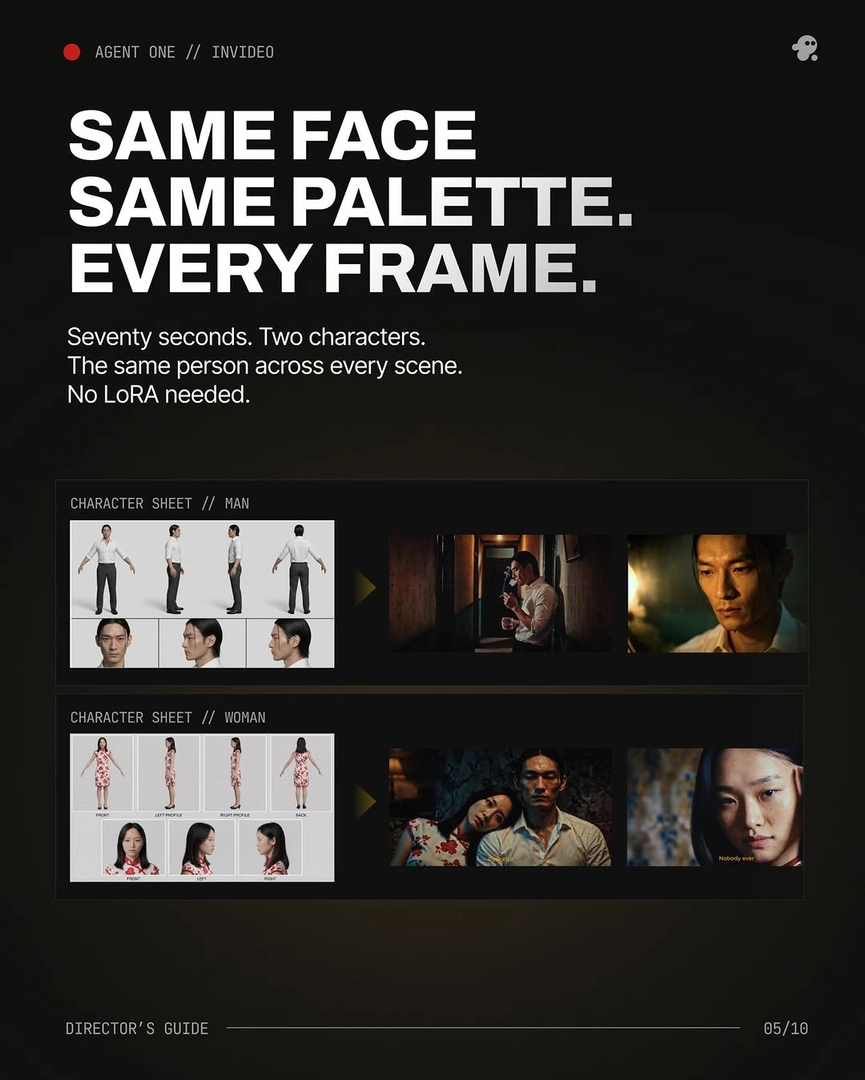
2. Lock characters with reference sheets before any video generation. Generate multi-angle character sheets — front, side, back, plus face and mid-angle close-ups, since close-up panels are what keep small details like scars and accessories consistent across models — and have the invideo agent store them in context. Generate several options per asset and lock the best before motion: one production locked 4 characters and 1 prop with just 11 reference images, averaging 5 generations (~$9.78) to lock one character; a 70-second short kept 2 characters identical across every scene with no LoRA or fine-tuning. Remove objects from characters' hands before turnarounds, and create a separate sheet for each beat where a character's appearance deliberately changes.
3. Apply a fixed prompt structure to every shot, no exceptions. Use a consistent assembly order — one production held a 9-element sequence across every frame: camera spec, lens and aspect ratio, lighting source, palette, composition, atmosphere, mood register, film/DP attribution, negative prompt. Attach the character sheets and style block to every single prompt; consistency at scale is a discipline of zero exceptions, not occasional reminders.
4. Carry continuity shot-to-shot with reference inputs. For continuous or adjacent sequences, clip the end of each generated segment and re-upload it; the invideo agent attaches it to Seedance 2.0 reference-to-video alongside your character and location references, which carries camera movement, framing, and atmosphere into the next segment — something extend cannot do, since it accepts neither character nor location references. For world continuity, work grids-to-anchors: batch your references by theme with explicit instructions on what to take and what to ignore, generate image grids rather than single frames, then extract the best panels and use those — not your original references — as the seeds for all subsequent scenes.
5. Fix continuity errors at the source, never per shot. When a detail breaks in a generation, don't re-roll the shot — ask the invideo agent to inspect the character sheet; in one documented case it identified the exact panel containing the error, corrected it, stored the updated sheet in context, and every subsequent shot inherited the fix while the rest of the film stayed intact. Surgical source fixes beat regenerating everything.
6. Gate spend, select hard, unify in the grade. Run generation in approval mode (Always Ask) so you confirm each prompt and its attached references before credits are spent. Plan for selection rather than perfection: one 3-minute production generated 164 clips and used 41 (a 25% selection rate), averaged 3 generations per usable shot, and stitched 17 final shots from 2+ generations — Frankenstein shots are a normal technique at this scale, not a failure mode. Finish with one light unifying pass — a touch of blur, grain, and a matched grade across all clips — to smooth any residual shot-to-shot variance.
Watch some of these to see what works for you:
I want you to deeply understand this art style and save it into context for further generations. All of these attached images are the art style that I want for this entire project.
— invideo's creative team, documented production prompt