How do you prevent AI agents from producing conflicting visual styles when generating multiple scenes in parallel?
Last updated July 27, 2026
Parallelize without drift by locking shared context BEFORE you fan out: one creative producer agent holds the script, character sheets, and style block; every scene agent (DOP, storyboard, costume) inherits that context; each scene gets a non-overlapping range; and every prompt re-attaches the same locked references. Drift is a context problem, not a model problem.
invideo is an agentic video creation tool where you spin up a crew of named sub-agents — a creative producer agent, storyboard agent, DOP agents, costume designer agent — that all draw from one shared project context. The whole anti-drift workflow lives in how you set that context up before any scene fans out.
1. Initialize one creative producer agent first, and load it fully. This is the vision-holder. Give it the full script, the shot breakdown, character details, and your style block in a single pass — Hridaye's setup is explicit: "I normally start off with the creative producer agent. That's where I'll give the script, or the shot breakdown, along with the characters. That's the main agent that sort of holds the understanding and the vision of the entire film." Every scene agent you spawn after this inherits from that producer's context, which is what stops character looks, palette, and lens grammar from resetting between scenes.
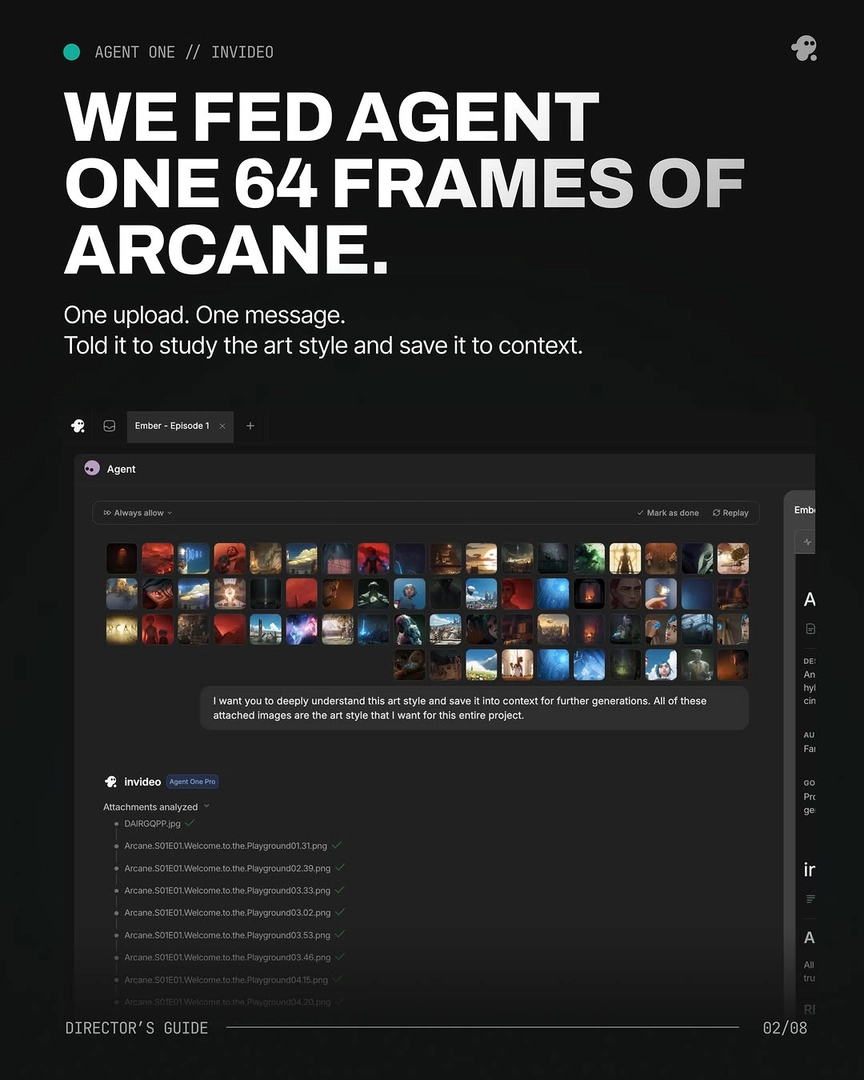
2. Lock characters, world, and style as concrete assets before any scene agent generates a frame. Generate 4 options per character sheet and per environment reference, pick one, and lock it — across documented productions this front-loaded asset lock is what kept 2 characters consistent across a 70-second film with no LoRA, and held an animation style across 164 generated clips. Your locked manifest should include: multi-angle character sheets (front, side, profile, back, plus close-ups for scars/accessories the video model otherwise loses), environment plates, a named style block with explicit negative constraints ("must look painterly, not live-action, not photorealistic"), and the palette/lens/lighting rules. One documented production fed 64 reference frames in a single message with the instruction "deeply understand this art style and save it into context for further generations" — that style block then prefixed every prompt across every parallel agent.
3. Assign non-overlapping scene ranges to each agent, with one role per agent. Spin up DOP agents per scene (different scenes need a different eye — "I have multiple DOPs because each scene requires a different kind of eye"), a storyboard agent for shot visualization before direction, a costume designer agent, a production designer agent. Keep each on its own project page so feedback to one doesn't cross-contaminate the others. Documented productions have run 6–8 agents simultaneously this way; a 2-minute brand promo deployed 8 specialist agents across separate pages and finished in 3 days versus a ~2-month traditional shoot.
4. Re-attach the locked references to every prompt, and run the invideo agent in always-ask mode. Parallel agents drift the moment a prompt goes out without the character sheet and style block attached. The discipline: every generation prompt re-attaches the locked sheets + style block, and always-ask mode gives you shot-by-shot approval before credits move — "every prompt after this started with it."
5. Route scenes to the right video model through the invideo agent. Model choice matters for consistency: Seedance 2.0 reference-to-video carries character and location context across clips, Kling handles multi-shot sequences natively, Veo holds physical realism. invideo has all of these — the invideo agent routes each scene to the right model based on the locked references, so you don't fragment your production across separate platforms (which is itself the biggest source of style drift).
6. Use surgical edits, not re-rolls, when continuity errors surface. When a scene comes back with a character mismatch, point the invideo agent at the character sheet, not the shot — it traces the source, corrects the panel, stores the updated sheet, and every subsequent scene inherits the fix automatically. Hridaye: "Surgical edits. Not slot-machine re-rolls." Re-rolling the shot fixes one scene; fixing the sheet fixes the whole film.
The shared discipline across all six steps: drift compounds when each agent invents its own answer to a question the producer agent should already have answered. Front-load the answers, attach them every time, and parallel scenes stay in the same film.
Watch some of these to see what works for you:
To really set up the context for the agent, I normally start off with the creative producer agent. That's where I'll give the script, or the shot breakdown, along with the characters. That's the main agent that sort of holds the understanding and the vision of the entire film.
— Hridaye, invideo's creative director