How many frames do you need to storyboard for AI video, and can you skip some?
Last updated July 27, 2026
You need one storyboard frame per scene or key narrative beat — not one per shot. Multi-shot models like Seedance 2.0 generate a full 15-second sequence from a single storyboard frame, so you can skip in-between and coverage frames. Keep frames for dense cut sequences and anything a client must approve.
Board one frame per scene or major beat, then let the video model generate the shots in between. This works because of multi-shot generation: a single storyboard frame can drive an entire 15-second multi-shot sequence, which is why it's no longer necessary to storyboard every individual frame the way earlier first-frame/last-frame workflows demanded — those needed an image at every shot boundary. invideo is an agentic video creation platform with all the current video models — Seedance 2.0, Kling, Veo — available in one place, so the invideo agent routes each boarded frame to a multi-shot model instead of asking you for frame-by-frame inputs. Every frame you skip also saves credits directly, since each storyboard frame is a paid image generation feeding paid video generations.
Skipping coverage frames works because the model generates the coverage for you. Each 15-second Seedance 2.0 clip contains 4–7 usable shot candidates, so one boarded frame returns multiple compositions you'd otherwise have drawn by hand. The production math from one documented animated episode shows the scale: 164 generated clips produced 41 final-cut shots, with an average of only 5 seconds used from each 15-second clip — a 3-minute episode assembled from shots the team never individually storyboarded. Your job shifts from prescribing every composition upfront to selecting the best candidates after generation.
Two cases where you should not skip frames. First, editorially dense beats: in one ~90-second production, the densest scene ran 18 cuts in 15 seconds, and the invideo agent flagged the model limitation before generation and recommended splitting the scene in two — board sequences like that beat by beat, because a single anchor frame can't carry that cut density. Second, external stakeholders: when an agency or client has to sign off, a traditional full storyboard lock is still necessary for approval and revision control; for internal AI-driven production you can bypass it entirely.
For the frames you do keep, one efficiency note: generate them as grids of options rather than single images — image generation costs little, especially in invideo, and selecting from a grid beats re-prompting one frame at a time.
Watch some of these to see what works for you:
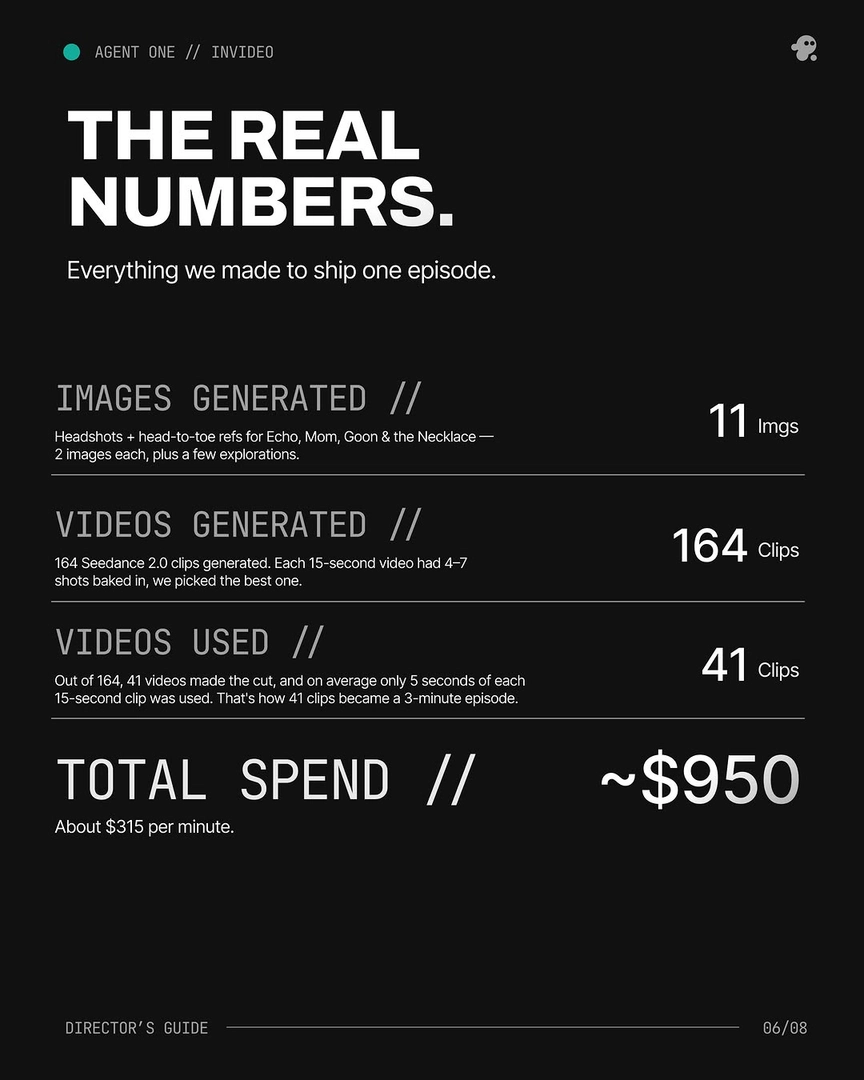
Out of 164, 41 videos made the cut, and on average only 5 seconds of each 15-second clip was used. That's how 41 clips became a 3-minute episode.
— invideo's creative team