What should you put in a negative prompt for AI video generation?
Last updated July 27, 2026
A negative prompt for AI video should suppress four things: quality artifacts (blurry, low quality, pixelated, compression artifacts), anatomy errors (extra fingers, distorted limbs, deformed face), overlays (watermark, text, logo, subtitles), and motion artifacts (flickering, jitter, strobing, duplicate subjects). For cross-shot consistency, also block style drift — 'changing costume, morphing face, inconsistent hair color, photorealistic' when you're animated, or vice versa.
Start with this copy-paste baseline on every shot: blurry, low quality, worst quality, pixelated, compression artifacts, noise, watermark, text overlay, logo, subtitles, distorted limbs, extra fingers, deformed face, flickering, jitter, strobing, duplicate subjects, morphing face. That's your floor — everything else is goal-specific.
Layer in by what you're protecting against:
Quality and resolution drift — add: oversharpened, plasticky skin, oversaturated, blown highlights, banding, chromatic aberration. The plasticky-skin term matters specifically for Seedance 2.0 output, which tends to come back ultra-sharp with waxy faces; the negative helps, and a light blur-plus-grain pass in post finishes the job.
Anatomy and hands — add: malformed hands, fused fingers, extra limbs, missing limbs, bad proportions, cross-eyed, asymmetrical face. For multi-character contact shots (one character carrying another, hands on props, rope work), also block: merged bodies, floating limbs, detached hands. Contact shots break models faster than anything else — when negatives alone aren't enough, hand-sketch the arrangement and upload the drawing as a reference for the image model.
Motion artifacts (video-specific) — add: frame jitter, strobing, ghosting, motion smearing (unless you want it), warping background, melting edges, popping. These rarely appear in image-gen negatives but matter every clip in video.
Style contamination — pick the side you're NOT on. For a hand-painted look (think Arcane-style animation), block: live action, photorealistic, 3D render, CGI, plastic shading. For photoreal, block: cartoon, anime, illustration, painting, sketch, cel-shaded. Style negatives must be explicit — one production locked an Arcane animation style and every prompt afterward carried 'not live action, not photorealistic, every surface has hand-painted brushstroke texture' as part of the block.
Cross-shot consistency — this is the one most lists skip. To stop drift between scenes add: changing costume, morphing face, inconsistent hair color, different eye color, prop swapping, wardrobe change. Pair these negatives with locked character sheets (front, side, profile, back, plus close-ups) — the negative suppresses drift, the character sheet gives the model the correct target. One short film held two characters consistent across 70 seconds and every scene using sheets plus context, no fine-tuning.
Unwanted text and UI — add: subtitles, captions, signature, username, timestamp, UI overlay, HUD elements. Closed-API models occasionally hallucinate these from training data.
Honest note on model behavior: negative prompts carry strong weight in open-weight pipelines and weaker-to-moderate weight in closed APIs like Runway and Kling — don't expect the negative alone to fix a broken shot in a closed model. When the prompt-plus-negative still won't land it, switch tactics: shoot a 10-second mock of the action on your phone and upload it as a reference video, or hand-sketch a complex arrangement and feed the sketch into the image model. The invideo agent holds all roster models — Runway, Veo, Kling, Seedance 2.0 — and routes each shot to the model whose negatives and references actually behave for that shot type, so you're not stuck with one engine's quirks.
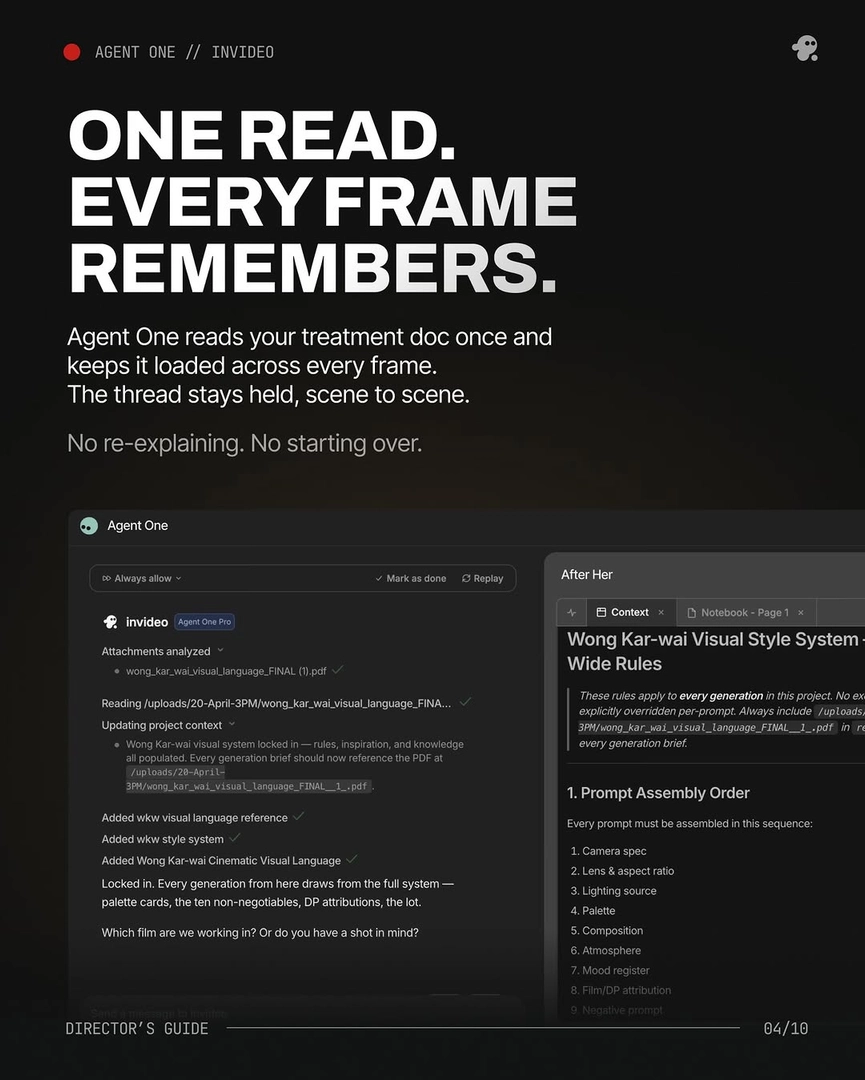
Wire the negative into your shot formula, not as an afterthought. The invideo agent's prompt assembly carries nine elements in a fixed order — camera spec, lens and aspect ratio, lighting source, palette, composition, atmosphere, mood, film/DP attribution, and negative prompt — locked into context once via your treatment doc so every shot inherits the same negatives without re-typing. Across one project, that discipline meant 'every prompt after this started with it.'
One more tactical move: when you spot a recurring artifact across several generations (say, a character's airpod keeps appearing), don't just expand the negative — ask the invideo agent to inspect the character sheet, find the panel containing the error, and fix it at the source. The negative suppresses; the sheet correction eliminates.
Watch some of these to see what works for you:
This MUST look and feel like Arcane animation — not live action, not photorealistic. Every surface has hand-painted brushstroke texture. Every element in frame must feel painterly and handcrafted like a moving Arcane frame.
— invideo's creative team, on locking a style block with explicit negative constraints