AI Shot Generation: How to Prompt, Iterate, and Composite Cinematic AI Video Shots
July 15, 2026
AI shot generation works by assembling each prompt in a fixed 9-element order, generating in 15-second chunks, and running about 3 generations per usable shot at a 25% selection rate. The strongest seconds from multiple takes are composited into Frankenstein shots, while POV failures are cracked with phone-mock reference clips. The invideo agent routes shots to Seedance 2.0, Veo, or Kling.
AI shot generation runs on a repeatable system, not luck: assemble every prompt in a fixed 9-element order, generate in 15-second chunks with manual approval switched on, and budget roughly 3 generations per usable shot. Composite the strongest seconds from multiple takes into one Frankenstein shot, and crack POV failures with phone-shot mock reference clips. Inside invideo, the agent routes each shot to Seedance 2.0, Veo, or Kling.
The 9-element prompt structure
Most AI video generation tools produce inconsistent shots because the prompts feeding them are inconsistent — the fix is assembling every prompt in the same fixed order, every time. The order that held across every frame of a documented three-film series:
Camera spec — the camera or sensor character of the shot
Lens & aspect — focal length behavior and your film's aspect ratio
Lighting source — where light comes from, named specifically ("warm yellow from the lamps only" beats "warm lighting")
Palette — the color world of the frame
Composition — framing, blocking, where the subject sits
Atmosphere — haze, rain, dust, practical texture in the air
Mood register — the emotional temperature of the shot
Film/DP attribution — the cinematographic reference the model should lean on
Negative prompt — what the shot must never contain
The negative prompt carries more weight than most filmmakers give it. One animated production's style block read: "This MUST look and feel like Arcane animation — not live action, not photorealistic." Explicit prohibitions prevent drift across hundreds of generations. For the full breakdown of each element with examples, see the best AI video prompt structure.
Because every prompt shares the same skeleton, every generation becomes comparable — when a shot fails, you know which element to change instead of rewriting from scratch.
Generate in 15-second chunks with Always Ask mode
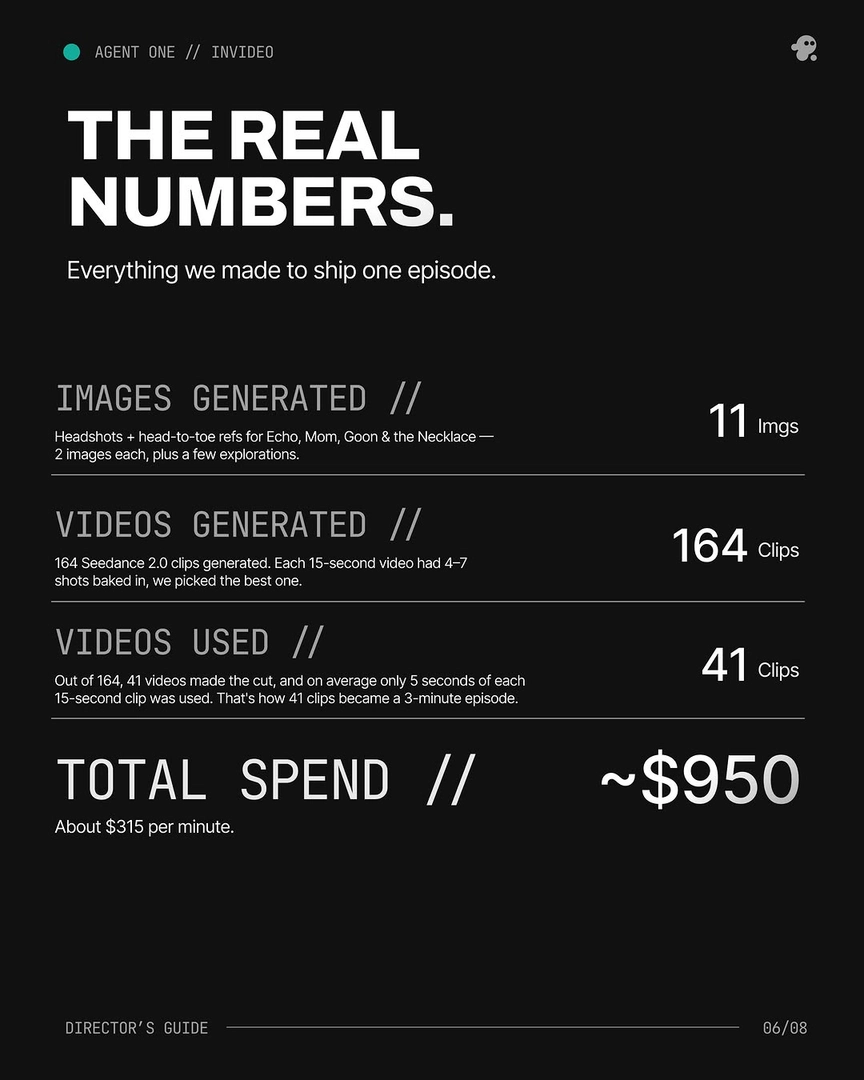
With the prompt structure fixed, the next decision is generation unit size: break your script into 15-second segments and generate each one individually. One documented production generated clips at 15 seconds each to produce a single 3-minute episode — and each 15-second clip contained 4–7 usable shot candidates, with an average of 5 seconds used per clip. You're not generating shots; you're generating raw footage to select from, in your film's aspect ratio.
Attach your character references and style block to every single prompt — as one production put it, "Every prompt after this started with it." That discipline, not any single great prompt, is what holds visual consistency across a hundred-plus generations.
Run the invideo agent in Always Ask mode so every prompt and its attached references come to you for approval before credits are spent. You review the assembled prompt, correct the lighting source or swap a reference, then approve — shot-by-shot directorial control with no wasted generations on prompts you never saw.
Stitch segments from multiple generations into one shot
When no single generation nails the full shot, you don't need one to — a Frankenstein shot is a single final shot composited from the strongest segments of two or more generations of the same prompt. On the 3-minute episode above, more than 40% of the final shots were stitched from 2+ generations. The production's own summary: "MOST SHOTS AREN'T ONE SHOT. Prompt → 8 tries → Frankenstein the keepers."
The workflow: generate multiple takes from the same 9-element prompt, mark the seconds where each take works — the first take's camera move, the second's facial performance, the third's ending — then cut between them at motion peaks or framing matches, where the eye won't register the seam. Because every take came from the same prompt skeleton, style block, and character references, the segments already match in palette, lighting, and texture; the edit point is the only variable.
This is the workhorse technique of AI shot assembly. The full Frankenstein shot method walkthrough covers seam selection and pacing in detail.
Crack POV and complex shots with physical reference inputs
Some shots resist prompting entirely, and the answer is to bring physical inputs into the pipeline. Current video models miss POV framing more than almost any other shot type, and multi-character physical contact — ropes, props, bodies touching — breaks models faster than anything else. Text iteration alone won't close that gap.
For POV shots: act the shot out yourself and film it on your phone, then upload that footage as a reference video for the model to use as a visual anchor. On one documented production, the invideo agent itself suggested this: "instead of prompting our way to our goal, why don't we shoot a mock video of it on our phone inside the office." The model copies the camera behavior from your mock, not your words. The mock-shot reference technique has its own dedicated breakdown, and we cover the full set of approaches to generate POV shots in AI video separately.
For complex physical arrangements: hand-sketch the configuration — how one character attaches to another, how a prop is held — and upload the drawing as a visual reference. The invideo agent feeds the sketch to the image model to produce an accurate character sheet that prompting alone couldn't reach. The principle behind both moves: when models get stuck, introduce a real-world input — draw it or shoot it — then hand it back to the invideo agent to take over the line.
Chain shots into continuous one-take sequences
For shots longer than a single generation window, build the take in linked segments: clip the final moments of each generated segment and re-upload them to the invideo agent, which feeds that clip into Seedance 2.0's reference-to-video alongside your character and location references to generate the next segment seamlessly. Camera movement, framing, and atmosphere carry across the boundary because the model sees the actual prior footage, not a description of it.
Reference-to-video outperforms extend for one-take workflows because it accepts character references and location references simultaneously — extend accepts neither. It also provides more context than start-frame/end-frame methods, which hand the model two stills and leave everything between them to chance. The full workflow to chain clips into one-take sequences covers segment lengths and reference management.
Which video model for which shot
Different shots route to different models, and the invideo agent makes that routing decision per shot. Kling AI generates multi-shot sequences natively, useful when one prompt needs to carry several cuts. Veo is the pick for cinematic single-shot motion. Seedance 2.0 is the continuity engine — its reference-to-video carries character and location context across clips, which is why it anchors the chaining workflow above. Runway covers specific shot needs where its motion profile fits.
You don't need separate AI video creation tools to access them: every one of these models runs inside the invideo AI video generator, so the invideo agent attaches your 9-element prompt, style block, and references, then routes each shot to the model best suited to it — one context, every model.
FAQ
What is the best prompt structure for AI video shots?
A fixed 9-element assembly order: camera spec, lens & aspect, lighting source, palette, composition, atmosphere, mood register, film/DP attribution, negative prompt. Holding the same order across every shot makes generations comparable and keeps style consistent across a whole production.
What is the Frankenstein shot method?
A Frankenstein shot is a single final shot composited from the strongest segments of two or more generations of the same prompt, cutting between takes at motion peaks so the seam disappears.
How do you generate a POV shot in AI video?
When prompting fails, film a mock version of the shot on your phone and upload it as a reference video. The model anchors to the physical camera behavior in your footage instead of interpreting text, which resolves POV framing that text iteration can't.
Which AI video model is best for one-take sequences?
Seedance 2.0, via reference-to-video: it ingests the end of your previous clip plus character and location references simultaneously, carrying camera movement and atmosphere across segment boundaries. It outperforms extend and start/end-frame methods, which can't accept those references. Inside invideo, the invideo agent handles the routing automatically.