Best AI Video Editors for Creating Ad Cutdowns and Variations
November 4, 2026

Invideo Editor is the best overall choice for creating ad cutdowns and variations from existing footage. It combines assistant-directed hook and duration changes, separate editable timelines and precise manual control over framing, graphics, colour and sound. Manual editing, ordinary ChatGPT or Claude MCP editing and exports are free; your assistant's usage allowance applies separately. Built-in-agent work and generated media use invideo credits. CapCut suits hands-on short-form finishing, Kapwing collaborative browser revisions, Canva campaign design, VEED caption-led versions and Descript spoken-ad restructuring.
An approved ad can still leave you with a long editing list. You need another opening, a shorter version, a square cut and a portrait cut. The product has to stay visible, the offer has to stay correct, and the captions and closing card need enough time to be read. Simply chopping seconds off the end rarely solves all of that.
We compared six AI video editors for creating ad cutdowns and variations from existing footage: invideo Editor, CapCut, Kapwing, Canva, VEED and Descript. The comparison follows selecting material and alternative hooks, shaping different durations, adapting formats and finishing, then revising and delivering the versions.
Top AI video editors for ad cutdowns and variations at a glance
Tool | Selecting material and hooks | Shaping duration variants | Adapting formats and finishing | Revising and delivering versions |
|---|---|---|---|---|
invideo Editor | The built-in agent or free ChatGPT/Claude MCP route imports clips, then searches speech and visual action to shortlist alternate openings with supporting product shots to make ad variations. | Assistant-directed restructuring and revisions follow your brief, creating shorter versions on separate editable timelines. Precise manual cuts refine each version while the original stays available for comparison. | Agent assistance and manual controls support format-specific framing, captions and layered graphics, plus detailed animation, colour and separate dialogue, music and effects. | Watermark-free video exports and editable-project exports with media are free, supporting finished delivery and continued editing in another application. |
CapCut | Desktop search locates objects, dialogue and people in your footage, helping you shortlist alternate spoken hooks and supporting product shots for different ad variations. | You create shorter ads by manually splitting and rearranging clips on the timeline, while keeping the product demonstration and ending together. | Auto Reframe adapts footage to different formats, but requires CapCut Pro; free format changes use manual crop and positioning. Keyframe graphs, colour tools, captions and sound support detailed finishing. | Video exports are free with non-Pro features and materials. Pro resources require paid access to export, so a repeated premium treatment can affect every version using it. |
Kapwing | Allows you to import clips and use previews and transcripts to shortlist footage and spoken hooks. Transcription-based AI editing uses credits, so longer source videos use more of the allowance. | Project duplication, scene rearrangement and transcript or timeline cuts support different hooks and durations for different ads, with each editable copy available for revisions. | Allows you to resize and reframe footage to adapt it for each format, with separate layers for repositioning captions and brand graphics. Kai video resizing costs four credits per video, so batch resizing adds up. | The free plan exports videos up to four minutes long at 720p with a watermark. The Pro plan removes the watermark and adds 4K exports, supporting higher-resolution ad delivery. |
Canva | Allows you to upload footage, preview takes and manually shortlist clips for different ad variations and cutdowns. | Manual timeline trims, splits and clip rearrangement create shorter ad versions, with footage and graphics remaining separately editable for revisions. | Allows you to resize between supported video formats and adjust crops, captions and graphics. Magic Resize counts against monthly AI usage, so additional formats consume the allowance. | The free plan exports watermark-free MP4s using your own or free assets. Premium stock videos need a licence or eligible subscription, adding a cost when used in a deliverable. |
VEED | Allows you to import footage and use Edit by Script to shortlist alternate spoken hooks for different ad variations. It requires spoken audio and auto-generated subtitles, leaving other sources to manual clip selection. | Project duplication and manual timeline cuts create shorter ad versions for later revisions. Edit by Script cannot reorder footage, so moving a hook or scene requires the timeline. | Allows you to change aspect ratio and reposition footage, captions and overlays for each format. Reusable Brand Kit media and groups require the Pro plan or above, increasing the cost of shared assets. | The free plan exports watermarked 720p videos. The Creator plan adds watermark-free 1080p; 4K exports require the Pro plan or above, increasing the cost of higher-resolution delivery. |
Descript | Transcript search and Underlord help find alternate spoken hooks for ad variations. Create Clips produces editable clip candidates from longer recordings, but sources under one minute may be too short for automatic selection. | Manual transcript edits and timeline trims reshape separate compositions into different ad lengths that remain editable. Underlord requests use AI credits, including subsequent revisions. | Allows you to change aspect ratio and layouts, reposition captions and visual layers, and refine audio for each format. Custom layout packs require a paid plan, adding a cost for reusable branded formats. | The free plan exports watermarked 720p; the Hobbyist plan adds watermark-free 1080p and the Creator plan adds 4K. Timeline export requires the Creator plan or above; XML omits titles, animation and audio keyframes. |
1. invideo Editor: Best overall for creating and finishing ad cutdowns and variations

Snackable AI's sneaker-commercial walkthrough shows a populated editable timeline. The creator describes the sources as generated shots and client B-roll.
In invideo Editor, you can turn an existing ad or a collection of recorded takes into distinct hooks, durations and formats, then finish their picture, graphics and sound in the same editing suite. Its built-in agent handles restructuring and revisions from your brief. The free ChatGPT or Claude MCP route also supports assistant-directed work on the timeline.
The agent or connected assistant can import clips and search speech and visual action to shortlist alternate spoken hooks, product reveals and supporting shots. A brief, script or approved base edit gives that selection its direction, connecting each new opening to the footage that supports its message.
Separate editable timelines give each hook and duration its own revision space. ChatGPT or Claude can duplicate an existing edit before changing its opening, duration or format, leaving the original available for comparison. Shared brand requirements can carry across distinct versions, while precise manual trimming and further assistant revisions remain available on each timeline.
Duration changes can centre on the essential message, demonstration and call to action. The brief identifies the wording, offer and qualifications to retain, giving the assistant a basis for rearranging or removing less essential material. The guide to applying feedback to an existing edit explains scoped revisions that preserve approved portions while refining a particular version or element.
Format adaptation can include changing the aspect ratio, reframing individual shots and repositioning titles and subtitles. The frame-accurate multitrack timeline keeps product close-ups, captions, offer graphics and the closing card separately editable. Independent keyframes and Bézier curves give you control over how graphics move and settle. You can build effects from layers or ask the agent for a custom treatment with settings you can adjust afterward.
Colour wheels, curves, scopes, qualifiers and masks let you match the footage and target a correction without changing the entire frame. Separate dialogue, music and effects tracks carry the edit into sound finishing, with EQ, compression, de-essing, fades, level automation and a track mixer. Those controls help keep a spoken offer clear while retaining the music and product sounds around it.
Snackable AI's walkthrough at 02:20 shows the working ad timeline with separate picture and audio cuts. You can continue from that kind of editable assembly through chat or direct timeline work, targeting a particular shot, caption, sound or named version.
Invideo Editor is the strongest overall choice for creating ad cutdowns and variations from existing footage because it combines free assistant-directed editing through ChatGPT or Claude MCP with precise manual control. Alternative hooks, duration changes, format-specific layouts and detailed finishing stay in one editable workflow, with separate versions available for revision and comparison. Finished videos can be exported for delivery, while editable-project exports with media allow continued work in Premiere Pro, Final Cut Pro or DaVinci Resolve.
2. CapCut: For hands-on short-form variations and detailed finishing

CapCut's official desktop help image highlights Auto Reframe. The source uses a landscape clip to show the controls.
CapCut Desktop supports hands-on ad variations from existing footage. Its media search locates objects, dialogue and people, helping shortlist alternate spoken hooks and supporting product shots. Manual timeline splits and clip rearrangement create shorter versions while keeping the product demonstration and ending together. Each version remains editable for later changes.
Keyframes and graphs control the movement and timing of titles and graphics, while colour wheels and adjustments help match shots across the ad. Captions, overlays and transitions shape the on-screen treatment; audio controls refine speech and music. Graphic timing and framing remain adjustable for each hook, duration or format.
For different aspect ratios, basic crop and zoom remain free. Auto Reframe requires an active CapCut Pro subscription across the web, desktop and mobile routes. It uses subject-aware framing to adapt the composition, but has no ongoing free allowance. Without that subscription, moving subjects and product details need manual framing adjustments in each version.
Video exports are free with non-Pro features and materials. A project containing a Pro feature or material requires paid access to export with it. Removing or replacing those elements provides a free route. A premium caption style, effect or music treatment repeated across the batch can therefore affect the export requirements of every version using it.
CapCut's subscription price varies by region and platform, with the current amount shown at checkout. Pippit and Dreamina have separate workflows and entitlements. For shared editing and review, our invideo Editor versus CapCut collaboration comparison explores the team decisions.
CapCut suits editors who want to make and refine short-form ad variations directly, with detailed motion, picture and sound controls. Subject-aware reframing and premium treatments make CapCut Pro part of the delivery cost when those features are used across the batch.
3. Kapwing: For collaborative browser variations with Kai

Authentic Kapwing research capture showing independent text and video layers with keyframe controls.
Kapwing combines footage imports, clip previews and transcripts to help shortlist spoken hooks and supporting product shots for ad variations. Kai, its AI assistant, works with uploaded footage and existing Studio projects for caption changes, graphic replacement, layouts and further edits.
The ability to duplicate an edited project gives each hook and duration a separate editable copy. Scene rearrangement, transcript edits and timeline cuts reshape the ad while keeping its footage, text and soundtrack available for revisions. Shared editing and comments let reviewers work from the same version.
Aspect-ratio resizing changes the canvas, while reframing and position or zoom keyframes adjust the product shot within it. Separate layers allow captions and brand graphics to be repositioned for each format. Brand Kit stores logos, colours and fonts for reuse; captions, audio cleanup, volume adjustments and fades support finishing. Our invideo Editor versus Kapwing creative-control comparison examines the motion, colour and sound controls available for more detailed treatments.
Kai's assisted operations draw on a credit allowance. Its credit schedule charges four credits per video for resizing. Transcription-based editing charges one credit per minute of transcription plus one per five minutes of input video; generated media has separate model-dependent charges. The Pro plan includes 1,000 monthly credits, with a displayed annual rate of US$16 per member per month, billed yearly. Repeated assisted operations draw from that allowance, while direct timeline edits remain available.
The free plan exports videos up to four minutes long at 720p with a watermark. The Pro plan removes the watermark and adds 4K exports for higher-resolution ad delivery.
Kapwing suits teams that want editable browser copies, comments and conversational changes around a shared base ad. The subscription and AI allowance both affect the cost of a batch that relies on repeated assisted resizing or restructuring.
4. Canva: For branded video variations alongside campaign designs

Authentic Canva capture of a custom text-animation study, with the video and title timing visible.
Canva supports manual selection of uploaded footage for ad variations and cutdowns. Clip previews help compare takes and choose spoken openings or product shots. Its multitrack timeline keeps video, graphics and audio separate, with trims, splits and clip rearrangement for shorter versions. Each cut remains editable, including the timing of captions and closing cards.
Custom animation paths give text and graphic elements their own movement. Brand Kit brings approved fonts, colours and media into the editor, including reusable brand video assets on eligible paid plans. This connects the ad versions to the wider campaign while leaving each title, graphic and visual layout open to revision.
Canva's resize workflow creates a copy in another supported video format while retaining the original. Crop controls and separately editable elements allow footage, captions and brand graphics to be repositioned for the new canvas, with timing adjusted on the timeline.
Each Magic Resize counts against monthly AI usage, so additional formats consume the allowance. The editing workflow for format changes depends on the original Canva design. New video designs use the updated multitrack editor, which supports resizing between video formats. Older page-based videos retain their original structure and editing layout rather than automatically converting to the new timeline.
Canva also supports connected AI assistants through MCP for supported design operations, copies and exports. Supported actions vary by assistant, with manual controls available for the remaining video-timeline work.
The free plan exports watermark-free MP4s using your own or free assets. Premium stock videos carry a watermark on the free plan until covered by an appropriate licence or eligible subscription. Our invideo Editor versus Canva editing-control comparison examines the animation, colour and audio controls available for detailed finishing.
Canva suits manually assembled ad variations whose editable graphics need to stay consistent with a wider campaign. Its timeline supports shorter cuts, while editor-version differences, resize usage and premium assets affect adaptation and delivery.
5. VEED: For caption-led ad versions and reusable brand elements

VEED's official help image shows a timeline element being saved to Brand Kit for reuse.
VEED brings uploaded footage, captions, text, logos and audio into a browser timeline. Edit by Script presents speech as editable text, helping shortlist alternate spoken hooks for ad variations. Project duplication and manual timeline cuts keep different openings and durations separately editable. Its Magic Cut tool removes pauses, fillers and repeated mistakes, with cuts available for review and adjustment.
Aspect-ratio presets change the canvas for each format, while crop and positioning controls adjust the footage within it. Captions, text and overlays can be repositioned around the product or speaker, with audio controls supporting the finish. The native AI Agent accepts requests such as adding subtitles and changing aspect ratio, with direct controls available for further refinement.
Edit by Script requires spoken audio and auto-generated subtitles. It cannot reorder footage, so moving a hook or scene uses the timeline. Magic Cut is available on all plans but supports English only; other-language cleanup uses manual editing or another suitable speech tool.
The dashboard's Resize for Social shortcut appears only after a project has been exported. Whole-project templates require the Studio or Enterprise plan, making that reusable starting-point workflow more restricted than ordinary project duplication.
Brand Kit can save graphic groups, such as a reusable lower third or closing treatment, alongside fonts and media. The Creator plan includes one kit limited to fonts and colours. The Pro, Studio and Enterprise plans provide multiple kits with images, video, audio and groups, increasing the access required for reusable graphic arrangements across ad versions.
AI generation spends credits separately. VEED's MCP server focuses on generation; its separate OpenEdit beta offers agent-driven local editing on Apple Silicon Macs running macOS 26, with HTML/CSS compositions and no graphical timeline. Those routes have different capabilities and requirements from revisions in the browser editor.
The free plan exports watermarked 720p videos. The Creator plan adds watermark-free delivery up to 1080p, while the Pro, Studio and Enterprise plans add exports up to 4K. Higher-resolution ad delivery therefore requires the Pro plan or above.
VEED suits caption-led ad variations built through transcript selection and manual timeline changes. The choice of plan depends on the reusable media, whole-project templates and export resolution required across the batch.
6. Descript: For restructuring presenter and testimonial ads through text
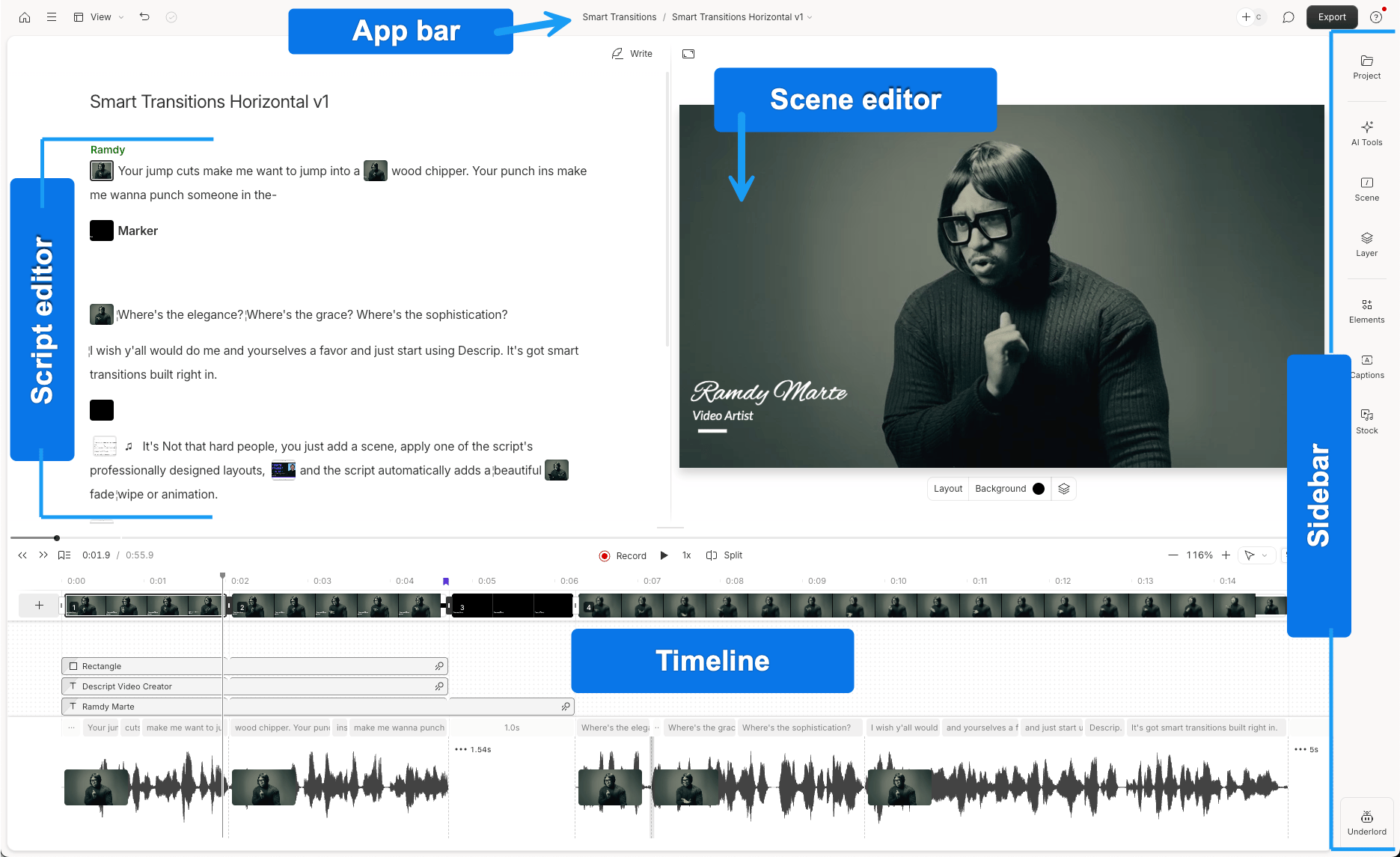
Descript's official annotated interface shows the script, scene editor and timeline. This is a general editing example.
Descript fits presenter and testimonial ads whose variations depend on spoken wording and order. Transcript search helps locate alternate hooks, while moving or deleting passages changes the accompanying media. Separate compositions keep different openings and durations editable, with timeline trims providing closer control over cut boundaries.
Underlord, its AI co-editor, supports assisted hook selection and restructuring. Its Create Clips feature generates editable clip candidates from longer recordings, with topic criteria, length preferences and layout choices. However, sources under one minute may not contain enough material for automatic selection. In those cases, manual transcript and timeline edits remain available.
Aspect-ratio settings adapt each composition to landscape, square or portrait formats. Layout and layer-positioning controls refine the framing of speakers, captions and supporting footage. Audio effects and Studio Sound help finish spoken recordings. Custom layout packs require a paid plan, making reusable branded formats part of the access cost.
Product shots and other B-roll can be added as separate layers, with their position, size and timing adjusted for each ad variation. Replace Media can also swap an existing B-roll, image or audio layer while retaining its edits and adjustments, but this control is unavailable on script tracks.
Imports and AI work use separate allowances. New recordings or uploads count toward media minutes, even when the finished ad uses only a short extract. Underlord requests use AI credits, including through MCP. Reusing an already-uploaded Media Library asset avoids another processing charge, while repeated assisted revisions still draw from the AI balance. The Hobbyist plan costs US$24 per person with monthly billing and includes ten media hours and 400 AI credits. The Creator plan costs US$35 per person monthly, with 30 media hours and 800 credits. Annual billing is cheaper.
The free plan exports watermarked 720p videos. The Hobbyist plan adds watermark-free 1080p and the Creator plan adds 4K delivery. Timeline export requires the Creator plan or above; XML omits animation, titles and audio keyframes, so an XML handoff can require rebuilding those treatments in the finishing application.
Descript suits presenter and testimonial ads whose alternative hooks and durations are easiest to shape through text. Its editable compositions support ongoing revisions, while media allowances, AI credits and timeline-export limits shape the cost and finishing route. Our invideo versus Descript comparison explores the underlying conversation-editing and handoff decisions.
Frequently asked questions
Can I start with an exported ad instead of the original editing project?
Yes. You can cut and reframe an exported video, but its titles, captions and mixed soundtrack are already combined with the picture and sound. To revise those components independently, use the original project and source media where possible. Invideo also supports compatible XML project imports with media; check the elements that carry over before developing all the versions.
How do I keep an approved offer and qualifications in shorter versions?
Identify the exact wording, required shots, offer, call to action and qualifications before requesting the cutdown. Specify which material may be shortened or removed, and retain the approved version separately. Review each finished cut for meaning, readable text and complete audio. Invideo lets you direct those scoped changes through its agent, ChatGPT or Claude and refine the same timeline manually.
Can I replace a product shot without rebuilding the rest of the ad?
Yes. Invideo Editor keeps footage, captions, graphics and audio separately editable. Its agent or a connected ChatGPT or Claude assistant can replace a selected product shot with another uploaded clip. Manual controls refine its framing and timing, while a separate timeline copy keeps the original ad available for comparison.
Can I create watermark-free ad variations without another editing subscription?
Yes. Invideo's manual editing, ordinary ChatGPT or Claude MCP editing, watermark-free video exports and editable-project exports are free. Your external assistant's subscription and usage limits apply separately; built-in-agent work and media generation use invideo credits. Canva also exports clean videos with your own or free assets, while CapCut's free route requires avoiding Pro features and materials. Check the paid assets and automated operations your versions actually use.
What is the best video editor for making ad variants at an agency?
For an agency creating editable hooks, lengths and formats from existing footage, invideo Editor is the strongest overall choice in this comparison. Its agent or connected ChatGPT or Claude can develop variations from a brief, while separate timelines keep approved versions available for review. Editors can refine product shots, captions, offer graphics, colour and sound manually, then export finished videos or editable projects with media. Kapwing is another option for teams that prioritise shared browser editing and comments. Check that each version retains the complete offer, qualifications and call to action.
Which AI tools help editors cut one ad into many versions and sizes?
Invideo Editor, Kapwing, Descript and CapCut Desktop can all help create shorter ad versions and adapt their framing. But invideo Editor is the best overall choice. Its agent or connected ChatGPT or Claude can duplicate an edit into separate timelines, try alternate openings, shorten the sequence and change aspect ratios. Footage, captions, graphics and audio remain editable for each version, with manual controls for finishing the crop and text placement. Descript suits transcript-led presenter ads; CapCut Desktop supports hands-on cutdowns and paid Auto Reframe.