Best AI Video Editors for Sound Design and Audio Mixing
October 29, 2026

Invideo Editor is the best overall choice for sound design and audio mixing: it combines agent-directed sound assembly with separate editable tracks, detailed voice processors, automation and a full manual mixer. Manual editing, ordinary ChatGPT/Claude MCP editing and exports are free; your assistant’s allowance applies separately. Built-in-agent work and generated media use credits. Resolve suits detailed Fairlight post-production, Premiere fits existing Adobe projects, Filmora offers an approachable desktop workflow, Final Cut Pro organizes Mac edits through audio roles, and Descript suits speech-led video with adjustable audio processing.
Cover: AI-generated monochrome editorial illustration of video frames, layered audio and mixing controls.
A video can look finished while its soundtrack still feels unfinished. The voice changes level between takes, music covers a quiet line, a room sounds empty after a cut, and the impact arrives just before the action. Cleaning the dialogue helps, but a complete sound pass also needs atmosphere, well-timed effects and a mix you can keep adjusting.
We compare six AI video editors for that work: invideo Editor, DaVinci Resolve, Adobe Premiere, Filmora, Final Cut Pro for Mac and Descript. Starting with an existing video cut, recorded dialogue and optional supplied music or effects, we look at cleaning recordings, building the soundtrack, refining the mix and delivering revisions. The comparison draws on current product documentation and demonstrations.
Best AI video editors for sound design and audio mixing at a glance
Tool | Cleaning and balancing dialogue | Building the soundtrack | Mixing and refining tracks | Delivering and revising |
|---|---|---|---|---|
invideo Editor | Provides EQ, de-essing, compression and level controls for shaping dialogue tone and dynamics. These controls can be adjusted manually, by the built-in agent, or by ChatGPT or Claude through free MCP editing. | Keeps ambience, music and effects on separate editable tracks, with timing and levels adjustable manually, by the built-in agent, or by ChatGPT or Claude via MCP. The agent can also source or generate missing cues. | Provides fades, volume and pan automation, ducking, buses and sends for detailed manual mixing. Agent revisions offer another way to adjust the same editable tracks. | Exports watermark-free H.264 MP4 video, audio in WAV, AAC or Opus, and editable projects in Final Cut Pro 7 XML or OpenTimelineIO. |
DaVinci Resolve | Free Dialogue Leveler evens out speech; Fairlight adds EQ and dynamics. Voice Isolation requires Studio, so AI voice separation needs a paid licence. | Fairlight combines sound-library search, effects auditioning against picture and separate tracks for ambience, Foley and music. | Detailed automation, buses and ducking support complex mixes. Fairlight Audio Assistant requires Studio, so its automated mixing pass is a paid upgrade. | Delivers finished video and audio from the free desktop suite. Studio adds processing and delivery options through a paid licence. |
Adobe Premiere | Enhance Speech provides adjustable dialogue cleanup; Essential Sound and track effects add level, EQ and dynamics control within the picture edit. | Separate timeline tracks hold effects and ambience; Remix adapts music duration to the cut, leaving the soundtrack available for further editing. | Auto Ducking creates editable gain keyframes. Generating them again overwrites manual changes, so a new pass can erase carefully refined dips. | Exports finished videos and keeps the native project editable for revisions. Desktop use requires a subscription after the trial, adding ongoing access costs for revisions. |
Filmora | AI Voice Enhancer and AI Audio Denoise clean speech; AI Vocal Remover separates vocals and background audio. EQ, normalization and level controls add manual refinement. | Separate tracks hold imported and library audio; AI Audio Stretch adapts music duration to the cut. AI generation can supply missing music and sound effects. AI music and sound effects use credits, so repeated generation draws on the included allowance. | The Audio Mixer balances levels and stereo position; ducking, keyframes and fades shape the mix. AI Mate adds supported audio edits from chat. | Exports watermark-free videos with a paid licence. Perpetual includes a one-time AI allocation, so it does not replenish generation credits each month. |
Final Cut Pro for Mac | Uses machine learning in Voice Isolation to reduce background noise around speech. EQ, loudness and noise/hum controls treat recordings; audio components allow independent microphone adjustments. | Roles and subroles organize dialogue, effects and music in audio lanes; connected clips keep sound organized alongside picture changes. | Balances audio with clip effects, volume keyframes and fades, with roles organizing the mix and audio components allowing independent adjustments. | Exports finished videos and separate role stems. This workflow requires a Mac; Windows teams need another editor or a different handoff route. |
Descript | Studio Sound uses AI to reduce speech noise and echo; Regenerate smooths English-language audio edits. Parametric/graphic EQ, compression and limiting add manual treatment. Studio Sound uses AI credits. | Separate layers hold music, effects and ambience alongside dialogue, keeping soundtrack elements independently editable. Underlord can add music and adjust levels, including through ChatGPT or Claude via MCP. These Underlord edits use Descript AI credits. | Offers volume keyframes for manual mixing and ducking to lower background audio. Ducking remains active throughout the foreground clip, so music may stay low during pauses. | Exports finished videos and editable timelines. Watermark-free video needs paid access; timeline export requires Creator or above. XML omits audio effects and keyframes, leaving mix treatments to rebuild. |
1. invideo Editor: Best overall for sound design and audio mixing

Invideo Editor’s audio workspace: separate sound clips, selected-clip controls and track mixer faders. Reused from a separate project.
Invideo Editor combines separate audio tracks, recording processors and detailed manual mixing controls in the same project as the video. Dialogue, music, effects and ambience remain independently editable, with control over each layer’s timing and balance. Cues can be aligned to the action, atmosphere can continue across cuts, and individual sounds can be revised without flattening the soundtrack. Our sound-design guide explains how these layers work together.
AI assistance adds another way to operate those editing capabilities. The built-in agent can clean recordings, source or generate supporting sound, place cues around the action and balance the soundtrack. ChatGPT or Claude can also edit for free via MCP, working with the same editable tracks and controls. Requests can target a particular sound layer or time range, with manual refinement available afterward.
The audio workspace provides detailed controls for treating recordings. Eight-band parametric EQ can target a boomy frequency range, a de-esser can soften sharp sibilants, and compression can control differences between loud and quiet phrases. Click removal and voice treatment address other recording problems. Each processor’s settings remain available for adjustment.
Clip and track levels, pan automation, fades and volume keyframes shape how sounds enter and develop. Buses group tracks for shared treatment, while sends route sound to additional processing destinations. The Ducker lowers music around dialogue, with controls for shaping the recovery between spoken passages. The music-under-dialogue guide explains that workflow.
The finished mix can be exported as watermark-free H.264 MP4 video or WAV, AAC or Opus audio. Editable-project exports in Final Cut Pro 7 XML or OpenTimelineIO support continued work in a compatible desktop editor.
A separate partner demonstration, Artificicy AI’s music edit at 02:51, shows a music layer with volume points and selected-clip level controls. Those controls remain available for further shaping after the agent’s pass.
Manual editing, ordinary ChatGPT/Claude MCP editing, watermark-free video exports and editable-project exports are free. Your external assistant’s subscription and usage limits apply separately. The built-in agent is a paid, credit-using route, and generating new images, video or audio uses invideo credits.
Invideo is our strongest overall choice for sound design and audio mixing, bringing editable sound layers, detailed audio controls and free exports into one editor. The built-in agent and free editing with ChatGPT or Claude via MCP let you operate that same audio suite through conversation, with manual control available throughout.
2. DaVinci Resolve: For detailed sound post-production in Fairlight

Official Blackmagic training screenshot from the Resolve 20 Fairlight guide, page 560: a layered soundtrack beside the mixer and picture viewer.
DaVinci Resolve is a substantial option for editors who want to finish sound and picture in one desktop application. Its Fairlight page combines detailed waveform editing, a sound library, track and bus processing, automation and metering. You can audition an effect against the picture, place a room-tone bed beneath dialogue and group related sound layers for mixing.
The free version already offers serious manual audio work, including EQ, dynamics and level automation. AI Dialogue Leveler is also free, helping control speech-level variation. Fairlight’s ducking tools can lower music from dialogue-track signals, while its mixer lets you shape track and bus balances directly. This is a credible complete mixing environment, including for an editor who never upgrades.
Voice Isolation, Music Remixer and Fairlight Audio Assistant require DaVinci Resolve Studio. Music Remixer adjusts elements within an existing song; the Audio Assistant supplies an automated mixing route. Those tools are not included in the free manual suite.
Studio is available through a paid licence rather than a mandatory recurring subscription. Blackmagic’s US storefront showed US$236, reduced from US$295, when checked on 29 October 2026. Desktop and iPad feature sets differ: the complete Fairlight workflow discussed here is the desktop route. Our Resolve free-version comparison separates the substantial free suite from paid automation.
Choose Resolve when detailed sound post-production, routing and automation are central to the project and you prefer working directly in Fairlight. Its free tools can carry a complete manual mix; Studio adds the specific assisted treatments you may want on top.
3. Adobe Premiere: For mixing within an established Premiere project

Official Adobe help screenshot: track-effect slots and adjustable parameters in the Audio Track Mixer.
Premiere lets you develop the soundtrack alongside a detailed picture edit. Enhance Speech reduces distracting background sound with a Mix Amount control for blending the processed and original dialogue. Essential Sound groups useful dialogue and music adjustments, while clip effects and the Audio Track Mixer support more deliberate EQ, dynamics and track-level treatment.
Music and effects can stay on separate timeline tracks. Remix analyzes a music track and adapts its duration to the sequence, which is useful when the edit needs a shorter musical arrangement. Auto Ducking lowers music or ambience against assigned audio types and creates gain keyframes you can edit. Track effects, sends, submixes and automation support refining the overall balance within the project.
The important revision boundary is that generating ducking keyframes again overwrites manual changes. Regeneration can replace manually refined rises and dips in the music. Local adjustments to the existing keyframes let you refine the balance while retaining the rest of that automation.
Enhance Audio in Premiere Beta separates speech, music, ambience and sound effects. Voice enhancement can run locally with Enhance Speech V1 or in the cloud with V2. The cloud V2 route uses two generative credits per minute; local V1 processing does not use generative credits.
Premiere’s desktop subscription continues after its seven-day trial. The US individual plan showed US$22.99 per month on an annual commitment billed monthly. Continued revisions therefore carry a software-access cost, even when you use supplied sound and manual mixing.
Premiere suits an existing Adobe production pipeline: you can clean speech, reshape music, mix tracks and deliver without moving the picture edit into another application.
4. Filmora: For an approachable desktop soundtrack workflow
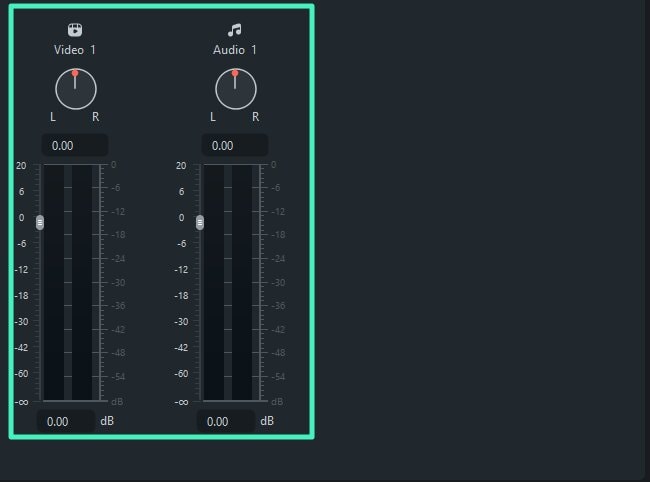
Official Filmora Windows guide detail: separate channel levels and stereo balance controls in the Audio Mixer.
Filmora brings recording cleanup, soundtrack arrangement and mixing into a complete video editor. AI Voice Enhancer and AI Audio Denoise reduce unwanted sound and improve speech clarity, with adjustable processing strength. Equalization, normalization, clip levels, fades and keyframes provide further control. The Audio Mixer puts track volume and stereo positioning together, so a voiceover and music bed can be adjusted independently.
AI Vocal Remover separates vocals and background audio into results that can be edited on tracks. AI Audio Stretch adapts existing music to a different duration, reducing the manual cutting and rearrangement needed to fit a video. Instrumental music is the recommended input; lyrical material needs review after retiming.
Its ducking control reduces competing audio around a selected foreground track. Supplied or library effects stay on the timeline for timing and fade adjustments, while AI music and sound-effect generation can provide missing assets. On Windows, Smart BGM Generation creates background music from the video's visuals, timing and mood. AI Extend offers a separate generation route for continuing music or ambience beyond the supplied recording.
AI Mate's Windows Action mode can apply supported changes such as audio denoising from conversational instructions. Guide mode explains controls and provides on-screen navigation, so some requests lead to guidance rather than an executed change. The manual timeline and audio controls remain available for refinement. Filmora therefore offers both AI sound preparation and a conventional desktop finishing workflow.
The material cost distinction is between the editing licence and the AI services. AI music and sound effects use Filmora credits, and AI Mate has its own conversation allowance. Repeated requests for new cues can therefore consume an allowance even when the finished-video export is covered. Manual mixer adjustments remain a separate part of the workflow.
The displayed Advanced plan was US$59.99 per year with automatic renewal and 1,000 AI credits each month. Perpetual is a one-time licence for the specified major version, with 1,000 AI credits once rather than a renewed monthly allocation. Ongoing watermark-free delivery normally requires a paid licence; limited new-user export offers should not be treated as a continuing free plan. Creative Assets subscriptions and content rights also need to match the music or effects you choose.
Choose Filmora for a straightforward desktop video workflow with practical cleanup, ducking, a track mixer and optional generated audio. Its paid delivery and separate AI allowances are the main budget considerations; the Filmora comparison develops those distinctions for recurring spoken-video work.
5. Final Cut Pro for Mac: For organizing sound through audio roles
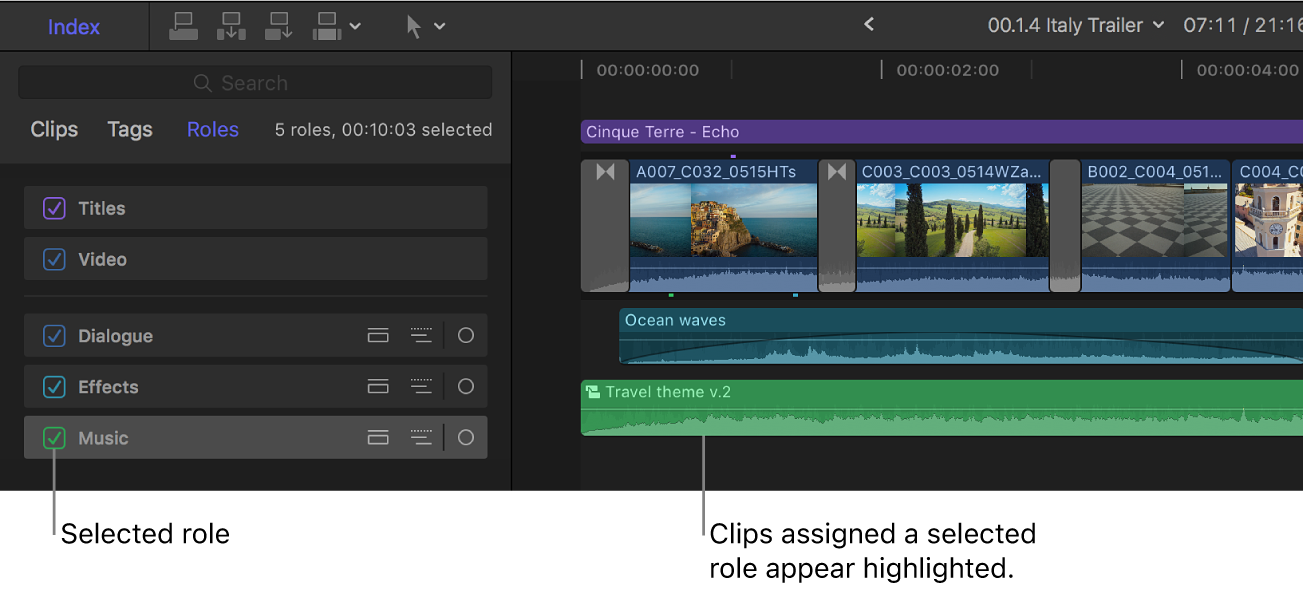
Official Apple guide screenshot: the Music role is selected, highlighting the matching audio clip. Apple’s explanatory labels are part of the source.
Final Cut Pro’s Mac workflow organizes a soundtrack through roles such as Dialogue, Music and Effects, with custom subroles for finer distinctions. Audio lanes group related material visually, while connected audio clips keep sounds arranged alongside the picture. That organization lets you focus on dialogue, location sound or music independently, with related clips grouped for easier navigation and adjustment.
Voice Isolation uses machine learning to prioritize speech and reduce background noise. Noise and hum removal, equalization and loudness controls provide further cleanup and balancing choices, and audio effects, volume keyframes and fades support detailed treatment. Expand a multichannel recording into audio components when individual microphones need separate attention. Apple applies enhancements at the component level, which matters when one source file contains several channels.
Roles also support delivery. You can export a completed video or send dialogue, music and effects as separate role stems for further audio work. Correct role assignments early in the edit make those deliverables easier to organize. This is a different way to structure a mix from keeping everything in fixed numbered tracks, with useful control for an editor comfortable with the magnetic timeline.
Final Cut Pro offers limited AI assistance for soundtrack creation and mixing. Voice Isolation helps clean speech, but arranging music and effects and refining their balance largely depends on manual editing. That makes it a weaker fit when generated audio or conversational mix revisions are a priority.
The platform requirement is the main restriction for this route: the desktop workflow requires a Mac. Final Cut Pro for iPad is a separate application with different controls; it should not be assumed to provide the Mac workflow described here. A Windows collaborator needs a planned interchange or rendered-stem handoff.
On Apple’s US page, the Mac app was US$299.99 as a one-time purchase. Apple Creator Studio also includes Final Cut Pro, at US$12.99 per month or US$129 per year after its trial, with some premium content reserved for subscribers.
Choose Final Cut Pro when you already edit on a Mac and want role-based sound organization, clip-level treatment and stem delivery within the picture edit.
6. Descript: For speech-led video with editable audio processing
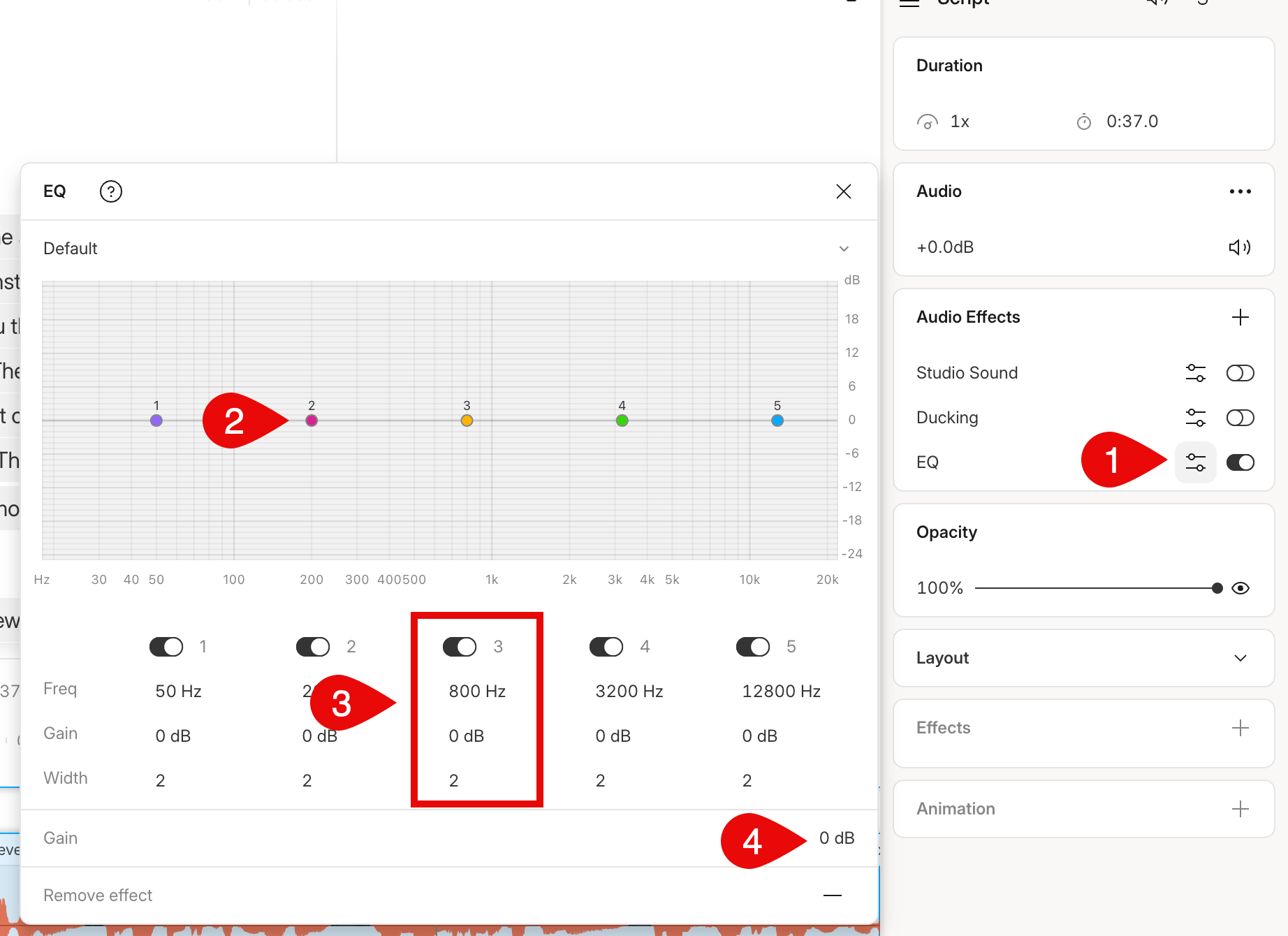
Official Descript help screenshot: adjustable five-band EQ with the source guide’s numbered annotations.
Descript combines dialogue cleanup, soundtrack layering and mix refinement in a video editor. Music, ambience and effects stay on separate editable layers. Adjustable compression, limiting, a five-band parametric EQ, a ten-band graphic EQ and creative effects provide manual treatment, while Studio Sound adds AI voice cleanup.
Regenerate can smooth abrupt audio edits by generating replacement sound from surrounding original audio. It is limited to English audio and needs original recording around the selection. It supports short repairs where that surrounding recording provides usable context.
Volume keyframes let you shape a music entrance or a local dip, and composition-level audio properties apply treatment across the combined output. Its Lower audio of other layers effect provides automatic ducking from a foreground layer. Descript is therefore a credible option for a presenter video with a supporting soundtrack, including when you want to refine voice tone and dynamics yourself.
Underlord adds conversational editing: it can apply Studio Sound, add background music and adjust levels from instructions. The Descript MCP connection lets ChatGPT or Claude request supported edits, which Underlord carries out using Descript AI credits. The connection itself has no separate fee. Audio effects and keyframes remain available for manual refinement.
The ducking effect stays active throughout the foreground clip, so music and other background layers may remain low during breaths or quiet passages. Music volume keyframes and adjustments to the foreground clips and gaps provide control over where the soundtrack comes forward.
Finishing elsewhere has a second, separate consequence. Timeline export requires Creator or above, and XML omits audio effects, audio keyframes and automatic microfades. Those treatments need rebuilding in the destination editor. Studio Sound is an exception: Descript exports processed source audio, with original and processed files balanced to represent the intensity setting. Its beta native Premiere route has a different support list, so check the particular format before planning a handoff. MCP can publish a composition with a share/download link, but does not return a rendered MP4 directly on request.
Studio Sound and Underlord requests use AI credits. Imports draw on media minutes. Watermark-free video export requires paid access. The US Hobbyist plan showed US$16 per person per month billed annually, or US$24 monthly, for watermark-free 1080p output. Creator showed US$24 billed annually or US$35 monthly and adds timeline export. Descript’s web editor works in supported Chromium browsers, alongside its desktop apps.
Choose Descript when transcript editing and voice-led production are the centre of the job, with the ducking behavior and final delivery route decided before you invest in detailed mix automation.
Frequently asked questions
Can I mix a soundtrack without paying for an editing subscription?
Yes. Invideo provides free manual audio editing, watermark-free video exports and editable-project exports. Ordinary ChatGPT or Claude MCP editing is also free of invideo editing charges, within your assistant’s separate allowance. Built-in-agent work and generated media use credits. Resolve’s free desktop edition is another substantial manual mixing option, with Dialogue Leveler included; selected AI tools require Studio.
Can I lower music if it is already mixed into the dialogue recording?
Turning down a mixed file turns down both the voice and music. Some tools, including Resolve Studio and Premiere’s Enhance Audio beta, offer separation or rebalancing treatments, but processed separation does not recover the original independent recordings. Keep separate dialogue and music sources when available, and listen for changes to the voice before accepting a repair.
Will an editable-project export preserve my whole audio mix?
Invideo exports an editable timeline and its media in Final Cut Pro 7 XML or OpenTimelineIO, so editing can continue in a compatible desktop editor. H.264 MP4 video and WAV, AAC or Opus audio are also available for reference and handoff. Preservation of individual mix settings depends on the format and receiving editor. Descript’s XML routes omit audio effects and keyframes, while Studio Sound travels as processed audio. A representative sequence with automation, fades and effects helps check the transfer before handing over the full project.
Does generating sound effects also mix them with the video?
Generation creates a sound asset. Placement, timing, fades, perspective and balance are further editing decisions. Invideo’s agent can source or generate a cue and place it on an editable track, then you can request revisions or refine it manually. Listen with the picture and the full soundtrack; a visible waveform cannot establish that the effect fits the action.
Should I normalize every track to the same level?
No. Dialogue, music, ambience and accents serve different purposes. Leveling voices can make speech more consistent, while music and effects still need their own balance and timed changes. Set the voice comfortably, build the supporting layers around it and check the exported file. A loudness target or limiter alone does not establish intelligibility or compliance with a delivery specification.
Capabilities checked through 30 October 2026. Displayed US prices checked on 29 October 2026. Region, billing term, offers and account entitlements can affect the final cost.