invideo Editor vs Filmora: Which Is Better for Editing Podcasts with AI?
October 23, 2026

invideo Editor and Filmora are two popular editors for podcasts, offering AI assistance alongside manual timeline controls for refinement. We compare how they sync cameras and microphones, assemble and tighten an episode, finish picture and sound, add captions, create promotional Shorts and export. The choice comes down to how you prefer to direct the edit and what repeated AI work and delivery cost.
Cover: AI-generated editorial illustration of a podcast recording.
invideo Editor and Filmora are two popular video editors for podcasts. Both offer AI assistance to help turn recordings into an episode and promotional Shorts, along with manual timeline controls to refine cuts, camera choices, captions and sound.
Choosing between them comes down to how you prefer to direct the edit and what continued use costs. We compare the work from syncing camera and microphone recordings to assembling the conversation, finishing the episode and delivering Shorts.
Imagine editing a discussion about AI and first jobs, with a host, founder and recruiter recorded on four cameras and three separate microphones. Let’s compare how invideo Editor and Filmora turn those recordings into a finished episode and promotional Shorts.
invideo Editor vs Filmora at a glance
invideo Editor combines a built-in agent with a professional, frame-accurate multitrack editing suite. You can also connect ChatGPT or Claude through its free MCP connection to direct ordinary edits without an additional invideo editing charge.
Filmora brings native multicam editing, text-based cuts, AI Mate, audio and colour tools, editable captions and Smart Short Clips into one desktop editor. Some AI operations draw on credits, and ongoing watermark-free delivery normally requires a paid licence.
Editing job | invideo Editor | Filmora |
|---|---|---|
Importing and syncing | A strong fit for delegating camera and microphone alignment from a source brief using ChatGPT or Claude via MCP, with separate tracks retained for finishing. | Offers native multicam sync and audio syncing through AI Mate. The separate Windows Auto Synchronization command handles one video clip and one microphone recording per run, so this route involves repeated setup for several microphones. |
Assembling and tightening | Lets you assemble a cut while removing silences, false starts and unusable takes with accurate camera switches based on instructions given through ChatGPT or Claude MCP with full timeline controls for refining the rhythm. | Convenient for transcript cuts and live angle switching, but AI Text-Based Editing uses credits. AI Mate also supports conversational edits within its allowances. |
Finishing picture and sound | Provides EQ, denoise, compression, colour correction, titles and keyframes, with agent assistance and full manual control. Ordinary edits through ChatGPT or Claude via MCP add no invideo editing charge. | Provides EQ, denoise, colour and keyframes, plus AI Mate assistance, but conversational use has daily or monthly allowances on the displayed plans. |
Adding captions | Offers editable transcription and caption styling through ordinary MCP without invideo credits, making long episodes and repeated corrections more accessible. | Offers editable captions and dynamic styling, but Speech-to-Text consumes 4 credits per processed minute, drawing on the allowance for each episode. |
Making promotional Shorts | A strong fit for developing selected stories as separate timelines, with repeated MCP revisions to openings, framing, captions and sound at no additional invideo editing charge. | Convenient for automatic candidates, editable social treatments and integrated distribution, but Smart Short Clips processing uses 6 credits per minute. |
Exporting and ongoing costs | Offers free manual editing and watermark-free exports, with no additional invideo charge for ordinary MCP edits. Built-in-agent work and generation use credits. | Paid licences support ongoing watermark-free delivery, while relevant AI services draw on separate allowances. A clean-export licence does not make those services unlimited. |
1. Importing and syncing the footage
While editing a podcast, the host’s close-up, two guest angles, wide shots and microphone recordings must agree on the same moment before you start shortening the conversation. Here’s how both tools prepare those sources for an edit:
In Filmora, native multicam synchronization brings the camera recordings into one sequence. The Windows workflow offers audio waveform, first-frame and marker methods; Mac choices vary with the media-bin or timeline route. This gives an editor explicit control over the sync setup and a dedicated viewer for switching angles once the sources are aligned.
The drawback appears in its separate-audio Auto Synchronization command on Windows: it accepts one video/audio pair at a time, so aligning several microphone recordings through that route means repeating the operation. This limit belongs to that command, not Filmora’s native multicam feature. AI Mate also provides an Audio Sync action, giving Filmora a conversational route as well.
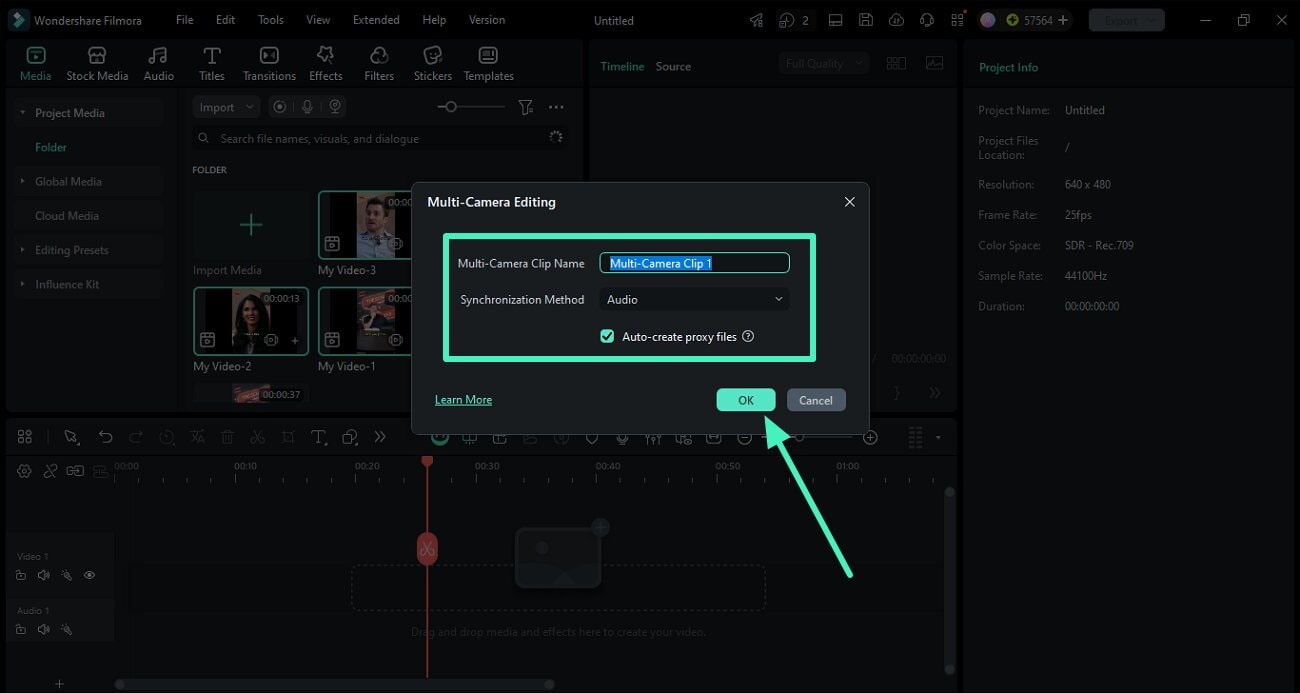
Filmora’s official Windows guide image shows the multicamera clip name and audio-sync selection. Source: Wondershare Filmora.
In invideo Editor, source preparation can be delegated through a brief describing the cameras and microphones. For a podcast, the brief should identify Camera A as the host, B as the founder, C as the recruiter and D as the wide shot, with a separate microphone for each speaker. The assistant can align the recordings while retaining separate audio tracks for finishing. This is available through the built-in agent or through ChatGPT or Claude via MCP for free.
The advantage is being able to describe the source relationships and delegate the preparation, rather than work through the native setup for each operation. Synchronization remains distinct from the assembled camera cut, and either editor needs an alignment review before content edits. Our multicam podcast workflow develops that distinction.
Verdict: invideo is the stronger fit for delegating the preparation of several camera and microphone sources from a brief. Filmora is convenient for editors who prefer its native multicam controls, but its Windows selected-pair audio-sync route adds repeated setup when several microphone recordings need alignment.
2. Assembling and tightening the episode
The useful conversation may be scattered across repeated answers, tangents and long gaps. You want a clear episode that preserves qualifications, meaningful pauses and reactions. Let’s compare how the two editors select passages, arrange the conversation and choose the cameras:
In Filmora, the transcript is an editing surface: searching and deleting words removes the corresponding passage, and silent clips can be removed before the result reaches the timeline. This is convenient when the editor prefers choosing the episode’s content by reading the conversation. Its separate Silence Detection tool can also shorten gaps.
But deleting words or silent gaps does not by itself create a well-paced episode. The remaining joins, qualifications and reactions still need editorial judgment. The multicam viewer gives direct control over live angle choices, while AI Mate’s Action Mode adds executable conversational edits.
The recurring cost is a clearer difference: AI Text-Based Editing draws on Filmora’s credits, and AI Mate has its own conversation allowance and relevant task charges. Repeated AI-assisted episode work therefore depends on the services and allowances used. A transcript deletion also needs review across the required camera and microphone tracks.
In invideo Editor, the story and camera treatment can be developed together through editorial direction. For a podcast, the assistant can build an opening around the founder’s hiring dilemma, bring forward the recruiter’s counterargument, remove repeated explanations and retain the pause before that response. Camera choices can follow the same brief, including complete answers and wide shots for shared reactions.
The result remains on a fully editable timeline, with control over individual cuts, reactions and camera switches. invideo’s advantage is that repeated ordinary edits through MCP add no invideo editing charge, within the external assistant’s subscription and usage allowance. The built-in agent remains a separate credit-using option.

Generated illustration of a scoped ChatGPT revision request beside the fictional podcast timeline.
In a separate example, John The Video Guy’s built-in-agent walkthrough at 04:50 shows an assembled camera cut. The visible agent note says some switches may land a sentence early or late, making the review pass part of the workflow.
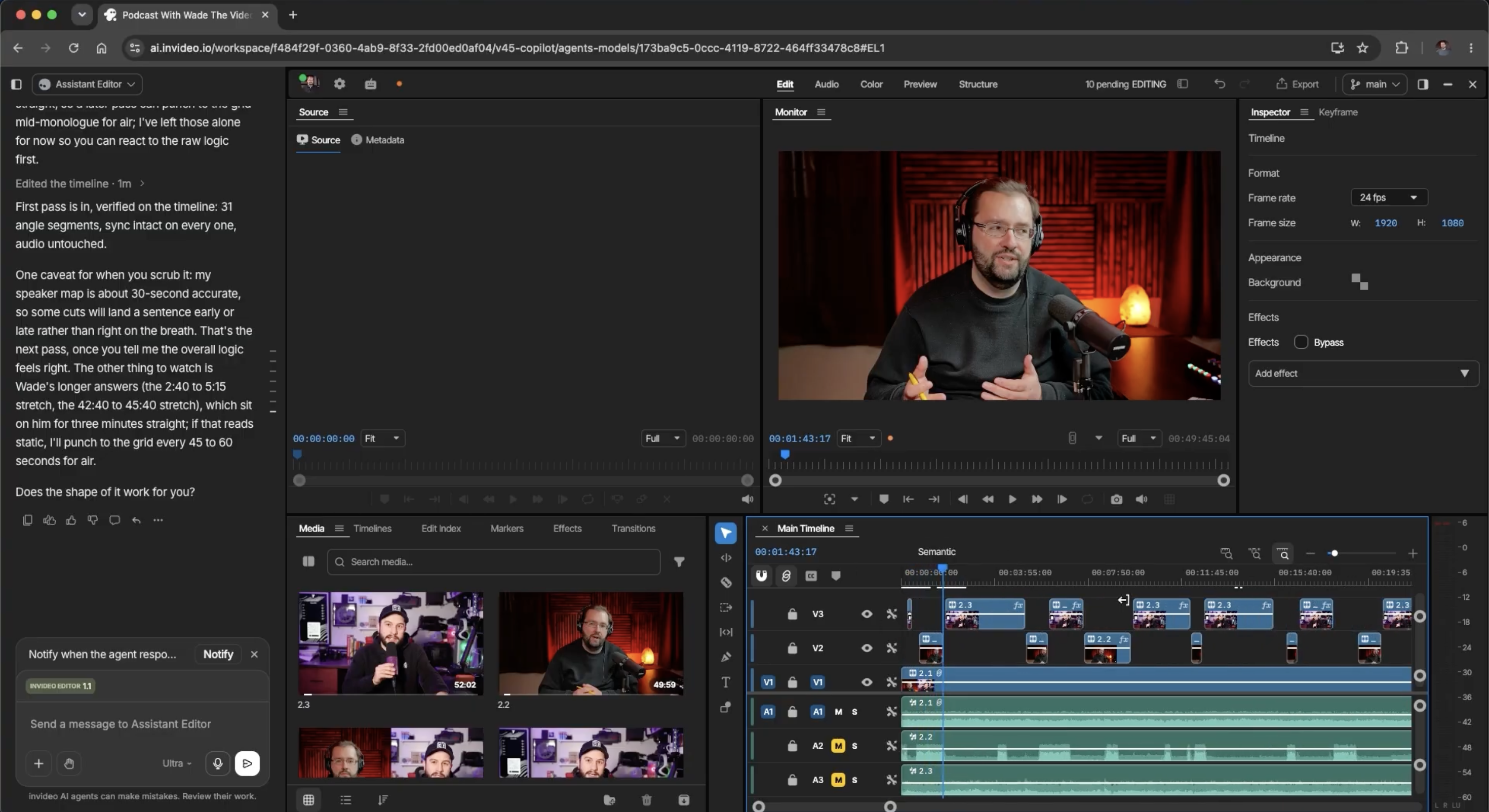
Capture from John’s separate podcast demonstration: an editable camera cut assembled through invideo’s built-in agent.
Both editors still need a review of meaning, camera choices and audio alignment after a passage is removed. Our guide to applying feedback through Claude or ChatGPT develops the targeted revision approach.
Verdict: invideo has the advantage for assembling the episode through its free MCP connection with ChatGPT or Claude, combining editorial direction with frame-accurate timeline control over cuts, camera switches and pauses. Filmora offers native multicam assembly and AI Mate assistance, with conversational editing subject to its allowances.
3. Finish the picture and sound
In a podcast, three microphones can need different treatments, and four cameras can disagree on exposure or colour. The music should support the opening without masking the first answer. Below, we compare the tools for balancing voices, matching cameras and shaping the music:
In Filmora, EQ, denoise, levels, fades and keyframes provide substantial control over the voices and music. Colour matching, titles and lower thirds cover the picture and speaker identification. AI Mate can execute sound, noise-reduction and colour instructions as well, so Filmora supports both manual finishing and conversational assistance.
The trade-off concerns repeated agent-assisted work: AI Mate includes 15 free uses a day on Free and 500 a month on the displayed paid plans, with relevant AI task charges also possible. Those allowances can accommodate some finishing requests, but they are not unlimited access to every AI service. Manual EQ, colour adjustments and keyframes remain separate.
In invideo Editor, you can direct picture and sound edits through ChatGPT or Claude using its free MCP connection. Its professional audio workspace, colour tools and title controls are also fully available for manual editing. EQ, compression, de-essing, click removal, level automation and routing allow each microphone to receive its own treatment. For this podcast, that means balancing the founder against the host, softening a harsh guest microphone and matching the four camera angles without giving up direct control over the result.
The opening music can also be shaped around the conversation: lower under speech, higher through the opening gap and faded before the main discussion. These ordinary MCP audio-cleanup and timeline adjustments do not use invideo credits. That gives invideo a cost advantage for repeated finishing requests on existing recordings; generating new music or sound still uses credits.

Published illustration from a separate product-video project: dialogue, music and effects stay on separate tracks, with an editable volume envelope and mixer.
Verdict: invideo is the stronger fit for repeated finishing requests through free ordinary MCP, backed by a full manual editing suite. Filmora remains capable for detailed sound and picture work, but its conversational assistance operates within AI Mate’s allowances and relevant service charges.
4. Add and refine captions
A caption should preserve the speaker’s meaning, spell their name correctly and remain readable when the video is watched on a phone. Here’s how both tools handle transcription, corrections and appearance:
In Filmora, Speech-to-Text produces editable captions, with text corrections and appearance changes that can be applied across the video. Dynamic Captions adds active-word and keyword treatments, animations and emphasis. This is convenient for a show with a repeatable caption style.
The drawback for a recurring show is the transcription allowance: Speech-to-Text consumes 4 credits per processed minute, or 240 credits for 60 minutes. Caption creation therefore draws on the AI budget for each episode, even when the styling is already settled. AI Text-Based Editing is a separate credit-paid feature.
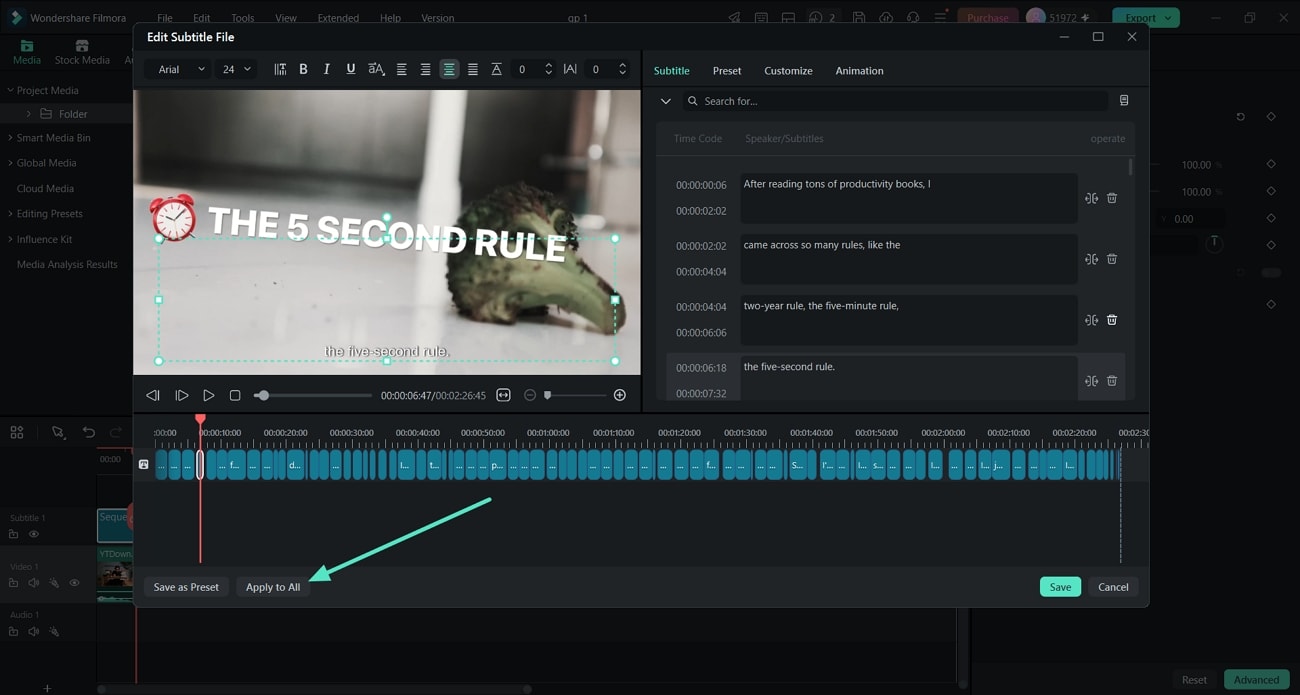
Official Filmora guide image showing caption-editing settings. Source: Wondershare Filmora.
In invideo Editor, ordinary MCP transcription and caption work do not consume invideo credits. ChatGPT or Claude can handle the transcription and styling direction, while timeline controls retain precise access to the wording, timing and placement. This makes repeated corrections to names, terminology and portrait line breaks accessible without an additional invideo editing charge. The built-in agent is a separate credit-using route.
Both workflows still need a final accuracy and layout review, particularly when a landscape episode becomes a portrait Short.
Verdict: invideo has the advantage for long episodes and repeated caption revisions using ChatGPT or Claude via MCP without incurring additional credit charges. Filmora offers useful dynamic styling and editable captions, but transcription consumes credits at each episode’s processed length.
5. Create promotional Shorts
A self-contained Short needs an opening that makes sense to a new viewer, enough explanation to support it and a satisfying ending. Let’s see how the two editors find candidates and develop them into finished promos:
In Filmora, the Smart Short Clips feature identifies candidate moments and offers duration, theme and aspect-ratio controls. The results remain editable, including transcripts, captions, text styling, templates, stickers and framing layouts. Integrated social uploading and scheduling make this convenient when the main need is a repeatable clipping and distribution workflow.
The cost follows the material processed: the Smart Short Clips feature uses 6 credits per minute, so a 60-minute run uses 360 credits at the listed rate. This can take a meaningful part of a recurring show’s allowance before optional generated music or other AI services are added.
In invideo Editor, the assistant can suggest stories and the source passages supporting them, then develop chosen ideas on separate cutdown timelines. The careers discussion might become “Do Juniors Still Matter?”, “The Hiring Catch-22” and “Where New Careers Start”, with each promo retaining its own editable structure.
The advantage is the cost of developing those individual edits. Openings, framing, captions and sound can be revised through an MCP connection to Claude or ChatGPT without incurring any additional invideo editing charge. A request can bring the recruiter’s practical advice forward in the third promo while preserving the full episode and other versions, with full manual controls available for the crop and cut. Generated media remains credit-using.

Generated illustration: the fictional “AI and the First Job” episode and three separately named promos, with four camera sources and three microphone tracks.
Our long-video-to-Shorts guide develops that distinction between candidate passages and individual cuts. Both editors’ finished Shorts still need review at phone size, including camera exchanges and caption changes.
Verdict: invideo is the stronger fit for developing and repeatedly revising selected promo stories through an MCP connection to Claude or ChatGPT without incurring any additional invideo editing charge. Filmora is convenient for automatic candidates and integrated distribution, but Smart Short Clips processing draws on credits for the source minutes used.
6. Export and compare ongoing costs
A weekly show needs repeatable delivery and enough AI allowance for the episodes you publish. Here’s how the editing licence and AI allowances affect an episode-and-Shorts workflow:
In Filmora, paid licences include watermark-free exports, including 4K on the displayed plans. Routine trial exports carry a watermark. Wondershare also offers a one-time new-user redemption with a limited use window, so a free clean export is possible under that offer; it is not an ongoing free delivery plan.
The Advanced plan displayed US$59.99 for a year on 23 October 2026, with automatic renewal and 1,000 AI credits per month. The meaningful distinction is between the editing licence and the AI allowance: regular allocations are zero on Free or Basic, 1,000 monthly on Advanced and 1,000 once on Perpetual. A perpetual licence therefore does not supply a fresh allowance each month. Platform, renewal terms, bonuses and any Creative Assets add-on can change the final comparison.
For a recurring podcast, the source minutes sent to transcription and clipping determine how far the relevant allowance goes. The examples above describe individual service charges, not a fixed combined episode price. Qualifying unlimited-credit subscribers also have normal-mode rights after high-speed credits run out, but those are separate from ordinary Free or Basic allowances.
In invideo Editor, manual editing and watermark-free video exports are free. Ordinary editing through ChatGPT or Claude via MCP is also free of an additional invideo editing charge, including transcription, captions and audio cleanup. Your assistant’s subscription and usage limits apply separately. Work assigned to invideo’s built-in agent and generating new images, video or audio use invideo credits, including generation requested through MCP.
Finished-video exports cover the episode and its Shorts, while editable-project exports provide a route for continued work in another editor. The receiving application and the elements that need to carry over remain separate handoff considerations. The cost advantage here is finishing and delivering the edit without buying another editing licence.
Verdict: invideo is the better fit when you want ongoing manual editing, ordinary MCP assistance and clean delivery without buying another editing licence. Filmora earns its cost when its desktop multicam, transcript, caption and social workflow suits your show, but the export licence and relevant AI allowances remain separate budget questions.
Which should you choose?
Go with invideo Editor if you want to direct the podcast’s story, camera choices, pacing, captions and sound through an assistant while retaining precise manual control. Its free MCP connection lets Claude or ChatGPT edit and revise your existing footage without additional invideo editing charges. Free watermark-free exports also cover the finished episode and promos.
Go with Filmora if you value its native multicam viewer, dynamic captions and integrated social distribution. Its main drawbacks are the paid licence normally required for ongoing watermark-free exports and the separate credits used for transcription and the Smart Short Clips feature. Longer episodes use more of those credits, while AI Mate’s conversational editing has its own usage allowances.
Frequently asked questions
Do I need ChatGPT or Claude to use invideo Editor?
No. You can edit manually for free or use the built-in agent with invideo credits. ChatGPT and Claude provide an optional route for ordinary editing through the free MCP connection, within the assistant’s own subscription and usage limits.
Can I keep editing after an AI allowance runs out?
Both editors provide manual timeline controls. In Filmora, AI-service access depends on your remaining credits and account rights, while ongoing watermark-free delivery still depends on your licence. invideo’s ordinary MCP route uses your external assistant’s allowance; manual editing remains available when that allowance is exhausted.
Should I remove every silence from a podcast?
No. Keep pauses that give an answer weight, allow a reaction or make a speaker’s meaning clear. Use automatic silence removal as a starting point, then review the joins and restore breathing room where needed.
Can I use one caption layout for the episode and every Short?
Use the same visual identity, then check each format separately. A landscape caption can cover a speaker or fall outside a comfortable reading area after portrait reframing. Correct the line breaks, placement and timing for each final version.