Best AI Video Editors for Making Wedding and Event Highlights in 2026
October 30, 2026

Invideo is the best overall choice for editing and finishing in one project, with precise timeline, colour and audio controls. Free ordinary editing through ChatGPT or Claude via MCP adds AI assistance with full manual control. Wedit needs another editor for detailed finishing. Resolve’s key AI tools require Studio, Premiere needs a subscription, and Final Cut Pro is Apple-only. Filmora needs a paid licence for watermark-free exports, with separate AI allowances.
Wedding and event footage can span several cameras, separate audio recordings and hours of material. A useful editor helps turn that material into a shorter film while keeping shot choices, timing, picture and sound adjustable through finishing and client revisions.
To find the best editor for making wedding and event highlights, we compared invideo Editor, Wedit, DaVinci Resolve, Adobe Premiere, Final Cut Pro and Filmora across four stages: finding moments and assembling; shaping music and dialogue; finishing picture, sound, graphics and captions; and revising and delivering. For each editor, we looked at the core tools, the role of AI assistance, the manual control available and the limits that affect completing the highlight.
Top AI video editors for wedding & event highlights at a glance
Tool | Finding moments and assembling | Shaping music and dialogue | Finishing picture, sound, graphics and captions | Revising and delivering |
|---|---|---|---|---|
invideo Editor | AI-assisted footage selection and assembly bring relevant shots and dialogue into an editable highlight, with full manual timeline control and free editing through ChatGPT or Claude via MCP. | You can arrange music, edit dialogue and balance the soundtrack with AI assistance, including beat syncing and ducking. Separate tracks and frame-accurate trims keep pacing and levels manually adjustable. | You can use the built-in agent or ChatGPT/Claude via MCP to correct colour, apply a reference look, clean up dialogue and add titles, graphics and captions. Colour wheels, curves, scopes, EQ, mixing and keyframe controls keep the finish manually adjustable. | Scoped revisions and separate cutdown timelines keep changes editable. Free delivery includes watermark-free videos and editable-project exports with media. |
Wedit | Wedding sections, favourite-shot selection and replaceable choices build a structured highlight. The shot board keeps selected footage open to review and revision. | Supplied songs and section lengths shape the film’s pace. Detailed music and dialogue finishing requires another editor and the original media. | Editable handoffs carry selected clips and timing into Premiere, Resolve or Final Cut for grading, mixing, custom graphics and captions. Original media and checks of the imported sequence remain necessary. | Video and editable-timeline exports support delivery and further finishing, with per-wedding and monthly purchase options. Vertical reels and portrait delivery require another editor. |
DaVinci Resolve | Media bins, markers and multicam editing help in footage selection and shaping camera choices. IntelliSearch and transcription add AI-assisted discovery, but require the paid Studio edition. | Precise trims, retiming and Fairlight shape music and speech. AI features such as Music Editor and Show Music Beats require Studio; only manual music editing is available in the free version. | Grading, Auto Color and Shot Matching align colour and exposure while Fairlight and Dialogue Leveler refine sound. Fusion titles and manual subtitles add graphics and captions in the free version, with Studio needed for Voice Isolation, automatic captions and AI Animated Subtitles. | Native projects preserve the edit for revisions, with free exports up to UHD 60 fps in supported formats. Higher resolutions or frame rates require Studio. |
Adobe Premiere | Multicam and transcript editing support assembly, aided by Media Intelligence’s AI search. Visual search is English-only, and Adobe discourages client work in its separate AI Assistant beta. | Precise audio trims, editable ducking and AI-powered Remix shape music and speech. Remix does not analyze lyrics, so vocal tracks need review for lyrical continuity. | Lumetri helps match colour and exposure while audio effects shape the mix. Enhance Speech cleans up dialogue, excluding multichannel audio and nested sequences. Titles, graphic templates and keyframes add names, branding and animation alongside editable Speech-to-Text captions. | Editable timelines and integrated review support client revisions, while Auto Reframe and export presets prepare landscape and vertical deliverables. Continued desktop editing requires a subscription, including for later client changes. |
Final Cut Pro | The Magnetic Timeline and multicam tools support assembly and camera choices. Visual Search and Transcript Search add AI-assisted discovery, but require Apple silicon on Mac and are unavailable on Intel Macs. | Precise audio trims and level controls shape music and speech. AI-assisted Beat Detection provides an editable grid for manual cut timing. | Colour controls help match colour and exposure across shots, while Voice Isolation and audio effects refine sound. Customisable text and graphics let you add names and branding alongside editable captions, with Generate Captions automating caption creation on Apple silicon Macs for U.S. English only. | Finished files and FCPXML support delivery and editable handoff. Mac access is available through a one-time purchase or an Apple Creator Studio subscription; there is no Windows version. |
Filmora | AI transcription makes dialogue searchable and editable as text. You select and order the initial footage and choose which spoken passages to keep. | AI Auto Beat Sync arranges clips around music in an editable timeline, with manual control over timing and mixing. AI Mate’s Action Mode executes supported edits from instructions, subject to conversation and relevant AI-service allowances. | Colour matching, wheels and scopes align colour and exposure while EQ and denoise refine sound. Customisable titles, graphics and keyframes let you add names and branding alongside editable Speech-to-Text captions. Caption generation uses AI credits, while some premium graphics need a separate Creative Assets subscription. | Native projects retain revisions and paid licences include clean exports. Routine free exports carry a watermark, making ongoing clean delivery a paid step. |
1. invideo Editor: Best overall for wedding and event highlights

invideo Editor connects finding the material, building the highlight and finishing it in one editable project. Its built-in agent can search recordings for visual actions, people and spoken ideas, select source ranges and assemble the film around your direction. Connecting ChatGPT or Claude through MCP offers another way to carry out those ordinary edits for free, alongside the full manual editing suite.
Frame-accurate trims and adjustable clip durations help fit selected event footage into the required highlight length. Access to the original footage lets selections include complete actions or spoken passages, while separate picture and audio tracks allow visual pacing to change independently of dialogue. Gizmo Journal’s wedding-film demonstration at 02:33 shows the separate picture and sound layers.
The agent can arrange supplied music, time picture edits to musical cues and balance the track around speech. Fades and volume automation keep transitions and level changes manually adjustable. A reference film can guide pacing, sequencing and treatment when a client has a particular style in mind.
Colour wheels, curves, selective controls and scopes help match colour and exposure across footage from different cameras and lighting conditions, while EQ, compression, de-essing and noise cleanup refine dialogue and ambience. The same timeline supports editable titles and graphic layers for couple names, dates, speaker labels and event branding, alongside captions for included speech. The built-in agent or ChatGPT/Claude via MCP can assist with these colour, audio and on-screen adjustments, with manual control over wording, placement, styling and keyframe timing.
Later client revisions can target particular clips, passages or layers while retaining approved parts of the film. The assistant can continue from manual changes on the same timeline. Separate timelines support shorter or portrait versions, with framing and text adjusted for each format.
Invideo is the best overall choice for wedding and event highlights because of its precise timeline, colour and audio controls that cover editing and finishing in one project with watermark-free video and editable-project exports. AI assistance brings those capabilities into an assisted workflow, with free ordinary editing through ChatGPT or Claude via MCP and full manual control throughout.
2. Wedit

Wedit builds a structured wedding highlight around supplied footage, songs and section lengths. Favourite-shot selection guides the assembly, while the shot board keeps its choices open to review, replacement and removal before export. These controls help refine the initial selection without starting the assembly again.
Supplied songs and section lengths establish the film’s broad pace, while an editable handoff carries selected clips and timing into Premiere Pro, Final Cut Pro or Resolve for detailed trimming, grading and mixing. That finishing editor also provides the tools for custom names, dates, speaker labels and event branding, alongside captions for included speech.
Wedit processes lightweight proxies in the cloud while the originals remain on your storage. The app needs to remain open until proxy upload finishes, and turnaround varies with the footage, connection and processing workload. Those originals must remain available for the finishing workflow, and moving or renaming them can create relinking work. Imported sequences also need checking for timing, audio, slow motion and transitions before delivery.
Highlights costs US$119 per wedding, while Full movie costs US$89. The All access launch offer provides unlimited weddings for US$200 per month through 30 November 2026. Vertical reels remain forthcoming, so portrait delivery needs another editor. Wedit supports Apple silicon Macs running macOS 13 or later and 64-bit Windows 10 or 11 PCs.
Wedit suits wedding filmmakers who want section-based assembly and revisable shot choices before completing detailed finishing in their usual editor. Its editable handoff makes that continuation practical, with original-media management and import checks remaining part of the workflow.
3. DaVinci Resolve
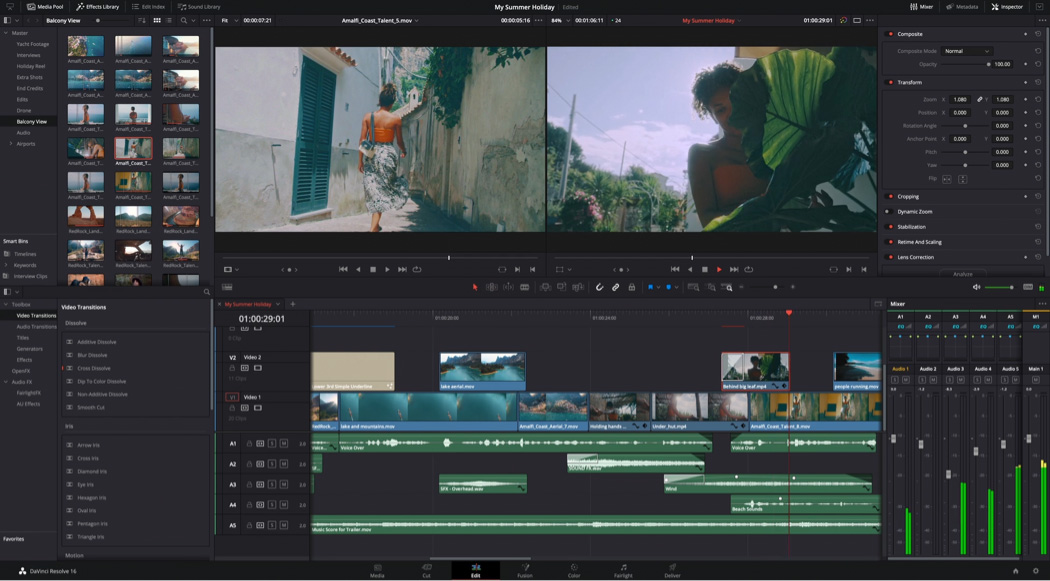
DaVinci Resolve connects media organization, timeline editing and finishing in one desktop project. Bins, markers and source-range selections support footage review, while multicam editing provides access to alternative camera angles. Precise trims, retiming and separate timelines support both a short highlight and longer event deliverables. IntelliSearch and transcription add AI-assisted discovery, but require Studio.
Some camera formats may need conversion or Studio before editing. On Windows, free H.264 support is limited to 8-bit profiles.
For music and dialogue, Fairlight provides EQ, dynamics, automation and detailed mixing controls. These tools help balance speech against music and manage changes in level across recordings. Music Editor and Show Music Beats require Studio; the free version retains manual music editing and includes AI Dialogue Leveler for spoken passages.
Auto Color and Shot Matching provide starting corrections, while node-based grades, curves, qualifiers, windows and scopes offer detailed control over colour and exposure differences between camera recordings. Fusion titles and graphics extend the finish to name/date cards, speaker labels and event branding, with manual subtitle tracks for included speech. The Studio edition is needed to expand these audio and caption capabilities with Voice Isolation and Fairlight Audio Assistant for assisted cleanup and mixing, plus automatic caption creation and AI Animated Subtitles. Studio also includes the MCP-compatible AI Assistants integration for connected assistant workflows.
Native projects preserve timelines for later revisions and handoff. The free version exports up to UHD 3840 × 2160 at 60 fps in supported formats; higher resolutions or frame rates require Studio. Studio is currently US$236 in the US promotion, reduced from US$295, without a mandatory subscription.
Resolve suits editors who need detailed camera matching, selective grading and control over the final mix. Its free toolset can complete the highlight, while Studio adds assisted discovery, music preparation and further audio processing.
4. Adobe Premiere

Source Monitor selections, multicam editing and transcript-based assembly bring selected shots and dialogue into a sequence. Media Intelligence adds AI-powered visual and dialogue search. Visual queries are English-only, and small details or fast action can need closer source review.
The separate AI Assistant beta can organize footage and create rough assemblies through instructions, but Adobe does not recommend it for client work. That restriction concerns the beta Assistant; it does not apply to Premiere’s established editing tools.
Precise audio trims and editable ducking shape music and speech, while AI-powered Remix adjusts a track to a target length. Remix does not analyze lyrics, so vocal tracks need review for lyrical continuity after rearrangement.
Lumetri colour helps align colour and exposure across camera footage, while audio effects shape the mix. AI-powered Enhance Speech cleans up dialogue in mono and stereo clips, but does not support multichannel audio or nested sequences. Titles, shapes and Motion Graphics Templates keep names, dates, speaker labels and event graphics editable, with keyframes controlling animation. Speech-to-Text creates a caption track for included dialogue, with control over wording, timing and styling.
Editable timelines and integrated review support client revisions, while Auto Reframe and export presets prepare landscape and vertical deliverables. Fast movement or several points of interest can require manual keyframe corrections after reframing. Continued desktop editing requires a subscription, including for later client changes. The individual plan costs US$22.99 per month on an annual commitment billed monthly.
Premiere suits studios whose collaborators and review process already use Adobe. Source selection, transcript editing, soundtrack tools and integrated finishing support the highlight workflow, while review and reframing tools help carry it through revisions and multiple delivery formats.
5. Final Cut Pro
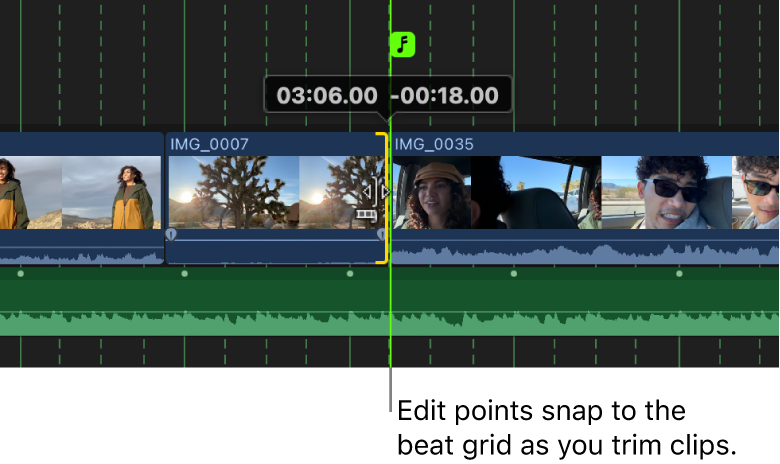
The Magnetic Timeline, connected clips and multicam tools support assembly and camera choices while keeping associated picture and sound together during revisions. Visual Search and Transcript Search add AI-assisted discovery, but require Apple silicon on Mac and are unavailable on Intel Macs.
On iPad, Montage Maker provides a separate automatic assembly route, selecting visual highlights from chosen media and arranging them around music. The result remains editable, and the project can continue on Mac for deeper finishing. Montage Maker is an iPad feature, so that workflow requires a device handoff for Mac finishing.
Precise audio trims, fades and level controls shape music and speech. AI-assisted Beat Detection displays song sections, bars and beats as a grid, helping place cuts and shorten music around its structure. Shot changes and longer holds remain editorial decisions.
Colour wheels, curves and LUTs help match colour and exposure across camera footage, with Enhance Light and Color offering automatic starting adjustments. Voice Isolation and audio effects refine dialogue and ambience, while titles and generators add editable names, dates and event graphics. Editable subtitle clips provide control over caption wording, styling, animation and placement. The Generate Captions feature enables automatic creation of these captions on Apple silicon Macs for U.S. English only.
Finished files and FCPXML support delivery and editable handoff. The standalone Mac app costs US$299.99 as a one-time purchase, while Apple Creator Studio costs US$12.99 per month or US$129 per year. A subscription is optional for the Mac editor; there is no Windows version.
Final Cut Pro suits Apple-based editors who want flexible timeline assembly, music-guided cut timing and integrated finishing. Search adds assistance on supported Macs, while iPad Montage Maker offers an additional automatic starting point.
6. Filmora
Filmora combines manual footage selection with AI transcription that makes dialogue searchable and editable as text. Multicam editing supports camera choices, while the editor determines the initial footage order and which spoken passages belong in the highlight. AI Text-Based Editing uses credits, so its allowance matters when working through longer recordings.
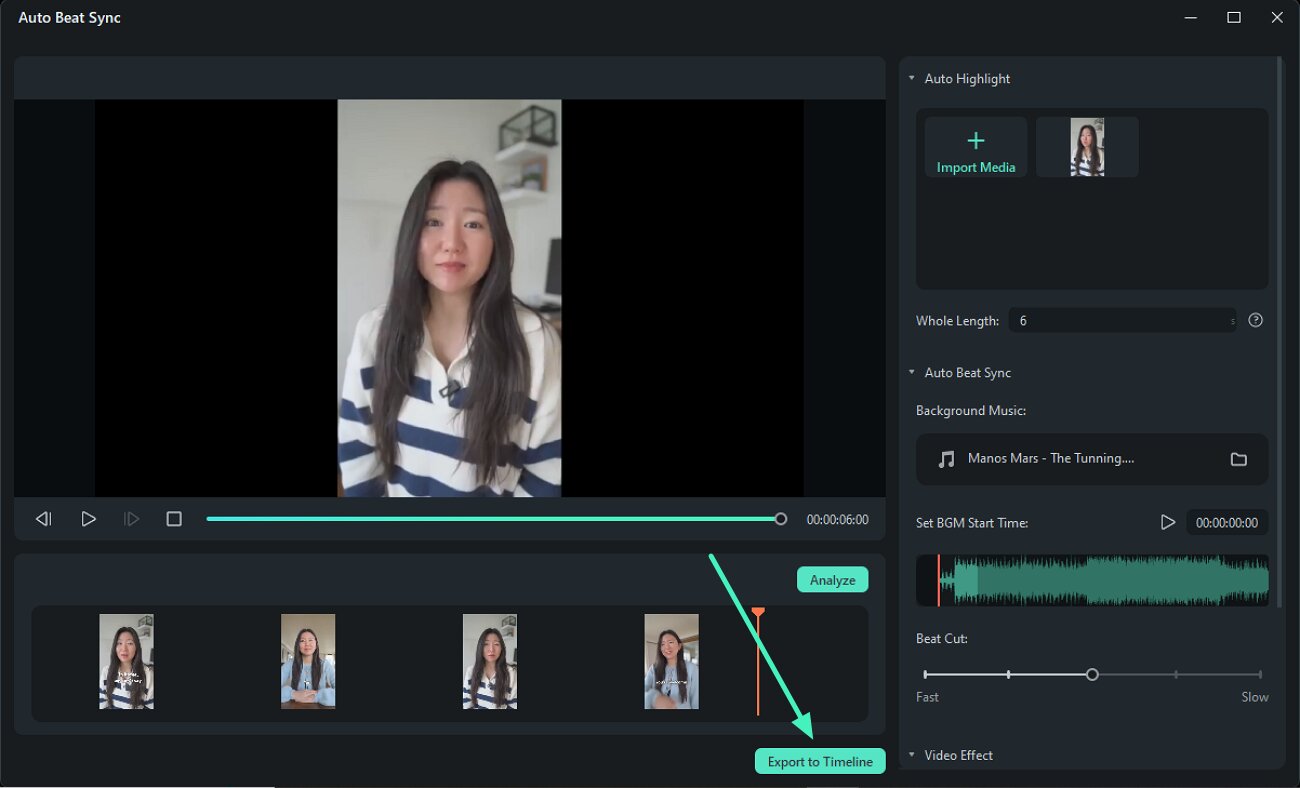
AI Auto Beat Sync arranges supplied clips around a chosen music track and duration, then sends the result to an editable timeline. Manual timing and mixing controls allow revisions to cut points, shot lengths and the soundtrack. The arrangement still depends on the supplied selections and order, and complete actions or spoken passages need review.
Colour matching, wheels and scopes help match colour and exposure across footage from different cameras, while EQ, denoise and ducking refine dialogue and balance it against music. For names, dates and event branding, customisable title presets, graphic overlays and keyframes keep the text, placement and animation editable. Speech-to-Text uses AI credits to generate captions, with manual control over their wording, timing and styling. AI Mate’s Action Mode can also apply supported timeline changes from instructions, within its conversation and relevant AI-service allowances.
Native projects preserve the edit for later revisions. Paid licences include watermark-free exports, while routine free exports carry a watermark. Listed US offers include Basic at US$49.99 per year, Advanced at US$59.99 per year with 1,000 AI credits monthly, and Perpetual at US$79.99 for the licensed major version with 1,000 credits supplied once. Prices should be checked for the intended platform. Some premium effects, titles, transitions and audio require a separate Creative Assets subscription.
AI-service access is separate from clean-export licensing. Paid plans list 500 AI Mate conversations per month, while Speech-to-Text uses four credits per processed minute. Eligible normal-mode AI entitlements can allow continued use after high-speed credits run out.
Filmora suits editors who want an automatic music-led starting point followed by desktop timing, colour and sound refinement. AI Mate adds assistance with supported changes, while export licensing and the AI services used determine the ongoing cost.
Frequently asked questions
Can I create both a short highlight and a full ceremony or event film?
Separate timelines in invideo Editor let you keep a short highlight and a longer ceremony or event edit in the same project. Each version can have its own selections, pacing and soundtrack.
Can I edit and deliver a highlight video without an editing subscription?
Yes. Invideo Editor lets you build the highlight from your own footage, refine picture, titles and sound manually, and export a watermark-free video without an editing subscription. Manual editing and exports are free. You can also request ordinary edits through connected ChatGPT or Claude without an additional invideo editing charge; the assistant's own subscription and usage limits apply. Work assigned to invideo's built-in agent and AI-generated images, video or audio use invideo credits.
Can I make client changes without rebuilding the highlight?
In invideo Editor, revisions can target specific clips, spoken passages, audio or text while retaining approved parts of the film. You can make changes manually, use the built-in agent, or connect ChatGPT or Claude via MCP to request edits.
What is the best AI video editor for wedding videographers?
For wedding videographers who want AI-assisted selection and control over the finished highlight, invideo Editor is the strongest overall choice in this comparison. Its agent or connected ChatGPT or Claude can find relevant moments, assemble the film around your direction and pace picture to supplied music. Separate picture and audio layers, colour controls, dialogue cleanup and editable titles support finishing and client revisions. DaVinci Resolve is another capable option for a desktop colour and audio workflow. Review the selections, spoken passages, music timing and final mix before delivery.
Capabilities and displayed US-dollar prices checked on 30 October 2026. Billing terms, region, offers and account entitlements can affect the final cost.