How many AI video generations do you need per usable shot for professional film editing?
Last updated July 27, 2026
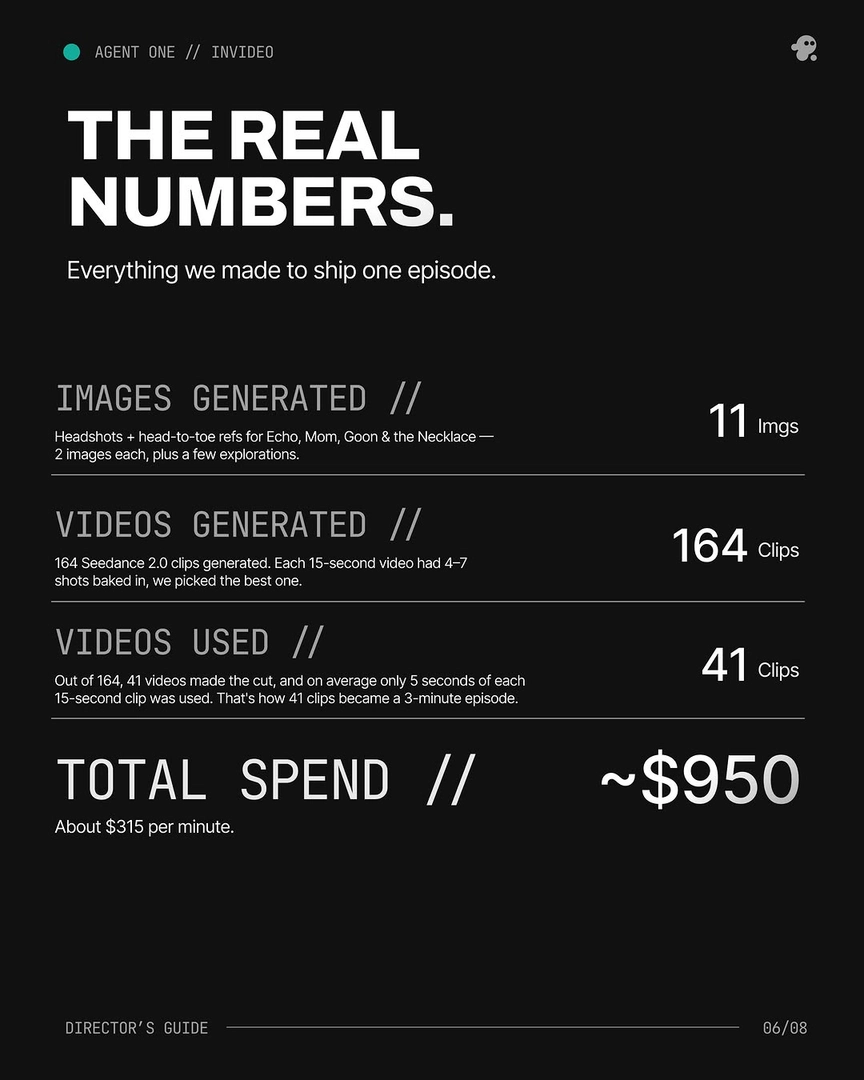
Plan for about 3 generations per usable shot on average, with roughly a 25% selection rate from total clips generated. On a documented 3-minute episode, 164 Seedance 2.0 clips became 41 in the final cut, and 17 of those were stitched from 2+ generations. Each 15-second clip typically yields 4–7 usable candidate seconds.
Budget generations and credits against three documented ratios from real productions:
Average 3 generations per usable shot. That's the planning number for shots that clear the editorial bar. Some land on the first try (one complex top-down shot hit on attempt 1 once the invideo agent was directing the prompt), others take 8+ tries — 3 is the working average across a 3-minute episode.
~25% clip-to-cut selection rate. On that same episode, 164 Seedance 2.0 clips were generated and 41 made the final cut. Treat overgeneration as a deliberate budget line, not waste — the math of editorial yield assumes you throw most away. A horror short in a similar workflow ran ~400 video generations for 90 seconds of finished film, hitting comparable selection ratios.
4–7 usable shot candidates per 15-second clip, average 5 seconds used. You're not picking whole clips — you're picking the strongest seconds inside them. That's why 41 clips compressed into a 3-minute episode: each contributed roughly 5 seconds of its 15.
Plan for composites — 40%+ of final shots will be stitched. 17 of the 41 final shots on the documented episode were combined from 2 or more generations of the same prompt — strongest seconds from one generation, the rest from another. Build your edit assuming this is the default, not the exception. As Hridaye, invideo's creative director, put it: "MOST SHOTS AREN'T ONE SHOT. Prompt → 8 tries → Frankenstein the keepers."
Character locking sits on top of shot generation. Expect ~5 generations to lock one character at roughly $9.78 per character using multi-angle reference turnarounds. Do this BEFORE shot generation begins — locked character sheets and environment references are the single biggest lever for raising your usable-shot rate downstream.
Which model you route to changes the yield. Seedance 2.0 is strong for reference-to-video continuity across clips, Kling for multi-shot sequences, Veo for native audio realism, Runway for fine motion control. The invideo agent routes each shot to the right model from a single project context — you don't pick a platform per model, every roster model runs inside invideo, so the same locked character sheets and style block carry across all of them.
What to do when your ratio gets worse. POV shots and multi-character physical-contact shots (bodies, ropes, props touching) are the documented break points — they pull the per-shot generation count up fast. Two practical unlocks:
Shoot a mock of the shot on your phone and upload it as a reference video. Real-world footage anchors POV framing that pure prompting won't crack.
Hand-sketch complex physical arrangements and upload the drawing. When the image model can't visualize two characters in contact from text, the sketch gets the agent to a correct character sheet, which then drives the video gen.
For one-take continuous shots, use reference-to-video chaining. Clip the end of each generation, re-upload it to the invideo agent, and feed it into Seedance 2.0's reference-to-video alongside your character and location references — camera movement, framing, and atmosphere carry across the seam. This is more context-rich than start/end-frame or extend methods, which can't accept character or location references at the same time.
Cost math across documented productions. Finished-minute costs run $315–$750 across four productions with known length and spend: $315/min on the Arcane-style episode, ~$580/min on the horror short, ~$643/min for a 70-second short, $750/min on a 2-minute brand promo. Total spend ranges from $750 to $5,000 depending on length, complexity, and how many physical-contact shots you're solving.
Close the loop with a maker-checker pass: hand the rough cut back to the invideo agent for a "what's working, what's not" review against your loaded treatment. It catches pacing, SFX, and emotional-stage register errors a human editor often misses — on one production it flagged that an entity reveal was running at the wrong stage register, something the director hadn't noticed.
These ratios are planning numbers — your usable-shot rate depends on how much you lock before generation (script, character sheets, environment references, style block) and how disciplined your model routing is.
Watch some of these to see what works for you:
MOST SHOTS AREN'T ONE SHOT. Prompt → 8 tries → Frankenstein the keepers.
— Hridaye, invideo's creative director