How do you reduce credit costs when generating AI video?
Last updated July 27, 2026
You reduce AI video credit costs by spending credits on cheap image work before expensive video generation, approving each generation before it runs, and planning around real editorial yield (~25% of clips make a final cut). Methods documented productions used:
Lock characters and style in images first
Generate image grids, not single shots
Approve every generation before credits spend
Storyboard fewer frames with multi-shot generation
Use every second of each clip — and budget for yield
Fix errors at the source, not by re-rolling
Work in acts to avoid context-loss regenerations
Most wasted credits come from one mistake: generating video before the visual decisions are locked. invideo is an agentic video creation platform with all the current video and image models available, so the techniques below run inside one workflow.
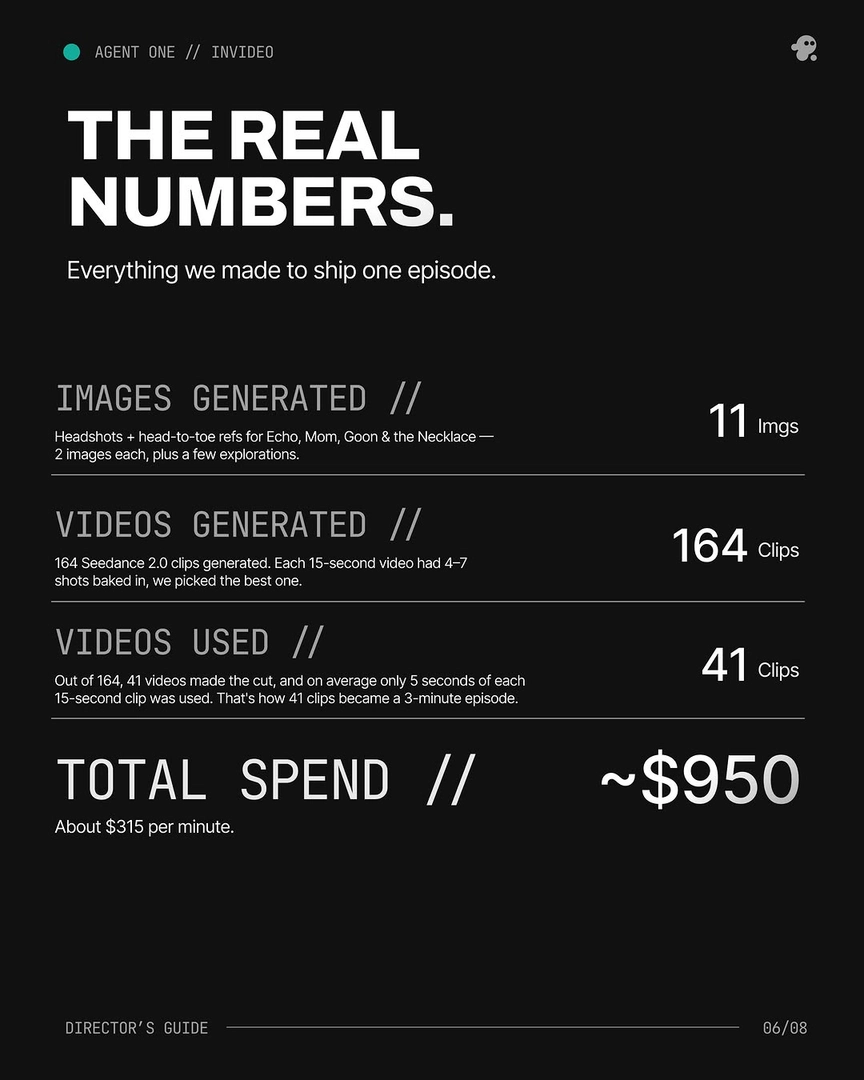
Lock characters and style in images first. Image generation is the cheap stage; video generation is where credits go. Generate character sheets and environment references, produce 4 options per asset, pick one, and lock it before any video runs — every consistency error you don't lock upfront becomes regenerated video later. Documented benchmark: about 5 generations to lock one character, roughly $9.78 per character. One production covered 4 characters and a prop with just 11 reference images, then generated 164 video clips against those locked references.
Generate image grids, not single shots. Ask the invideo agent for 3 grids per round instead of one-off images, iterate on the grids you like, then extract the best panels and use them as continuity anchors for all scene generation. You get directorial optionality at image-generation prices, and the extracted panels reduce missed video generations downstream because every shot starts closer to your intent.
Approve every generation before credits spend. Run the invideo agent in Always Ask mode so you review the prompt and attached references shot by shot before anything generates. The invideo agent also flags model limitations before generation: in one production it identified that a scene with 18 cuts in 15 seconds exceeded what the video model could deliver and recommended splitting the scene — before any credits were spent on doomed generations.
Storyboard fewer frames with multi-shot generation. Multi-shot video models generate full 15-second sequences from a single storyboard frame, so you no longer need to board and generate every frame the way legacy first-frame/last-frame workflows required — a creator on a 7-minute animated short explicitly credited the reduced storyboard frame count with saving both time and credits. Where model choice matters: Kling 3.0 generates multi-shot sequences natively, and Seedance 2.0 reference-to-video carries character and location context across clips so fewer setup generations are needed; all of these models run inside invideo, with the invideo agent routing each shot to the right one.
Use every second of each clip — and budget for yield. Each 15-second generation typically contains 4–7 usable shot candidates, so cut multiple shots from one clip instead of generating one clip per shot. In a documented 3-minute episode, an average of only 5 seconds of each 15-second clip was used, and 17 final shots were Frankenstein shots — stitched from the best seconds of 2 or more generations of the same prompt. Plan the budget around real ratios: that production averaged 3 generations per usable shot and kept 41 of 164 clips (~25% selection rate). Treat overgeneration as a deliberate line item — budgeting 3–4× your final clip count costs less than chasing single perfect takes through endless re-rolls.
Fix errors at the source, not by re-rolling. When a shot you like has one continuity error, don't regenerate the shot — ask the invideo agent to inspect the character sheet, and it identifies the exact panel containing the mistake, corrects it there, stores the fix in context, and regenerates only what's needed. Surgical edits replace slot-machine re-rolls, and every subsequent shot inherits the fix for free.
Work in acts to avoid context-loss regenerations. Complete storyboarding, generation, and editing for one act before starting the next — roughly 25% increments — so the invideo agent never loses context mid-project and forces redo rounds. Loading your full script and style references into the invideo agent's context once at the start serves the same purpose: consistency holds without re-prompting, so drift-driven regenerations don't eat the budget.
For calibration: documented productions ran 3,000–20,000 credits ($750–$5,000 all-in) at $315–$750 per finished minute depending on team and approach — the $315/minute production was the one that locked references first, used Always Ask mode, and planned for 25% yield. These are some of the ways to problem-solve this — what works depends on your production.
Watch some of these to see what works for you:
Rather than generating one, one, one, one, one images to generate grids. Image generation doesn't cost much, especially in invideo. Use that to your advantage.
— invideo's creative team