How do you set up a multi-agent AI film crew with named specialist roles?
Last updated July 27, 2026
Set up a multi-agent AI film crew inside invideo by spinning up a creative producer agent first (loaded with the full script, shot breakdown, and characters), then branching specialist agents on separate project pages: a storyboard artist, a costume designer, a production designer, a casting agent, a director's assistant, and one or more DOP agents per scene. Each agent gets a named role and its own page so feedback stays clean.
Start with the creative producer agent. Give it the full script, the shot breakdown, and every character detail you have — this is the vision-anchor that grounds every other agent in the same understanding. "To really set up the context for the agent, I normally start off with the creative producer agent. That's where I'll give the script, or the shot breakdown, along with the characters. That's the main agent that sort of holds the understanding and the vision of the entire film," says Hridaye, invideo's creative director.
Then branch each specialist onto its own project page inside invideo. Project-page isolation is the design principle that keeps notes to your DOP agent from contaminating your costume agent — you give targeted feedback to one role without polluting another's context.
Creative producer agent. Holds the script, shot breakdown, and characters. Everything downstream reads off this agent's understanding.
Storyboard artist agent. Visualize every shot before you direct anyone else. The frames it returns become the brief for the DOP and production designer, so direction lands more precisely. Treat this as a pre-direction planning step, not decoration.
Casting agent. Generate and iterate character looks; run the same character prompt on two image models in parallel (Recraft, Nano Banana, GPT-Image-2 are all live inside invideo) and pick the aesthetic you want. Build character sheets with multi-angle turnarounds and close-ups — small details like scars or accessories need their own panels or AI video models will hallucinate them.
Costume designer agent. When you don't have a precise costume spec, give it the feel. Ask for several options in one zoom and pick. Lock costumes before generating any video.
Production designer agent. Owns sets, props, world. Keep it scoped narrowly — props get their own iteration pass because a lifeless prop breaks narrative believability regardless of how good the character looks.
Director's assistant agent. Tightens and sequences the shot breakdown so the order is locked before video generation starts. This is the agent that answers "which shot comes after which."
DOP agent (one per scene, sometimes two). Each scene needs a different cinematographic sensibility, so assign a fresh DOP agent per scene rather than one DOP across the film. For complex sequences, run two DOP agents simultaneously on the same scene — two creative perspectives, faster iteration. Direct each one conversationally: "I want to stay on the feral guy when we run this scene. No back and forth cutting. We hold on him right up till he lunges" — natural on-set language outperforms formal prompting.
Upscale artist agent. A named sub-agent in invideo dedicated to running batch upscales through Topaz Astra so post is automated instead of manual.
How agents hand off: every specialist reads from the creative producer's locked context (script, characters, world, treatment). When the casting agent finalizes character sheets, those sheets are stored in context and the DOP and storyboard agents inherit them automatically. When you fix a continuity error, the invideo agent traces it back to the source character sheet, corrects it once, and every subsequent shot inherits the fix — surgical edits, not slot-machine re-rolls. If you make a manual override (say, a close-up crop of a wide shot), log the result back to the invideo agent so its shot breakdown memory stays accurate.
Which model each agent routes to: the invideo agent holds the full model roster, so you don't pick a platform per task. Recraft for photoreal portraits with skin imperfections (pores, lines, stubble). Nano Banana or GPT-Image-2 for character sheets and grids. Seedance 2.0 for video, including reference-to-video for continuous takes that carry character and location context across segments — better continuity than the extend method, which can't take character or location refs. Kling 3.0 and Veo are available for shots their grammars suit. The invideo agent routes per shot; you direct in natural language.
Scale this works at: documented productions ran 6–8 agents simultaneously — a one-person 2-minute brand promo with 8 specialist agents across separate pages finished in 3 days for ~$1,500 (6,000–6,500 credits) against a $100,000–$500,000 traditional equivalent; a 4-person team ran 6 agents each across 3 parallel projects for a 5-day short. Costs across documented multi-agent productions ran $750–$5,000 all-in and $315–$750 per finished minute, depending on length and team. Manual prompting for the same brand promo would have taken at least a week; the multi-agent path compressed it ~20x against a traditional shoot.
A few discipline points so this actually runs clean: tell each agent in the first few exchanges how you want to work with it and what assets you'll share next — workflow coherence comes from that framing. Keep no other LLM open while you're producing; context-switching across tools degrades output. Work act-by-act (lock one act fully before starting the next) so no agent loses context on a long project. And run a maker-checker pass — send your rough cut back to the creative producer agent with an open "what's working, what's not" prompt; it catches pacing, SFX, and emotional-register errors human editors miss. Skipping that review is the most common failure mode.
These are the roles a real film crew runs; the invideo agent lets you spin them up as named specialists and route each one to the right model. What you actually need depends on the film — a 70-second piece may only need four agents; a 2-minute promo with VFX and international locations runs eight.
Watch some of these to see what works for you:
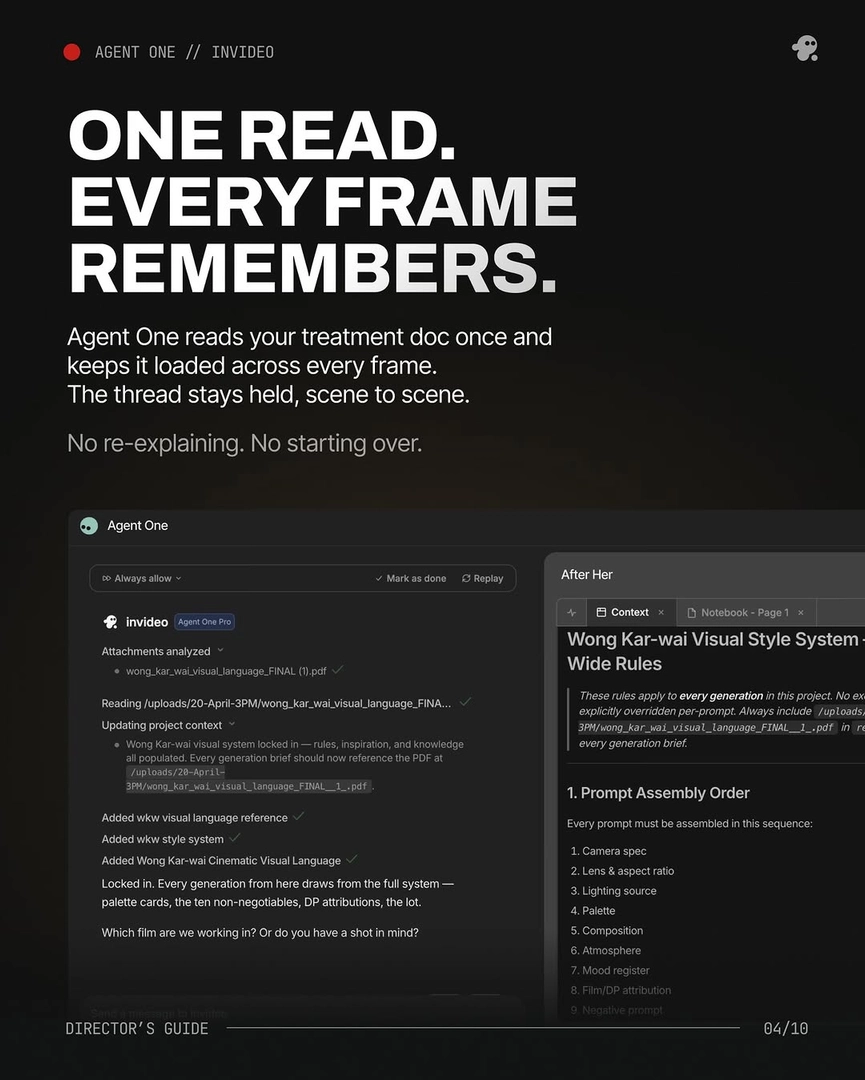
To really set up the context for the agent, I normally start off with the creative producer agent. That's where I'll give the script, or the shot breakdown, along with the characters. That's the main agent that sort of holds the understanding and the vision of the entire film.
— Hridaye, invideo's creative director