Why aren't negative prompts enough to enforce a consistent visual style in AI video?
Last updated July 27, 2026
Negative prompts only suppress named failure modes — they carry no positive signal about what the style actually is, and they reset with every new clip. Consistent style comes from positive anchors held in persistent context: a detailed style block applied to every prompt plus saved reference frames. In documented AI film workflows, the negative prompt is one element of a nine-part prompt system, never the style mechanism itself.
Negative prompts fail at style enforcement for three mechanical reasons: they subtract without specifying, they don't persist across shots, and even when applied aggressively they still require multiple generation passes to hold a single constraint.
Negative prompts subtract; they never specify. Telling a model "not photorealistic, not live-action" removes two failure modes but says nothing about brushstroke texture, palette, line weight, or lighting grammar — so the model fills the gap with its default aesthetic and drifts back toward it. One documented animated production solved this by pairing the prohibition with an explicit positive description in the same style block: "Every surface has hand-painted brushstroke texture. Every element in frame must feel painterly and handcrafted." The negative closes a door; only the positive description tells the model which door to walk through.
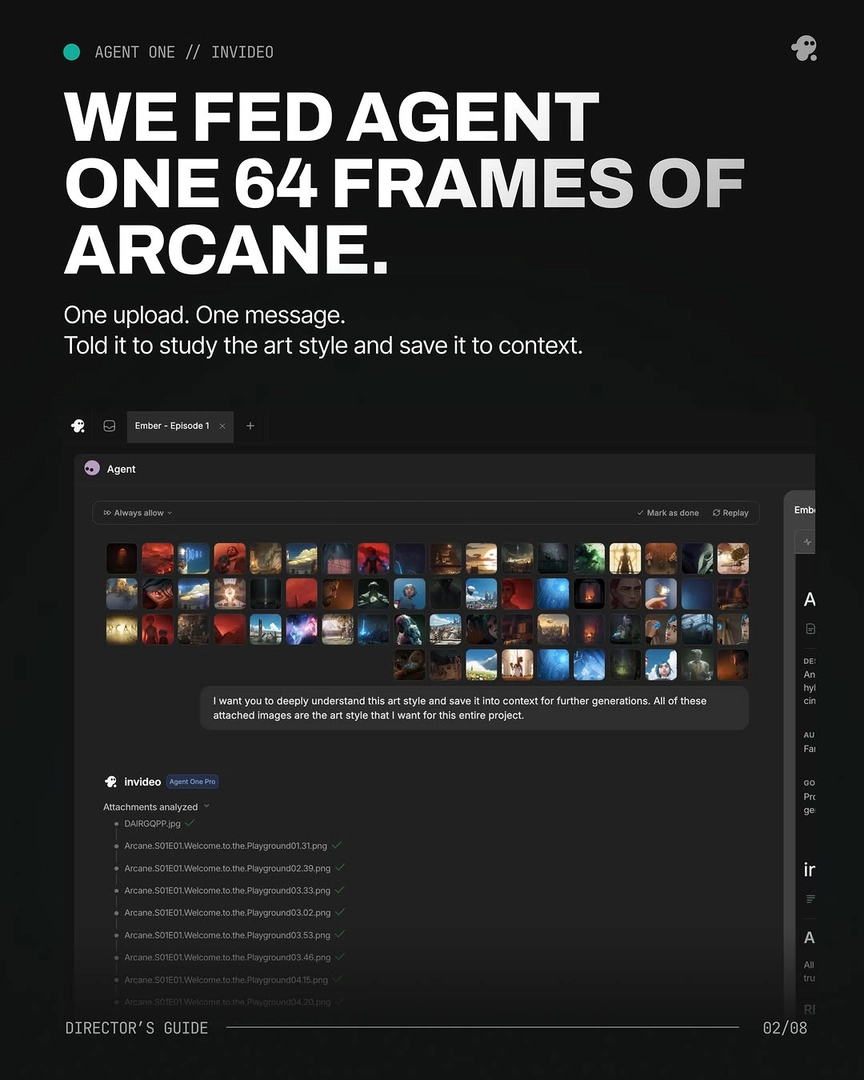
Negatives reset with every new generation. Visual style is a cross-shot consistency problem, and a negative prompt only exists inside the single prompt that carries it — generate clip two without it and the constraint is gone. That is why documented productions apply the full style block to 100% of prompts ("Every prompt after this started with it") and, better, save style references to persistent context so nothing depends on manual re-typing. The invideo agent is built around exactly this: it holds your style directives in project context across every shot, so the style survives shot 40 the same as shot 1. One team uploaded 64 style-reference frames in a single message with the instruction to save the art style into context, and that lock held across 164 generated clips for a 3-minute episode.
Even aggressive negatives need multiple passes. In one project targeting a painterly 2.5D aesthetic, enforcing "no outlines" required aggressive negative prompting AND multiple generation passes per shot — the creator described it as the most-typed phrase of the entire project. A negative constraint lowers the probability of an unwanted trait; it does not zero it out, so on any single generation the trait can still appear.
Negatives are one layer of a larger system — and their real job is artifact control. In documented prompt-assembly workflows, the negative prompt is the last of nine ordered elements: camera spec, lens and aspect ratio, lighting source, palette, composition, atmosphere, mood register, film/DP attribution, then the negative prompt. In a 14-section director visual-language document, negative prompts occupy one section out of fourteen. Use negatives for what they're good at — blocking scene-specific artifacts like floating, cloning, and anatomical errors, tailored per scene rather than pasted as one universal list — and let positive anchors (style block, reference frames, persistent context) carry the style. If you want the style held automatically instead of re-asserted per prompt, load your style directives once into the invideo agent's project context — the pattern one production summarized as: set it once, it holds.
Watch some of these to see what works for you:
This MUST look and feel like Arcane animation — not live action, not photorealistic. Every surface has hand-painted brushstroke texture. Every element in frame must feel painterly and handcrafted like a moving Arcane frame.
— style block used by the creative team on a documented AI animated episode production