Why is asset management so hard in AI episodic video production?
Last updated July 27, 2026
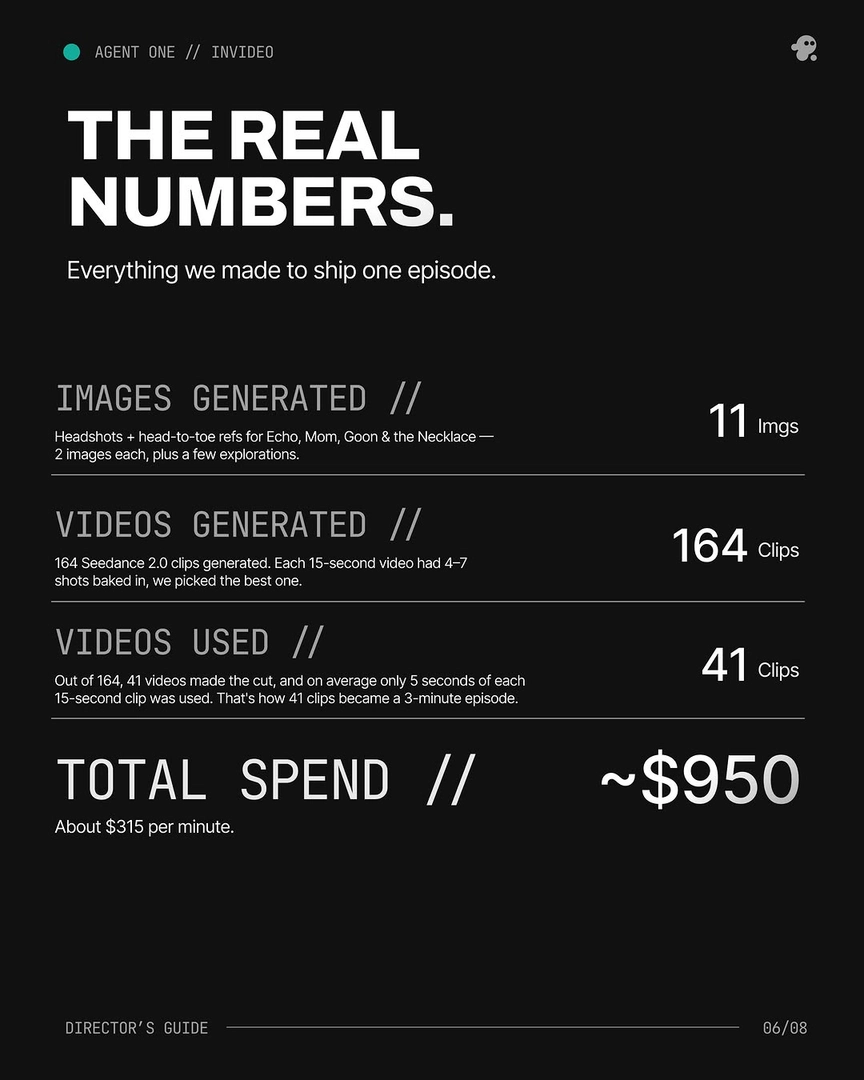
Asset management in AI episodic production is hard because generative outputs are non-deterministic and massively over-produced: one documented episode generated 164 clips to keep 41, tools forget context between sessions, a single character change cascades across every scene, and continuity — faces, voices, style — must survive from episode to episode without a native file system built for any of it.
Four compounding causes explain why AI episodic assets sprawl faster than any traditional production library.
Overgeneration is the default, so the file pool explodes. AI shots average about 3 generations per usable result, and editorial yield is low: in one documented episode, 164 generated clips produced 41 keepers — a ~25% selection rate — with only about 5 seconds used from each 15-second clip. Worse, 17 of those final shots were stitched from 2 or more generations, so your true asset unit isn't even a clip — it's a segment inside a clip. That means every episode leaves you tracking hundreds of near-identical files, most of which are partially usable and none of which are labeled by what makes them different. One episode-scale production logged 920 individual dispatched tasks and roughly 30,000 credits over 4 weeks — that task volume is the asset count you're managing.
Outputs are non-deterministic, so versions never converge. Regenerating the "same" character or location produces a different file every time; identity drifts between shots unless you lock character bibles, turnarounds, and wardrobe references before generating a frame. And changes cascade: a single costume tweak — adding a baseball cap — nearly doubles the work in a manual workflow, because every shot containing that character needs regeneration and re-tracking. In one agent-managed project, a single outfit note triggered updates to 6 images across 3 sequences; without a system propagating that change, you're doing it by hand and logging each new version yourself.
Most AI tools have no memory, so context becomes an asset you re-create constantly. Creators lose around 20 minutes per session re-describing characters, world, and visual language in tools that forget everything between clips — and the problem scales with ambition: the more scenes and episodes you add, the worse the amnesia gets. One creator described running 35 notepads simultaneously just to hold project state outside the tools. Your "assets" quietly expand to include prompts, style blocks, negative constraints, and reference attachments — all of which must be findable and correctly paired with each shot.
Episodic work adds cross-episode continuity that clips alone can't carry. Characters, voices, and visual language have to match episode to episode. Documented workflows handle this with dedicated infrastructure: persistent voice profiles generated in a voice tool and resynced in the edit so a character sounds identical across episodes, and uploading a finished episode so the next one inherits its camera language and tone instead of re-explaining it in text. Each of those is another asset class — voice profiles, style references, per-beat character sheets — layered on top of the raw footage.
What actually reduces the problem is a persistent context system, not better folders. invideo is an agentic video creation platform, and the invideo agent's context tab functions as the production's single source of truth — storing character sheets, location constants, and cinematographic rules that every generation references, with a numbered versioning convention (asset 5.1 iterates to 5.2) so iterations stay traceable. It applies global changes from one instruction — one prompt changed a character's hair color across every generated scene — and it audits continuity for you: upload a cut and it flags prop changes and color-grade inconsistencies across shots, then traces errors back to the source character sheet and fixes only that panel, leaving the rest of the film intact. Two disciplines carry most of the weight regardless of tooling: lock reference assets (character sheets, environment refs, style frames) before any video generation, and log every manually created or edited asset back into the system that holds project memory so its record stays accurate.
Watch some of these to see what works for you:
Every single one of these tools has amnesia. You spend 20 minutes setting up your character, your world, your visual language, generate a clip, it looks great, then you move to the next scene, and the tool has forgotten everything.
— a creator documenting AI episodic video production