Image-to-Video AI: How to Turn Images Into Cinematic Video
July 15, 2026
Image-to-video AI animates a still you upload by describing a camera move; for multi-shot films, reference-to-video carries one character and look across clips. Seedance 2.0 leads with an Elo near 1,343-1,351 and 10/10 character consistency, accepting 12 references; Veo 3.1 handles audio, Kling 3.0 physics. Expect roughly 3 generations per usable shot at $315-$750 per finished minute.
Image-to-video AI animates a still image you upload by describing a camera move and motion in plain language; for multi-shot films, reference-to-video carries one character and one look across every clip instead of animating stills in isolation. Seedance 2.0 currently leads for character consistency (an Elo near 1,343–1,351, 10/10 character consistency, and up to 12 reference inputs), Veo 3.1 generates native audio, and Kling 3.0 handles physics-heavy motion.
Image-to-video vs reference-to-video: the distinction that decides your result
Image-to-video takes one still as a start frame and animates it — the model invents everything after frame one, so each clip is an island. Reference-to-video takes a set of persistent inputs — character sheets, location plates, a prior clip — and generates new footage that honors all of them, which is what makes multi-shot films with the same face, wardrobe, and world possible.
The practical consequence: a start frame and end frame are the standard inputs for generating one specific cinematic shot, but they carry no memory between shots. Reference-to-video provides more context than start/end-frame methods — in one documented continuous-take production, Seedance 2.0's reference-to-video was chosen over extend specifically because it accepts both character references and location references simultaneously, preserving camera movement, framing, and atmosphere across segment boundaries. If your project is one animated still, use the one-shot path below. If it is a film, build reference discipline from the start — everything after the next section is about that.
invideo is an agentic video creation tool with all the current video and image models available, so the workflows below run in one place: you direct, and the invideo agent routes each shot to the right model.
How to turn a single image into a video (the one-shot path)
Upload your image as the start frame and describe three things: the camera move (push-in, lateral track, slow orbit), the subject motion (what moves, how fast), and the atmosphere (light shift, particles, weather). Keep the motion description to one or two actions per clip — models execute a single clear camera instruction far more reliably than a stack of them.
Generate in short clips and expect to harvest. Each 15-second generation typically contains 4–7 usable shot candidates inside it; treat the output as coverage to select from, not as a finished shot. Across one documented animated production, the average was only 5 seconds used from each 15-second clip — generate, scrub, and keep the strongest seconds.
If you want a specific end composition, supply an end frame as well: the model interpolates a motion path between your two stills. Generate in your film's aspect ratio from the first attempt so you never crop away composition later.
The workflow: from images to a finished cinematic sequence
A single animated still becomes a cinematic sequence through five stages: lock a style, compress it into a reusable text block, lock each character's identity, generate in short approved chunks, and stitch the best seconds into final shots. One documented production ran this exact pipeline to produce a hand-painted animated episode for ~$950.
1. Ingest a style, lock it into context
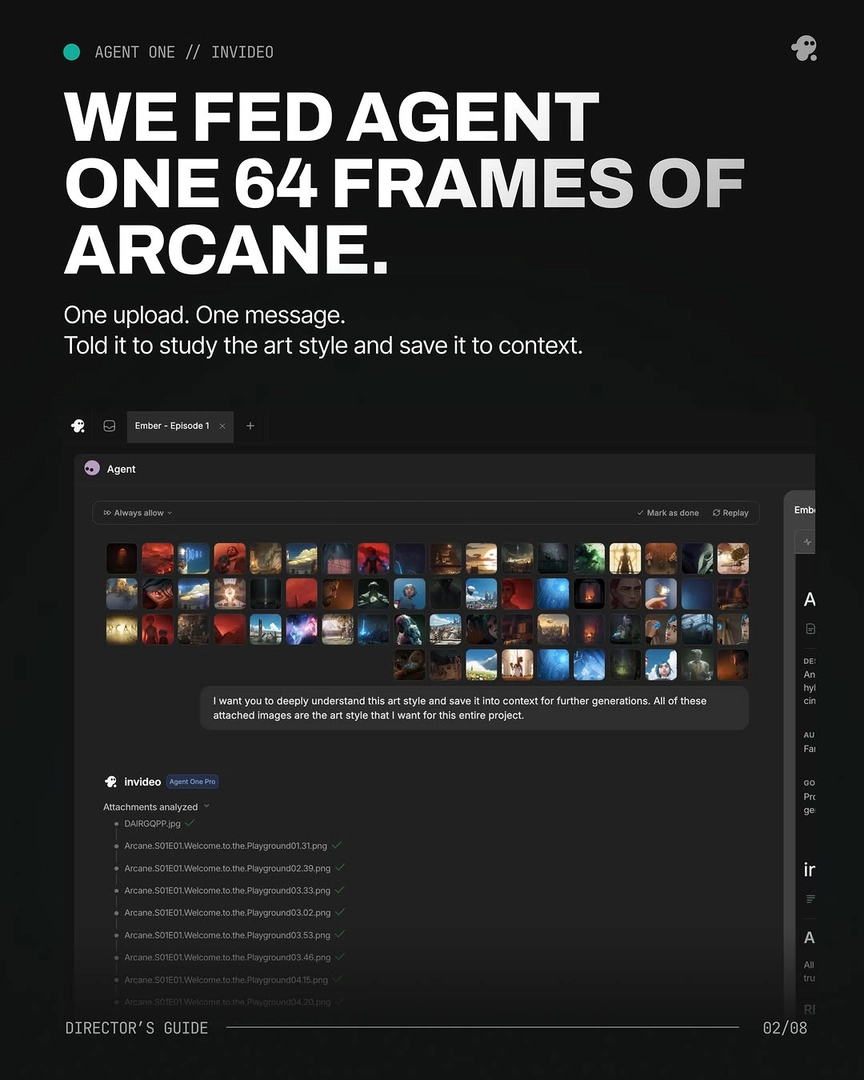
Upload a large batch of style-reference frames in a single message and instruct the invideo agent to analyze and store the style before any generation begins. The exact prompt language that worked: "I want you to deeply understand this art style and save it into context for further generations. All of these attached images are the art style that I want for this entire project." The point of batch ingestion is that the invideo agent reads the style once and holds it for every downstream prompt, so you never re-explain it shot by shot.
2. Synthesize a reusable style block
Have the invideo agent compress the ingested style into a written block that every generation prompt opens with. Include explicit negative constraints — the documented block read in part: "This MUST look and feel like Arcane animation — not live action, not photorealistic. Every surface has hand-painted brushstroke texture." Without the prohibition, models drift toward photorealism over a long run of generations. The discipline is absolute: "Every prompt after this started with it."
3. Build character identity locks
Generate a multi-angle character sheet per character — front, side, profile, back, plus face close-ups — and lock it before any video generation. Close-up panels matter: small details like scars and accessories only stay consistent across models when the sheet shows them at close range. Remove objects from characters' hands before generating turnarounds, or the object mutates across angles.
The numbers from documented productions: one team locked each character at roughly $9.78 per character. A separate 70-second film held 2 characters visually consistent across every scene using character sheets and agent context alone — no LoRA fine-tuning. Generate several options per asset (one production generated 4 per character sheet and environment reference), select the best, and lock it; this single step prevents most consistency problems for the rest of the film.
4. Generate in short chunks, with approval on every shot
Break the sequence into 15-second segments and generate each one individually, attaching the character sheets and the style block to every single prompt. Run the invideo agent in Always Ask mode so you approve each generation's prompt and attached references before credits are spent — shot-by-shot approval is what keeps a long run of generations on-style and on-budget.
Budget for iteration as a line item, not a failure: documented productions averaged 3 generations per usable shot. Overgeneration is the plan, because you are buying selection room, not single takes.
5. Stitch the keepers — the Frankenstein shot
When no single generation delivers a complete usable shot, assemble one from the strongest seconds of two or more generations of the same prompt — the Frankenstein shot. Because every generation ran from the same style block and character sheets, segments from different takes cut together invisibly. This is the default, not the exception: in one finished episode, more than 40% of the final shots were stitched from multiple generations. As the production notes put it: "MOST SHOTS AREN'T ONE SHOT. Prompt → 8 tries → Frankenstein the keepers."
Reference images: the discipline that separates good output from mush
How you feed references determines what comes back, and the first rule is to batch them by theme rather than dumping everything at once. Separate your references into thematic batches — spatial logic in one, lighting in another, color theory in a third — and give the invideo agent each batch with explicit instructions on what to adopt and what to ignore. Telling the model what to leave out is as important as what to take: in one production, a reference batch came with the instruction to extract only the screen concept and ignore the room's small scale.
Second rule: don't drop illustrated or animated reference images directly into photorealistic prompts — it doesn't work. Instead, instruct the invideo agent to read the colour palette and texture qualities of the reference and translate those into a prompt. One creator's result: "The gens came back hyper-realistic with the exact colour temperature I was looking for." The agent isn't copying the image; it's extracting intent — "Agent 1 didn't rip the image off. It understood what I wanted from the image."
Third rule: pull references per sequence, not as one general mood board. Mapping specific visual references to individual sequences gives each scene's generations a precise target instead of an averaged aesthetic. And once your world is locked, switch from external references to your own approved generations as seeds — using locked world images rather than outside references produces stronger continuity in every subsequent shot.
If a continuity error appears mid-production, trace it to the source instead of re-rolling the shot: ask the invideo agent to inspect the character sheet, and it identifies the exact panel containing the error, corrects it, stores the fixed sheet in context, and regenerates only what's needed. Surgical source fixes beat slot-machine re-rolls every time.
Which model for which shot — and why you don't pick a platform per model
Model choice is per-shot, not per-project. Seedance 2.0 is the reference-to-video leader — it accepts up to 12 reference inputs and holds character identity across clips (10/10 character consistency, Elo near 1,343–1,351), which makes it the default for any shot that must match a locked character or continue a prior segment. Veo 3.1 generates native audio with the footage, so route dialogue and sound-forward shots there. Kling 3.0 generates multi-shot sequences natively and handles physics-heavy motion. Runway remains an option where its specific motion handling fits a shot.
On the image side — where your start frames, character sheets, and reference plates come from — Recraft generates photoreal portraits with skin-level imperfections (pores, lines, stubble) that read as real on camera; Nano Banana builds multi-angle character sheets, including fused multi-character arrangements; GPT-Image-2 covers general image generation and reference-plate work. One documented pipeline ran frames-first in exactly this order: portraits, then 4K character sheets at four angles plus close-ups, then video generation.
All of these models run inside invideo, so you never adopt a different tool per model. The invideo agent is the routing layer: you describe the shot, and it selects the model, attaches the right references from context, and prompts it. When one model fails on a shot type, the invideo agent can self-redirect to an alternative model and prompting strategy without you engineering the pivot — that behavior is documented, including a case where a known model weakness on over-the-shoulder shots was resolved by re-routing rather than re-prompting.
Direct the agent from a treatment, not shot by shot
Re-prompting scene by scene is the anti-pattern; the superior workflow is loading your visual direction once and letting persistent context carry it. Write a treatment document covering camera language, lighting, palette, composition, and mood, upload it to the invideo agent at project start, and every subsequent generation is checked against it. One documented production used a 25-page treatment as a permanent instruction set and produced a 70-second film with 12 evaluated parameters per shot — lens, lighting plan, color script, blocking, negative prompt and more — without re-stating style once. As the workflow's core claim puts it: "One agent that reads your treatment once and holds every directive across every shot, every scene. No re-prompting. No drift. So now, you direct, and the Agent remembers."
With context loaded, direction collapses to intent. A documented continuation prompt of three words — "Everything should match" — was sufficient for the agent to hold character, lighting, lens grammar, and spatial logic across a multi-shot sequence. Prompt the invideo agent the way a director briefs a crew: give intent ("hold on her face, then cut wide as he exits"), not parameter lists.
For larger productions, split the direction across roles: initialize a creative producer agent first with the full script, shot breakdown, and character details so every downstream agent grounds in the same vision, then assign a storyboard agent to visualize shots before you direct them and a DOP agent per scene — different scenes want different visual sensibilities, and per-scene DOP agents outperform one generalist. Quality stays gated throughout: "You write the direction. Agent One builds the shot, holds it against the treatment, and only sends back what passes. Every frame is a decision, not a draft."
What it actually costs
Documented productions ran $315–$750 per finished minute, depending on team, style, and iteration appetite — the variance is natural, not noise.
The cost driver is iteration volume, not clip price.
Failure modes and how to avoid them
Style drift over long runs. Models pull toward photorealism across dozens of generations. Fix: every prompt opens with the locked style block, including its explicit prohibitions ("not live action, not photorealistic"). No exceptions, no paraphrasing.
Character mutation between shots. Caused by generating without locked references, or by sheets that lack close-up panels. Fix: lock multi-angle character sheets before video generation and attach them to every prompt; when drift appears anyway, have the invideo agent trace and correct the source panel in the sheet rather than re-rolling shots downstream.
Multi-character contact shots. Ropes, props, and bodies in contact break models faster than almost any other scenario — one production's dominant recurring shot was a two-character carry that consumed the most iteration of the film. Fix: lock a fused multi-character reference sheet first, then generate motion from it; if text prompting can't produce the sheet, a quick hand-drawn sketch uploaded as a visual reference will get the configuration across.
POV and unusual camera moves. These take multiple iterations and multiple prompting approaches. When prompting stalls, a mock version of the move filmed on a phone and uploaded as a reference video gives the model a physical anchor that text can't.
Over-prompting and stray attachments. Attaching a wrong reference image produces confidently wrong output — one documented continuity problem was fixed entirely by removing a stray attachment, not by rewriting the prompt. Fix: audit what's attached before blaming the prompt, and keep prompts to the locked assembly order rather than stacking ad-hoc instructions.
The plasticky AI look. Generated footage often comes back over-sharp with synthetic skin texture. A light post pass — upscale (Topaz Astra runs on invideo), then a touch of blur, grain, and a grade — moves it convincingly toward live action.
Abstract or ambiguous sequences. For dream states and hallucinations, don't gamble on one interpretation: have the invideo agent generate several distinct visual takes (one production generated 5), pick one, and lock it as the canonical reference for the scene.
FAQ
What is image to video AI?
Image to video AI is a class of generative models that take a still image as input and produce moving footage from it — you supply the frame and a text description of camera movement and motion, and the model synthesizes the video. Current leaders include Seedance 2.0, Veo 3.1, and Kling 3.0, all of which run inside invideo with the invideo agent routing each shot to the best-fit model.
How do I keep the same character across multiple clips?
Use reference-to-video rather than animating isolated stills: lock a multi-angle character sheet (front, side, back, face close-ups), then attach it to every generation.
What makes a good starting image?
A frame generated in your locked style, at your film's aspect ratio, with the character matching an approved character sheet. Frames-first is the documented production order: direct your stills to approved quality with image models like Recraft, Nano Banana, or GPT-Image-2, then send them to video — fixing a frame costs far less than re-rolling motion.
Sources
r/aivideo — community documentation of image-to-video and reference-to-video workflows: https://www.reddit.com/r/aivideo/
r/StableDiffusion — practitioner threads on reference discipline and character consistency in generative video: https://www.reddit.com/r/StableDiffusion/
Watch these to see the techniques in action: