Can AI generate painted canvas backdrops with visible brushstrokes for fashion photography?
Last updated August 1, 2026
Yes — AI can render painted canvas backdrops with visible brushstrokes, canvas weave, and impasto texture for fashion shots, and treating the constructed, theatrical look as the intent (not a flaw to hide) is what makes it land. The trick is directing stroke direction, canvas plane, and lighting at the micro level — not relying on a generic 'painterly' prompt.
Start at the image stage, not the video stage — lock the painted-backdrop aesthetic in a still keyframe first, then animate. The invideo agent routes image generation across GPT-Image-2, Nano Banana, and Recraft; for a hand-painted canvas backdrop, GPT-Image-2 sets the aesthetic baseline (texture, color, brushwork) and Nano Banana is the right pass when you need to lock a product or garment cleanly into that painted scene without losing the surface quality.
Prompt tokens that actually elicit visible brushwork. Generic 'painterly' fails — it averages strokes into a filter. Specify the surface and the hand: "hand-painted canvas backdrop, visible impasto brushstrokes, canvas weave texture showing through, theatrical portrait backdrop, oil paint surface with palette-knife ridges, diagonal brushwork upper-left to lower-right, soft hand-painted background out of focus behind subject." Naming stroke direction is the single biggest upgrade — without it the model paints uniformly and the backdrop reads as a texture filter rather than a constructed set piece.
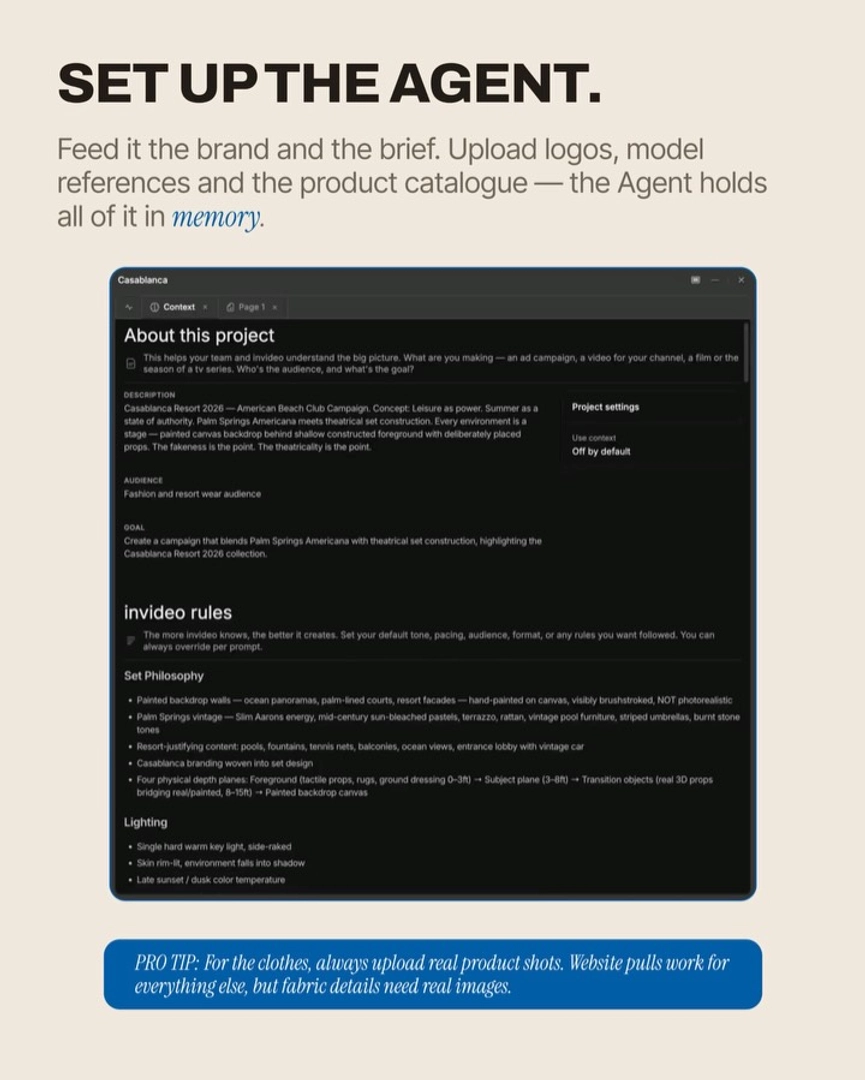
Build the backdrop as a deliberate plane, not a wallpaper. Treat the painted canvas as the deepest layer of a four-plane depth structure: sharp textured foreground (props, fabric), subject plane (model, garment), a real 3D midground object, and the deliberately soft hand-painted backdrop behind. Bake this into the global rules for the shoot so every generated frame carries the same depth logic. As Hridaye, invideo's creative director, put it: "The set does the depth of field work, not the lens. Every shot from here on adhered to this visual direction." Pair that with a single hard warm key light, side-raked, skin rim-lit, environment falling into shadow — editorial separation comes from light direction, not from a blur slider.
Direct posing and gaze against the painted plane. Per-shot pose directions need to be specified at the micro level — weight distribution, hand position, jaw tension, gaze angle in degrees — so the subject reads as posed against a backdrop rather than composited onto a texture. The aesthetic is theatrical on purpose: "The fakeness is the point. The theatricality is the point." Lean into it.
Probe one shot before you batch. Generate a single full-frame probe — character, garment, painted backdrop, skin, pose all in it. If the canvas weave holds, the stroke direction reads, and the subject sits convincingly in front of the backdrop, then scale the rest of the campaign. Skipping the probe propagates whatever's broken in shot one across every shot.
Decompose your references. If you have references — a Velázquez backdrop, a Vermeer light, a contemporary editorial framing — pull each attribute separately rather than uploading one composite: "I want the depth structure from this one, the stroke direction from this one, the lighting from this one." The invideo agent holds each reference's nuance separately instead of blending them into mush.
Editorial gap audit. After your initial shot list, ask for missing shot types for a "proper editorial" against a painted backdrop — back shots, cropped body fragments, reclined poses against the canvas, product still lifes on the painted floor (shoes, accessories with no wearer), empty atmospherics of just the backdrop and light. These pause beats are what make the campaign feel constructed and intentional rather than a stack of portraits.
For video: painted backdrops in motion. When you animate the still, route the shot to Seedance 2.0 for stable multi-shot continuity or Kling where you need richer motion — the invideo agent picks per shot. Use the locked painted-backdrop keyframe as the anchor frame for every clip so canvas weave, stroke direction, and lighting don't drift between cuts. Prompt motion sparingly: one slow gesture from the model, a subtle breeze through fabric, the backdrop itself static. Over-literal stillness prompts freeze the model entirely — specify "one slow micro-gesture, breath visible, backdrop unmoving."
Hybrid render + paint-over for the highest-craft jobs. Where a campaign needs maximum tactile authenticity, treat the AI render as the underpainting: export the locked still, paint over the backdrop layer physically or in a paint app to add real impasto ridges, then bring it back in as the reference for the video animation pass. The AI gives you composition, lighting, and 90% of the surface; the paint-over gives you the last 10% no model can fake.
Watch some of these to see what works for you:
The set does the depth of field work, not the lens. Every shot from here on adhered to this visual direction.
— Hridaye, invideo's creative director