From Storyboard to Video: How AI Turns Boards Into Footage
July 15, 2026
To turn a storyboard into video with AI, lock each approved frame as a reference image in Recraft or Nano Banana Pro, then hand it to the invideo agent as a Seedance 2.0 or Kling 3.0 anchor. Generate 15-second chunks, chain them, and composite the best seconds; expect $315 to $750 per finished minute.
To turn a storyboard to video with AI, lock each approved board frame as a reference image — generated in Recraft or Nano Banana Pro at 4K — then hand it to the invideo agent as the visual anchor for Seedance 2.0 or Kling 3.0 generation. Work in 15-second chunks, chain segments with reference-to-video, and composite the best seconds from each.
The rest of this guide walks that handoff in order: how a static board becomes a generation-ready anchor, which model to route each board to, and what the full pipeline costs against documented production ledgers.
The board-to-footage handoff, step by step
The storyboard to video pipeline is frames-first: every board frame gets approved as a still image before any motion is generated, because a flawed anchor propagates into every clip built on it. invideo is an agentic video creation tool with all the current video and image models available, so the whole pipeline below runs in one place — the invideo agent holds your boards, characters, and style in persistent context and routes each shot to the right model.
Step 1 — Lock each board frame as a reference image. Convert approved storyboard panels into high-fidelity stills: Recraft handles photorealistic portraits with skin-level imperfections — pores, lines, stubble — while Nano Banana Pro generates character sheets (it outperforms Nano Banana 2 for character fidelity). One documented production built 360-degree turnaround sheets at 4K with four angles plus face and mid-angle close-ups. Remove objects from characters' hands before generating turnarounds — held props drift across angles. Include close-up panels on every sheet, not just wides, so small details like scars and accessories survive across shots.
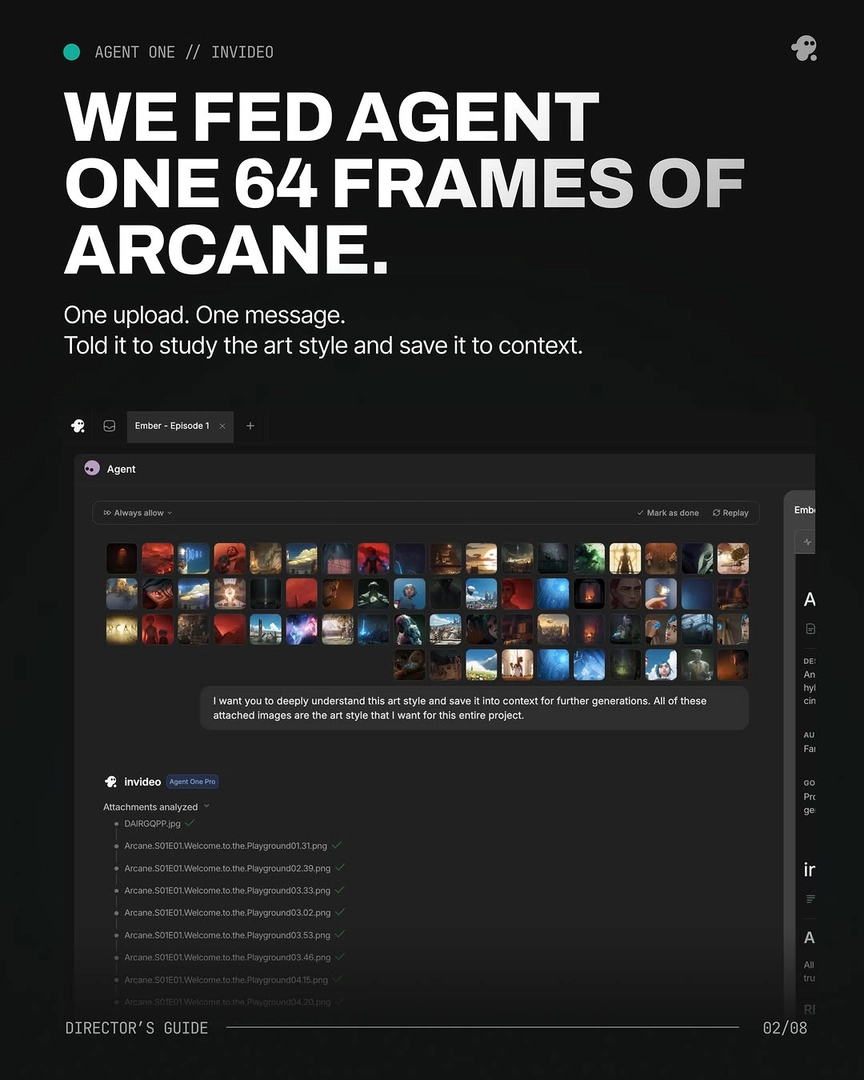
Step 2 — Load the boards and references into the invideo agent's context. Upload the locked frames, character sheets, and style references in one pass and instruct the invideo agent to save them to persistent context. One production uploaded 64 style-reference frames in a single message with the prompt "I want you to deeply understand this art style and save it into context for further generations" — every prompt afterward started from that block. Locked panels then function as continuity anchors: they replace your original references for all subsequent scene generation.
Step 3 — Generate motion in 15-second chunks with shot-by-shot approval. Have the invideo agent attach the board frame, character sheet, and style block to each generation prompt, and run in Always Ask mode so you approve every prompt and its attached references before credits are spent. A single storyboard frame can yield a 15-second multi-shot sequence — current multi-shot models make it unnecessary to board every individual frame the way first-frame/last-frame workflows required, which directly reduces both board count and credit spend. Generate in your film's aspect ratio from the first clip.
Step 4 — Chain segments for continuous sequences. When a sequence runs past one chunk, clip the end of the generated segment and re-upload it to the invideo agent, which feeds it into Seedance 2.0 reference-to-video alongside your character and location references to generate the next segment seamlessly. Reference-to-video carries character, location, and camera context across segment boundaries — which is why it outperforms extend for continuous takes: extend cannot accept character or location references.
Step 5 — Select and composite the best seconds. Treat each 15-second clip as a pool of candidates — each typically contains 4–7 usable shot moments, and one documented production used an average of just 5 seconds per clip. When no single generation delivers the full shot, build a Frankenstein shot: stitch the strongest seconds from two or more generations of the same prompt into one composite. In that same production, 17 final shots — over 40% of the cut — were composites. Assemble the selected segments in your edit timeline; the boards have now become footage.
If a board calls for a shot the model can't reach through prompting — a complex POV or multi-character contact setup — a phone-shot mock of the action uploaded as a reference video will usually unblock it; that technique has its own dedicated breakdown.
Picking the model for the motion
Each board should be routed to the model whose strengths match the motion it describes, and because invideo carries all the current models, you make that call per shot rather than per platform. Seedance 2.0 is the workhorse for board-anchored generation: its reference-to-video input accepts the board frame plus character and location references simultaneously, which is what keeps identity and geography stable across chained segments. Kling 3.0 generates multi-shot sequences natively, so a board panel describing a beat with internal cuts can become one generation instead of several. Veo and Runway round out the roster for shots where their look fits the material.
You don't have to commit upfront. The invideo agent acts as the routing layer: it attaches the right references per model, flags model limitations before generation — in one production it recommended splitting an 18-cuts-in-15-seconds scene rather than wasting credits on it — and when one model fails on a specific shot type, it self-redirects to an alternative model and prompting strategy without you engineering the pivot.
What board-to-footage actually costs
Documented productions put board-to-footage at $315–$750 per finished minute, with the variance driven by team, style, and iteration depth.
The budget line that surprises most filmmakers is deliberate overgeneration. Two cost behaviors follow from this. First, front-load iteration into stills — image generation costs little, so iterating a board frame ten times is far cheaper than iterating a video clip three times; locking one character ran about 5 generations at ~$9.78 per character. Second, budget video credits against the 3-generations-per-usable-shot average rather than your shot count.
FAQ
How many storyboard frames do I need per minute of video?
Fewer than traditional animatics require. Because models like Seedance 2.0 and Kling 3.0 generate 15-second multi-shot sequences from a single anchor frame, you board key beats rather than every cut — one documented 7-minute animated short explicitly reduced its frame count to save both time and credits. Board the moments that define composition and continuity; let the model carry the motion between them.
Can AI turn a storyboard image directly into video?
Yes — the board frame becomes the visual anchor for an image-conditioned generation. Upload it to the invideo agent with your character sheets and style block attached, and the invideo agent routes it into Seedance 2.0 reference-to-video or Kling 3.0, which generate motion that preserves the frame's composition, characters, and lighting. Rough sketch-style boards work better as locked, high-fidelity stills first: generate the polished frame in Recraft or Nano Banana Pro, approve it, then animate.
How long does it take to go from boards to a finished cut?
Documented productions ran 2–3 days from locked boards to final edit. A 90-second horror short took 2 days and roughly 400 video generations; a 2-minute brand promo finished in 3 days against an estimated 2-month traditional shoot.
Do I need character sheets if my boards already show the characters?
Yes. A board frame defines one composition; a character sheet — multi-angle turnaround with face close-ups — is what keeps that character identical across every other shot. Attach both to each generation: the board anchors the frame, the sheet anchors the identity. One 70-second film held two characters consistent across every scene this way, with no LoRA fine-tuning.
Sources
All production figures in this article — costs, clip counts, selection rates, and timelines — come from documented invideo productions, quoted as recorded in their production ledgers. Numbers vary by team and approach; ranges are presented where multiple productions reported the same dimension.
Watch these to see the techniques in action: