AI Motion Control
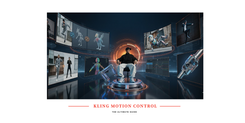
AI extracts skeleton-level motion and maps it onto your character image. The character performs the exact movement while face, hands, outfit, and proportions stay consistent across every frame. No animation skills required.
Motion Control Features
Skeletal Motion Extraction
1
Weight & Momentum Aware
2
Precise Hand & Finger Control
3
Consistent Character Identity
4
Camera Orientation Modes
5
Audio Preservation
6
Precision Outputs With AI Motion Control
Viral Dance Content
1
AI Influencers
2
Film Pre-Visualization
3
Animated Illustrations
4
Lifelike Motion with AI
Match Framing
Full-body reference + full-body image. Portrait + portrait. Mismatch is the top cause of warped output.
Keep Limbs Visible
Hidden limbs in the source image force the model to generate them — increasing artifact risk.
Avoid Camera Cuts
Rapid cuts and zooms interfere with motion extraction. Steady or slow-moving camera angles work best
Single Subject Videos Only
Multiple people? Kling motion control picks the largest subject. Use clips with one dominant, unobstructed figure.
Control Scenes with Prompts
Use the prompt for background and lighting only. Never describe motion — the reference video does that.
Start with Moderate Speed
Test with clear, moderate-speed movements before attempting high-velocity action choreography.