Best AI Filmmaking Tools in 2026: Which AI Models Do What in a Production Pipeline
July 15, 2026
The 2026 AI filmmaking stack splits into three jobs: image models like Recraft V4, video models like Kling 3.0, Veo 3.1, and Seedance 2.0, plus finishing tools like Topaz Astra. Every model lives inside the invideo agent, which routes each shot, so you direct intent rather than pick tools. Documented productions ran $315-$750 per finished minute.
AI filmmaking tools in 2026 split into three jobs: image models (Recraft V4, Nano Banana, GPT-Image-2) build characters and frames, video models (Kling 3.0, Veo 3.1, Seedance 2.0) generate motion, and finishing tools like Topaz Astra handle realism. Every one of these models runs inside the invideo agent, which routes each shot to the right model — so you direct intent instead of picking tools. Documented productions ran $315–$750 per finished minute on this stack.
The AI Filmmaking Tool Stack at a Glance
A working AI filmmaking pipeline in 2026 has three layers, and each layer answers a different production question. Image models handle casting, character sheets, and locked frames — the assets that define what your film looks like before anything moves. Video models turn those approved frames and references into motion. Finishing tools correct the over-sharp, plasticky quality of raw AI footage so it reads as cinema.
The order matters: frames first, then video. Documented productions generate and approve static frames — portraits, character sheets, environment references — before spending a single video credit, because video generation inherits whatever the frames lock in. A consistency error caught at the image stage costs one regeneration; the same error caught at the video stage costs a re-shoot of every clip that inherited it.
The second structural fact about the 2026 stack: you no longer assemble it yourself. invideo is an agentic video creation platform with all of these models — image, video, and upscale — available in one place, and the invideo agent decides which model each shot goes to based on what the shot needs. The rest of this guide maps which model does which job, and why the routing layer ends up mattering more than any single model on the list.
Image Generation: Recraft, Nano Banana, GPT-Image-2
The image layer starts with casting, and the model split is clean. Recraft V4 is the portrait model: it generates faces with skin-level imperfection — pores, lines, stubble — which is what separates a photorealistic cast from an obviously synthetic one. One documented production ran character portraits through Recraft at 4K specifically for that texture detail. If skin realism is your deciding factor, we break down the most realistic skin texture for portraits comparison in depth.
Nano Banana owns the character sheet job: 360-degree turnaround sheets at 4K with four angles per character, plus face and mid-angle close-ups. Those close-up panels are not optional — small details like scars and accessories drift across video models unless the sheet carries them explicitly. Character sheets are the single highest-leverage image asset in the pipeline because they replace LoRA fine-tuning entirely; one 70-second short film held two characters visually consistent across every scene using sheets and agent context alone. Our guide to the best tools for character sheets covers the full workflow.
GPT-Image-2 rounds out the stack for general frame and world-building generation — environment references, props, and the connective imagery between portrait work and turnarounds.
When you're unsure which model suits a character, don't choose blind: instruct a casting agent inside invideo to run the same character prompt on two image models simultaneously, then pick the aesthetic you prefer and develop the character sheet from the winner. That parallel test costs minutes, and image generation is cheap relative to video — the budget data proves it. The Arcane-style production locked 4 characters and 1 prop with 11 reference images total; the 90-second horror short used 30 image generations against roughly 400 video generations. Image work is a rounding error in the budget, so generate options. For a structured method, here's how to compare AI image models before committing.
Video Generation: Kling, Veo, Seedance 2.0, Runway
With frames locked, the video layer is where model choice changes your shot-by-shot results. The 2026 split:
Kling 3.0 generates multi-shot sequences natively — a single generation can return a cut sequence rather than one continuous take, which means fewer storyboard frames and fewer credits per finished scene.
Veo 3.1 is the cinematic motion model: camera moves, physics, and light behavior that hold up in photoreal work.
Seedance 2.0 is the continuity model. Its Reference-to-Video mode accepts character references and location references simultaneously, carrying both across clips — which is why it outperforms extend for one-take and multi-segment workflows, where extend can only push a clip forward without re-anchoring who and where.
Runway fits specific shot types within a routed pipeline, but in documented productions it plays a narrower role than the three above.
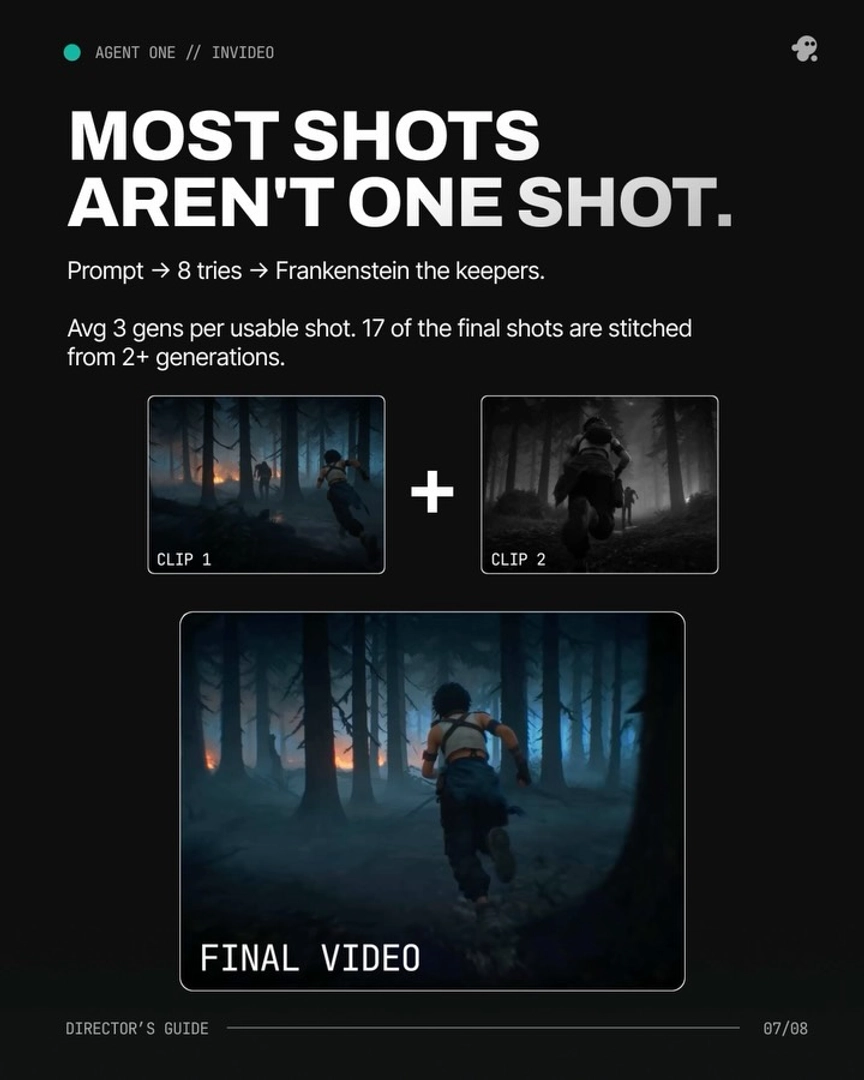
The production data shows what these models deliver at scale. One 3-minute animated episode was built from 164 Seedance 2.0 clips generated in 15-second chunks, with the strongest seconds of the best clips edited into the final cut. The 90-second horror short ran ~400 video generations to completion in two days. Both numbers reflect the same working reality: AI video production is a selection process — you generate volume, then direct the edit — and the model you route each shot to determines how much of that volume is usable.
The practical takeaway for tool selection: no single video model wins every shot. Continuity-heavy sequences want Seedance 2.0 Reference-to-Video; cinematic single setups want Veo; dialogue scenes with internal cuts want Kling. Because all of them run inside invideo, you specify the shot and the invideo agent routes it — you never commit your whole film to one model's weaknesses.
Post-Production: Topaz Astra on invideo
Raw AI footage comes back ultra-sharp with a plasticky skin quality, and the first correction is an upscale pass: Topaz Astra on invideo runs as the opening step of the post-production realism pipeline, before any color work. After the Astra pass, a light layer of blur, grain, and a color grade moves the footage measurably closer to live-action film texture.
You can automate this inside the same workspace: spin up a sub-agent dedicated to upscaling — name it for the role — and it batch-processes footage without per-clip intervention. Post-production is the most under-discussed layer of the AI filmmaking stack, and skipping it is the most visible difference between footage that reads as AI and footage that reads as film.
The Routing Layer: Why the invideo Agent Matters More Than the Models
The models above will keep changing names and version numbers; the durable part of the 2026 stack is the layer that decides between them. Inside the invideo AI video generator, every roster model — Recraft, Nano Banana, GPT-Image-2, Kling, Veo, Seedance 2.0, plus Topaz Astra for finishing — lives behind one conversational interface, and the invideo agent routes each shot to the model that fits it. You don't maintain subscriptions to five tools or learn five prompt dialects.
That changes the skill the pipeline rewards. The recommended posture from documented productions is to prompt the invideo agent the way a director prompts a crew — give directorial intent, not technical parameters — and let the routing layer translate intent into the right model, references, and settings. As one production team put it: "A more efficient way to go about doing it is actually just using few world reference images and character sheets... and then truly just prompting it like a director prompts his crew." Creators consistently describe this conversational directing as comparable to being on a physical set, where manual per-model prompting is mentally exhausting.
It also changes how failure is handled. When one video model can't produce a required shot type, the invideo agent can self-redirect to an alternative model and prompting strategy without you engineering the pivot — model limitations become routing decisions instead of dead ends. For working directors evaluating the stack, we've answered which is the best AI video tool for film directors directly: the honest answer in 2026 is that you choose a routing layer, and the models come with it.
FAQ
Which AI models are used in filmmaking?
The 2026 production stack uses image models for assets — Recraft V4 for photoreal portraits, Nano Banana for 4K multi-angle character sheets, GPT-Image-2 for general frames — and video models for motion: Kling 3.0 for native multi-shot sequences, Veo 3.1 for cinematic motion, and Seedance 2.0 for reference-driven continuity. Topaz Astra handles the upscale pass in post. All of these run inside the invideo agent, which routes each shot to the right model.
Which AI video model is best for one-take sequences?
Seedance 2.0, through its Reference-to-Video mode. It accepts character references and location references simultaneously and carries both across segment boundaries, which extend cannot do — extend only pushes a clip forward without re-anchoring the character or location. That makes Seedance 2.0 the documented choice for continuous-take and multi-segment shots.
Which image model gives the most realistic skin?
Recraft V4. It generates facial portraits with skin-level imperfections — pores, lines, stubble — which is the detail layer that makes an AI-generated face read as photographed rather than rendered. Documented productions run casting portraits through Recraft at 4K before building character sheets in Nano Banana.
Do you need multiple platforms for AI filmmaking?
No. Every model in the 2026 stack — image, video, and upscale — is available inside invideo, and the invideo agent routes each shot to the appropriate model based on what the shot needs. Documented productions completed entire films, from casting through final upscale, inside this single environment.